Top 10 Insider Threat Indicators to Look for in 2026
Learn the top 10 insider threat indicators for 2026, including warning signs, suspicious activity, and detection best practices for modern teams today.

You may focus heavily on external cyberattacks, but many security risks can also come from inside your workplace. Employees, contractors, and trusted users already have access to your systems, files, and sensitive business data, which makes insider threats harder for you to detect in the early stages. A single unusual action may not seem risky at first, but repeated behavior patterns can reveal larger security concerns over time. When you understand insider threat indicators early, you can respond faster, reduce security gaps, and protect critical business information without creating a culture of distrust across your organization.
This guide explains what insider threat indicators are, the different types of insider threats your organizations should watch for, and the top warning signs that often appear before a security incident occurs. You’ll also learn about insider threat detection tools, employee monitoring methods, and ways organizations can improve internal security visibility and risk detection.
What Is an Insider Threat Indicator?
An insider threat indicator is a behavioral, digital, or access-related warning sign that suggests an employee, contractor, vendor, or other trusted user may pose a security risk to an organization. These indicators often appear as unusual actions, changes in behavior, unauthorized access attempts, suspicious file activity, or violations of security policies that differ from a person’s normal work patterns.
An insider threat indicator does not confirm malicious intent on its own. Security teams evaluate multiple indicators together to identify patterns that may point to data theft, misuse of access privileges, account compromise, or other internal security risks. The strongest insider threat indicators usually involve a combination of behavioral changes, abnormal system activity, and access to sensitive information in a short period.

Did You Know?
The Ponemon Cost of Insider Risks Report found that insider-related incidents now cost organizations an average of $17.4 million annually, highlighting the growing financial impact of delayed insider threat detection and weak internal security visibility.
What Are the Three Types of Insiders These Indicators Point To?
Not every insider threat comes from the same type of person or intent. Different insider threat indicators often reveal different insider behaviors, from intentional misuse of access to careless mistakes or compromised accounts. Understanding these insider types helps security teams identify risks faster and respond more effectively before serious damage occurs.
Malicious Insiders
Employees, contractors, or business partners intentionally misuse their authorized access to steal sensitive information, damage systems, leak confidential data, or disrupt operations. Financial gain, revenge, or workplace dissatisfaction often motivate these actions. Security teams usually notice insider threat indicators such as unusual data downloads, unauthorized access attempts, or suspicious activity outside normal work hours. Behavioral changes like secrecy, frustration, or disengagement can also signal increased risk.
Negligent Insiders
Negligent insiders create security risks through careless actions without any harmful intent. They may ignore security policies, use weak passwords, share sensitive files incorrectly, or install unauthorized applications for convenience. Common insider threat indicators include accidental data exposure, repeated compliance violations, and unsafe file-sharing behavior. Even small mistakes can eventually lead to serious security incidents or data breaches.
Compromised Insiders
Compromised insiders become a threat when attackers gain access to employee accounts, devices, or login credentials. Cybercriminals often use phishing attacks, malware, or stolen passwords to operate under a trusted identity. Security teams usually identify insider threat indicators such as unusual login locations, impossible-travel logins, or unexpected privilege changes. In most cases, the affected employee does not realize that attackers are using their account.
What Are the Top 10 Insider Threat Indicators Every Team Should Know?
Most insider threats do not appear out of the blue. Employees often show small behavioral or technical warning signs before a serious security incident happens. When security teams monitor insider threat indicators early, they can improve insider threat detection, reduce data risks, and respond before sensitive information leaves the organization.
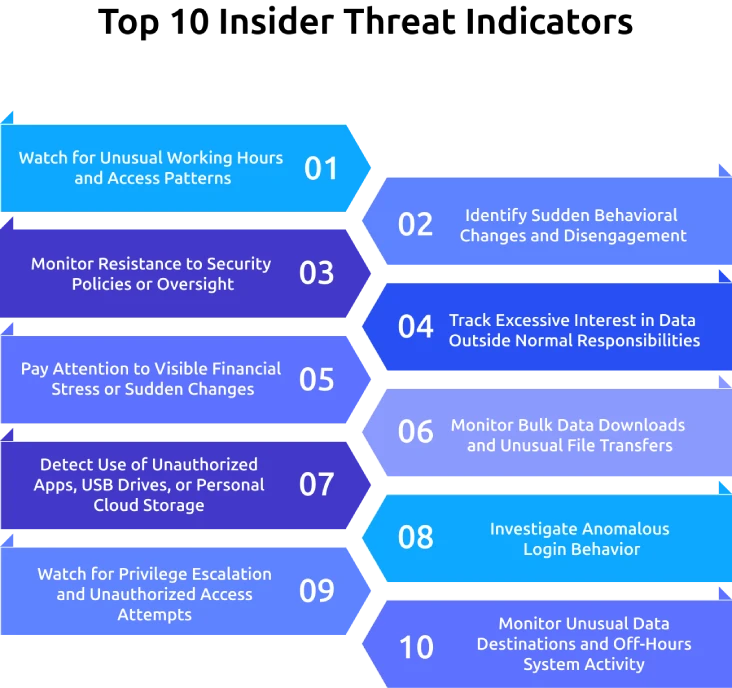
1. Watch for Unusual Working Hours and Access Patterns
Pay attention when employees suddenly access systems late at night, during weekends, or outside their normal working schedule without a clear reason. Repeated off-hours activity involving confidential files or sensitive systems can signal elevated insider risk. A single unusual login may not confirm malicious intent, but consistent changes in access behavior often require closer review.
2. Identify Sudden Behavioral Changes and Disengagement
Look for employees who suddenly become withdrawn, frustrated, defensive, or disconnected from their work. Declining performance, poor communication, or visible dissatisfaction can sometimes appear before larger security problems develop. When behavioral changes happen alongside unusual system activity, you need to investigate the situation more carefully.
3. Monitor Resistance to Security Policies or Oversight
Notice employees who repeatedly resist security procedures, monitoring practices, or access reviews. Some individuals may avoid software updates, push back against authentication requirements, or request unnecessary policy exceptions. Occasional frustration is normal, but repeated resistance to security controls can become an important insider threat warning sign.
4. Track Excessive Interest in Data Outside Normal Responsibilities
Review situations where employees repeatedly request access to files, systems, or confidential information unrelated to their role. Unusual curiosity about restricted data may indicate potential misuse of privileges or preparation for data theft. Monitoring unnecessary access requests helps you strengthen insider threat detection and reduce exposure to sensitive business information.
5. Pay Attention to Visible Financial Stress or Sudden Changes
Watch for employees facing heavy financial pressure, unexplained lifestyle changes, or sudden financial hardship when other suspicious behaviors also appear. Financial stress alone does not make someone an insider threat, but it can increase vulnerability to fraud, bribery, or data theft attempts. Focus on patterns of risky behavior and technical evidence before drawing conclusions.
6. Monitor Bulk Data Downloads and Unusual File Transfers
Investigate employees who suddenly download large amounts of confidential data, move files to shared locations, or store unnecessary copies of sensitive information. Unusual file movement often appears before data exfiltration or unauthorized sharing incidents. Monitoring large downloads and abnormal transfers helps you reduce insider threat risks before sensitive information leaves the organization.
7. Detect Use of Unauthorized Apps, USB Drives, or Personal Cloud Storage
Look for employees using personal cloud storage, USB devices, or unauthorized applications to move or store company data. These tools often bypass company security controls and increase the risk of data exposure. Monitoring shadow IT activity helps you maintain stronger data protection and identify risky behavior earlier.
8. Investigate Anomalous Login Behavior
Review failed login attempts, access from unfamiliar locations, impossible-travel logins, or multiple simultaneous sessions connected to the same account. These activities often signal compromised accounts or unauthorized access attempts. Strong authentication controls and continuous login monitoring help you identify suspicious activity before attackers gain deeper system access.
9. Watch for Privilege Escalation and Unauthorized Access Attempts
Pay close attention when employees request elevated permissions or attempt to access restricted systems without approval. Repeated denied-access attempts, unexplained admin requests, or unusual privilege changes can indicate potential misuse of access rights. Early monitoring helps you identify insider threats and compromised accounts more effectively.
10. Monitor Unusual Data Destinations and Off-Hours System Activity
Investigate situations where employees forward confidential emails to personal accounts, transfer files to unfamiliar external locations, or access systems during unusual hours without a valid reason. These insider threat indicators often appear near the final stages of data theft or unauthorized data sharing. Monitoring outbound activity and unusual system behavior helps you stop threats before major security damage occurs.
Which Insider Threat Detection Tools Are Most Effective?
Organizations cannot rely on manual reviews alone to identify insider risks. Modern insider threat detection requires a combination of tools that can monitor user behavior, track sensitive data movement, and identify unusual activity patterns before they become serious security incidents. The most effective insider threat detection tools work together to improve visibility, reduce false alerts, and help security teams respond faster to insider threat indicators.
User and Entity Behavior Analytics (UEBA)
Security teams use UEBA tools to understand normal employee and system behavior over time. These tools track login activity, file access patterns, device usage, and other daily actions to create behavioral baselines for each user. When activity suddenly changes, such as unusual logins, abnormal access requests, or unexpected file movement, the system flags the behavior for review. UEBA strengthens insider threat detection because it focuses on long-term behavior patterns instead of isolated events.
Data Loss Prevention (DLP)
Organizations use DLP tools to monitor and control how employees handle sensitive business data. These tools can detect, block, or alert teams when users move confidential information to personal email accounts, external drives, or unauthorized cloud storage platforms. DLP solutions play a major role in insider threat detection because they help prevent data exfiltration and reduce policy violations. Security teams also use DLP tools to strengthen compliance and improve control over sensitive information across the organization.
Employee Monitoring Software with Workforce Intelligence
Businesses use employee monitoring software to track work activity, application usage, login behavior, attendance, and productivity trends across teams. Time Champ combines employee monitoring with workforce intelligence to help organizations identify unusual activity patterns, risky behavior changes, and off-hours system access more effectively. This broader visibility helps you and security teams detect insider threat indicators that may not appear obvious at the individual level. When organizations combine workforce intelligence with UEBA and DLP tools, they create a stronger and more balanced insider threat detection strategy.
How Does Time Champ Help You Detect Insider Threat Indicators?
You may struggle to identify insider risks early because unusual employee activity often blends into normal daily operations. Without clear visibility into work patterns, login behavior, and data access trends, you can easily miss important insider threat indicators until serious damage already affects your organization. Time Champ is an employee monitoring software with workforce intelligence layer helps you improve insider threat detection by giving you better visibility into employee activity, work patterns, and unusual behavioral changes across your workplace.
You can use Time Champ to track app and website usage, attendance trends, project-level activity, and daily work patterns to build reliable behavior baselines across your teams. Its workforce intelligence layer helps you identify unusual activity, team-level shifts, and off-hours behavior that may signal insider threat indicators before they become major security incidents. You also get configurable screenshot settings and activity filters that help you maintain ethical monitoring and workplace transparency. Along with that, built-in compliance support for GDPR, ISO 27001, HIPAA, and SOC 2 helps you manage security monitoring requirements with more confidence.
Conclusion
Insider threats rarely appear without warning, but many organizations overlook the small signs until a serious incident occurs. When businesses understand insider threat indicators early, they can identify risky behavior, reduce security gaps, and protect sensitive data before damage spreads across the organization. Strong insider threat detection depends on consistent monitoring, clear security policies, and better visibility into employee activity and system access patterns. Organizations that combine behavioral awareness with the right detection tools can respond faster and make smarter security decisions. A proactive approach not only strengthens internal security but also helps teams build a safer, more accountable, and more resilient work environment over time.

Anjali

Table of Content
 What Is an Insider Threat Indicator?
- What Are the Three Types of Insiders These Indicators Point To?
- What Are the Top 10 Insider Threat Indicators Every Team Should Know?
- Which Insider Threat Detection Tools Are Most Effective?
- How Does Time Champ Help You Detect Insider Threat Indicators?
- Conclusion

Related Blogs

Employee monitoring software can catch insider data breaches early, if you configure it right. See what it catches, what it misses, and how to roll it out.
Jahnavi Pulluri | Apr 16, 2026
Learn about Data Loss Prevention (DLP), its types, challenges, and benefits to secure sensitive data, ensure compliance, and prevent costly breaches.
Tarun Kumar | Jan 20, 2025
Data loss costs more than you think. Learn what causes it, how employee monitoring reduces data exfiltration risk, and how to protect your business.
Thasleem Shaik | Apr 17, 2026
Identify cyber threats early with Indicators of Compromise (IOCs). Learn how IOCs help detect breaches and protect your business from potential attacks.
Sai Keerthi Uppala | Jan 20, 2025
Enhance your security with endpoint data loss prevention solutions that guard against data breaches and protect your most valuable assets.
Shabana Shaik | Jan 23, 2025
Stay ahead of cyber threats with our expert guide on endpoint security protection. Explore essential tips and tools to protect your devices, data, and network.
Shabana Shaik | Jan 23, 2025


 4.7/5 avg.
Ready to Manage Your Workforce Smarter?
Join our family of 1500+ companies using smart insights to redefine workforces!

Free Trial
No Credit Card Required