BYOD Security Policy: A Guide for Protecting Workplace Data
Learn how to create a BYOD security policy to protect company data, manage employee-owned devices, improve security, and reduce data theft.

Allowing teams to use personal laptops, smartphones, and tablets for work makes daily operations faster and more flexible, but it also creates serious security risks. A single unsecured device, weak password, unsafe app, or public Wi-Fi connection can expose confidential business data without warning. Without a clear BYOD security policy, controlling file access, device usage, and data protection quickly becomes difficult. That is why many businesses now focus on building strong bring your own device policies instead of allowing unrestricted device access.
A well-defined bring your own device security policy helps you set clear rules for personal device usage, access permissions, password requirements, approved apps, and security standards across your workplace. It also helps you reduce security risks while supporting flexible work environments. In this guide, you will learn what BYOD means, the most common security risks, and how to build a BYOD security policy that protects workplace data.
What Is a BYOD Security Policy?
A BYOD security policy is a set of rules that explains how employees can safely use personal devices like laptops, smartphones, and tablets for work. It defines what devices can access company systems, what security requirements employees must follow, how teams should secure business data, and what actions IT teams can take to reduce security risks.
A strong bring your own device security policy helps you control access to workplace data without limiting flexibility. It creates clear guidelines for password protection, approved apps, device updates, remote access, and data sharing so your business can support personal device usage while reducing security vulnerabilities.
Why Does Your Business Need a BYOD Security Policy?
Personal devices have become a regular part of modern workplaces, but unmanaged access can quickly create security gaps. According to a recent report, nearly 48% of organizations experienced data breaches linked to unsecured or unmanaged personal devices. A clear BYOD security policy helps you reduce these risks while giving employees the flexibility to work from their own devices. Here are the key reasons why your business needs one:
- Protects Business Data: A clear policy helps you control how employees access, store, and share company information across personal devices.
- Reduces Unauthorized Access: Security rules like strong passwords, multi-factor authentication, and device approvals help you prevent unauthorized logins.
- Controls Device Usage: A bring your own device policy clearly explains what your team can and cannot do on personal devices
- Supports Remote and Hybrid Work: Personal devices play a major role in remote work environments. A policy helps you manage access without disrupting daily operations.
- Improves Compliance and Security Standards: Clear security requirements help your business follow internal security practices and industry regulations more effectively.
Personal devices can create security risks when workplace activity stays unmonitored.
Use Time Champ to track activity, reduce risks, and improve control across employee devices.
What Should a BYOD Security Policy Include?
A strong BYOD security policy should clearly explain how employees can use personal devices for work without putting business data at risk. Many businesses allow personal laptops and smartphones at work, but very few define proper security rules around device access, app usage, password protection, and company data handling. That is where a clear policy becomes important. Here's what every BYOD policy for employees needs to include:
1. Clear Rules for Using Personal Devices at Work
This forms the foundation of any bring your own device security policy. Explain what employees can and cannot do on personal devices, not in legal language, but in plain terms they can actually follow. That includes clearly defining things like:
- Which work apps can employees use, and which apps do you restrict?
- Can employees connect personal devices to public Wi-Fi while accessing company systems?
- What qualifies as a work activity and a personal activity on the same device?
- Do employees download work files to their local device storage?
Write this section in simple and direct language so employees clearly understand what actions follow the policy and what actions create security risks. Clear rules reduce confusion and help employees use personal devices more responsibly at work.
2. Device and Operating System Requirements
Not every personal device provides enough security for work access. Your BYOD policy needs to clearly define which devices employees can use for work and what security standards those devices must meet before accessing company systems. Devices that fail to meet those standards should not receive access to company systems. At a minimum, your policy should define:
- Supported operating systems like iOS, Android, Windows, and macOS, along with minimum version requirements.
- Required security features such as screen locks, biometric authentication, and full-disk encryption.
- How frequently must employees update operating systems and applications?
- Whether employees can use jailbroken or rooted devices for work access.
This section helps your IT team avoid security issues caused by outdated devices, unsupported operating systems, and unpatched vulnerabilities.
3. Required Security Rules for Personal Devices
Every BYOD policy should include clear security rules that employees must follow before accessing company data on personal devices. You need to define clear security controls that every personal device must follow before employees access company data. Most BYOD policies include these core security requirements:
- Multi-factor authentication (MFA) for all work applications and business email accounts.
- VPN access for employees connecting outside the office network.
- Mobile Device Management (MDM) or Mobile Application Management (MAM) enrollment so IT teams can push security updates and remotely remove company data when required.
- Automatic screen lock after a fixed idle period.
- These restrictions help reduce unauthorized file sharing and lower the risk of data exfiltration through personal storage platforms.
BYOD mobile device management tools help your IT team manage work-related data on personal devices without accessing personal files or applications. This creates better security control while also helping you maintain employee trust and privacy.
4. Employee Privacy Rules and Monitoring Limits
Employee privacy is one of the most sensitive parts of any BYOD policy. Many policies either stay too vague about monitoring or create rules that feel overly intrusive. You need to set clear boundaries from the beginning. Your policy should clearly explain:
- What can your security or device management team monitor, such as app usage, network activity, and compliance status?
- What they cannot access, including personal photos, private messages, banking apps, and browser history outside work-related applications?
- Whether the company can remotely wipe devices, and whether that action removes only company data or the entire device content?
- How will you notify employees before monitoring activity or security actions take place?
Clear communication builds trust and helps employees feel more comfortable enrolling personal devices in your BYOD program instead of avoiding or bypassing security policies. For more information, you can also read our detailed guide on employee monitoring privacy laws.
5. Device Usage and Reimbursement Rules
If employees use personal devices for work, they will naturally have questions about expenses and responsibilities. Your BYOD policy needs to provide clear answers instead of creating confusion. Your policy should clearly define:
- Does your company reimburse work-related mobile data or internet usage?
- Who pays for approved security applications or MDM software?
- Who covers repair or replacement costs if employees damage devices during work-related usage?
- Does your company offer a fixed monthly allowance or expense-based reimbursement?
Defining these rules early helps you avoid future disputes and shows employees that the policy works as a shared agreement, not just a list of workplace rules.
6. Incident Response and Employee Offboarding
What happens when employees lose devices or leave the company? Most BYOD security policies either skip this section or place it at the very end, even though it plays a major role in protecting company data. Your policy should define:
- How should employees report lost or stolen devices and the expected response timeline?
- The offboarding checklist includes account access removal, MDM de-enrollment, and company data removal confirmation.
- Who verifies that employees fully remove company data from personal devices?
A well-written exit process helps you protect company data without creating situations where departing employees lose personal files along with work-related information. To help you create your own policy faster, you can use the sample template below as a starting point.
What Are the Real Benefits of a BYOD Policy?
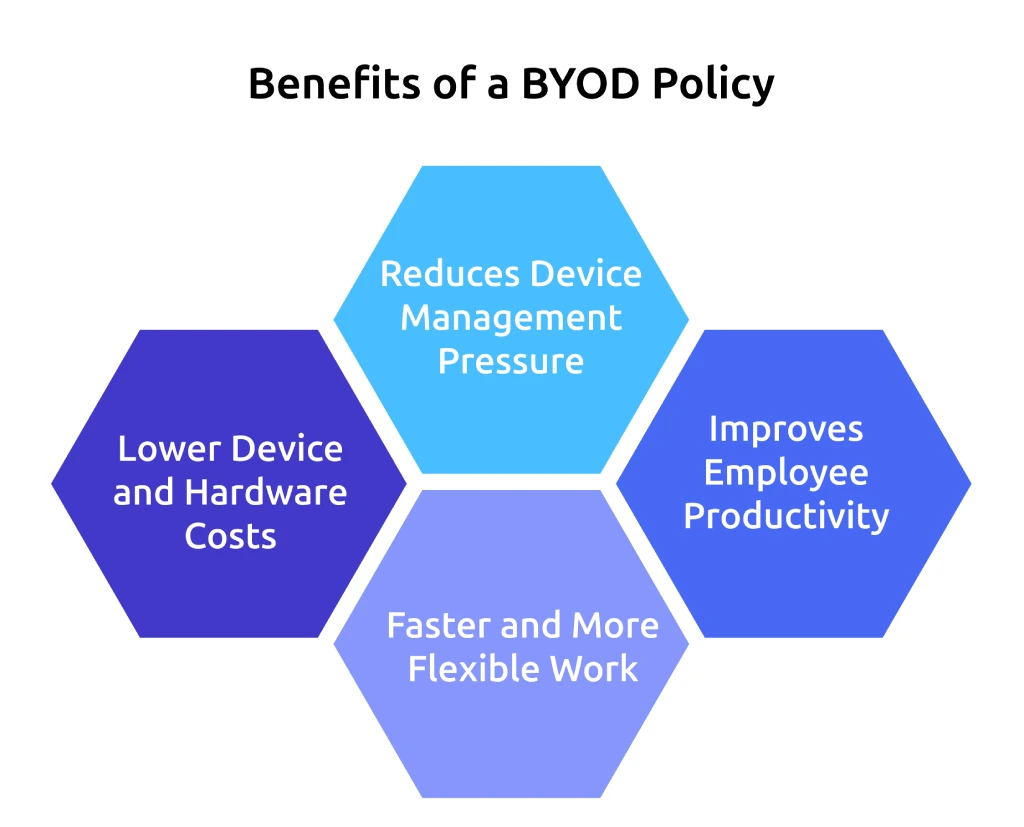
A well-structured BYOD policy does more than allow employees to use personal devices for work. It helps your business improve flexibility, reduce device costs, support faster communication, and create smoother work experiences without losing control over security. Here are the key benefits businesses gain from a properly managed BYOD environment:
1. Lower Device and Hardware Costs
Buying laptops, smartphones, and tablets for every employee increases operational costs quickly. A BYOD policy reduces those expenses by allowing employees to work on devices they already use daily. This helps your business lower hardware spending while still supporting productivity across teams. According to a Cisco study, organizations save an average of $350 per employee each year after implementing a formal BYOD policy.
2. Faster and More Flexible Work
Employees already know how to use their personal devices, which reduces setup time and allows them to work more comfortably from different locations. This flexibility becomes especially useful in remote and hybrid work environments where teams need quick access to business applications and communication tools.
3. Improves Employee Productivity
Employees often achieve better productivity when they work on devices they already use every day. Familiarity with personal devices helps employees navigate applications faster, reduce setup delays, and manage tasks more efficiently. A well-managed BYOD policy also improves productivity by giving teams quicker access to work tools, communication platforms, and business systems across different work environments.
4. Reduces Device Management Pressure
A clear BYOD policy helps your security and device management teams standardize rules for access control, password requirements, approved applications, and security updates. This creates a more organized system for managing personal devices across the workplace.
Unmanaged personal devices can quickly create security and productivity gaps.
Use Time Champ to monitor employee activity and maintain better control across BYOD environments.
What Are the Best Practices for Creating a BYOD Security Policy?
A BYOD security policy only works when you build it on strong practices from day one. Writing the rules is the easy part. The real challenge is making those rules practical, enforceable, and clear enough for employees to actually follow. The best practices below help you create a policy that sets clear access boundaries, strengthens security, and stays effective as your team and workplace continue to grow.
1. Create Clear and Simple Policy Rules
Employees should immediately understand what devices they can use, what security requirements they must follow, and what activities your company restricts. Avoid overly technical language or lengthy policy documents that employees may ignore. Simple and direct policies improve compliance and reduce misunderstandings.
2. Require Strong Authentication Methods
Passwords alone no longer provide enough protection for work accounts and business applications. Your policy should require strong passwords and multi-factor authentication (MFA) for all approved devices. This adds another layer of security, reduces unauthorized access risks, and helps your business lower the chances of data breachescaused by compromised credentials.
3. Limit Access Based on Work Requirements
Not every employee needs access to every system or business file. Your BYOD policy should define access permissions based on job responsibilities. Restricting unnecessary access helps you reduce security risks, strengthen data loss preventionefforts, and protect sensitive business information more effectively.
4. Keep Devices Updated Regularly
Outdated devices and applications often create security vulnerabilities. Your policy should require employees to install operating system updates, security patches, and approved software updates regularly. According to IBM, unpatched vulnerabilities remain one of the most common causes of security incidents across businesses.
5. Train Employees on Security Risks
Even strong security policies fail when employees do not understand common risks. You should regularly train employees on phishing attacks, unsafe downloads, password protection, and secure remote access practices. Regular awareness training helps employees identify threats before they create larger security problems.
What Mistakes Should You Avoid in BYOD Security Policies?
Many BYOD security policies fail because of unclear rules, outdated security practices, and poor device management. Even small policy gaps can create serious security risks over time. Avoiding these common mistakes helps you build a BYOD policy that stays practical, secure, and easier to manage.
1. Creating Vague Policy Rules
Employees cannot follow a policy when the rules remain unclear. If you fail to clearly define approved devices, allowed applications, access restrictions, or security responsibilities, employees will struggle to understand the policy properly. Clear and direct rules reduce confusion and help employees understand exactly what they can and cannot do on personal devices.
2. Allowing Unsecured Devices to Access Company Data
Allowing outdated or unsecured devices into company systems increases the risk of malware, unauthorized access, and data leaks. Your policy should clearly define minimum device requirements, operating system standards, and mandatory security controls before employees receive access to work-related systems.
3. Ignoring Employee Privacy Concerns
Overly aggressive monitoring policies often create resistance from employees. If employees feel uncomfortable about device monitoring, many may avoid enrolling personal devices altogether. Your policy should clearly explain what your company can monitor and what information remains private. Clear communication helps you build trust and address employee concerns around workplace monitoring and personal device usage.
4. Failing to Update the Policy Regularly
Technology, applications, and security threats continue to change quickly. If you continue using outdated BYOD policies, managing new BYOD security risks and device requirements becomes much harder over time. Regular policy reviews help you keep security rules, device standards, and access controls aligned with current workplace needs.
How Does Time Champ Support Your BYOD Security Policy?
Managing personal devices at work becomes difficult when you cannot clearly track employee activity, application usage, file movement, or unauthorized access attempts. Without proper visibility, reducing security risks and maintaining policy compliance across employee devices becomes much harder, especially in remote and hybrid work environments.
Time Champ is an employee monitoring software with built-in workforce intelligence. It helps you monitor application usage, track employee activity, and maintain better visibility across workplace operations when employees use personal devices for work. Time Champ also supports data protection with features like file activity logs, unauthorized website access tracking, USB usage monitoring, and file transfer visibility. These insights help you identify risky activity early, improve policy compliance, and maintain better control over sensitive business data across employee devices.
Conclusion
A BYOD security policy helps you set clear rules for how employees use personal devices like laptops, phones, and tablets for work. Without proper guidelines, personal devices can create security risks, confusion around data access, and challenges in managing workplace activity. A well-structured policy helps you control access, protect sensitive information, reduce security issues, and create clear expectations for employees while still supporting flexible work environments.
Looking for a better way to manage security and productivity across personal devices?
Use Time Champ to track work activity, monitor file access, and improve BYOD visibility.

Thasleem Shaik

Table of Content
 What Is a BYOD Security Policy?
- Why Does Your Business Need a BYOD Security Policy?
- What Should a BYOD Security Policy Include?
- What Are the Real Benefits of a BYOD Policy?
- What Are the Best Practices for Creating a BYOD Security Policy?
- What Mistakes Should You Avoid in BYOD Security Policies?
- How Does Time Champ Support Your BYOD Security Policy?
- Conclusion

Related Blogs

Compare the best employee monitoring apps for BYOD devices, with privacy controls, security features, pricing, and use cases for remote and hybrid teams.
Shabana Shaik | Apr 28, 2026
Learn how to get employee buy-in for monitoring. Understand resistance, address concerns, and build trust before and after implementation effectively.
Anjali | Apr 24, 2026
MDM and employee monitoring software are not the same tool. See what each one does, where they overlap, and whether your organization needs one or both.
Shabana Shaik | Apr 23, 2026
Learn what privileged access management (PAM) is, how it works, key features, and how to choose the right PAM software for your organization.
Thasleem Shaik | Apr 18, 2026
Understand the zero-trust model in employee monitoring and how it helps you control access, track activity, and reduce risks effectively.
Thasleem Shaik | Apr 17, 2026
Data loss costs more than you think. Learn what causes it, how employee monitoring reduces data exfiltration risk, and how to protect your business.
Thasleem Shaik | Apr 17, 2026


 4.7/5 avg.
Ready to Manage Your Workforce Smarter?
Join our family of 1500+ companies using smart insights to redefine workforces!

Free Trial
No Credit Card Required