Privileged Access Management: What It Is & How It Works
Learn what privileged access management (PAM) is, how it works, key features, and how to choose the right PAM software for your organization.

Every organization relies on certain accounts that can access sensitive data, manage systems, and make critical changes. These are called privileged accounts, and they play a key role in keeping operations running. But without clear controls over privileged access, a single compromised admin account can expose customer data, alter production systems, or disable security tools across the organization. One compromised domain admin account can give attackers lateral access to every server, database, and endpoint on the network. For the broader picture across this topic, our enterprise employee monitoring guide brings the moving parts together.
If you ignore how teams manage privileged access, you create gaps that are difficult to detect and even harder to fix later. This article helps you approach that risk in a structured way. It breaks down what privileged access management is, how it works in real environments, and what you need to focus on to keep critical systems secure without adding unnecessary complexity.
What is Privileged Access Management (PAM)?
Privileged Access Management (PAM) is a cybersecurity approach that helps you control, monitor, and secure access to critical systems, data, and infrastructure used by privileged accounts. These accounts have elevated permissions, which allow users to perform administrative tasks, access sensitive information, and make system-level changes that regular users cannot.
To understand how PAM works, you first need to know the different types of privileged accounts involved.
- Privileged Accounts: They exist across systems, applications, and automated processes. They allow actions like changing settings, accessing sensitive data, and managing infrastructure, which is why you need to control them carefully.
- Standard User vs. Privileged Account: A standard user handles basic tasks like accessing apps or data. A privileged account gives you deeper control, such as modifying systems, installing software, and managing users.
- Human Privileged Accounts: These accounts belong to roles like system administrators, database administrators, IT managers, and security engineers who manage and maintain systems.
- Non-Human Privileged Accounts: Service accounts, bots, CI/CD pipelines, API keys, and SSH keys run automated processes and often have continuous access, which makes them important to monitor.
- Third-Party and Vendor Accounts: Vendors and external partners often need temporary access to internal systems. If you do not control this access properly, it can expose credentials, open unauthorized data access, and create compliance violations.
Types of Privileged Accounts
Here are the most common types of privileged accounts you need to manage:
| Account Type | Description |
|---|---|
| Domain admin accounts | Provide full control over network systems and directory services. |
| Local admin accounts | Manage individual devices, servers, or endpoints. |
| Service and application accounts | Used by applications and services to run automated processes. |
| Emergency (break-glass) accounts | Reserved for critical situations requiring immediate access. |
| Business privileged users | Non-technical roles with access to sensitive data, like finance or HR. |
Why is Privileged Access Management Important for Companies?
In fact, studies show that around 80% of data breaches involve compromised credentials, including privileged accounts. That makes privileged access one of the most targeted entry points in any organization. Without proper control, a single account can expose systems, data, and operations. To understand why this matters, here are the key areas where privileged access management becomes critical:
1. Reduces Risk of Security Breaches
Privileged accounts have the highest level of access. If someone misuses them or attackers gain control, they can move across systems quickly. A strong privileged access management system limits this exposure and reduces the attack surface.
2. Controls High-Level Access
Not every user needs full access all the time. PAM helps you define who gets access, when they get it, and how long they can use it. This prevents unnecessary permissions and keeps control tight.
3. Improves Visibility into User Activity
Without monitoring, you do not know how privileged users interact with systems. Privileged access management software gives you clear visibility into actions, making it easier to detect suspicious activities early.
4. Prevents Insider Threats
Not all risks come from outside. Insider threats often come from employees or contractors who already have access to systems. With excessive permissions, they can unintentionally or intentionally cause damage. Privileged user access management helps you control and monitor this access, reducing the risk of insider threats.
See how your team interacts with systems, apps, and sensitive data in real time.
Use Time Champ to track activity, spot risks early, and stay in control of critical access.
How Does Privileged Access Management Work?
Privileged access management (PAM) works by controlling how users access critical systems and what they can do once they are inside. Instead of giving permanent, unrestricted access, it creates a structured process where the system grants, monitors, and reviews access at every step. Here is how the process typically works:
- Request and Approval: A user requests access to a system or resource. The privileged access management system checks policies and approvals before granting access. This ensures only authorized users get elevated permissions.
- Secure Credential Management: Once the system approves access, it provides credentials through a secure vault. Users do not see or store passwords directly, which reduces the risk of misuse or leaks. This approach helps you protect sensitive access using privileged access management software.
- Controlled Access Execution: The system gives access only for a specific task or for a limited time. The privileged access management platform defines clear roles and permissions, so you perform only the actions you need. It restricts unnecessary access and keeps your activity within defined boundaries.
- Session Monitoring: While the user is active, the system tracks actions in real time. It records activities to ensure transparency and detect unusual behavior early. You can review sessions, identify deviations, and respond before risks grow.
- Logging and Audit: The system records every action automatically and stores it for review. You can track who accessed what, when they accessed it, and what actions they performed. These records support audits, help meet compliance requirements, and strengthen privileged user access management.
- Access Revocation: Once the task is complete, the system removes access immediately. Users do not retain ongoing privileges, which reduces long-term risk and keeps control tight.
This process shows how privileged access management works in practice. It focuses on giving the right access at the right time, tracking usage, and removing access when it is no longer needed.
What Are the Key Features of Privileged Access Management Software?
A strong privileged access management software helps you control, monitor, and secure privileged access without adding complexity. Instead of relying on manual checks, it gives you structured controls, visibility, and automation to manage access effectively. Here are the key features you need to focus on:
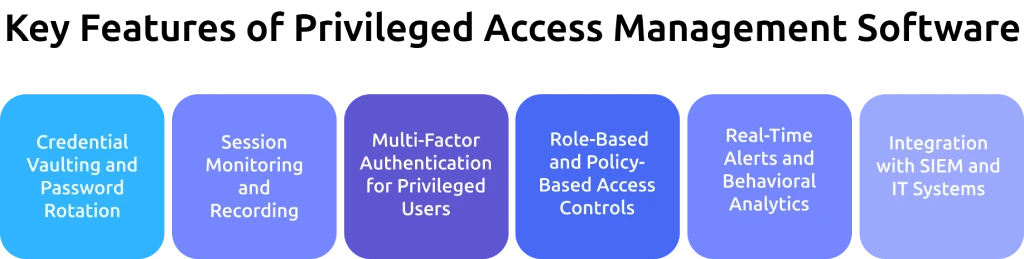
1. Credential Vaulting and Password Rotation
All privileged credentials sit in a secure vault instead of being shared directly. The system automatically generates strong passwords and rotates them regularly, so you reduce the risk of reuse or leaks.
2. Session Monitoring and Recording
You track and record every privileged session in real time. This helps you review actions, detect unusual behavior, and maintain a clear record for audits and investigations.
3. Multi-Factor Authentication for Privileged Users
An extra layer of security requires multiple forms of verification before access. Even if someone compromises credentials, they cannot access systems without additional authentication.
4. Role-Based and Policy-Based Access Controls
Access definitions follow roles and policies, not individuals. This ensures users only get the permissions they need for specific tasks, following the principle of least privilege.
5. Real-Time Alerts and Behavioral Analytics
You receive alerts when the system detects unusual activity or risky behavior. This allows you to respond quickly and reduce the time it takes to identify and handle threats.
6. Integration with SIEM and IT Systems
You connect your privileged access management platform with existing tools like SIEM systems and IT service systems. These integrations help you centralize monitoring, improve incident response, and maintain consistency across your security environment.
What Is the Difference Between PAM, IAM, IGA, and PUM?
These terms often sound similar, but they solve different parts of access control. IAM manages overall access, IGA governs and reviews that access, PAM secures high-risk privileged access, and PUM focuses on managing shared or account-level privileges. To make it clear, here are the key differences:
| Aspect | PAM | IAM | IGA | PUM |
|---|---|---|---|---|
| Core Focus | Secures privileged access | Manages access for all users | Governs and audits access | Manages privileged account usage |
| Target Users | Admins, root users, high-risk accounts | All users (employees, partners) | All users with the governance layer | Shared or account-level access |
| Primary Goal | Protect critical systems | Ensure the right access for the right users | Ensure access is compliant and reviewed | Control how teams use privileged accounts |
| Key Functions | Vaulting, session monitoring, JIT access | Authentication, SSO, MFA, RBAC | Access reviews, certifications, and compliance | Account-level control and monitoring |
| Risk Level | High-risk, sensitive systems | General access control | Compliance and policy risk | Medium risk, shared account tracking |
| Automation | Time-bound access, session tracking | User provisioning, authentication | Access reviews and lifecycle management | Basic control over account usage |
| Visibility | Deep visibility into privileged actions | General user activity visibility | Governance-level visibility | Limited to account-level tracking |
| Example | Admin accessing production server | Employee logging into the HR system | Manager reviewing user access rights | Multiple users are using a shared admin account |
See beyond access and understand real user activity across your systems.
Start using Time Champ to detect risks early and maintain full control.
What Are the Types of Privileged Access Management Solutions?
You can deploy a privileged access management solution in different ways depending on your infrastructure, security needs, and level of control. Each type offers a different balance between flexibility, scalability, and management effort. Here are the main types you need to understand:
1. On-Premises PAM
You install and manage the privileged access management system within your own data center or infrastructure. On-premises deployment gives you full control over security, data, and configurations. It works well if you handle sensitive data or need to meet strict compliance requirements. However, you also take full responsibility for maintenance, updates, and scaling.
2. Cloud-Native PAM
You run the privileged access management platform in the cloud instead of managing it locally. This setup allows you to scale quickly, access the system from anywhere, and integrate easily with modern cloud environments. It reduces infrastructure overhead and supports dynamic environments where systems and users change frequently.
3. Hybrid PAM Deployments
You combine on-premises and cloud-based setups to create a flexible model. You can keep critical systems on-premises while managing other resources in the cloud. This approach works well if you are transitioning to the cloud or managing a mix of environments. It helps you maintain control without limiting scalability.
4. PAM as a Service (PAMaaS)
You use a third-party provider to deliver privileged access management software as a service. The provider handles setup, maintenance, and updates, so you can focus on managing access instead of infrastructure. This model offers faster deployment and lower operational effort, especially for teams that want a ready-to-use solution.
How to Choose the Right Privileged Access Management Software?
Choosing the right privileged access management software is not just about features. You need a solution that fits your environment, supports your workflows, and gives you strong control without adding complexity. The right choice helps you reduce risk, improve visibility, and scale as your systems grow.
- Core Security Capabilities: Look for essential features like credential vaulting, session monitoring, multi-factor authentication, and least privilege enforcement. These features directly impact how well you can control and protect privileged access.
- Granular Access Control: Choose a solution that lets you define who can access what, when, and for how long. Fine-grained control helps you limit unnecessary permissions and reduce the risk of misuse.
- Integration with Existing Systems: Your privileged access management solution should integrate smoothly with your current tools, like SIEM, identity systems, and IT workflows. Strong integration improves visibility and reduces manual effort.
- Automation and Workflow Efficiency: Manual processes increase delays and errors. A good workflow automation solution automates tasks like password rotation, access approvals, and activity tracking, helping you manage access more efficiently.
- Scalability and Flexibility: Your environment will grow, so your PAM system should scale with it. Look for solutions that support cloud, on-premises, and hybrid setups without performance issues.
- Ease of Use and Deployment: A complex system slows down adoption. Choose a platform that offers a simple interface, easy setup, and minimal disruption to your existing processes.
- Compliance and Reporting: You need clear audit trails and reporting features to meet compliance requirements. A strong PAM platform helps you track activity and generate reports without manual effort.
- Vendor Reliability and Security Standards: Evaluate the vendor’s security practices, certifications, and update process. Since this system controls critical access, you need a provider you can trust.
How Does PAM Fit into a Zero Trust Security Strategy?
Zero trust follows a simple principle where you never trust any user or system by default. You verify every access request, no matter where it comes from, and allow access only after proper validation.
Privileged access management (PAM) supports this approach by controlling high-level access, which attackers often target first. Instead of allowing continuous access, PAM ensures you give access only when needed and limit it to specific tasks. You monitor activity, verify actions, and remove access once the user completes the task. This helps you reduce risk, prevent misuse, and maintain strict control over critical systems without relying on assumptions.
What are the Benefits of Privileged Access Management?
A strong privileged access management setup helps you control critical access, reduce security gaps, and bring more structure to how access works across your systems. With rising threats and credential misuse driving most data breaches, managing privileged access has become a core part of security. Here are the key benefits:
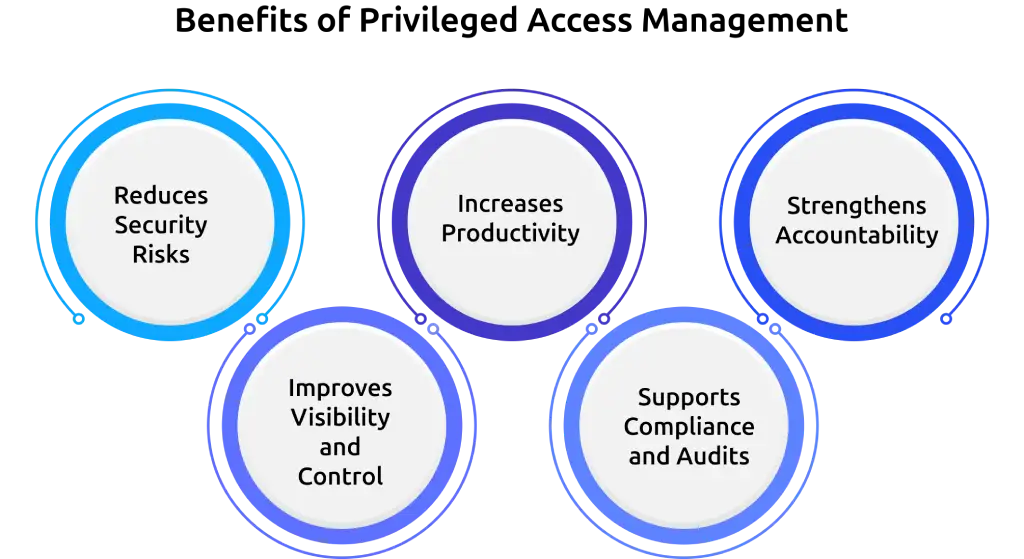
1. Reduces Security Risks
Limiting access to only what is necessary lowers the chances of unauthorized entry. Continuous monitoring and controlled permissions help prevent credential misuse and insider threats, which are among the most common causes of breaches.
2. Improves Visibility and Control
Clear insights into user activity allow better tracking of who accesses systems and what actions they perform. Early detection of unusual behavior becomes easier, helping you respond before issues grow.
3. Increases Productivity
Automation removes the need for manual approvals and repetitive access management tasks. Teams spend less time handling access requests and more time focusing on actual work, improving overall efficiency.
4. Supports Compliance and Audits
Well-maintained access records make it easier to meet regulatory requirements. Audit processes become faster and more accurate when you can quickly retrieve activity logs and reports.
5. Strengthens Accountability
Tracking actions at an individual level removes dependency on shared accounts. Clear ownership of activities helps identify issues faster and ensures responsibility across all privileged access.
What are the Best Practices for Privileged Access Management?
Many organizations invest in PAM but still leave gaps in how they manage access. In fact, nearly 49% of organizations lack proper policies for assigning privileged access. Without clear practices, even the best tools cannot prevent misuse or security risks. Here are the key best practices you should follow:
- Apply Least Privilege Access: Limit access to only what each user needs to complete a task. This reduces unnecessary permissions and lowers the chances of misuse or accidental changes.
- Use Just-in-Time Access: Give elevated access only when needed and remove it once the task is complete. This avoids permanent privileges and reduces exposure to attacks.
- Enforce Strong Authentication: Require multi-factor authentication for all privileged access. Even if credentials get exposed, additional verification prevents unauthorized entry.
- Monitor and Record All Activity: Track every privileged session and review user actions regularly. This helps you detect unusual behavior early and respond before it leads to a bigger issue.
- Regularly Review and Update Access: Access requirements change over time. Periodically review who has access and remove permissions that are no longer needed. This keeps your access control aligned with actual roles.
- Secure and Rotate Credentials: Store credentials in a secure vault and update them regularly. Frequent rotation reduces the chances of long-term misuse if credentials get exposed.
How Does Time Champ Support Privileged Access Monitoring and Control?
Managing privileged access does not stop at defining who can enter a system. You also need to track what users do after they access it. Time Champ adds a monitoring layer to your privileged access management setup. As an employee monitoring software, it helps you observe user activity, detect unusual behavior, and maintain visibility into how access is actually used. Monitoring plays a key role in preventing insider threats and identifying risky actions early.
Time Champ helps you move from assumptions to actual data. You can track sessions, review activity patterns, and identify deviations without disrupting workflows. This makes it easier to maintain control, improve accountability, and support your PAM strategy with real-time insights instead of relying only on access rules.
Conclusion
Privileged access management helps you control critical access points and reduce security risks across your systems. It limits unnecessary permissions, tracks user actions, and keeps sensitive data protected from misuse. When you apply clear policies, continuous monitoring, and the right tools, you create a structured environment where access stays controlled and risks remain minimal.
Move from limited visibility to complete clarity on user behavior.
Try Time Champ to track actions, reduce uncertainty, and respond faster.

Thasleem Shaik


Table of Content
-
 What is Privileged Access Management (PAM)?
-
Why is Privileged Access Management Important for Companies?
-
How Does Privileged Access Management Work?
-
What Are the Key Features of Privileged Access Management Software?
-
What Is the Difference Between PAM, IAM, IGA, and PUM?
-
What Are the Types of Privileged Access Management Solutions?
-
How to Choose the Right Privileged Access Management Software?
-
How Does PAM Fit into a Zero Trust Security Strategy?
-
What are the Benefits of Privileged Access Management?
-
What are the Best Practices for Privileged Access Management?
-
How Does Time Champ Support Privileged Access Monitoring and Control?
-
Conclusion
Instant Signup
Thank you for your request!
We have received your signup request and our team will get back to you soon. In the meantime, you can book a demo to see Time Champ in action.
Book a DemoFree trial. No credit card required. Prefer a walkthrough? Book a demo.
Related Blogs
Master PC monitoring software with our comprehensive guide. Discover benefits, best practices, and expert insights for enhancing security and productivity.
Thasleem Shaik | Dec 15, 2023
Your perimeter won't stop insiders. Learn how real-time insider threat monitoring, anomaly detection, SIEM, and response workflows work together to prevent risk.
Jahnavi Pulluri | Apr 14, 2026
Compare employee monitoring software costs in 2026. Explore pricing factors, models, tiers, hidden fees, and the real total cost of ownership for any team.
Jahnavi Pulluri | Apr 16, 2026
Companies are watching remote workers more than ever. But is it ethical? We break down where monitoring is justified and where it crosses the line.
Guna Lakshmi | Apr 16, 2026
Roll out employee monitoring the right way with our training guide. Learn what to teach managers and employees before and after launch for smooth adoption.
Anjali | Apr 16, 2026
Managing an async team? Learn how asynchronous work employee monitoring works and what to track to keep your team productive.
Guna Lakshmi | Apr 16, 2026


 4.7/5 avg.
Ready to Manage Your Workforce Smarter?
Join our family of 1500+ companies using smart insights to redefine workforces!

Free Trial
No Credit Card Required