Asynchronous Work Employee Monitoring: A Complete Guide
Managing an async team? Learn how asynchronous work employee monitoring works and what to track to keep your team productive.

In an asynchronous setup, team members work across different time zones and schedules. In this kind of environment, traditional methods like tracking login time or checking who is online no longer give useful insights. Anyone weighing this decision usually starts with our enterprise employee monitoring guide for the full landscape.
To manage async teams effectively, you need a different approach. This is exactly where asynchronous work employee monitoring becomes essential for managing performance effectively. They help you understand how work is getting done, track progress, and measure performance without depending on fixed hours or real-time availability.
In this guide, you will learn how asynchronous work employee monitoring works, what you should track, the key challenges you may face, and how to manage your team effectively without relying on fixed schedules.
What Is Asynchronous Work?
Async work (short for asynchronous work) is a way of working where employees complete their tasks independently, without needing to be online at the same time as their teammates. Teams don’t follow fixed hours, strict “10 AM availability” rules, or expect immediate responses. Communication happens through written messages, recorded video updates, shared documents, and task comments. Clear team communication is essential to keep async teams aligned and avoid confusion.
Research from McKinsey & Company shows that employees spend 28% of their workweek on communication like emails and messages, which explains why async communication helps reduce interruptions.
Here’s the practical difference: in a regular office or synchronous remote team, if you need something, you message an employee and expect a reply within minutes. In an async team, you leave a message, and the employee responds when they next start work, whether that’s in two hours or eight, depending on their schedule and time zone. Understanding this foundation is important before applying asynchronous work employee monitoring in your team.
Finding it hard to manage communication in asynchronous teams?
Stay aligned across every time zone and track work progress easily with Time Champ!
How Async Work Differs from Standard Remote Work
Remote work and async work may sound similar, but they work very differently in practice. Understanding this difference is important if you want your team to stay productive.
A simple way to identify the difference is that if your team needs to be online at the same time, it’s remote work, and if not, it’s async work.
| Asynchronous Work | Remote Work |
|---|---|
| Employees work on flexible schedules at different times | Employees usually follow a shared or fixed schedule |
| No need for team members to be online at the same time | Requires some overlap in working hours |
| Communication happens through messages and updates | Remote team communication happens through calls and meetings |
| Performance is measured by tasks and outcomes | Performance often includes hours worked and online presence |
| Fewer meetings, more written communication | Regular meetings and real-time discussions |
| Responses happen within agreed timeframes | Quick responses are expected during work hours |
| Monitoring focuses on output and progress | Monitoring often focuses on activity and availability |
| High flexibility in how and when work is done | Limited flexibility due to fixed schedules |
Now, remote work is steadily growing. Around 12.7% of full-time US employees work from home, and 28.2% follow a hybrid model, showing the rise of flexible work environments. This is where asynchronous work employee monitoring helps you track performance without relying on fixed schedules.
Why Traditional Monitoring Metrics Fail Async Teams
Traditional monitoring methods are built for teams that work at the same time, but async teams don’t follow that pattern. Metrics like clock-in and clock-out times, real-time activity dashboards, or tracking hours during standard business hours simply don’t reflect how async work actually happens.
When you apply traditional metrics to an async team, you end up measuring the wrong things entirely. A high screen-time score does not mean good work was produced. Fewer logins don’t mean someone is slacking. These numbers give you a false picture that can cause you to reward the wrong behavior and overlook the employees who are actually delivering your best results.
According to Deloitte, 85% of leaders say it is difficult to measure productivity in hybrid or remote work environments, showing why traditional tracking methods fail.
Async monitoring has to start from the output and work backward. The right questions for you to ask are: Was the task completed? Was the deadline met? Is the quality where it needs to be? Everything else is secondary. To manage this effectively, asynchronous work employee monitoring must be built around results.
Struggling to manage productivity across time zones?
Track your team's productivity and performance accurately with Time Champ.
Challenges of Monitoring Async Employees
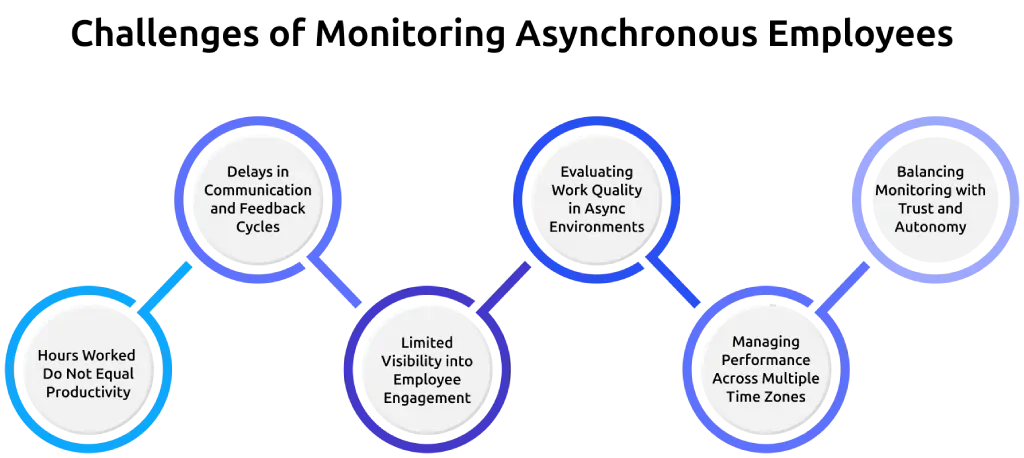
Monitoring async teams is not the same as monitoring a traditional team. Here are the key challenges you will face and what you can do about them.
Hours Worked Do Not Equal Productivity
In an async setup, the number of hours an employee works does not always reflect the quality of their output. One employee may work six hours and deliver an average result, while another works three focused hours and produces something far better. If you measure performance by time alone, you will consistently misjudge who is actually performing well on your team.
Delays in Communication and Feedback Cycles
Since employees are not online at the same time, replies can take longer. This can slow down decision-making if not managed properly. Without clear communication rules, even small issues can take hours or days to resolve. Setting expectations for response times helps reduce delays and keeps work moving smoothly.
Limited Visibility into Employee Engagement
You cannot see async employees daily like in an office. So, you need to rely on patterns like slow responses, fewer updates, or reduced output. Disengagement in async teams is not always obvious. It shows gradually through changes in behavior. Paying attention to these early signals helps you take action before it affects performance.
Evaluating Work Quality in Async Environments
Completing tasks alone does not reflect true performance. You also need to check how well the work is done. In async setups, you may not always review work in real time. That makes it important for you to set clear quality standards from the start. You can use peer reviews, feedback loops, or simple checklists to make sure the work meets expectations.
Managing Performance Across Multiple Time Zones
Employees work in different time zones, so activity may look uneven. Looking at weekly or overall performance gives a clearer picture. A team member may appear inactive during your working hours but may have already completed their work earlier. You need to focus on deadlines and results instead of matching work hours.
Balancing Monitoring with Trust and Autonomy
Async employees value flexibility and independence. If you monitor too much, it can reduce trust and affect morale. When you track every small detail, your team may feel like they are being watched constantly. This can reduce motivation and make them less comfortable with the system. When your team feels trusted, they are more likely to take ownership of their work and perform better.
When you understand these challenges clearly, it becomes easier to build a monitoring approach that is fair, effective, and aligned with how async teams actually work.
What Should You Monitor in an Asynchronous Work Environment?
In an async setup, you cannot rely on who is online or when work happens. What matters is understanding whether work is moving forward. To apply asynchronous work employee monitoring effectively, you need to focus on the right metrics.
| What to Monitor | Why It Works for Async Teams | What to Avoid |
|---|---|---|
| Task and deliverable completion | Directly measures results regardless of when or where work happens | Judging performance by hours logged rather than what was delivered |
| Total active work time (daily or weekly) | Confirms a reasonable amount of work is happening without requiring fixed hours | Checking real-time presence or expecting employees to be online at specific times |
| App and tool usage on work devices | Shows whether work tools are inactive or in use during claimed working time | Monitoring personal apps or accounts, or checking activity at specific moments of the day |
| Project milestone progress | Tells you whether projects are moving forward at the agreed pace | Expecting milestones to be completed during your working hours rather than by agreed deadlines |
| Response time within agreed-upon windows | Measures whether the async employee is meeting collaboration commitments | Expecting immediate replies or measuring response time against real-time availability |
| Quality of async check-in updates | Short written updates show engagement level and whether blockers are being flagged early. | Treating a brief delay in an update as a performance issue without context |
How Do You Set Up Monitoring Fairly for an Async Team?

Setting up asynchronous work employee monitoring fairly starts with clear expectations. Here are six steps that make the difference between monitoring that helps your team and monitoring that creates unnecessary friction.
Define Clear Performance Expectations
Before monitoring begins, clearly outline what success looks like for each role. What tasks should be completed each week? What does a quality deliverable look like? What are the project milestones and their deadlines? Having these expectations documented gives you a clear, fair anchor for every performance conversation that follows.
Establish Response Time Guidelines Instead of Fixed Hours
Do not expect your async employees to be available at specific times. Agree on a clear response window for different types of communication. For example, four hours for urgent matters, same day for standard queries, and 48 hours for low-priority requests. This gives your team structure while still allowing flexibility in their schedules.
Focus on Weekly Performance Trends
Set your monitoring tools to show daily and weekly totals for active work time, task completion, and tool usage. Review weekly summaries and avoid checking dashboards throughout the day. A weekly view gives you a clearer picture of how work is progressing. Looking at data at a single moment does not show overall performance.
Replace Real-time Meetings with Structured Written Check-Ins
Use short written check-ins daily or every two to three days. Each update needs to include what was completed, what comes next, and any blockers. This helps you stay informed while reducing unnecessary meetings.
Provide Employees Access to Their Own Performance Data
When async employees can see their own activity totals, productivity patterns, and task completion rates, they can manage their performance more effectively. This supports autonomy and reduces dependency on constant supervision.
Build a Monitoring Policy Designed for Async Work
A standard monitoring policy assumes fixed working hours, which does not fit async teams. Your policy needs to clearly state that monitoring is based on flexible time windows, response expectations, and output-based evaluation. Every async employee needs to review and agree to this policy before monitoring begins.
How Time Champ Supports Async Team Monitoring
Managing an async team becomes much easier when you have a monitoring tool built for flexible hours and distributed schedules. Time Champ is a workforce intelligence and employee monitoring software built to support teams that work without fixed hours, helping you track work, measure performance, and stay aligned without needing real-time visibility.
Automated Time Tracking
Time Champ automatically tracks when employees start and stop working by recording their active time. It captures work hours in the background, so you get accurate data without manual input.
Tracks Productivity
Time Champ tracks productivity by analyzing how employees spend their work time across tasks and applications. It provides clear insights into productive and non-productive activities, helping you understand work patterns and overall performance over time.
Connects Work to Tasks and Deliverables
Time Champ links time tracking with tasks and projects. You can clearly see what work is completed and how it contributes to overall goals.
Supports Async Work with Minimal Disruption
Time Champ runs in the background and does not interrupt workflows. Employees can work freely while you get the insights you need.
Helps Identify Patterns and Performance Trends
Time Champ helps you spot patterns like consistent performance or early signs of disengagement by analyzing activity and productivity data.
Reduces Manual Work with Automated Reports
Time Champ automatically generates reports and timesheets. This saves time and gives you accurate data without manual tracking.
Finding it hard to manage async teams with limited visibility?
Get clear insights into your team’s performance and work patterns with Time Champ.
Final Thoughts
Asynchronous work employee monitoring works best when you focus on what your team delivers and how consistently they do it. Clear expectations and simple processes make it easier to manage without adding pressure. When you use the right approach, you can manage your team effectively without forcing strict schedules. This helps your team stay productive, engaged, and motivated, no matter where or when they work.

Guna Lakshmi


Table of Content
-
 What Is Asynchronous Work?
-
How Async Work Differs from Standard Remote Work
-
Why Traditional Monitoring Metrics Fail Async Teams
-
Challenges of Monitoring Async Employees
-
What Should You Monitor in an Asynchronous Work Environment?
-
How Do You Set Up Monitoring Fairly for an Async Team?
-
How Time Champ Supports Async Team Monitoring
-
Final Thoughts
Related Blogs
Explore how to implement employee monitoring software effectively with clear steps, legal tips, best practices, ROI metrics, and key pitfalls to avoid.
Anjali | Apr 15, 2026
Managing digital nomads? Learn how digital nomad employee monitoring works, what to track, and how to stay fair while keeping your team productive.
Guna Lakshmi | Apr 15, 2026
Learn how GDPR and employee monitoring impact your business, including key principles, risks, employee rights, compliance steps, and best practices.
Thasleem Shaik | Apr 15, 2026
Learn how to choose the right remote employee monitoring software with the right features, scalability, and usability to manage remote teams effectively.
Guna Lakshmi | Apr 14, 2026
Learn how to detect employee monitoring software, identify the key signs on your computer, and understand what to do if your activity is being monitored.
Anjali | Apr 13, 2026
Choose the right employee monitoring tool for your team with this 2026 guide. Explore types, key features, a 5-step framework, and top software options.
Jahnavi Pulluri | Apr 13, 2026


 4.7/5 avg.
Ready to Manage Your Workforce Smarter?
Join our family of 1500+ companies using smart insights to redefine workforces!

Free Trial
No Credit Card Required