Digital Nomad Employee Monitoring: What You Need to Know
Managing digital nomads? Learn how digital nomad employee monitoring works, what to track, and how to stay fair while keeping your team productive.

Running a team that spans the world sounds great until you try to manage it. Digital nomad employee monitoring is a challenge most businesses do not think about until it becomes a problem. The tools most companies use for employee monitoring were built around offices, fixed hours, and people who show up in the same place every day. When your team works from multiple locations, those tools stop working the way they should. For the broader picture across this topic, our enterprise employee monitoring guide brings the moving parts together.
This guide covers what actually works, what to track, which tools help, and how to stay legally compliant no matter where your teams are working.
What Is Digital Nomad Employee Monitoring?
Digital nomad employee monitoring is the practice of tracking how your remote team works, what they do, when they are available, and what they deliver, as their location keeps changing. Unlike regular remote monitoring, digital nomad employee monitoring is harder to manage and handle. Your employee might move through multiple countries, work across completely different time zones, and connect from networks outside your control.
The privacy laws around monitoring also shift every time they cross a border. That is why the old way of tracking presence does not work here. You need to measure output, and the right employee monitoring software enables that.
Who Is a Digital Nomad Employee?
A digital nomad employee is someone who works for your business while traveling or living in different places, sometimes across different countries. They work wherever they can: hotel rooms, cafes, airport lounges, and co-working spaces. Their schedule often looks nothing like a typical 9-to-5, and where they are based can change every few weeks. They might be on your payroll as a full-time employee or working as a contractor.
According to MBO Partners, 75% of digital nomads today belong to Gen Z or Millennials, with Gen Z alone making up 35% of the nomad workforce as of 2024.
Struggling to manage digital nomad employees across locations?
Get complete visibility into work, team productivity, and availability with Time Champ.
How Digital Nomad Employee Monitoring Differs from Standard Remote Employee Monitoring
Standard remote monitoring assumes a fixed location, a consistent home office setup, and a predictable schedule. Digital nomad employee monitoring has none of these. The employee's time zone shifts, and the legal rules governing monitoring change with each country. Internet reliability varies, device security on shared networks is harder to control, and evaluating performance on hours logged makes no sense when someone is working from Bali one month and Berlin the next.
| Standard Remote Monitoring | Digital Nomad Monitoring |
|---|---|
| Employee works from a fixed location every day, usually a dedicated home office or a company office they commute to | Location changes regularly, sometimes every few weeks, often across different countries and continents |
| Time zone stays consistent throughout employment, making scheduling and availability easy to manage | Time zone shifts every time the employee moves, meaning your overlap window can shrink to just a couple of hours. |
| Works like a predictable schedule that aligns closely with the business's core hours, making real-time collaboration straightforward | Works flexible hours that may look nothing like yours, early mornings, late nights, or split shifts, depending on where they are |
| Connects through a reliable home broadband or office network with consistent speeds and minimal downtime | Relies on whatever connection is available, hotel Wi-Fi, cafe hotspots, or co-working spaces, with speed and stability that vary daily |
| Follows the same privacy and data rules, so you only need to set your monitoring policy once. | Moves through multiple legal jurisdictions in a single year, each with its own rules on what you can monitor and how data must be handled |
| Performance is commonly measured by hours logged, time online, and presence during business hours. | Performance must be measured by actual output, tasks completed, deadlines met, and project milestones reached |
| Clock-in and clock-out times serve as the primary signal that work is happening | Task completion, agreed availability windows, and async check-ins replace time tracking as the main measure of productivity |
What Are the Unique Challenges of Digital Nomad Employee Monitoring?
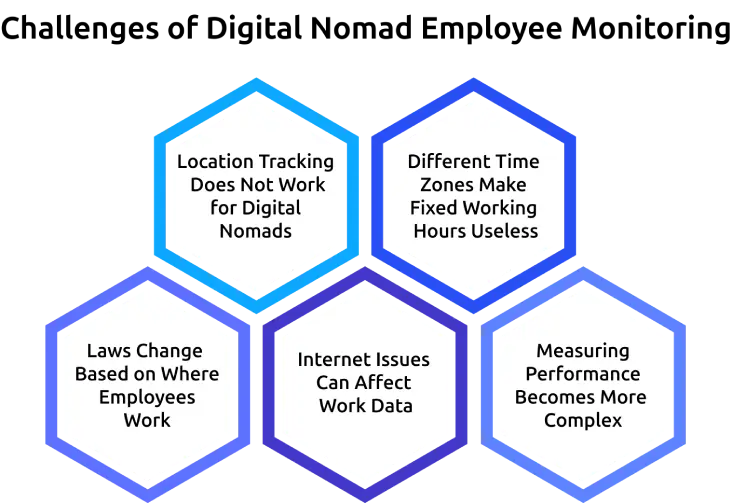
Managing digital nomad employees comes with unique challenges that are very different from handling office-based or remote teams. Because they work from different locations and conditions, the usual ways of monitoring and evaluating performance may not work well. You need a more flexible and thoughtful approach to handle these challenges effectively.
Location Tracking Does Not Work for Digital Nomads
Digital nomads are expected to work from different places, so tracking their location is not useful. It can also trigger data-protection violations and nomad visa restrictions in many countries. Instead of focusing on where they are, it is better to look at their work activity and progress during working hours.
Different Time Zones Make Fixed Working Hours Useless
When your employee works from another region, your working hours may only overlap for a few hours. This makes it difficult to follow fixed schedules like 9-to-5, so it’s better to focus on task completion and agreed working times instead. What matters more is whether they complete their tasks on time and stay available during the agreed overlap hours.
Laws Change Based on Where Employees Work
The rules for monitoring employees depend on the country in which they are working. Stay aware of local laws and update your monitoring practices whenever employees move.
Internet Issues Can Affect Work Data
Not every location has stable internet. Working from cafes, travel spots, or shared spaces can lead to slow or unstable connections. This can cause gaps in tracking data. Tools that capture work offline and sync later help maintain accurate records.
Measuring Performance Becomes More Complex
For digital nomads, time spent working does not always reflect actual performance. Some employees may complete important tasks quickly, while others may spend more time with less output. This makes it harder to evaluate performance using traditional methods. To get a clear picture, you need to focus more on results, quality of work, and defined goals.
Finding it hard to manage time zones and remote work issues?
Simplify tracking and keep your team aligned across locations with Time Champ.
What Should You Actually Monitor for Digital Nomad Employees?
Digital nomad employee monitoring works best when you track what matters for the job and leave everything else alone. The table below shows what to track, why it works for nomads, and what to avoid.
| What to Track | Why It Works | What to Avoid |
|---|---|---|
| Task and project completion | Shows real output regardless of when or where work happened | Using hours logged as a stand-in for results |
| Active work time in agreed windows | Confirms work is happening during committed hours | Clock-in and clock-out times are tied to your time zone |
| App and tool use on work devices | Shows whether work tools are actually being used during claimed work time | Personal apps or accounts on personal devices |
| Response time within agreed hours | Measures real team communication | Expecting instant replies outside agreed-upon hours |
| Project milestones and progress updates | Keeps you in the loop without constant check-ins | Tracking location or activity outside work hours |
Task and Project Completion
Task and project completion is the most reliable metric for digital nomad employees. It tells you directly whether your team is delivering results, regardless of where they are or what time they work. Track tasks completed against agreed deadlines, milestones hit within project timelines, and the quality of deliverables.
Active Work Time Within Agreed Windows
Agree on a set of hours each week when your employee will be available. During those hours, you can check if work is happening using activity tools that show app and tool usage. This helps you confirm that the reported hours are accurate, without forcing them to follow a fixed schedule or time zone.
App and Tool Usage on Work Devices
If your nomad employee works on a company-issued or company-approved device, you can monitor which apps and tools they use during work hours. This helps you verify that working time is genuinely being spent on work. If a project is delayed and there is very little activity in your work tools, it clearly shows that work was not happening as expected.
Async Communication Responsiveness
For nomads working in different time zones, being available all the time is not easy. What matters is how they respond during the hours you both agreed on. Check if they reply to messages, update tasks, and join scheduled calls during that time. This shows how well your team is working together.
What You Should Not Monitor for Nomads
Do not use GPS location tracking as an attendance tool for nomads. They are supposed to be in different places. Do not monitor outside agreed work hours. Do not access personal devices, accounts, or apps without a written and signed BYOD policy. Finally, do not treat activity data as a substitute for a real conversation when performance concerns arise.
What Are the Legal Considerations of Monitoring Digital Nomad Employees?
Digital nomad employee monitoring creates legal complexity that standard remote monitoring does not. The law changes each time your employee crosses a border, and your monitoring approach needs to account for that.
| Scenario | Key Legal Consideration | What You Need to Do |
|---|---|---|
| Nomad works from an EU country | GDPR applies to monitoring data collected while an employee is in the EU. Prior notice and a lawful basis for processing are required. | Update your monitoring policy to include GDPR language and ensure the employee has signed it before travelling to any EU country. |
| Nomad works from California, USA | CCPA employee provisions apply. Employees have the right to know what data is collected and how it is used. | Include California-specific data disclosure in your policy. Inform the employee what monitoring data is collected and for what purpose. |
| Nomad works from a country with a nomad visa. | Some nomad visa programs treat workers as local employees for labor law purposes, including monitoring and data protection rules. | Check the visa program rules of each country your nomad plans to work from. Adjust the monitoring approach or policy if local employment rules apply. |
| Monitoring data moves across borders. | GDPR and similar laws restrict how personal data, including monitoring records, is transferred outside certain regions. | Use a cloud provider with data residency options or standard contractual clauses where required to keep data transfers compliant. |
| Nomad uses personal devices for work | Monitoring personal devices without a written BYOD policy is a legal and ethical risk in most countries. | Provide a company device or put a clear BYOD policy in place before the nomad starts working. Only monitor agreed work apps on personal devices. |
How Should You Set Up a Digital Nomad Monitoring Policy?
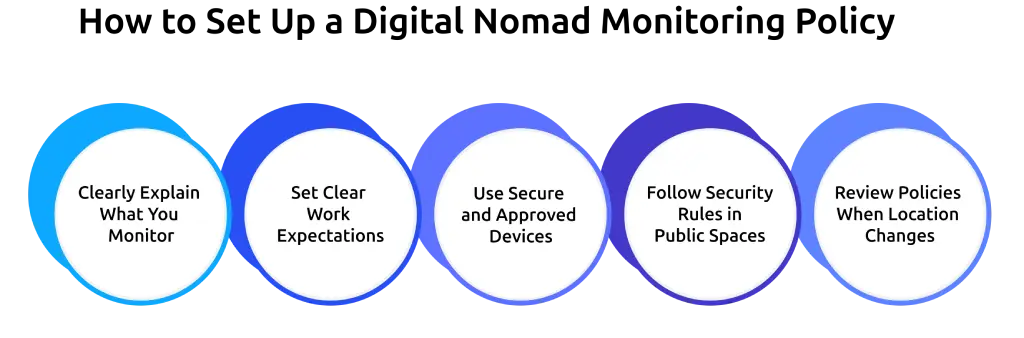
A written monitoring policy is the foundation of compliant and fair digital nomad employee monitoring. Here is how to build one that works across borders.
Clearly Explain What You Monitor
Tell employees what you track and make sure it applies no matter where they work. Mention the tools you use and what data they collect. Keep the explanation simple so there is no confusion. This helps build trust and avoids misunderstandings later.
Set Clear Work Expectations
Write down agreed working hours, response time, and how performance will be measured. Focus on tasks completed and deadlines instead of hours worked. Clear expectations make it easier for employees to stay on track.
Use Secure and Approved Devices
Ask employees to use company devices or approved devices. Personal devices on shared networks can expose work data to theft, malware, and unauthorized access. If you allow them, clearly define what can and cannot be monitored. This reduces security issues and keeps work data safe.
Follow Security Rules in Public Spaces
Set basic rules for working in public places. Ask employees to use a VPN on public networks and follow data-handling protocols when working in public. Simple precautions can prevent data leaks and privacy problems.
Review Policies When Location Changes
Whenever an employee moves to a new country, check if your monitoring rules follow local laws. Make updates if needed to stay compliant. Regular reviews help you avoid legal risks and stay updated.
How Does Time Champ Support Digital Nomad Employee Monitoring?
Managing digital nomad teams becomes much easier when you use the right employee monitoring tool. Time Champ is built to support teams working from different locations, time zones, and internet conditions. Here’s how it helps in a simple way.
Tracks Work Time Based on Employee Location
Time Champ records work hours automatically based on the employee’s local time. You do not need to adjust settings or convert time zones manually. This makes tracking accurate no matter where your employee is working.
Monitors Work Activity from Anywhere
Time Champ tracks app usage, websites, and active work time from any location. Whether your employee is working from a café, co-working space, or hotel, you still get clear and consistent data.
Works Even Without Internet
If the internet connection is slow or unstable, Time Champ continues tracking work offline. Once the connection is back, all data is synced automatically. This helps avoid missing information.
Connects Work to Tasks and Projects
Time Champ shows what tasks your employees complete and how much time they spend on each project. This helps you evaluate performance based on actual work done, not just activity.
Creates Timesheets Automatically
Employees do not need to fill in timesheets manually. Time Champ generates them automatically based on work activity. This saves time and reduces errors.
Keeps Data Safe and Secure
All data is protected with role-based access, so only authorized managers and HR staff can view employee data. In addition, SOC 2 Type II controls help protect sensitive information and reduce the risk of unauthorized access.
Looking for a smarter way to manage digital nomad teams?
Manage time, track activity, and monitor projects effortlessly with Time Champ.
Conclusion
Managing digital nomad employees becomes simpler when you focus on output, availability, and outcomes. Track what work is completed, set clear availability hours, and use tools like Time Champ that work across different locations. When you follow a clear and fair approach, it becomes easier to manage your team effectively, no matter where they are working. This also helps build trust and keeps your team more productive over time.

Guna Lakshmi


Table of Content
-
 What Is Digital Nomad Employee Monitoring?
-
Who Is a Digital Nomad Employee?
-
How Digital Nomad Employee Monitoring Differs from Standard Remote Employee Monitoring
-
What Are the Unique Challenges of Digital Nomad Employee Monitoring?
-
What Should You Actually Monitor for Digital Nomad Employees?
-
What Are the Legal Considerations of Monitoring Digital Nomad Employees?
-
How Should You Set Up a Digital Nomad Monitoring Policy?
-
How Does Time Champ Support Digital Nomad Employee Monitoring?
-
Conclusion
Related Blogs
Discover how to monitor remote employees effectively, boost productivity, and address challenges while respecting privacy.
Tarun Kumar Reddy | Aug 09, 2024
Productivity Tracking Software helps remote teams stay on top, track progress, streamline workflows & boost efficiency effortlessly. Learn more!
Shabana Shaik | Mar 15, 2025
The art of managing a remote team, especially when they're spread across different time zones, Discover effective strategies for success with your remote team.
Sai Keerthi Uppala | May 30, 2023
Discover essential Remote Work Etiquette tips to boost productivity and teamwork. Learn how to stay organized, maintain professionalism, and thrive remotely.
Tarun Kumar Reddy | Nov 12, 2024
Build a strong communication culture in remote teams to improve collaboration, trust, and productivity. Explore key strategies for seamless teamwork!
Sai Keerthi Uppala | Feb 24, 2025
Explore tips to establish your value as a remote worker. Learn how communication, time management, and proactivity help you stand out and build trust.
Tarun Kumar Reddy | Mar 13, 2025


 4.7/5 avg.
Ready to Manage Your Workforce Smarter?
Join our family of 1500+ companies using smart insights to redefine workforces!

Free Trial
No Credit Card Required