10 Simple Steps to Successfully Manage a Remote Team
Learn how to manage a remote team with 10 simple steps. Improve communication, boost productivity, build trust, and keep your team engaged from anywhere.
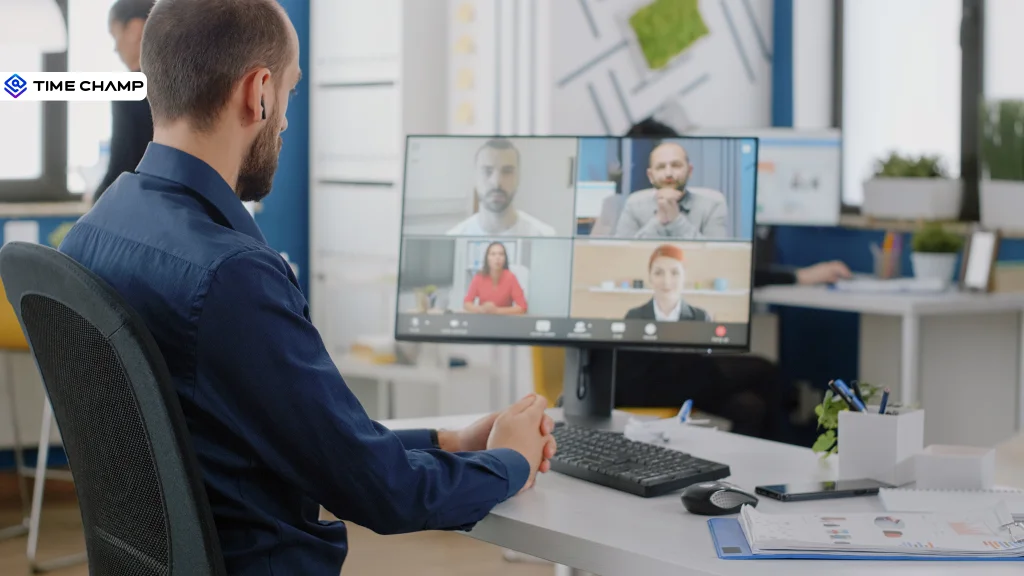
Managing a remote team sounds simple until you're actually doing it. How do you make sure everyone is staying productive? How do you keep communication clear when your team is spread across different locations? And how do you build trust without constantly checking in?
Chances are, you've dealt with at least one of these challenges. That's exactly what this blog is here to help with. These 10 simple tips will show you how to keep your remote team organized, connected, and working toward the same goals.
10 Steps to Manage a Remote Team Effectively
Every remote team faces different challenges, but the solution is often simple. Start with these 10 easy steps to improve communication, build trust, and help your team work better together.
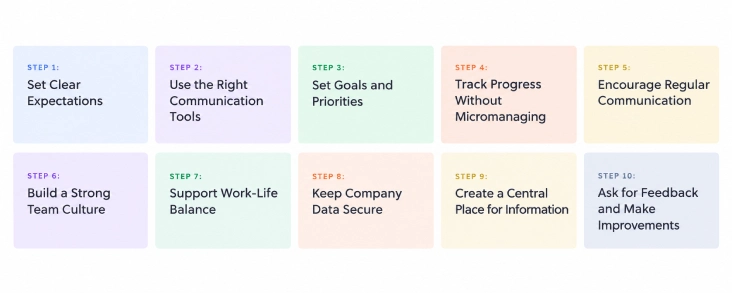
Step 1: Set Clear Expectations
Remote employees don't have the benefit of face-to-face conversations every day. That's why you need to set clear expectations from the start. Explain each person's role, responsibilities, work hours, deadlines, and communication rules.
Let your team know what they need to do, when tasks should be completed, and how they should share updates. You can also set response times for messages and decide how often meetings should happen. Clear expectations reduce confusion and help everyone stay accountable.
Step 2: Use the Right Communication Tools
Good communication is the foundation of every successful remote team. Choose tools that make it easy for employees to stay connected and work together.
For example, use Slack or Microsoft Teams for quick conversations, Zoom or Google Meet for video calls, and Asana or Trello to manage projects. Try not to use too many different apps. Keeping communication in one place makes work much easier. If you want, I will write a few more versions.
Step 3: Set Goals and Priorities
Employees work better when they know exactly what they need to do. Instead of giving a large project all at once, divide it into smaller tasks with clear deadlines.
Also, explain which tasks should be completed first. This helps employees manage their time better and focus on the most important work. Reviewing goals regularly also helps everyone stay on track and avoid delays.
Step 4: Track Progress Without Micromanaging
As a manager, you need to know how work is progressing. But that doesn't mean checking on employees every hour. Constant follow-ups can make people feel pressured and reduce trust.
Instead, focus on the results. Use workforce management or productivity tools to see task progress, completed work, and project status. This helps you understand how your team is performing while giving employees the freedom to manage their own work.
Step 5: Encourage Regular Communication
Regular communication helps everyone stay informed and prevents small problems from becoming bigger ones. Hold weekly team meetings to discuss ongoing work, upcoming deadlines, and any challenges your team may be facing.
You should also schedule one-on-one meetings with each employee. These conversations give them a chance to ask questions, share ideas, or discuss any concerns. Encourage your team to communicate whenever they need help instead of waiting until the next meeting.
Step 6: Build a Strong Team Culture
Working from home can sometimes make employees feel lonely or disconnected from the rest of the team. That's why building a positive team culture is important.
Celebrate birthdays, work anniversaries, and project successes together. Arrange virtual coffee chats or fun online activities where employees can relax and talk with each other. Even simple appreciation for good work can make employees feel valued and improve team spirit.
Step 7: Support Work-Life Balance
One challenge of remote work is that employees may continue working even after office hours. Over time, this can lead to stress and burnout.
Encourage your team to follow regular working hours, take short breaks, and finish work on time. Respect their personal time by avoiding unnecessary calls or messages after work. A healthy work-life balance helps employees stay happy, motivated, and productive.
Step 8: Keep Company Data Secure
Remote employees often use different devices and internet connections to access company information. Without proper security, sensitive data can be at risk.
Use simple security measures like strong passwords, multi-factor authentication, USB restrictions, website blocking, and secure file sharing. You should also teach employees how to identify phishing emails and other online scams. These small steps can help protect your company's data.
Step 9: Create a Central Place for Information
Employees should be able to find important information without searching through old emails or chat messages. Keep company policies, project documents, meeting notes, training guides, and other important files in one shared location.
Having everything in one place saves time and helps employees work more efficiently. It also makes it easier for new team members to learn about the company and get started quickly.
Step 10: Ask for Feedback and Make Improvements
Managing a remote team is something you should get better at over time. What works today may not work as your team grows or your business changes.
Ask your employees for feedback regularly. Find out what's helping them and what challenges they're facing. Listen to their ideas and make changes where needed. Even small improvements can make communication better, increase productivity, and build a stronger remote team.
Build a More Productive Remote Team!
See who's making progress, balance workloads, and keep every project moving forward
How Time Champ Helps You Manage a Remote Team
Time Champ is a remote employee monitoring software with workforce intelligence that gives you complete visibility into your team's productivity, attendance, projects, and work patterns, all from a single platform.
1. Productivity Tracking
See how work is progressing without constantly asking for updates. Time Champ tracks productive time, idle time, project hours, and task completion, helping you measure performance based on results rather than hours spent online.
2. Attendance & Shift Management
Track attendance, work hours, shifts, and work-from-home schedules from a single dashboard. This makes it easy to manage both remote and hybrid teams without manual follow-ups.
3. Project & Time Tracking
Monitor the time spent on projects and tasks, identify delays early, and make sure work stays on schedule. This gives you better visibility into project progress.
4. Workforce Intelligence
Get insights into productivity trends, workload distribution, and employee work patterns. These reports help you balance workloads, identify inefficiencies, and make better management decisions.
5. Data Loss Prevention (DLP)
Protect company data with features like USB restrictions, website blocking, file movement tracking, and policy-based alerts. This helps reduce the risk of data leaks while employees work remotely.
6. Employee Privacy & Transparency
Time Champ is designed to support transparency. Employees can access their own time records, role-based permissions control who can view data, and privacy features like blurred screenshots help protect sensitive information.
Managing a Remote Team Doesn't Have to Be Complicated!
Track productivity, monitor projects, manage attendance, and keep your remote team connected
Conclusion
Managing a remote team becomes much easier when you have clear expectations, open communication, and the right processes in place. These 10 simple steps can help you improve collaboration, keep projects on track, and create a more productive remote work environment. As your team grows, review your approach regularly and make changes where needed. With the right strategies and tools, you can build a remote team that stays connected, engaged, and performs at its best.

Jahnavi Pulluri

Table of Content
 10 Steps to Manage a Remote Team Effectively
- How Time Champ Helps You Manage a Remote Team
- Conclusion

Related Blogs
Why remote work is becoming more popular in the last few years? Check out our 4 reasons companies are using remote work.
Shabana Shaik | Mar 14, 2025
Wondering why meetings are essential in remote work? Uncover 10 key reasons they improve communication, teamwork, and efficiency for your remote team!
Tarun Kumar Reddy | Mar 14, 2025
Explore tips to establish your value as a remote worker. Learn how communication, time management, and proactivity help you stand out and build trust.
Tarun Kumar Reddy | Mar 13, 2025
Remote work is the secret sauce for more loyal employees. Discover how virtual collaboration and flexible hours transform teams into powerhouses.
Sai Keerthi Uppala | Feb 21, 2025
Ensure remote work compliance with our guide on key areas, common challenges, and best practices for your team.
Shabana Shaik | Jan 10, 2025
Discover essential Remote Work Etiquette tips to boost productivity and teamwork. Learn how to stay organized, maintain professionalism, and thrive remotely.
Tarun Kumar Reddy | Nov 12, 2024


 4.7/5 avg.
Ready to Manage Your Workforce Smarter?
Join our family of 1500+ companies using smart insights to redefine workforces!

Free Trial
No Credit Card Required