SIEM Monitoring Systems: What They Are, How They Work, and Why Your Business Needs One
SIEM monitoring systems collect, analyze, and alert on threats across your entire IT environment. Learn how SIEM works, what it detects, and how to choose one.

Cyber threats are easy to miss, and by the time you spot them, it’s often too late. The detail here sits inside a wider conversation covered in our enterprise employee monitoring guide.
SIEM monitoring systems are designed to change that. They collect, analyze, and respond to threat data across your entire IT environment in real time, giving you the visibility needed to act fast.
In this blog, you’ll learn how the SIEM system works, what it protects against, and how to choose the right solution.
What is a SIEM Monitoring System?
A SIEM monitoring system (Security Information and Event Management) is a cybersecurity tool that gathers and unifies log data and security events from across an organization’s IT environment. It uses this data to identify, investigate, and respond to threats in real time. By combining log management with advanced analytics, SIEM provides better visibility into system activity, detects suspicious behavior, and helps meet compliance requirements.
But what makes a SIEM more than just a log collector? A SIEM monitoring system doesn't just store data, it actively analyzes it, looks for patterns that suggest something is wrong, and raises an alert before a threat turns into a serious incident. Think of it like a security camera system, but smarter: instead of just recording footage, it watches for specific behaviors and calls for backup the moment something looks off.
Security Information and Event Management - Breaking Down the Acronym
Security Information Management (SIM) handles the long-term collection, storage, and analysis of log data, primarily for compliance reporting, forensic investigations, and audit trails. Security Event Management (SEM) focuses on real-time monitoring, event correlation, and immediate alerting when suspicious activity occurs.
SIEM systems combine both disciplines into a single platform. SIM provides the historical depth organizations need for regulatory compliance, maintaining 12-month audit trails for HIPAA, PCI-DSS, GDPR, and SOC 2. SEM provides the speed needed to catch active threats before they cause damage. Together, SIEM delivers complete visibility of SIM and the real-time detection capability of SEM, making it one of the most operationally complete security tools available to organizations of any size.
Key Components of a SIEM System
| Component | What it Does | Example |
|---|---|---|
| Log Collector | Gathers raw event data from all sources | Firewall logs, server logs |
| Normalization Engine | Converts different log formats into a standard format | Translating Cisco logs and AWS logs into one language |
| Correlation Engine | Finds relationships between events across sources | Linking a failed login to an unusual file access 5 minutes later |
| Alerting System | Triggers notifications when threat thresholds are crossed | Email/SMS alert to the security analyst |
| Dashboard | Visual interface for monitoring and investigation | Real-time threat map, event timeline |
| Log Storage | Long-term, tamper-evident storage for compliance | 12-month audit trail for HIPAA |
According to netwitness, it takes around 207 days on average to detect security threats. Good SIEM systems aim to convert at least 10% of alerts into real incidents and achieve over 40% accuracy in detecting threats.
How Does a SIEM Monitoring System Work?
SIEM security software works in six key steps, turning messy, unstructured event data into clear, actionable security insights. Each stage depends on the one before it. Understanding the full picture explains why SIEM produces security intelligence rather than just another stream of raw data.
Let’s have a look at it!
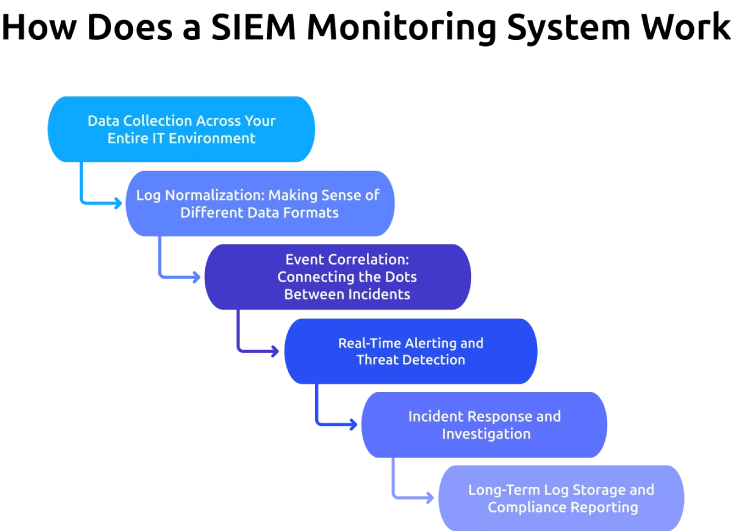
Step 1: Data Collection Across Your Entire IT Environment
A SIEM monitoring system starts by collecting log data from every device and application on the network. This includes network devices (routers, switches, firewalls), servers (web, mail, database), endpoints (laptops, desktops, mobile), cloud and SaaS platforms (AWS, Azure, Microsoft 365), security tools (antivirus, IDS/IPS), and all applications employees use daily. The more data sources a SIEM connects to, the clearer its view of what's happening, and the better its ability to find threats that span multiple systems.
Step 2: Log Normalization: Making Sense of Different Data Formats
Every device speaks a slightly different language when it records events. A Cisco firewall log looks nothing like a Windows event log or an AWS CloudTrail entry. The SIEM's normalization engine translates all of these into a consistent format so they can be compared and analyzed together. Without normalization, correlation would be impossible. With it, the SIEM can line up events from 50 different systems and ask: Do any of these fit a known attack pattern?
Step 3: Event Correlation: Connecting the Dots Between Incidents
This is where SIEM gets genuinely powerful. A single failed login attempt is not an alarm, but 150 failed login attempts from the same IP address in 3 minutes, followed by a successful login and an unusual file download, absolutely is. SIEM's correlation engine applies pre-built and custom rules to find these patterns. When a sequence of events matches a known threat signature, the system flags it as a potential incident.
Step 4: Real-Time Alerting and Threat Detection
Once a potential threat is identified, the SIEM immediately sends an alert to the security team. Alerts are categorized by severity, low, medium, high, and critical, so analysts know which ones to solve first. Modern SIEM tools also use machine learning to reduce the number of false positives, so analysts aren't drowning in noise.
Step 5: Incident Response and Investigation
When an analyst receives an alert, the SIEM gives them everything they need to investigate: the full event timeline, the affected systems, the user accounts involved, and a clear path back to the source of the activity. This information speeds up the investigation and helps teams contain threats faster.
Step 6: Long-Term Log Storage and Compliance Reporting
Every event the SIEM collects is stored in a secure database. This historical record is important for investigations after an incident and for compliance reporting under standards like HIPAA, PCI-DSS, GDPR, and SOC 2.
What Are the Key Benefits of SIEM Monitoring Systems?
So, what makes the SIEM monitoring system so valuable? It all comes down to a key benefit that helps you see more, respond faster, and stay in control of your security.
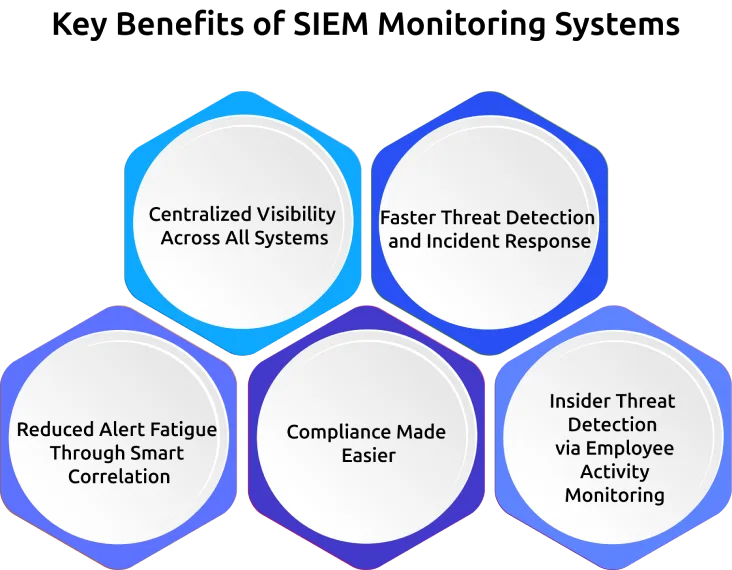
1. Centralized Visibility Across All Systems
Before SIEM, security teams had to jump between dozens of tools just to understand what was happening. A SIEM brings everything into one place, giving you a single dashboard to monitor your entire environment in real time, whether it’s on-premises, in the cloud, or both.
2. Faster Threat Detection and Incident Response
Without automated monitoring, it can take weeks or even months to detect a breach. SIEM shortens that timeline, often spotting threats within minutes. The sooner you detect an issue, the faster you can respond and limit the damage.
3. Reduced Alert Fatigue Through Smart Correlation
Security teams often struggle with too many alerts and not enough context. SIEM helps by filtering low-priority events and grouping related activity together. This means fewer false alarms and more focus on real threats.
4. Compliance Made Easier
Meeting compliance requirements can be time-consuming and complex. SIEM simplifies the process by automatically tracking access, logging activity, and generating reports when needed, so you’re always audit-ready.
5. Insider Threat Detection via Employee Activity Monitoring
Not all threats come from outside your organization. SIEM helps you identify unusual user behavior, such as odd login times or large data transfers, so you can find potential insider risks before they escalate.
Tools like Time Champ, an employee monitoring tool, track user activity such as USB usage and file downloads, helping SIEM monitoring systems better understand what’s really happening.
Want Centralized Visibility Across Your Security and Workforce Data?
See how Time Champ feeds behavioral intelligence into your security stack.
How Does SIEM Handle Insider Threats and Employee Monitoring?
Insider threats are one of the hardest security problems to solve. Unlike external attacks, insider threats come from people who already have legitimate access to your systems, employees, contractors, or third-party vendors. These scenarios are more common than most businesses realize.
Why Insider Threats Are One of the Biggest Security Risks
Traditional perimeter security tools like firewalls are built to stop threats from outside the network. They are largely blind to threats that originate from inside. SIEM, on the other hand, monitors internal activity just as closely as external threats, making it one of the few tools capable of catching insider threats early.
How SIEM Monitors Employee Activity for Suspicious Behavior
SIEM doesn't monitor employees the way a fully monitoring tool might. What SIEM captures from employee activity includes:
- Login Times and Locations: Is an account authenticating from two countries simultaneously?
- File Access and Downloads: Is an employee accessing files outside their normal role or job function?
- Application Usage Patterns: Is a database administrator running unusual queries at 3 AM?
- Privilege Escalation: Has a standard user account suddenly acquired administrator rights?
- Email Activity: Are large attachments being sent to external addresses outside normal working hours?
- Data Transfer Volume: Is significantly more data than usual being moved to external storage or cloud services?
When these behaviors deviate from set baselines, SIEM raises a flag.
SIEM and Screen Monitoring: What Gets Logged and Why
Screen monitoring or capturing screenshots, or recording screen activity, is typically handled by dedicated employee monitoring tools rather than SIEM systems. However, SIEM and screen monitoring tools work together in environments where both security and workforce visibility matter. A SIEM might detect that an employee accessed a sensitive file at an unusual time. A screen monitoring tool might provide the visual context, confirming whether that access was work-related or suspicious.
What Types of Threats Can SIEM Monitoring Systems Detect?
External Cyberattacks: SIEM detects unusual network traffic patterns, mass file encryption activity, or known malware signatures communicating with command-and-control servers, all early signs of ransomware or malware attacks.
Insider Threats: By baselining normal employee behavior and flagging deviations, SIEM finds both intentional theft and accidental data exposure by internal users.
Unauthorized Access and Privilege Escalation: If a low-level user account suddenly gains admin privileges, or if credentials are used from an unexpected location, SIEM finds it instantly.
Advanced Persistent Threats (APTs): APTs are slow, stealthy attacks where hackers quietly work their way deeper into a network over months. SIEM's long-term log correlation makes it one of the few tools capable of spotting these patterns before serious damage occurs.
Data Exfiltration and Unusual Network Traffic: Large volumes of data being moved to external locations, or traffic to suspicious IP addresses, are detected and alerted on in real time.
Too Many Alerts Yet Too Little Clarity?
Time Champ adds user-level behavioral context to make every SIEM alert more actionable.
SIEM vs. Other Security Tools - What's the Difference?
You’ve probably heard of many security solutions, but how is SIEM different from all of them? Here’s a quick comparison:
| Tool | Core Function | Works Alone? | Works with SIEM? |
|---|---|---|---|
| SIEM | Collects, correlates, and alerts on security events | Yes, but better with others | Foundation layer |
| SOAR | Automates response to threats flagged by SIEM | Limited alone | Ideal SIEM partner |
| XDR | Extends detection across endpoint, network, cloud | Yes | Complements SIEM |
| IDS/IPS | Detects and/or blocks intrusions at the network level | Yes | Feeds data into SIEM |
| Firewall | Blocks unauthorized network traffic at the perimeter | Yes | Feeds data into SIEM |
| Employee MonitoringTool (Time Champ) | Tracks workforce productivity and activity | Yes | Feeds behavior data into SIEM |
The key difference: SIEM is the aggregation and correlation layer, it makes all other tools more effective by combining their outputs. Tools like Time Champ that generate detailed user-level behavioral data become significantly more powerful when that data is correlated with system-level events inside a SIEM, creating a complete picture of both what happened in the system and what the user was doing at the time.
How to Choose the Right SIEM System for Your Business?
Choosing the right SIEM system starts with a few basic questions:What rules or regulations do you need to follow?
What kind of threats are you most worried about?
And do you have a team to manage the system, or will you need a managed service?
Answering these questions first helps you avoid a common mistake, choosing a SIEM based on features instead of what your business actually needs.
1. Define Your Requirements First
Before looking at demos or pricing, focus on these:
Compliance Needs
Different standards like HIPAA, GDPR, PCI-DSS, and SOC 2 have specific requirements. Make sure the SIEM supports them and offers ready-to-use reports.
Main Threats to Watch For
If you’re worried about ransomware, you’ll need strong network and file monitoring. If insider threats are your concern, look for user behavior tracking. Know your top risks before choosing a tool.
Team and Resources
Cloud SIEM tools are easier to manage, but you still need people to handle alerts and set rules. If your team is small, a managed SIEM service might be a better option.
Your IT Setup
If you use cloud platforms like AWS or Azure, choose a SIEM that integrates with them easily. For on-premises or hybrid setups, make sure it supports all your systems.
2. SIEM Evaluation Checklist
| Factor | Why it Matters | Questions to Ask |
|---|---|---|
| Data source coverage | Blind spots = missed threats | Does it connect to all our systems? |
| Scalability | Your data will grow | Can it handle 10x our current log volume? |
| Alert tuning | Reduces false positive overload | How customizable are the correlation rules? |
| Compliancetemplates | Saves reporting time | Does it have built-in HIPAA/GDPR/PCI templates? |
| Ease of use | Adoption by your team | Can a junior analyst use the dashboard effectively? |
| Integration support | Works with existing tools | Does it integrate with our EDR, firewall, and identity tools? |
| Cost model | Budget clarity | Is pricing per GB of data, per user, or a flat rate? |
| Vendor support | Help when you need it | What's the SLA for critical incident support? |
How to Implement a SIEM Monitoring System: A Step-by-Step Guide
Setting up a SIEM doesn’t have to be a headache, just follow these step-by-step guidelines.
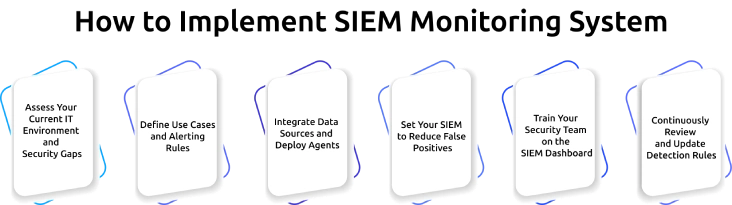
Step 1: Assess Your Current IT Environment and Security Gaps
Map all your data sources, identify which systems generate security-relevant logs, and document your current security gaps. This inventory will help with every decision that follows.
Step 2: Define Use Cases and Alerting Rules
Before you turn on the SIEM, decide what you want it to do. Start with your top 5–10 threat scenarios, ransomware detection, unauthorized admin access, and data exfiltration, and build correlation rules for each.
Step 3: Integrate Data Sources and Deploy Agents
Connect your SIEM to every data source on your list. Most modern SIEM tools use API connectors, so prioritize your highest-risk sources first: Active Directory, cloud platforms, and network perimeter devices.
Step 4: Set Your SIEM to Reduce False Positives
The first few weeks of any new SIEM deployment produce a flood of alerts, many of them false positives. Spend time reviewing these, adjusting thresholds, and refining correlation rules until the alert noise drops to a manageable level.
Step 5: Train Your Security Team on the SIEM Dashboard
A SIEM is only as effective as the team using it. Run training sessions to help your team handle alerts, use the tools, and follow response steps. Document everything so new team members can get up to speed quickly.
Step 6: Continuously Review and Update Detection Rules
Your SIEM rules need to keep evolving as threats change. Schedule quarterly rule reviews, subscribe to threat intelligence feeds, and update your correlation rules whenever new attack techniques emerge.
How Time Champ Strengthens SIEM Monitoring With User-Level Behavioral Intelligence
Time Champ is a workforce intelligence platform that improves SIEM monitoring by adding real-time user behavioral data, including application usage, file operations, website access violations, and USB activity, to the security picture that SIEM builds from system-level events.
SIEM monitoring systems are highly effective at detecting system-level anomalies: unusual network traffic, authentication failures, privilege changes, and process execution patterns. What SIEM does not natively capture is the user-level behavioral context surrounding those events, what the person was doing, which applications they were using, and what actions they took in the minutes before and after a suspicious system event.
Time Champ fills this gap with four capabilities that directly complement SIEM detection:
Real-Time Activity Monitoring: Tracks application usage, website visits, and active task time across every monitored device. When a SIEM alert fires, the security team can immediately see what the user was doing in that session, helping confirm whether the behavior was work-related or suspicious.
Data Loss Prevention (DLP): Monitors file creation, modification, and deletion events; detects unauthorized USB insertions, and logs website access violations with domain and timestamp details. These DLP signals feed directly into the insider threat detection workflows that SIEM correlation engines are built to process.
Configurable Behavioral Alerts: Generates real-time alerts for policy violations, access to restricted websites, use of unauthorized external devices, unusual file downloads, or activity outside normal working hours. Alerts can be customized based on your organization’s policies, so you only get notified about what truly matters.
Audit-Ready Reports: Provides detailed reports on device activity, communication logs, application usage, and location data, all formatted to support compliance requirements and incident documentation.
Together, they provide stronger protection against hidden and emerging threats.
Ready to Close the Gap between System-Level Alerts and User-Level Behavior?
See how Time Champ adds behavioral intelligence to your existing security setup.
Conclusion
SIEM monitoring systems are not just for large enterprises with big security teams. Today, they’ve become a practical and more affordable way for organizations of all sizes to strengthen their security. By bringing everything into one place, SIEM helps teams see what’s happening across their systems, detect threats faster, and stay prepared for compliance requirements. Instead of reacting to incidents after they happen, organizations can take a more proactive approach to security.

Jahnavi Pulluri


Table of Content
-
 What is a SIEM Monitoring System?
-
Key Components of a SIEM System
-
How Does a SIEM Monitoring System Work?
-
What Are the Key Benefits of SIEM Monitoring Systems?
-
How Does SIEM Handle Insider Threats and Employee Monitoring?
-
What Types of Threats Can SIEM Monitoring Systems Detect?
-
SIEM vs. Other Security Tools - What's the Difference?
-
How to Choose the Right SIEM System for Your Business?
-
How to Implement a SIEM Monitoring System: A Step-by-Step Guide
-
How Time Champ Strengthens SIEM Monitoring With User-Level Behavioral Intelligence
-
Conclusion
Related Blogs
Discover advanced employee screen monitoring solutions designed to enhance productivity, ensure transparency, and optimize workplace efficiency effectively.
Mounika Sai | Dec 17, 2023
Discover the risks of internal security threats and how to spot, prevent, and address them to keep your business secure and your data safe.
Thasleem Shaik | Jan 21, 2025
Strengthen your employee monitoring security with Multi-Factor Authentication (MFA)n ensures a secure and ensure a reliable environment for workforce management
Mounika Sai | Aug 04, 2023
Master PC monitoring software with our comprehensive guide. Discover benefits, best practices, and expert insights for enhancing security and productivity.
Thasleem Shaik | Dec 15, 2023
Stay ahead of cyber threats with our expert guide on endpoint security protection. Explore essential tips and tools to protect your devices, data, and network.
Shabana Shaik | Jan 23, 2025
Find the best Insider Threat Detection Tools for 2026. Compare features, pricing, pros & cons to reduce internal risk and secure workforce activity data.
Tarun Kumar Reddy | Apr 02, 2026


 4.7/5 avg.
Ready to Manage Your Workforce Smarter?
Join our family of 1500+ companies using smart insights to redefine workforces!

Free Trial
No Credit Card Required