Zero Trust Model in Employee Monitoring: How to Implement It
Understand the zero-trust model in employee monitoring and how it helps you control access, track activity, and reduce risks effectively.

The zero-trust model in employee monitoring highlights a growing problem in how teams manage visibility and access. Many teams still rely on unclear tracking methods or broad access controls, which create gaps in how teams monitor work and protect data. These gaps lead to confusion around what you track, who can access it, and how you use that data. Over time, this affects accountability, increases risk, and makes monitoring inconsistent across your team. Without employee monitoring buy-in, even the best tooling will struggle to gain employee acceptance.
The zero-trust model in employee monitoring solves this by replacing assumptions with continuous verification. It helps you track activity with clear rules, control access at every level, and maintain visibility without creating confusion or overreach. This guide explains what zero trust means in simple terms, why it matters as teams work across home offices and shared networks, and how employee monitoring adds the verification layer that makes this model effective.
What Is the Zero Trust Model?
Zero-trust model is a security model that verifies every user, device, and action before granting access. Instead of trusting anything by default, it continuously checks identity, access permissions, and context at every step.
In simple terms, zero trust means “never trust, always verify.” It does not assume that someone inside the system is safe or that access once granted should remain open. Each request undergoes authentication as to who is making the request, what they are requesting, and whether they are authorized to do so at that time.
When teams apply this model to employee monitoring, they avoid random or excessive tracking. They define what to monitor, control who can view the data, and manage how teams use that access, making the entire process structured, secure, and accountable.
When you define these controls, you also need to stay aligned with compliance requirements. You can explore how regulations shape monitoring practices in this guide on employee monitoring legal compliance.
What are the Three Core Principles of Zero Trust?
The zero trust model works on three core principles that guide how teams control access and handle data. These principles remove assumptions and replace them with clear, continuous verification.
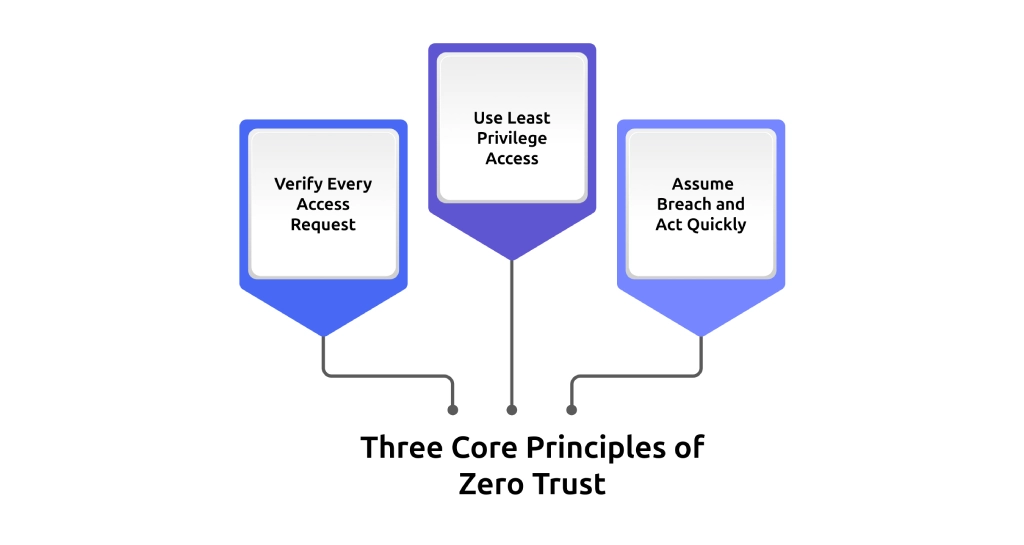
1. Verify Every Access Request
Zero trust checks every access request against identity, device, location, and behavior. It continues to verify activity even after login. When user behavior changes during a session, the system detects it and responds. A valid login does not guarantee a safe session, so you must verify continuously at every step.
2. Use Least Privilege Access
You give each person access only to what their role actually needs. You avoid giving extra permissions that are not required. A developer does not need access to payroll data. A support agent does not need access to source code. This approach limits how much data each role can access and reduces risk if someone misuses an account.
3. Assume Breach and Act Quickly
Zero trust works with the assumption that a threat can exist inside your system at any time. You focus on detecting risks early and responding without delay. You monitor activity continuously, limit how far access can extend, and take action as soon as you notice unusual behavior. This approach helps you contain risks quickly and keep your systems secure and under control.
Get clear visibility into how your team uses apps, handles data, and accesses systems.
Try Time Champ to track activity, control access, and respond to unusual behavior in real time.
Why Remote Work Demands Zero Trust Monitoring?
When your team works from one office, your network and setup give you built-in control over access and activity. Remote work spreads your team across multiple networks, locations, and devices, reducing your direct control over the work environment. This shift makes it harder to manage access, visibility, and accountability without a structured approach. Here are the key factors that make zero-trust monitoring important in a remote work environment.
1. Work Happens Across Different Environments
You no longer operate within a single office network. Your team connects from home Wi-Fi, shared networks, and personal devices. Location-based trust is not reliable, so you should check all access requests, no matter where work occurs.
2. Access Points Increase Rapidly
Every device, login, and connection becomes an entry point. As your team grows or shifts locations, the number of access points increases. Without strict verification and access control, you lose track of who accesses what and from where.
3. Visibility Becomes Fragmented
You may track activity, but without a structured model, that data stays scattered. You struggle to connect actions, access, and outcomes in one clear view. Zero-trust monitoring helps you bring all activity under one controlled system.
4. Risk of Unauthorized Access Increases
When you allow broad access across tools and systems, you increase exposure. If one account faces misuse, it can affect multiple systems. Limiting access and verifying every action helps you reduce this risk and keep control.
5. Accountability Becomes Harder to Maintain
When your team works across different locations, you cannot directly see how work progresses or how your team uses systems. You need clear records of work activity, system access, and data usage to understand who did what and when. Zero trust monitoring ensures you track every activity with proper context and accountability.
When your team works across different locations, privacy and legal boundaries also change. You need to understand how monitoring laws apply in different regions, especially for remote teams. This becomes important when dealing with global standards like GDPR and region-specific rules, such as employee monitoring privacy laws in the USA.
How Zero Trust Principles Map to Employee Monitoring?
Zero trust does not stay at the policy level. You apply it directly to how you track activity, control access, and manage data across your team. Each principle translates into a clear monitoring action that drives how your system operates in practice. Here is how the zero-trust model in employee monitoring connects to actual monitoring practices.
| Zero Trust Principle | What It Requires | How Employee Monitoring Delivers It |
|---|---|---|
| Verify Explicitly | Continuous verification of system and data access throughout the session. | Activity logs and audit trails that track who accessed what, when, and from which device. |
| Use Least Privilege | Data access is limited to role-based requirements. | Role-based access controls that restrict data visibility to defined roles. |
| Assume Breach | Immediate detection and response to unusual activity. | Real-time alerts for policy violations, file transfers, and abnormal behavior. |
| Protect Data at Every Point | Visibility into how data moves across systems. | File monitoring, upload tracking, and alerts for unauthorized data movement. |
| Limit Lateral Movement | Keep access within defined limits and prevent it from extending beyond approved boundaries. | Detection of unusual access patterns and alerts when behavior shifts outside normal limits. |
Track exactly how work happens across apps, files, and systems without confusion.
Use Time Champ to monitor activity, manage access, and stay in control of risks.
What Employee Monitoring Does in a Zero Trust Setup?
Zero trust defines what you need to enforce. Employee monitoring shows how you apply zero trust in day-to-day operations. It provides you with real-time visibility of activity, access, and data movement, so you can verify actions, manage access, and react to risks as they occur. Here are the main ways it works in practice.
1. Tracks Activity Continuously Across Every Session
Zero trust requires ongoing verification, not a one-time check. Employee monitoring captures activity during the work session, such as application usage, task flow, and internet usage. This constant activity monitoring will help you know how work occurs and the changes in behavior wherever they take place.
2. Creates Audit Trails for Every Access and Action
You must have proper documentation to show who accessed what and at which time. Monitoring systems keep elaborate audit records of user actions, gadget use, and data access. These records support internal reviews, compliance requirements, and incident investigations without gaps.
3. Enforces Role-Based Access to Monitoring Data
Zero trust limits access based on roles, and monitoring systems apply that control to the data they collect. You decide who can view individual activity, team-level reports, or organization-wide insights. This keeps sensitive information restricted and aligned with responsibility.
4. Detects Policy Violations in Real Time
Zero trust depends on an immediate response. Monitoring employees will help to detect behaviors that are not within the defined policies, e.g., a file transfer that is not authorized, attempts to access restricted files, or unusual behavior patterns. Real-time alerts allow you to act before the issue escalates.
Organizations that detect and respond to incidents quickly reduce breach costs significantly, often saving millions compared to delayed response, according to the IBM Cost of a Data Breach Report. This shows why real-time visibility and quick alerts are critical in a zero trust setup.
5. Monitors Data Movement Across Systems and Devices
Data does not stay in one place, especially in remote work environments. Monitoring systems track how files move across applications, devices, and external channels. This helps you detect suspicious transfers and maintain control over sensitive information at every stage.
While implementing these controls, you should also consider how monitoring impacts trust and transparency. Ethical practices play a key role in maintaining balance, which you can explore in this guide on ethical considerations in employee monitoring.
How Time Champ Supports a Zero Trust Approach?
Zero trust requires continuous verification, strict access control, and the ability to act on risks as they appear. To make this work in day-to-day operations, you need systems that can track activity, manage access, and provide clear visibility into how work happens across your team.
Time Champ, as a workforce intelligence and employee monitoring software, delivers these capabilities through real-time activity tracking across applications and websites, role-based access control that limits monitoring data visibility by team or department, and detailed audit logs that record every session with timestamps and user identity.
You can also configure alerts for policy violations such as unauthorized USB access, restricted website visits, or unusual file movement. This allows you to maintain consistent visibility, enforce clear boundaries, and respond quickly, making zero-trust practical and manageable within your operations.
Conclusion
Zero trust gives you a clear way to manage data access, visibility, and control in a distributed work environment. When you apply the zero-trust model in employee monitoring through the right tools, you move from assumptions to verified actions, with defined access and real-time oversight. It helps you stay consistent, minimizing risks, and maintaining full control over how your team works and processes data. As distributed teams become the norm and insider threats grow more sophisticated, zero trust monitoring will shift from a security best practice to a baseline requirement for every organization.
Gain full visibility into work without losing control over access.
Start using Time Champ to track activity and manage risks with clarity.

Thasleem Shaik


Table of Content
-
 What Is the Zero Trust Model?
-
What are the Three Core Principles of Zero Trust?
-
Why Remote Work Demands Zero Trust Monitoring?
-
How Zero Trust Principles Map to Employee Monitoring?
-
What Employee Monitoring Does in a Zero Trust Setup?
-
How Time Champ Supports a Zero Trust Approach?
-
Conclusion
Related Blogs
Explore how to implement employee monitoring software effectively with clear steps, legal tips, best practices, ROI metrics, and key pitfalls to avoid.
Anjali | Apr 15, 2026
Change management makes employee monitoring adoption smoother. Learn strategies to reduce resistance, communicate transparently, and roll out in phases.
Anjali | Apr 15, 2026
Managing digital nomads? Learn how digital nomad employee monitoring works, what to track, and how to stay fair while keeping your team productive.
Guna Lakshmi | Apr 15, 2026
SIEM monitoring systems collect, analyze, and alert on threats across your entire IT environment. Learn how SIEM works, what it detects, and how to choose one.
Jahnavi Pulluri | Apr 15, 2026
Struggling with remote work productivity challenges? Learn what’s slowing your team down and how to improve focus, communication, and performance.
Guna Lakshmi | Apr 15, 2026
Your perimeter won't stop insiders. Learn how real-time insider threat monitoring, anomaly detection, SIEM, and response workflows work together to prevent risk.
Jahnavi Pulluri | Apr 14, 2026


 4.7/5 avg.
Ready to Manage Your Workforce Smarter?
Join our family of 1500+ companies using smart insights to redefine workforces!

Free Trial
No Credit Card Required