Employee Monitoring Privacy Laws: Federal and State (U.S.A)
Understand how employee monitoring privacy laws in the U.S. affect your business, what you can track, the rules to follow, and how to stay compliant.
If you use employee monitoring software in your business, you need to understand the rules. Employee monitoring privacy laws in the USA set the limits on what you can track, how you can track it, and what you must tell your employees before you start. For the broader picture across this topic, our enterprise employee monitoring guide brings the moving parts together.
Employee monitoring software helps you manage your team more effectively, but using it without knowing the legal rules can put your business at risk. This article walks you through the key laws, what they mean for you, how they differ by state, and what you need to do to stay compliant.
What Are Employee Monitoring Privacy Laws in the USA?
Employee monitoring privacy laws in the USA are the federal and state rules that define what businesses can track, how they must disclose that tracking, and what consent employees must give before monitoring begins. These laws cover a wide range, including reading work emails, tracking website activity, recording phone calls, logging keystrokes, and tracking field team locations during work hours.
If you run a business in the USA and use any kind of monitoring tool, these laws directly apply to you. No single national law covers everything. Instead, you need to follow a mix of federal laws, state laws, and court decisions. The rules you follow depend on where your business operates and where your employees work. If your team works across multiple states, you may need to follow different rules for each employee.
No Single Federal Law Covers Everything
- Electronic Communications Privacy Act (ECPA): Limits interception of electronic communications but allows you to monitor work-related messages when you provide a clear written notice.
- Computer Fraud and Abuse Act (CFAA): Prohibits accessing systems, personal accounts, or data beyond the scope of employees authorized in your monitoring policy. Penalties can reach $250,000 per individual and $500,000 per organization.
- Fair Labor Standards Act (FLSA): Governs how you use time tracking data for pay calculations, overtime, and wage-and-hour compliance. Activity captured outside paid hours can trigger back-pay claims.
- NLRA (National Labor Relations Act): Protects employees' right to discuss wages, working conditions, and union activity. You cannot use monitoring tools to surveil, interfere with, or discourage these protected conversations, regardless of device ownership.
For a full picture that includes international frameworks like GDPR alongside US rules, see the guide on employee monitoring legal compliance.
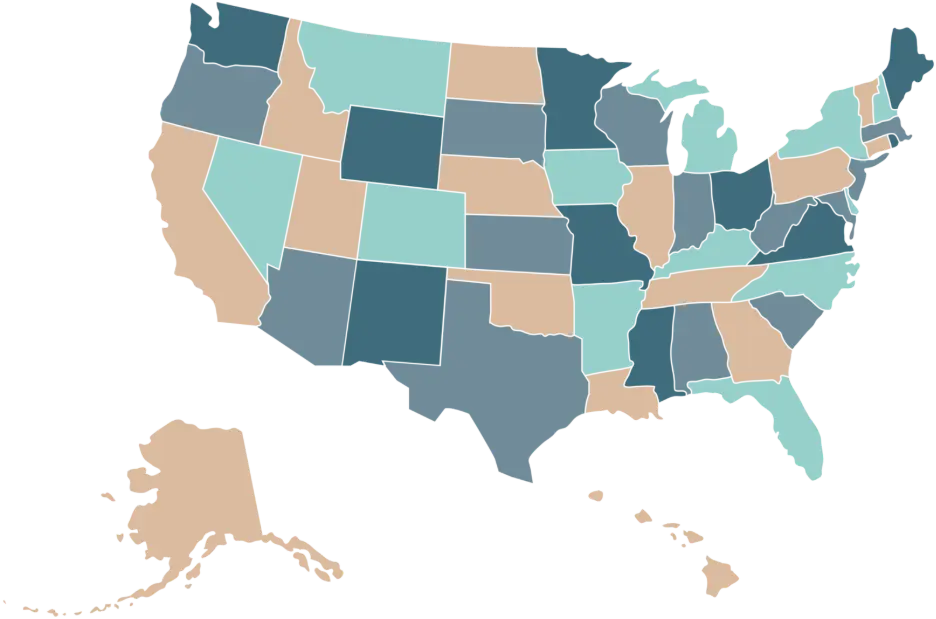
State Laws Add Another Layer
- Written Notice Requirements: States like New York, Connecticut, and Delaware require you to give written notice before monitoring.
- Data and Recording Rules: Illinois, Texas, and Washington regulate biometric data collection under dedicated laws, and 11 states require all-party consent before recording calls.
- Strict States to Watch: California, New York, Connecticut, and Delaware have the strictest notice, consent, and disclosure requirements in the country.
- Employee Location Matters: You must follow the law of the state where the employee works, even if your business operates elsewhere.
Why This Matters for Your Business
California, New York, Connecticut, and Delaware have the strictest notice, consent, and disclosure requirements in the country. Unclear monitoring practices can also damage trust with your workforce. Keep your monitoring clear, documented, and within defined limits so it holds up legally and works in practice.
What Can You Legally Monitor in the USA?
Employee monitoring privacy laws in the USA allow you to track many types of work activity, but each type comes with specific requirements. You can monitor your team, but what you monitor, how you do it, and what you communicate in advance depend on the method and the state your team works in.
The table below breaks down the six main categories of legal monitoring, the key requirements for each, and what you need to watch out for.
| What You Can Monitor | Applies To | Key Condition | What to Watch Out For |
|---|---|---|---|
| Computer and Internet Activity | Office and remote | Must be on a company-owned device. | If your team uses personal devices for work, a separate BYOD policy is a must. |
| Work Email Accounts | Office and remote | Notify employees in writing before monitoring. | Never access personal email accounts, even on a work device. |
| Screen Activity and Screenshots | Remote and office | Prior notice required; rules vary by state. | Some states require explicit written consent before you start screen monitoring. |
| Keystroke Logging | Office and remote | Allowed in most states with notice. | You can track activity intensity, but capturing actual message content or passwords violates federal wiretapping laws in most states and creates criminal exposure. |
| GPS Location Tracking | Field teams | Work hours and company vehicles only. | Tracking off-hours or personal vehicles creates serious legal exposure. |
| Phone Calls and Audio Recording | Office and remote | One-party or two-party consent, depending on the state. | Eleven states (California, Connecticut, Delaware, Florida, Illinois, Maryland, Massachusetts, Montana, New Hampshire, Pennsylvania, and Washington) require all parties on a call to agree before you record. |
Set the right boundaries before you start tracking.
Try Time Champ and stay in control of every detail.
Which US States Have the Strictest Employee Monitoring Laws?
There is no single national rule on workplace monitoring laws in the United States. What you can track, how you notify your team, and what consent you need all depend on where your employees work. More than a dozen states now have comprehensive privacy laws, and a growing number extend those rights to employee data. If your team spans multiple states, you are not dealing with one set of rules. You are dealing with several.The table below gives you a quick, clear breakdown of the states with the tightest requirements.
| State | Key Law | What It Means for You |
|---|---|---|
| California | State Constitution + CCPA/CPRA | Your California-based employees can ask what data you collect through monitoring, why you collect it, and who you share it with. You must include this in your privacy disclosures. California also prohibits access to personal social media accounts. |
| New York | 2022 Electronic Monitoring Law | You must give written notice before monitoring email, internet, or phone activity. New hires must receive and acknowledge this notice in writing. First-time violations carry heavy fines. |
| Connecticut | Conn. Gen. Stat. 31-48d | Connecticut enacted one of the earliest state notice laws in the USA, active since 1998. You must give prior written notice before monitoring computer or phone activity and explain what you monitor and why. |
| Delaware | Del. Code Title 19, §705 | A one-time written notice to employees covers you, but it must describe the types of monitoring that may occur. Applies specifically to email and internet use on work systems. |
| Illinois | Biometric Information Privacy Act (BIPA) | If your monitoring tools use fingerprints, facial recognition, or any biometric data, you need written consent before collection and a formal data retention and deletion policy. Violations can result in significant fines. |
| Massachusetts | 201 CMR 17.00 + Electronic Monitoring Notice | You must notify employees if any electronic monitoring is in place. You are also required to maintain a Written Information Security Program (WISP) to protect sensitive employee data. |
| Texas | Texas Privacy Protection Act (effective Jan 2025) | Texas updated its rules in 2025. You must now provide detailed disclosure about what data you collect through monitoring, how you store it, and who you share it with. Generally, more employer-friendly than the northeast, but disclosure requirements now apply. |
| Colorado | Colorado Privacy Act + Biometric Amendment | Covers biometric data collected from employees. You cannot condition employment on biometric consent for any purpose beyond those the law specifically permits. And, also, you cannot use biometric data to track location or time-on-task. |
Worth noting: California, New York, Connecticut, and Delaware carry the highest direct compliance risk for employee monitoring consent requirements. If you have even one employee in any of these states, their state law applies to that person regardless of where your business headquarters sits.
Illinois stands apart because BIPA targets biometric data specifically. If your attendance systems, access controls, or monitoring tools collect any form of biometric data, Illinois has some of the strictest requirements in the country and the most active litigation history around violations.
Do Employee Monitoring Privacy Laws Apply Differently for Remote Workers?
Employee monitoring privacy laws apply differently for remote workers, and this is where many businesses run into problems.
Monitoring an employee in an office feels straightforward. Monitoring someone working from their spare bedroom is a different situation entirely. The physical boundaries shift, device usage becomes more complex, and you need to follow multiple rules at the same time.
Here is what you need to know.
1. Company Device vs Personal Device Rules
The device your employee uses directly affects what you can monitor. If work happens on a company-owned laptop or phone, you can track app usage, take screenshots, log activity, and monitor work accounts, as long as you have clear notice in place.
If work happens on a personal device, your control becomes limited. You can only monitor work-related apps and accounts, and you cannot access personal files or personal data. Without a clear BYOD policy that defines these limits, any monitoring on a personal device can create legal risk.
2. Limits on Monitoring Home Network Activity
You cannot monitor a remote employee’s home network, even if they connect through your company VPN. Your access stays limited to company systems, not the home internet connection. You can track activity on work devices and work accounts, but you cannot see what happens on a home router or any personal network. Trying to monitor network traffic at home can violate federal rules like the Electronic Communications Privacy Act and several state privacy laws.
3. Monitoring Should Stay Within Work Hours
Remote work can blur the line between work time and personal time, but that does not mean you can monitor continuously. You should track activity only during scheduled work hours. If your tools capture activity late in the evening, that data can raise wage and hour issues under the Fair Labor Standards Act, especially if that time is not paid. Outside of legal risk, tracking beyond work hours without a clear and documented reason can also create compliance issues. Set clear boundaries and reflect them in your employee monitoring policy.
4. Employee Location Decides Which Laws Apply
The laws you need to follow depend on where your employee works, not where you run your business. If you operate your company from Texas, but an employee works from California, you must follow the California Consumer Privacy Act requirements for that person.
If another employee works from New York, New York’s 2022 Electronic Monitoring Law applies, including the requirement to give written notice before monitoring email, internet, or phone activity. As your team spreads across states, you need to track which laws apply to each employee because one standard policy will not work for everyone.
For teams with employees in the EU or UK, GDPR and employee monitoring rules apply separately and carry stricter data handling obligations.
5. BYOD Policy Should Clearly Define the Scope
If you allow personal devices for work, your BYOD policy must clearly define what you can monitor. It should specify which apps you track, what data you collect and store, and how long you keep that data. You also need to explain how employees can separate personal and work activities. Without clear details, your monitoring approach can create legal risk.
6. Monitoring Approach and Team Trust
Following remote worker monitoring laws helps you stay compliant, but how you implement monitoring also affects trust. Tracking every click, logging keystrokes, or capturing frequent screenshots can create a sense of constant oversight. A clearer approach is to explain what you track, why you track it, and how you use the data. When you keep monitoring transparently and limited to what is necessary, you maintain both compliance and a healthy working environment.
Keep track of work without overstepping boundaries.
Try Time Champ and control screenshots, activity, and access with precision.
What Do You Need to Do to Stay Compliant?
Staying compliant with employee monitoring privacy laws in the USA comes down to having a clear process and keeping it properly documented. The steps are straightforward, but missing them can create legal and financial risks. Here is what you need to have in place.

- Create a Clear Policy: Define what you monitor, why you monitor it, how you store data, who can access it, and how long you keep it. Keep the language simple and easy to understand. According to Gartner, 41% of workers report receiving no communication about what data their organization collects, which shows how often businesses miss this step.
- Get Written Confirmation: Collect signed or digital acknowledgment during onboarding. For existing team members, share updates and keep a record of confirmations.
- Check State Laws: Follow the rules based on where your team works. If you have employees in states like New York, California, Connecticut, or Delaware, meet those specific requirements.
- Limit Data Collection: Track only what you need. Avoid enabling every feature. Collecting less data reduces legal risk and builds trust.
- Use Compliance-Ready Tools: Choose tools that allow data visibility for employees, restrict access by role, and maintain audit logs for accountability.
- Verify Call Recording Rules: Check consent requirements for each state. Some states require all parties to agree before recording calls.
- Review Policies Regularly: Update your policy every six months or whenever a state where your team works passes new monitoring legislation.
- Control Data Access: Set role-based access so only relevant team members can view activity logs, screenshots, or reports.
How Does Time Champ Help You Monitor Employees Within the Law?
Knowing the rules is one thing. Using a tool that follows those rules in practice is another. Time Champ gives you real-time visibility into app usage, website activity, screenshots, attendance, and keyboard and mouse intensity. Every feature runs within the boundaries set by employee monitoring privacy laws in the USA and stays limited to company-owned devices by default. You can configure screenshot intervals, control data access by role, and give your team access to their own activity data, which supports transparency and notice requirements in states like New York, Connecticut, and California.
Time Champ focuses on the areas where monitoring often creates legal risk and keeps them controlled. GPS tracking stays limited to work hours and company devices. Keystroke tracking measures activity intensity without capturing personal content. Role-based access ensures only the right people can view monitoring data. Because every feature works within a clear and configurable policy setup, you can align your US employee monitoring policy directly with how the tool operates and maintain a documented and compliant approach.
Conclusion
Employee monitoring privacy laws in the USA are not about limiting what you can track. They define how you do it responsibly. If you stay clear on what you monitor, communicate it upfront, and follow the rules based on where your team works, you reduce risk and avoid unnecessary complications. A structured approach keeps your monitoring consistent, compliant, and aligned with how your team actually works.
Stay in control of what you track and who can access it.
Try Time Champ and manage monitoring with role-based visibility and clarity.

Thasleem Shaik


Table of Content
-
 What Are Employee Monitoring Privacy Laws in the USA?
-
What Can You Legally Monitor in the USA?
-
Which US States Have the Strictest Employee Monitoring Laws?
-
Do Employee Monitoring Privacy Laws Apply Differently for Remote Workers?
-
What Do You Need to Do to Stay Compliant?
-
How Does Time Champ Help You Monitor Employees Within the Law?
-
Conclusion
Related Blogs
Strengthen your data security with file integrity monitoring and keep your business compliant, resilient, and protected from breaches and cyber risks.
Sai Keerthi Uppala | Mar 12, 2025
Get answers to the most asked questions about employee monitoring laws, including legal considerations and privacy rights for compliant workplace monitoring.
Thasleem Shaik | Aug 17, 2024
Explore the top questions about employee monitoring, including legal requirements and best practices to ensure compliance and protect privacy.
Thasleem Shaik | Jul 29, 2024
Network Traffic Monitoring is the basis of security, performance, and also bandwidth management. Use tools and strategies to improve network transparency.
Hima Bindhu Nara | Jan 29, 2024
Explore key types and strategies for employee performance monitoring to boost productivity and align team goals with company success.
Jahnavi Pulluri | Jan 21, 2025
Discover the ultimate guide to employee monitoring & time tracking software. Learn features, benefits, and tips to boost productivity effectively.
Mounika Sai | Dec 15, 2023


 4.7/5 avg.
Ready to Manage Your Workforce Smarter?
Join our family of 1500+ companies using smart insights to redefine workforces!

Free Trial
No Credit Card Required