Employee Email Monitoring: What It Is, How It Works, and How to Implement It
Learn what employee email monitoring is, how it works, why companies use it, its legality, and how to implement it step by step, ethically and effectively.
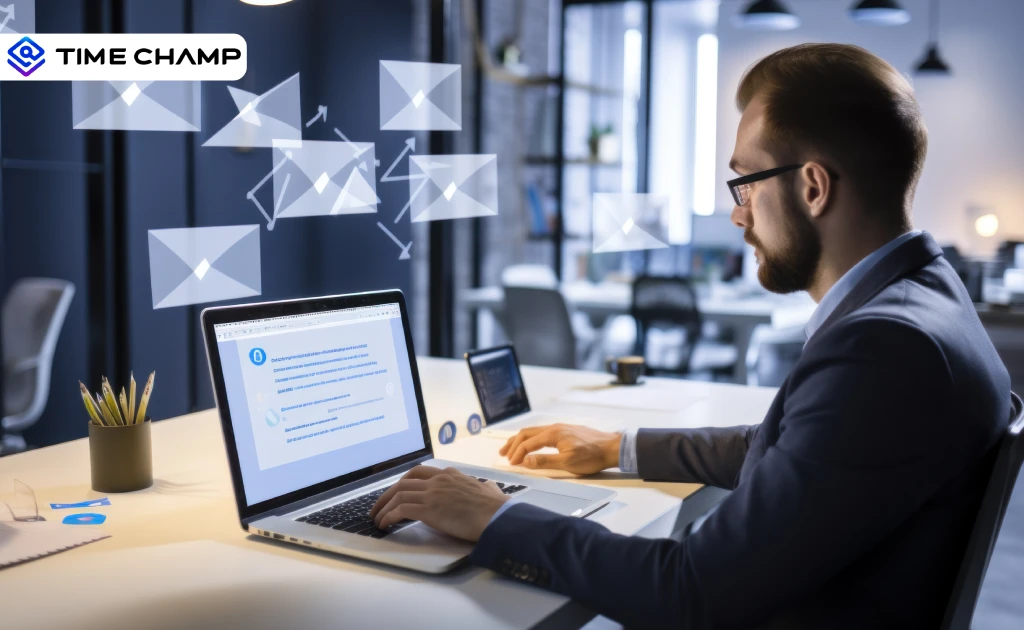
Most data breaches don’t start with a hacker, they start with an email. The detail here sits inside a wider conversation covered in our enterprise employee monitoring guide.
An employee forwards a client list to a personal account before leaving. Someone opens an attachment that looks like it came from IT. A vendor accidentally CCs the wrong person on a thread full of sensitive pricing data. These aren’t rare edge cases; they’re everyday situations that keep security and HR teams up at night.
That’s where employee email monitoring comes in. Not as a surveillance tool. Not to catch someone checking personal mail at 2 p.m. But to protect the business from quiet, preventable damage that often goes unnoticed until it’s too late.
What is Employee Email Monitoring?
Employee email monitoring is the practice of tracking, reviewing, and analyzing emails sent and received on company-owned accounts or devices. It allows employers to monitor employee email activity, including message content, attachments, metadata, and external forwarding, to prevent data leaks, detect security threats, maintain regulatory compliance, and enforce workplace conduct standards.
What employee email monitoring is not: Monitoring personal email accounts on personal devices is usually off-limits. Unless someone is using a company device to access their inbox, personal email is generally outside workplace monitoring policies, and in most countries, the law supports that.
Email Monitoring vs. Email Archiving
This difference trips a lot of people up. Email monitoring and email archiving are related, but they serve different purposes.
Monitoring is active. It's about real-time scanning, alerts, and flagging unusual activity as it happens. Archiving is passive. It stores a copy of all email communications for a set period, mainly for legal holds, compliance audits, or eDiscovery purposes.
You can have one without the other. But for most compliance-heavy industries, you need both.
Why Do Companies Monitor Employee Emails?
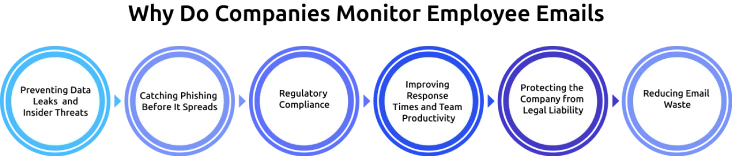
Monitoring employee emails is one of those things that sounds intrusive until you see what it actually catches. Here are the main reasons companies do it.
1. Preventing Data Leaks and Insider Threats
Not every data breach comes from outside. Sometimes the threat is an employee, not always maliciously. A finance team member emails a spreadsheet of payroll data to their personal account to work on it over the weekend. A sales rep forwards the full client database to a competitor before they leave. These things happen more often than companies like to admit.
Employee email monitoring gives you visibility into unusual outbound activity such as large attachments going to personal accounts, bulk forwarding, or emails going to addresses that aren't in your usual contact list.
2. Catching Phishing Before It Spreads
Phishing attacks almost always start with an email. Someone clicks a link, enters credentials, and suddenly, IT has a very bad week. A practical way to reduce risk is by keeping an eye on incoming emails for common red flags, like spoofed senders, odd attachments, or links that don’t look trustworthy.
Want accurate reports on your team’s activity without manual effort?
3. Regulatory Compliance
For healthcare, it’s HIPAA, for financial services, it’s FINRA, and for companies in Europe, it’s GDPR, each with its own rules for handling and protecting data. In India, the Digital Personal Data Protection (DPDP) Act 2023 adds another layer, specifically around how personal data shared over business communication channels is handled.
Email is the primary channel through which regulated data moves around an organization. Monitoring email is, in many cases, a compliance requirement, not just a security preference.
4. Improving Response Times and Team Productivity
This one’s less about security and more about operations. In customer-facing teams, like support, sales, and account management, email response time is a key performance metric. Monitoring email activity helps you find inefficiencies: who’s sitting on unanswered threads, which accounts aren’t being followed up on, and where handoffs are breaking down.
5. Protecting the Company from Legal Liability
If an employee sends harassing, discriminatory, or legally risky content through a company email account, the company can be held responsible. Monitoring email helps create a record and can even serve as an early warning before issues escalate.
6. Reducing Email Waste
Less talked about, but real: a lot of internal email is low-value. Tracking patterns like email volume, frequency, and who people are communicating with (without reading messages), you can find inefficiencies and remove the noise.
Types of Employee Email Monitoring
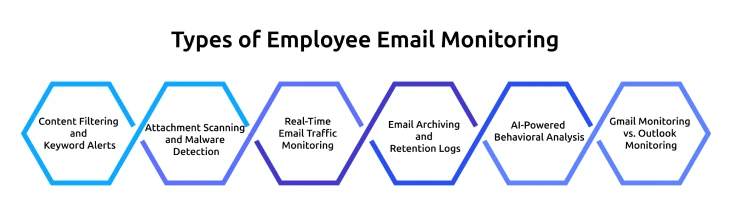
Employee email monitoring can vary widely depending on how it’s implemented and what it’s designed to track. The approach you choose depends on what you're trying to protect and how much your industry requires you to document.
1. Content Filtering and Keyword Alerts
This is the most common type. You define a list of keywords or phrases, such as client names, confidential project codes, "do not forward," competitor names, and the system flags any email that contains them. Some tools let you set rules that automatically flag emails for review before they're delivered.
2. Attachment Scanning and Malware Detection
Attachments are one of the most common ways malware enters a network. Scanning every inbound attachment before it reaches an employee's inbox is a standard security measure in most mid-to-large organizations. Beyond malware, attachment monitoring also tracks what employees are sending out, file types, sizes, and destination addresses.
3. Real-Time Email Traffic Monitoring
This is less about reading emails and more about watching patterns. Real-time monitoring flags anomalies like an employee sending 300 emails in an hour, a mass external forwarding event, or a sudden spike in emails to a personal Gmail address. These patterns are often more telling than the content itself.
4. Email Archiving and Retention Logs
As mentioned earlier, archiving isn't the same as monitoring, but the two often work together. Retention logs give you a searchable record of all emails sent and received over a defined period. If a legal dispute arises or a regulator asks for records, you have them.
5. AI-Powered Behavioral Analysis
This is where things are heading. Rather than just scanning for keywords, newer tools use machine learning to analyze communication patterns over time. Who talks to whom? How does tone change before someone resigns? Are there clusters of communication that suggest coordination around a sensitive activity? AI-driven analysis can surface risks that keyword filters simply can't catch.
6. Gmail Monitoring vs. Outlook Monitoring
Most businesses run on one of two platforms: Google Workspace (Gmail) or Microsoft 365 (Outlook). Both have built-in admin-level controls that allow email auditing, though the depth varies.
Google Workspace offers audit logs, Gmail Vault for archiving, and DLP rules natively in the admin console. Microsoft 365 provides Microsoft Purview (formerly Compliance Center), which handles content filtering, retention policies, and supervised communication monitoring.
If you're using a third-party tool on top of either platform, check for API compatibility before you buy. Some tools work well with one and not the other.
Is It Legal to Monitor Employee Emails?
Yes, but with conditions. This is the question most employees ask, and it's the one employers most often get wrong because they either over-restrict out of legal nervousness or monitor without putting the right structure in place.
The short answer: monitoring employee emails on company accounts and devices is generally legal in most countries, as long as employees are informed, and a legitimate business purpose exists.
Key Laws That Apply
United States (ECPA)
The Electronic Communications Privacy Act sets the baseline. You can legally monitor communications on company-owned systems, but interruption of personal emails, even on a company device, can get complicated. A written consent clause in the employment agreement is the safest protection.
European Union (GDPR)
EU law permits monitoring when it is necessary, proportionate, and documented in a legitimate interest assessment. You must inform employees before monitoring starts. Stealth monitoring that goes beyond what's necessary for the stated purpose is a violation.
India (DPDP Act 2023)
The Digital Personal Data Protection Act creates obligations around how personal data is processed, stored, and retained. For companies monitoring employee email in India, this means clear policies, defined retention periods, and data processing that doesn't exceed its stated purpose.
UK
Post-Brexit, the UK GDPR applies alongside the Regulation of Investigatory Powers Act. The principles are similar, transparency, proportionality, and legitimate purpose.
What Makes Monitoring Legal?
Three conditions, consistently:
- Written Notice: Tell employees that monitoring takes place, what you monitor, and why
- A Legitimate Business Purpose: Security, compliance, performance, or legal liability, not curiosity
- Proportionality: The monitoring doesn't go beyond what's needed for its stated purpose
The cleaner approach: Explicitly state in your policy that personal email accounts should not be accessed on company devices. That puts the responsibility on the employee instead of requiring you to deal with the legal gray areas around monitoring personal accounts.
How to Monitor Employee Emails: Step-by-Step

If you’ve decided employee email monitoring is needed for your organization, here’s how to set it up in a way that holds up legally and doesn’t create more problems than it solves.
Step 1: Define What You're Trying to Achieve
Before you touch a single setting, be clear on the purpose. Are you trying to prevent data leaks, maintain compliance with HIPAA or FINRA, or improve customer response times? Each goal requires a different monitoring setup.
Defining that purpose isn’t just about internal clarity, it’s the foundation of your legal justification. “We monitor employee email to prevent unauthorized disclosure of client data in line with our HIPAA obligations” is defensible. “We monitor emails to keep an eye on things” isn’t.
Step 2: Write a Clear Email Monitoring Policy
This should be a short document, not written in a 40-page employee handbook. It needs to cover:
- What you monitor (accounts, devices, content types)
- Why do you monitor it (specific business purposes)
- Who has access to monitoring data, and under what conditions?
- How long do you retain the data
- What happens when something is flagged
Simple language matters here. If employees need a lawyer to understand the policy, it's not doing its job.
Step 3: Get Written Consent from Employees
Have employees sign an acknowledgement that they've read and understood the monitoring policy. This is both an ethical and legal step. In most countries, this signed acknowledgement, combined with a clear policy, is what makes monitoring lawful.
For new hires, this should be part of the onboarding process. For existing employees, a policy update notification with a required acknowledgement is the standard approach.
Step 4: Choose the Right Tool for Your Email Platform
Start by exploring the built-in features available in your email platform. Many systems already offer basic tools for data protection, archiving, and monitoring, which may be enough depending on your needs.
Third-party tools become useful when you need more advanced capabilities, like cross-platform visibility, deeper behavioral insights, or integration with a wider security or HR ecosystem.
Key questions to ask:
- Does it work with your email system?
- Can it scan attachments and track external forwards?
- Does it offer role-based access controls, so access is limited appropriately?
- Can it generate compliance-ready audit reports?
Step 5: Configure Alerts, Filters, and Retention Rules
A system that flags too many things creates noise and makes it harder to find real issues. Start with high-confidence rules, like mass external forwards, specific confidential keywords, unusual attachment volumes, or emails sent to competitor domains. Set retention periods that align with your legal obligations, not indefinite storage.
Step 6: Define Who Reviews Flagged Emails
This is something that often gets overlooked, even though it plays an important role. Flagged emails should go to someone who has the right authority and knows how to review them properly. This is usually a mix of IT (for security issues) and HR (for behavior-related issues). No single person should have full, unchecked access to everything. Clearly define who has access, keep a record of every review, and set up a clear process for handling serious issues.
Step 7: Review and Update the Strategy Regularly
Email monitoring isn’t something you can set once and forget, because communication patterns change over time, tools keep evolving, and regulations are regularly updated, all of which require you to review and adjust your approach continuously. Build in a formal review at least once a year, check whether the monitoring scope still matches the purpose, whether alert thresholds need adjusting, and whether your legal basis is still current.
Best Practices for Monitoring Employee Emails
Configuration takes just few hours, but long-term success depends on how well it’s managed legally and operationally.
Before setting up any monitoring tool, take the time to clearly document its purpose. Your policy should already be in place before monitoring begins, not created afterward to justify what’s already running. If you can’t clearly explain why monitoring is needed and what risk it addresses, it’s a sign that the scope needs more thought before going live.
- Access to flagged content should always be limited to only those who truly need it. Using role-based access controls and maintaining access logs is considered standard practice, and it also makes your monitoring program easier to defend if it’s ever questioned.
- It’s equally important to define how long monitoring data will be stored. A clear data retention policy, along with automatic deletion, helps reduce risk. Holding onto flagged emails or logs for too long doesn’t increase safety; in many cases, it actually creates legal exposure, especially under regulations like GDPR or India’s DPDP Act.
- Monitoring should also be reviewed regularly. What worked a year or two ago may no longer be appropriate or compliant today. A simple annual review helps you to keep your setup relevant without needing constant adjustments.
- Finally, keep your employees informed whenever there are changes to the monitoring policy. If you expand or modify what’s being tracked, communicate it clearly in advance. Finding out through informal channels can damage trust and may even create compliance issues.
Email is just one channel, and it represents only a part of how communication happens within a team. For teams managing broader security and compliance risk, Time Champ adds the non-email monitoring layer - app usage, file access, DLP policy violations, and productivity patterns, so unusual behavior in email doesn't exist in isolation from the rest of the digital picture.
See what your email tool doesn't catch.
Conclusion
Employee email monitoring works best when the purpose is clear, the policy is defined before anything goes live, and employees know it’s in place from the start. Getting these basics right makes everything else much easier, from choosing the right tool to staying compliant over time. When monitoring is set up transparently and used with the right intent, it helps protect communication channels while still maintaining trust across the team.

Jahnavi Pulluri


Table of Content
-
 What is Employee Email Monitoring?
-
Why Do Companies Monitor Employee Emails?
-
Types of Employee Email Monitoring
-
Is It Legal to Monitor Employee Emails?
-
How to Monitor Employee Emails: Step-by-Step
-
Best Practices for Monitoring Employee Emails
-
Conclusion
Related Blogs
Discover how to detect employee monitoring software, protect your privacy, and ensure a secure work environment with these effective methods and best practices.
Tarun Kumar Reddy | Jul 15, 2024
Discover the ultimate guide to remote employee monitoring software, including its features, benefits, and how to choose the best one for your business.
Mounika Sai | Aug 29, 2023
Learn about employee monitoring laws, what they mean for businesses, and how they protect employee privacy and rights.
Shabana Shaik | Jul 10, 2024
Explore our complete guide on employee monitoring: understand its types, benefits, legalities, and best practices for workplace efficiency.
Mounika Sai | Jan 12, 2024
Understand whether employee monitoring a Boon or Bane for Modern Workplaces. Discover how it impacts productivity, privacy, and the overall work environment.
Jahnavi Pulluri | Aug 06, 2024
Explore key factors and considerations to find the perfect employee monitoring tool for your needs in our extensive guide. Make the right choice
Mounika Sai | Jun 07, 2023


 4.7/5 avg.
Ready to Manage Your Workforce Smarter?
Join our family of 1500+ companies using smart insights to redefine workforces!

Free Trial
No Credit Card Required