How to Address Employee Concerns About Productivity Tracking
Address employee concerns about productivity tracking with clear communication, rollout steps, and practical scripts that build trust and transparency.

The announcement about productivity tracking goes out on Tuesday. By Wednesday, the inbox fills up. One team member assumes they are being watched. Another questions why this change is happening. A high performer starts rethinking their future with the team. This is how most rollouts look when communication moves in one direction. The real problem does not come from the tool. It comes from what you leave unsaid. When you skip clarity around employee privacy, fairness, and intent in the productivity tracking rollout, the team starts forming assumptions on their own. Those assumptions quickly turn into resistance.
Teams that handle this well do not treat the rollout as a one-time update. They start early, answer difficult questions directly, and continue the conversation after launch. That approach turns employee resistance to productivity tracking into a situation you can work with instead of a situation you have to manage. Addressing employee concerns about productivity tracking starts with how you frame the rollout from day one. This guide walks you through a clear sequence, practical scripts, and ready-to-use templates so every question leads to clarity instead of confusion.
Why Your Employees Are Worried (And What They Are Really Asking)
Most pushback against productivity tracking does not come from the software. It comes from the silence around it. When a rollout lands without context, the team starts filling in the gaps on their own, usually with doubt. What looks like resistance is often a set of unanswered questions about privacy, fairness, and intent. When these questions stay unaddressed, employee resistance to productivity tracking builds quickly and slows adoption.
There are a few common concerns that show up in almost every rollout. Each one points to a specific question that needs a clear answer.
- "Are you watching my personal life?" They want to know what is and is not tracked, and whether the tool sees their personal apps, private messages, or off-hours activity.
- "Will this be applied fairly?" They want to know if the rules are the same for everyone, including senior staff and high performers.
- "Will I still get to do my job my way?" They want to know if you will respect different working styles, or if you will start treating idle time as wasted time.
- "Will this be used to fire people?" They want to know exactly what behavior would put their job at risk, and whether they will be warned before consequences.
- "Why now, and what changed?" They want to know what triggered this decision, because a rollout that comes from nowhere feels like an accusation.
72% of employees accept productivity monitoring when it stays transparent, and they can access their own data. The gap usually comes from poor communication, not the tool itself. Focus on the question behind each concern, answer it clearly, and the conversation starts moving in the right direction.
The Five-Phase Communication Sequence for Productivity Tracking Rollouts
Most productivity tracking rollout best practices fail because communication starts too late. By the time the announcement goes out, assumptions already exist. A clear sequence fixes that by guiding the rollout step by step, from early alignment to post-launch follow-up.
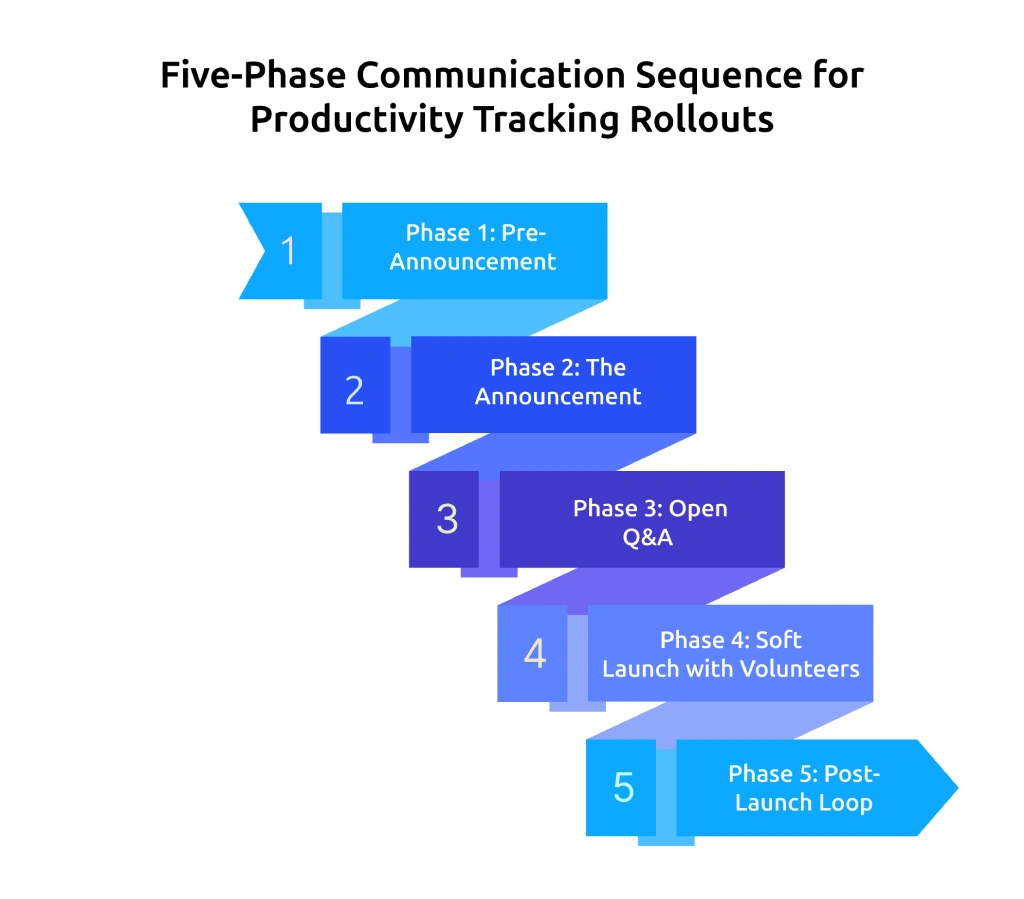
Phase 1: Pre-Announcement (Weeks 6 to 4 Before Launch)
Before anyone hears about productivity tracking, bring all key stakeholders onto the same page and define a clear, consistent message.
Do this:
- Choose an executive sponsor (CEO, COO, or CHRO) to send the first announcement. This sets the tone and shows that the rollout comes from the top, not as an IT side initiative.
- Write the business case in one paragraph. If the reason does not stay clear in three sentences, it will not stay clear during the rollout.
- Identify three to five team champions across departments. These are the people who will explain the tool to their teams later, so brief them early.
- Define what you will not track. Many teams overlook this step. Be clear about what stays private, such as personal apps, off-hours activity, and message content. This gives a direct answer when questions about employee privacy and productivity tracking come up.
If teams skip this phase, different teams explain the rollout in different ways, which leads to confusion and mixed expectations. Getting this step right keeps the message clear from the start.
Phase 2: The Announcement (Week Three Before Launch)
The first all-hands message shapes how the team reacts. Explain the purpose and impact on work instead of listing tool features. Skip technical details like screenshots or keystroke tracking. Focus on what changes, what stays the same, and why this shift is happening now.
Every announcement should answer three questions in this order:
- Why are we doing this? Connect it to a problem the team already understands, such as project delays, uneven workload, missed deadlines, or billing accuracy.
- What changes for you? Be specific. Clearly state what data the tool tracks and the time period it runs.
- What does not change? Be even more specific here. Call out what remains private, including personal apps, private messages, off-hours activity, and personal devices, if your policy supports it.
Keep the announcement under four minutes if spoken or within 250 words if written. Longer messages lose attention and weaken clarity.
Phase 3: Open Q&A (Weeks Two to Three Before Launch)
This phase builds employee communication and monitoring trust more than any other step, yet many teams rush through it or skip it.
Open two channels before the tool goes live:
- Set up an anonymous question form using a tool like Slido or Google Forms. Answer every question that comes in, including the difficult ones.
- Host a live town hall and take questions for about 45 minutes. Spend most of the time answering, and use the remaining time to listen without interrupting or explaining too quickly.
Follow two simple rules during the session:
- If you do not know the answer to something, say, "We do not know yet, and here is when we will." Pretending to have every answer ready is what erodes trust fastest.
- If someone asks a direct or uncomfortable question, acknowledge it and thank them for bringing it up. Do not dismiss or avoid it.
Phase 4: Soft Launch with Volunteers (Week One Before Launch to Week One After)
Start with a volunteer pilot instead of rolling it out to everyone at once. Choose one team that is open to trying the tool, give them full access for two weeks, and ask them to share their experience with the rest of the team.
Why this works:
- Employees trust their peers more than their leadership. A coworker saying "this is fine" lands harder than an executive saying it.
- The volunteer team will surface real problems your IT team would never have caught.
Train team leads during this phase as well. Cover what the dashboard shows, how to explain the data, and how to respond when questions come up. A short session is enough to avoid confusion later.
Phase 5: Post-Launch Loop (Weeks Two to Eight After Launch)
Many teams stop communicating once the tool goes live. That is when a second wave of resistance begins.
Build a simple loop:
- Send a monthly “what we learned” report to the entire team. Include wins, such as a project the data helped improve, unexpected insights like long working hours, and the changes you are making based on those findings.
- Run a 90-day review to evaluate the rollout openly. Keep what worked, adjust what did not, and remove anything that adds no value.
- Give every employee access to their own dashboard first. When individuals can view their own data before anyone else, concerns around employee privacy and productivity tracking reduce significantly.
All five phases work together. If you skip one step, confusion and resistance show up later. Follow the full sequence, and the rollout becomes easier to accept and manage.
Once this structure is in place, the next step is handling direct conversations with team members who still have concerns.
Lack of transparency turns productivity tracking into a challenge.
Use Time Champ to create clear visibility and build confidence across your team.
Real Scripts for the Hardest Productivity Tracking Conversations
The rollout plan handles group communication. This section focuses on direct conversation. When someone raises a concern about productivity tracking, keep the response clear, specific, and consistent by addressing the exact concern instead of giving general or unclear answers.
Below are five scripts built around the toughest objections you will hear during a productivity tracking rollout. Each script follows the same structure: acknowledge the concern, explain the specifics, and give a clear next step. Adapt the wording to fit your team’s voice, but keep the structure intact.
1. "Are You Spying on Me?"
This is the most common objection in any employee monitoring rollout, and it is also the easiest to handle when you stay specific.
"That is a fair thing to ask. Here is exactly what the tool tracks and what it does not. During work hours, it records the apps and websites you use, your active time, and your idle time. It does not read the content of your messages. It does not access your personal device. It does not run outside of working hours. You will also get to see your own dashboard before anyone else on the team can view it. If something in there ever looks wrong, bring it to us and we will look into it together."
2. “Will This Be Used to Fire People?”
A vague “no” does not land here. What works better is clearly explaining what kind of behavior could lead to a discussion and what will not lead to any action.
“We are not introducing this productivity tracking tool to fire people. But I want to be clear about what matters. If someone consistently logs time they did not work or violates our IT security policy, that leads to a conversation, with or without this tool. The data adds context to that discussion. Before anything moves forward, you will hear directly and get a full chance to respond.”
3. “I Have Nothing to Hide, but This Still Feels Wrong”
Take this one seriously. The team member is not questioning the rules. They are expressing discomfort with being monitored, even when they understand the intent. That feeling is valid and deserves a clear response.
“That feeling makes sense, and it is worth saying out loud. Even when the tool works within the limits we have explained, knowing your work is being measured can feel uncomfortable at first. We are doing two things to address that. First, you will see your own data before anyone else on the team can access it. Second, in 90 days, we will run a review with the whole team, collect honest feedback, and make changes based on what we hear. Your input in that review will directly shape what we keep and what we adjust.”
4. "Why Are You Doing This Now?"
A rollout that appears without context feels like an accusation. Without a clear reason, the team starts questioning what triggered this change and why it is happening now.
"Here is what drove this decision. (Add one specific business reason here. For example: 'We missed three project deadlines last quarter and did not catch the capacity issue early enough,' or 'Our billing accuracy has been off because we do not have reliable time data,' or 'We are scaling fast and need better visibility into where workload is piling up.') This tool is part of how we are fixing that. This is not about catching anyone doing something wrong. It is about solving a problem the whole team has been feeling."
5. "What About My Privacy on Personal Apps?"
This is a technical concern that needs a technical answer. Simple reassurance is not enough here.
"Personal apps do not fall under the work app categories in the system. Any time spent on them shows up as personal or neutral activity, not as productive or unproductive. The tool does not capture the content of anything you do in those apps. Our written policy covers this in full, and you can read it on the wiki anytime. If you ever feel the tool is picking up something it should not, come to HR and we will check it together."
When Resistance Persists: Telling Healthy Pushback from Cultural Misfit
Even after clear communication and a structured rollout, some resistance may continue. At this stage, the focus shifts from fixing communication to understanding what the resistance actually means.
Not all pushbacks are a problem. Some of them help improve productivity tracking work. Some of those concerns point to deeper issues that go beyond the tool.
Healthy Pushback Looks Like This:
- Team members ask specific questions about specific features, not broad accusations about the company.
- Concerns come up once and fade after you give a clear answer.
- Skeptical team members are still willing to join the volunteer pilot or the 90-day review.
- Once someone sees their own dashboard data, their resistance drops.
This kind of pushback is a normal part of any productivity tracking rollout. Clearer communication about monitoring resolves this kind of pushback.
Cultural Misfit Looks Different:
- Broad accusations about distrust that have nothing to do with the tool itself.
- Refusal to look at the data or engage with any answer you give.
- Threats of mass quitting before the tool is even live.
- Strong resistance appears before the rollout even begins.
This pattern signals a deeper issue. The concern is no longer about the monitoring rollout or how it was communicated. It points to gaps in trust, communication, or alignment that existed before the rollout.
Treat these two cases differently. Healthy pushback needs better answers and small adjustments. Cultural misfit needs a pause and a closer look at the bigger issue.
How Does Time Champ Help Address Employee Concerns About Productivity Tracking?
The way the team reacts to productivity tracking depends on both the tool and the communication around it. Some tools create a gap by giving full visibility at the top while limiting access for the rest of the team. That gap often leads to employee resistance to productivity tracking. Time Champ is an employee monitoring software with built-in workforce intelligence that gives every employee access to their own time logged, apps used, and active hours, before you see it. When everyone can see what the tool records, employees stop asking 'what does this track?' and start asking 'how do I use this data?
It runs in visible mode, so the team always knows when tracking is active. It includes screenshot blur for sensitive content and role-based access, so data stays limited to the right people. These features make it easier to address employee concerns about productivity tracking by showing clear boundaries and giving control back to the team. If you are rolling out transparent employee productivity monitoring and want a tool built to support that process rather than complicate it, Time Champ gives you the structure to do it right.
Conclusion
To address employee concerns about productivity tracking, focus on clear communication from the start and continue it after rollout. Most resistance comes from unanswered questions, not the tool itself. When you explain what the tool does, what it does not do, and why it matters, adoption happens faster, and trust is established. Follow a structured rollout, respond to concerns directly, and stay consistent in how you share information. When employees see their own data before their manager does, objections drop and the rollout sticks.
Unclear tracking creates gaps between intent and understanding.
Try Time Champ to close that gap with simple, transparent visibility.

Thasleem Shaik


Table of Content
-
 Why Your Employees Are Worried (And What They Are Really Asking)
-
The Five-Phase Communication Sequence for Productivity Tracking Rollouts
-
Real Scripts for the Hardest Productivity Tracking Conversations
-
When Resistance Persists: Telling Healthy Pushback from Cultural Misfit
-
How Does Time Champ Help Address Employee Concerns About Productivity Tracking?
-
Conclusion
Related Blogs

Explore the top benefits of productivity tracking software for better visibility, balanced workloads, smarter planning, and improved business decisions.
Guna Lakshmi | Apr 30, 2026
Align employee performance with productivity tracking using a practical framework, clear metrics, and a 90-day plan to turn your data into measurable growth.
Jahnavi Pulluri | Apr 30, 2026
Implement a productivity tracking tool with clear steps, setup tips, and best practices to track employee productivity and improve team performance.
Thasleem Shaik | Apr 30, 2026
Learn employee conversation recording laws, consent rules, and compliance tips to monitor workplace communication without violating employee privacy or trust.
Anjali | Apr 29, 2026
Explore ethical employee monitoring techniques to track work transparently, protect privacy, and improve productivity while building trust across your team.
Anjali | Apr 27, 2026
Explore how an employee monitoring privacy policy protects employee rights, maintains compliance, and supports transparent workplace monitoring.
Thasleem Shaik | Apr 25, 2026


 4.7/5 avg.
Ready to Manage Your Workforce Smarter?
Join our family of 1500+ companies using smart insights to redefine workforces!

Free Trial
No Credit Card Required