How to Align Employee Performance with Productivity Tracking
Align employee performance with productivity tracking using a practical framework, clear metrics, and a 90-day plan to turn your data into measurable growth.
Most teams don’t have a performance issue, they have a connection issue.
You set goals, run reviews, and track productivity, but these systems often work separately. Performance is reviewed quarterly & annually, while productivity is tracked daily. When they don’t connect, daily work never shows up clearly in performance conversations.
That gap slows progress, leading you to rely on memory, your team feeling uncertain during reviews, and valuable data going unused.
This blog shows you how to fix that. You will learn how to connect performance with productivity tracking and turn everyday work into clear evidence of growth, with a practical 90-day plan you can start right away.
What Does It Mean to Align Employee Performance with Productivity Tracking?
Alignment means everything works as one loop. Goals decide what you track, tracking shows the work being done, that data feeds feedback, and feedback updates the goals. This keeps running all the time, not just once a year.
In simple terms, three things matter. The metrics you track should match each role’s goals. You and your team should look at the same data and agree on what “productive” means. Reviews, one-on-ones, and OKR check-ins should all use that same data.
Without alignment, you rely on memory during reviews. With alignment, you base your discussions on clear patterns that both you and your team have already seen.
You may see quick benefits from automating employee processes, but automation alone is not enough. The real impact comes when you connect everything and use the data to actually improve performance.
Why Do Most Teams Keep Performance Management and Productivity Tracking Apart?
This usually comes down to four recurring reasons that keep both systems siloed.
1. Having Different Owners
You may have performance management handled by HR, focusing on goals, reviews, and compensation cycles. At the same time, productivity tracking often sits with operations or team leads who focus on daily output and efficiency. While both aim to improve performance, they operate with different priorities and languages. Without shared ownership or a clear link, the systems tend to grow separately and never fully connect.
2. Different Cadences
You likely run performance management on a slower cycle, such as quarterly check-ins or annual reviews, while productivity tracking happens daily or weekly. This difference makes it harder to connect short-term activity with long-term performance. If you do not build a process to link them, they remain separate conversations.
3. Tools That Don’t Talk
You may find that your performance management tools do not clearly show productivity data. This often leads you to switch between dashboards, interpret trends manually, or ignore the data altogether. When your tools are not connected, insights stay scattered, and it becomes difficult to build a clear performance story.
4. A Culture That Treats Tracking as Compliance
If you introduce productivity tracking as a way to check whether employees are working, it rarely helps with improvement. Your team may disengage from the data, and you may only look at it when something goes wrong. This makes the system reactive instead of useful for regular coaching and growth.
The solution is not adding more tools. You need to treat productivity tracking and performance management as one system with a single purpose, helping your team improve and perform at their best.
How to Build a Productivity Tracking System That Drives Performance?
A solid system needs five steps. If you skip any of them, the loop breaks.
Step 1: Start with Performance Goals, Not Tracking Metrics
Start with clear outcomes, you need to define what success looks like for each role this quarter. Make sure the goals are specific, measurable, and tied to real business impact. Once those are clear, you can choose tracking metrics that reflect progress toward those goals. For example, if your goal is to increase the qualified pipeline, your tracking can include CRM usage, outreach activity, and follow-up consistency. This helps you focus on meaningful progress, not just activity.
Step 2: Define What Productive Looks Like for Each Role
You need to recognize that productivity looks different across roles. What matters for an engineer is not the same as what matters for a salesperson or a designer. If you use one definition for everyone, the data can become unclear. Take time to define role-specific productive activities, so your tracking reflects real work.
Step 3: Choose Productivity Tracking Data That Mirrors Outcomes
Focus on data that connects to performance. While simple metrics like active time can be useful, they are not enough on their own. You should aim for a mix of metrics. Include an input metric (like focus time), a process metric (such as task progress), and an outcome metric (like completed deliverables). This helps you connect daily work to real results.
Step 4: Set a Review Cadence Your Team Can Sustain
Your data only becomes useful when you review it regularly. Set a rhythm your team can follow. You can do a quick weekly check to find patterns, monthly one-on-ones to discuss progress, and quarterly reviews to connect work with goals. When you stay consistent, feedback becomes more timely, and conversations stay focused.
Step 5: Build Transparency in From Day One
Make sure your team has access to the same data you see. When employees can view their own data, they can understand their work patterns and take part in improving them. Choose tools that support this with flexible settings and clear reports. When you keep data open, conversations shift toward improvement and engagement starts to grow.
How to Use Productivity Tracking Data in Performance Reviews?
Most reviews fall apart when you look at the data the night before. A better approach is to use the data early and with context.
Pull Tracking Data Two Weeks Before the Review
Start early so you have time to notice patterns and gather examples. This helps you walk into the review prepared and makes the conversation more balanced and thoughtful.
Lead With Patterns, Not Single Days
Avoid focusing on a single day, since day-to-day changes can happen for many reasons. Instead, look at trends over weeks or months so you can understand real progress and guide a more meaningful discussion.
Use Data to Highlight Strengths, Not Just Gaps
Use the data to show what is working well, not just what needs improvement. When you recognize strengths first, the conversation feels more balanced and makes it easier to talk about areas that need attention.
Pair Every Metric with Context
Always connect numbers to real work situations. Instead of stating metrics on their own, add context and ask questions. This helps you create an open, constructive conversation based on understanding, not judgment.
Want to See How Your Team’s Productivity Actually Connects with Your organization Goals?
Common Mistakes to Avoid When Aligning Productivity Tracking with Performance
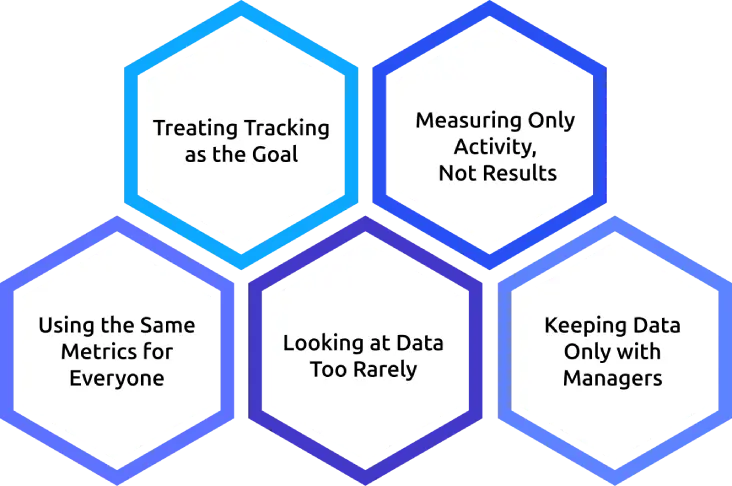
When you try to align productivity tracking with performance, a few common mistakes can hold you back. Being aware of them early makes the system much more effective.
1. Treating Tracking as the Goal
You may start focusing too much on scores and numbers, but the goal is not to get a “good score,” it is to improve how your team works. If people begin chasing metrics instead of outcomes, the system loses its purpose. Use the data to guide coaching and better decisions, not just to monitor activity.
2. Measuring Only Activity, Not Results
It is easy to track hours, clicks, or active time, but activity alone does not show performance. Someone can be busy without making real progress. You need to connect effort with outcomes, so you can see what work is actually driving results.
3. Using the Same Metrics for Everyone
You might be tempted to apply one standard across all roles. It feels simple, but it rarely works well. Different roles require different types of work, and productivity looks different for each one. Take time to define what “productive” means for each role so the data reflects reality.
4. Looking at Data Too Rarely
If you only review data during annual or quarterly reviews, you miss the chance to guide improvement in real time. The context is often lost by the time it’s discussed. Regular check-ins, even short ones, help you spot patterns early and support your team consistently.
5. Keeping Data Only with Managers
If you are the only one who sees the data, it can feel like monitoring from the team’s perspective. When employees have access to their own data, they can understand their patterns and take ownership of improvement. Transparency makes the system more useful and builds trust.
Avoiding these mistakes helps you turn productivity tracking into a tool that supports real performance growth, rather than just another system running in the background.
How to Align Productivity Tracking with Performance in 90 Days
If you avoid the above mistakes, the next step is putting alignment into action with a clear plan. You can connect productivity tracking with performance in a structured way over three months. The goal is to start simple, learn quickly, and then scale with clarity.
Days 1–30 (Setup phase)
- For the first month, focus on building the foundation.
- Decide which performance goals you want to align with tracking.
- Define what “productive” work looks like for each role, so the data reflects real impact.
- Choose a tool that supports both your and employee visibility and clearly explain to your team what will be tracked and why.
This step is important for setting expectations and building trust from the start.
Days 31–60 (Test phase)
- In the second month, you test the system with one team instead of rolling it out everywhere.
- Start small so you can learn what works and what needs adjustment.
- Review the data weekly, hold short check-ins with employees, and gather feedback on metrics and dashboards.
This is where you refine definitions and fix gaps before expanding further.
Days 61–90 (Expand phase)
- In the final month, you roll the system out to more teams with the improvements you have made.
- Establish a regular review rhythm, such as weekly scans and monthly conversations.
- Begin using the data in real performance discussions, including reviews and goal check-ins.
At this point, productivity tracking is no longer a separate layer, it becomes part of how performance is managed.
Within 90 days, the shift moves you from disconnected tools to a system where daily work and performance reviews are clearly connected.
How a Productivity Tracker Can Simplify Performance Alignment
Most of this work comes down to process, but the right tool can reduce a lot of manual effort and confusion. A tool like Time Champ helps bring everything into one place, so you don’t have to piece together data from multiple systems.
Time Champ is an employee monitoring software with a workforce intelligence layer. In simple terms, it captures day-to-day activity data and turns it into clear, usable insights. Instead of raw data sitting in dashboards, it organizes information in a way that supports real performance conversations. This makes it easier for you to move from tracking activity to understanding outcomes.
What makes it useful for alignment is how it connects daily work with performance discussions. You can see patterns over time, not just snapshots, and employees can also understand their own work habits. This shared visibility helps shift the focus from monitoring to improvement.
A few features that support alignment:
- A single dashboard that brings productivity data and goal progress together, so you don’t have to switch between tools
- Productivity scoring across roles, projects, and teams, making it easier to compare work in context
- Manager and employee views built on the same data, which keeps conversations transparent and consistent
- Reports designed for review preparation, helping you walk into discussions with clear examples
- Integrations with existing goal-setting and project tools, so tracking fits into current workflows instead of replacing them
With the right setup, a tool like this doesn’t just track work. It helps turn everyday activity into insights that support better coaching, clearer reviews, and steady performance improvement.
Are You Still Managing Performance and Productivity Tracking in Separate Spreadsheets?
It’s time to level up with Time Champ.
Conclusion
Productivity tracking gives you data, and performance management gives you structure. When you connect them, you create a system that helps your team improve consistently over time. Start with clear goals and define what productive work looks like for each role. Use a tracking system that gives both you and your employees shared visibility. Over time, performance becomes part of everyday work, where teams have clarity on their work, and decisions are based on real progress, not just activity.

Jahnavi Pulluri


Table of Content
-
 What Does It Mean to Align Employee Performance with Productivity Tracking?
-
Why Do Most Teams Keep Performance Management and Productivity Tracking Apart?
-
How to Build a Productivity Tracking System That Drives Performance?
-
How to Use Productivity Tracking Data in Performance Reviews?
-
Common Mistakes to Avoid When Aligning Productivity Tracking with Performance
-
How to Align Productivity Tracking with Performance in 90 Days
-
How a Productivity Tracker Can Simplify Performance Alignment
-
Conclusion
Related Blogs
Implement a productivity tracking tool with clear steps, setup tips, and best practices to track employee productivity and improve team performance.
Thasleem Shaik | Apr 30, 2026
Learn how to improve efficiency in the workplace with 15 practical strategies to reduce wasted time, improve focus, and help your team work smarter and faster.
Jahnavi Pulluri | Apr 30, 2026
Apply the OKR framework to boost employee productivity with clear goals, aligned teams, and measurable progress you can track weekly.
Guna Lakshmi | Apr 22, 2026
Workforce productivity analytics turns daily work data into clear decisions. Learn the key metrics, monitoring signals, and AI tools that improve team output.
Thasleem Shaik | Apr 21, 2026
Learn what a team effectiveness model is, why it matters, the key types of models, and the pros and cons of using these models to build high-performing teams.
Guna Lakshmi | Apr 02, 2026
Understand how employee monitoring affects workplace morale, trust, and productivity, with practical ways to implement monitoring without reducing engagement.
Anjali | Apr 28, 2026


 4.7/5 avg.
Ready to Manage Your Workforce Smarter?
Join our family of 1500+ companies using smart insights to redefine workforces!

Free Trial
No Credit Card Required