Can an Employer Monitor Your Personal Phone after Work Hours
Learn if your employer can monitor your personal phone after hours. Explore legal rules, real examples, and how to protect your privacy beyond work time.

If you use your personal phone for work, you have probably wondered whether an employer monitor personal phone outside work hours is actually possible. You may also question where your privacy begins after your workday ends and how much access your employer still has. This uncertainty grows stronger in remote or hybrid roles, where personal and work boundaries often overlap. According to the U.S. Government Accountability Office (GAO), research shows that employers are increasingly using workplace monitoring tools to understand how work gets done, especially as remote and hybrid teams grow.This blog explains whether an employer monitoring personal phone outside work hours is legal, what workplace monitoring laws say, and how employee privacy rights apply in real situations. You’ll also learn about real scenarios, BYOD policies, and practical steps you can take to protect your privacy beyond work hours. Anyone weighing this decision usually starts with our enterprise employee monitoring guide for the full landscape.
Three After-Hours Monitoring Scenarios That Most Employees Recognize
After-hours monitoring often feels unclear because it does not always happen in obvious ways, especially when you use your personal device for work-related tasks. You may assume tracking stops after work, but certain tools and policies can still keep your activity visible. These scenarios show how employer monitor your personal devices can continue even beyond standard working hours.
Scenario 1: Emma, the 10 p.m. Email Checker
Emma, a team lead, quickly reviews a few work emails on her personal phone late at night to stay prepared for the next day. This situation often raises the question of whether an employer monitors personal phone use outside work hours, even during late-night usage.
- Monitoring Focus: The email system may record her late-night login and activity, marking it as work engagement and storing it in usage or productivity logs.
- Employee Recognition: Emma begins to notice that even small after-hours actions are being tracked, which may affect how her work patterns and availability are interpreted.
Scenario 2: Raj, the weekend BYOD user
Raj occasionally uses his personal phone on weekends to access company tools under a BYOD policy, especially when urgent updates are needed. In such cases, employer monitor personal phone outside work hours can extend beyond standard work hours.
- Monitoring Focus: Company applications installed on his device may continue syncing data or tracking access, even when he is not actively working.
- Employee Recognition: Raj realizes that using his personal device for work can increase visibility into his activity beyond regular workdays.
Scenario 3: Marco, the on-call engineer
Marco is part of an on-call rotation and keeps his phone nearby to respond to alerts if needed. This often leads to concerns about whether an employer monitor personal phone outside work hours, even when they are not actively working.
- Monitoring Focus: Background services, alerts, and location-based tools may continue collecting data while he remains available for work.
- Employee Recognition: Marco understands that simply being on standby can still involve passive tracking, even when he is off duty.
When Does “Work” Actually End on a Personal Phone?
When you use your personal phone for work, it becomes difficult to clearly define where your workday actually ends. This confusion matters because workplace monitoring laws and employee privacy rights at work often depend on how your working time is categorized. Understanding these time boundaries helps you recognize when monitoring is expected and when it may extend into your personal space.In many cases, work is not just defined by fixed hours but also by system activity and availability expectations. This creates overlapping zones where your actions, even outside scheduled hours, may still be recorded or monitored. The table below explains how different time categories affect monitoring and your privacy rights.
| Time Category | What It Means | Monitoring & Privacy Impact |
|---|---|---|
| Contract Hours | Your officially agreed working hours are defined in your employment contract or company policy. | Monitoring is generally expected within these hours under workplace monitoring laws, and your employee privacy rights at work are clearly defined within this period. |
| Logged Hours | Time recorded by apps or systems when you access work tools, even briefly outside scheduled hours. | Your activity may still be tracked and stored, which can blur boundaries and raise concerns about employee privacy rights at work beyond official work time. |
| Standby / On-Call | Periods when you are not actively working but are expected to remain available if required. | Monitoring may continue in limited ways, creating a gray area where workplace monitoring laws and employee privacy rights at work may vary depending on policies. |
What Your BYOD Policy Really Allows Employers to Monitor
When you use your personal phone for work under a BYOD policy, you may assume your activity is limited to work-related access only. However, many agreements include clauses that allow broader visibility than expected, especially when connected apps continue to track activity on a personal phone after the workday ends. Understanding these clauses helps you see how employee monitoring can extend beyond just active work tasks. In most cases, the wording in BYOD policies is not always clear, which makes it difficult to understand what you are actually agreeing to. Breaking down these clauses in simple terms helps you understand when and how your personal device might still be monitored.
| Policy Clause | What It Says | What It Actually Means for You |
|---|---|---|
| The “All-Time” Monitoring Clause | The company can track device activity at any time. | Monitoring can continue even after work hours. |
| The “As Required by Business” Clause | Monitoring happens when needed for business purposes. | Your activity may be tracked whenever required. |
| The “Device-Wide Visibility” Clause | The company can access device-level data. | Some personal data may also become visible. |
Right to Disconnect Laws: Where Employees Are Protected in 2026
Governments are actively introducing laws to protect your time outside work and limit unnecessary monitoring beyond working hours. These “right to disconnect” rules help you set clear boundaries and reduce pressure to stay constantly available. Understanding where these protections exist helps you know when your after-hours time is legally respected.
EU Countries Leading the Way (France, Belgium, Portugal, Spain, Ireland, Italy)
Several European countries have introduced strong right-to-disconnect laws to protect employees from after-hours communication. France requires companies to define clear rules for off-hours communication and employee availability. Portugal and Belgium have stricter limits on employer contact outside working hours. These laws support employee privacy rights and protect your personal time. Employers must follow clear policies, making it easier for you to disconnect without pressure.
Australia Fair Work Amendment 2024
Australia updated its laws through the Fair Work Amendment to improve after-hours boundaries. You can refuse unreasonable work communication outside scheduled hours without facing penalties. The law focuses on maintaining work-life balance while allowing necessary flexibility. It strengthens workplace monitoring laws by defining limits on employer expectations.
California and New York State Proposals
California and New York have proposed right-to-disconnect laws, but they are still under review. These proposals aim to let you ignore after-hours communication without negative consequences. They reflect growing concerns about employee burnout and privacy. If approved, they could change how monitoring and availability are managed.
Why the US Federal Law Still Lags
The United States does not have a federal right-to-disconnect law yet. Current laws focus more on wages and overtime than on after-hours communication. Your protection depends on company policies or state-level rules. Pressure is increasing to update laws and better protect employee privacy.
How Employers May Still Monitor Your Phone after Work Hours
Even after your workday ends, your phone may run background processes without your interaction. These systems keep apps updated but can also share data silently. This is where employee monitoring tools may capture activity, raising concerns about whether an employer monitor personal phone outside work hours or tracks location beyond work time.
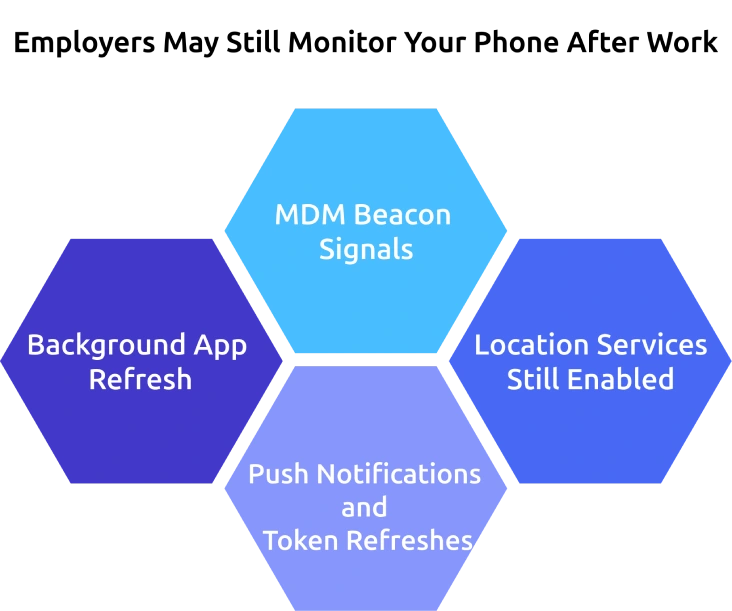
Background App Refresh
Many apps continue to refresh in the background to update content and maintain connections. If work-related apps are installed, they may still sync data even when you are not actively using them. This can keep certain activity visible without your awareness.
MDM Beacon Signals
Mobile Device Management (MDM) systems can send periodic signals to check device status and security compliance. These signals may run quietly in the background and confirm whether your device is active. This allows companies to maintain visibility without constant direct monitoring.
Location Services Still Enabled
If location services are turned on for work apps, your device may continue sharing location data. This raises concerns about whether an employer tracks my location even when I am off duty. In some cases, location tracking depends on app permissions and company policies.
Push Notifications and Token Refreshes
Push notifications and authentication tokens help apps stay connected and secure. These systems refresh automatically to ensure you receive updates and maintain access. While useful, they can also indicate background activity linked to your work apps.
Not sure how your phone still shares data after work?
Time Champ helps you track only work activity with clear limits.
Signs Your After-Hours Monitoring Has Crossed the Line
Not all monitoring is unreasonable, but some practices can go beyond what is fair or clearly communicated. Recognizing these signs helps you understand when boundaries are crossed. It also helps you question how monitoring employees is being handled in your workplace.
Red Flags on Your Phone
You may first notice unusual battery drain, frequent app activity, or unexpected permissions enabled on your device. Work-related apps may continue running even when you are not using them. These signs can indicate background activity linked to employee monitoring software.
Red Flags in Your Policy
Beyond your device, your company policy may include vague terms like “monitoring at all times” or “as required by business needs.” These unclear phrases can allow broader monitoring than expected. This often creates confusion about how monitoring employees is actually applied.
Red Flags in HR Behavior
You may also observe how HR responds when you ask about monitoring practices and data collection. If answers are unclear or inconsistent, it can raise concerns about transparency. This lack of clarity may signal gaps in how employee monitoring is managed.
What to Do Next
Once you notice these signs, start by reviewing your company policy and checking app permissions on your device. You can also request written clarification from HR about what is tracked and when. These steps help you stay informed and protect your privacy.
Four Questions You Can Ask HR in Writing Today
If you are unsure about how monitoring works after hours, asking clear questions can help you understand your rights. Written communication ensures transparency and accountability in responses. These questions help you clarify your employee privacy rights and how your workplace privacy policy is applied.
What Data Is Collected Outside Contracted Hours?
Ask HR to clearly explain what type of data is collected when you are not actively working. This may include app usage, location data, or login activity. Understanding this helps you evaluate how your employee privacy rights are handled beyond work hours.
Who Can Access That Data and For How Long?
It is important to know who has access to your data and how long it is stored. Ask whether managers, IT teams, or third-party tools can view this information. This ensures your workplace privacy policy is transparent and properly followed.
Can You Opt Out or Request a Company Device?
You can ask if there is an option to opt out of using your personal device for work purposes. Some companies may allow you to switch to a company-provided device instead. This helps you maintain better control over your personal data and privacy.
How Can You Request a Copy of Your Data?
Request information on how you can access or obtain a copy of your data collected by the company. This is often part of your employee privacy rights in many regions. Knowing this process helps you stay informed about what information is stored and used.
Concerned about your work activity being tracked beyond office hours?
Time Champ helps you understand and control what gets tracked with clear limits and privacy-focused monitoring.
Conclusion
Understanding whether an employer monitor personal phone after work hours depends on policies, consent, and legal boundaries. While monitoring may continue in some cases, it needs to remain limited and transparent. You need to be aware of how your device is used, what data is collected, and when tracking applies. Clear policies, informed consent, and evolving laws play an important role in protecting your privacy. Asking the right questions and staying informed helps you manage your personal boundaries while meeting work expectations.

Anjali


Table of Content
-
 Three After-Hours Monitoring Scenarios That Most Employees Recognize
-
When Does “Work” Actually End on a Personal Phone?
-
What Your BYOD Policy Really Allows Employers to Monitor
-
Right to Disconnect Laws: Where Employees Are Protected in 2026
-
How Employers May Still Monitor Your Phone after Work Hours
-
Signs Your After-Hours Monitoring Has Crossed the Line
-
Four Questions You Can Ask HR in Writing Today
-
Conclusion
Related Blogs
Discover the ultimate guide to employee monitoring & time tracking software. Learn features, benefits, and tips to boost productivity effectively.
Discover essential features of time tracking software and how Time Champ enhances project management, productivity, and accuracy.

Explore common employee monitoring myths and learn what's actually true. Find out how proper monitoring boosts productivity, trust, and team performance.
Get insights for workforce tracking: Meaning, importance, methods, how to implement it, benefits, challenges, and FAQs to support better team productivity.
Discover how to create an effective employee monitoring policy with our comprehensive guide. Enhance productivity while respecting privacy. Learn best practices today!
Productivity Tracking Software helps remote teams stay on top, track progress, streamline workflows & boost efficiency effortlessly. Learn more!
Shabana Shaik | Mar 15, 2025


 4.7/5 avg.
Ready to Manage Your Workforce Smarter?
Join our family of 1500+ companies using smart insights to redefine workforces!

Free Trial
No Credit Card Required