How Automated Time Tracking Boosts Team Productivity
Learn how automated time tracking improves team productivity, reduces manual work, builds trust, and delivers smarter workforce insights for managers today.

How many hours does your team actually spend on meaningful work every week? Most businesses cannot provide a clear answer to that. Teams stay active all day with meetings, messages, updates, and constant task switching, but important work still gets delayed, productivity feels inconsistent, and you struggle to understand where the time really goes. Improving time tracking productivity becomes difficult when you rely only on assumptions, but not on real work insights. This is where automated time tracking becomes valuable. It helps you move beyond surface-level activity and uncover the real patterns affecting focus, efficiency, and overall performance.
This blog explains how automated time tracking helps to improve your team’s productivity, reduce hidden inefficiencies, and create better visibility into daily work. You’ll also learn how to implement it effectively without affecting employee trust or creating a culture of micromanagement.
What Is Automated Time Tracking?
Automated time tracking is a technology-driven process that automatically records how time is spent across work activities without requiring employees to manually start timers or fill out timesheets. It tracks work patterns such as application usage, active hours, task duration, website activity, and project time in the background, helping you generate accurate productivity insights, improve reporting accuracy, and reduce administrative effort.
The main purpose of automated time tracking is to give you clear visibility into how work happens across your team. You can identify productivity trends, reduce time waste, improve workload distribution, and make better operational decisions using real-time work data, without relying on assumptions or incomplete timesheets.
How Does Automated Time Tracking Improve Team Productivity?
Your team may stay busy all day, but without clear visibility, it becomes difficult to understand what is actually improving productivity and what is quietly wasting time. Automated time tracking helps you uncover real work patterns, improve focus, balance workloads, and make better productivity decisions using accurate data.

Here are the most important ways automated time tracking improves team productivity:
1. Helps You Identify Where Time Is Actually Spent
Automated time tracking gives you clear visibility into how work hours are distributed across tasks, meetings, projects, and daily activities. This helps you identify hidden inefficiencies, reduce unnecessary work, and improve time tracking productivity through more informed workflow decisions.
2. Improves Focus and Reduces Multitasking
Constant task switching reduces concentration and slows down meaningful work. Automated tracking helps employees become more aware of how they spend their time, encouraging longer focus periods, fewer distractions, and better productivity without relying on constant supervision.
3. Helps You Balance Workloads More Effectively
Uneven workloads often create burnout, delays, and productivity issues across teams. Time tracking data helps you identify overloaded employees early, redistribute tasks more effectively, and maintain a healthier work balance while improving overall team efficiency and project performance.
4. Improves Project Planning and Time Estimates
Many businesses struggle with unrealistic deadlines because project estimates are often based on assumptions. Automated time tracking provides accurate historical work data, helping you create better timelines, allocate resources more effectively, and improve planning accuracy for future projects.
5. Supports Faster and More Data-Driven Decisions
Better productivity decisions require accurate operational insights. Automated time tracking helps you analyze work patterns, identify performance trends, and optimize team processes using real data, leading to stronger productivity management and improved business efficiency.
Why Does Manual Time Tracking Quietly Reduce Productivity?
Manual time tracking often reduces productivity because employees need to constantly stop their work to enter hours, update spreadsheets, or remember what they worked on throughout the day. In most cases, time entries are delayed until the end of the week, which leads to inaccurate reporting, missing data, and poor visibility into actual work patterns.
Over time, these small inefficiencies create larger operational problems. You spend additional time correcting timesheets, reviewing incomplete reports, and following up on missing entries without focusing on workflow improvements and team performance. This also makes it harder for you to improve time tracking productivity because the data is often inconsistent and delayed.

Did You Know?
Recent workforce research shows that U.S. employers correct errors on nearly 80% of submitted employee timesheets because manual entries are often forgotten, delayed, or inaccurately recorded.
Automated Time Tracking vs Manual Time Tracking
When it comes to improving time tracking productivity, the biggest difference often comes down to how accurately and consistently work hours are captured. Automated time tracking gives you real-time visibility with minimal effort, while manual tracking often creates delays, errors, and incomplete productivity insights.
| Aspect | Automated Time Tracking | Manual Time Tracking |
|---|---|---|
| Time Recording | Automatically captures work activity in real time without requiring manual input. | Employees must manually enter hours, start timers, or fill out timesheets. |
| Accuracy | Provides more accurate work-hour data with fewer missed entries or estimation errors. | Depends on memory, leading to inaccurate or incomplete records. |
| Productivity Visibility | Gives real-time insights into work patterns, focus time, and productivity trends. | Offers limited visibility and usually only shows logged hours. |
| Administrative Effort | Reduces the time spent managing timesheets, approvals, and corrections. | Increases administrative workload for both employees and managers. |
| Reporting and Analytics | Generates automatic productivity reports, project summaries, and workforce insights. | Requires manual compilation of reports and limited performance analysis. |
| Scalability | Easily supports remote, hybrid, and growing teams with centralized tracking. | Becomes difficult to manage as team size and workload increase. |
Want clearer visibility into how your team actually spends its time?
Use Time Champ to automate time tracking, uncover productivity gaps, and help your team focus on work that drives real results.
How to Implement Automated Time Tracking Without Hurting Employee Trust
Employees are more likely to support automated time tracking when you introduce it with transparency and clear intentions. If you position the system as a way to improve productivity, reduce workload pressure, and create better work visibility, your team is more likely to see it as support, not as surveillance.
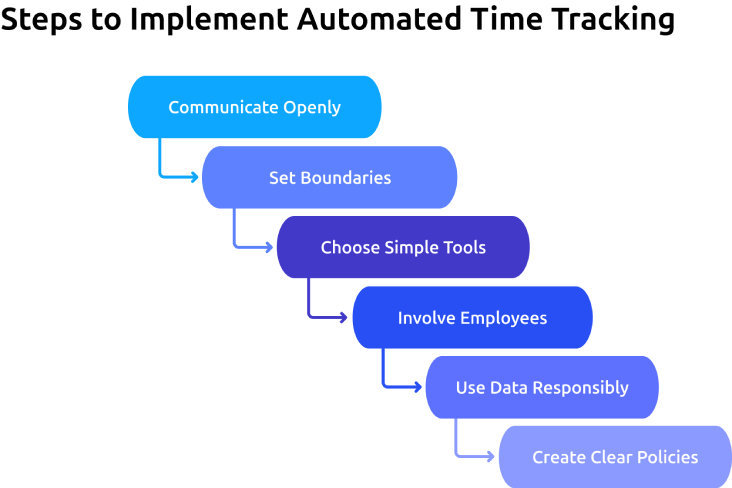
1. Communicate Openly
Explain why you are implementing automated time tracking before the rollout begins. When employees clearly understand the purpose behind the system, they are more likely to trust the process and participate comfortably.
2. Set Boundaries
Clearly define what will be tracked and what will not. Establishing ethical limits helps employees feel respected while ensuring the system supports workflow improvements without unnecessary monitoring.
3. Choose Simple Tools
Use software that works quietly in the background without interrupting daily work. Employee-friendly tools improve adoption, reduce resistance, and help teams maintain better time tracking productivity with less manual effort.
4. Involve Employees
Allow employees to ask questions, share concerns, and give feedback during implementation. A collaborative rollout creates better acceptance and helps teams feel included in workplace productivity decisions.
5. Use Data Responsibly
Use productivity insights to improve workloads, workflows, and team support instead of constantly evaluating employee activity. When employees see the data being used fairly, they are more likely to trust automated time tracking systems.
6. Create Clear Policies
Document your time tracking policies clearly and share them with the entire team. A transparent policy helps employees understand how data is collected, who can access it, and how the organization uses it responsibly.
Common Time Tracking Mistakes That Hurt Productivity
Automated tracking can improve visibility, workload management, and operational efficiency, but the wrong implementation often creates frustration and disengagement across teams. Time tracking productivity improves only when the data is used thoughtfully, transparently, and with a clear focus on improving work processes.
Tracking Excessive Employee Activity
Monitoring every keystroke, screenshot, or small activity creates unnecessary pressure and distracts employees from meaningful work. High-level productivity insights and workflow visibility are usually enough to understand work patterns effectively.
Treating Productivity Data Like a Performance Scoreboard
When logged hours become a competition, employees focus more on appearing busy than completing meaningful work. Productivity insights work best when they support better planning, workload balance, and operational improvements across teams.
Collecting Data Without Taking Action
Tracking work hours without improving processes, workloads, or team workflows adds extra overhead without creating real value. Employees quickly lose confidence in the system when productivity insights never lead to visible improvements or meaningful decisions.
Implementing Time Tracking Without Transparency
Employees become uncomfortable when tracking systems are introduced without clear communication. Explaining what is being tracked, why it matters, and how the information will be used helps reduce resistance and creates stronger trust during implementation.
Confusing Activity with Real Productivity
Busy schedules and constant online activity do not always reflect meaningful output. Productivity analysis becomes more effective when you evaluate time data alongside actual project progress, work quality, deadlines, and business outcomes.
How Does Time Champ Turn Automated Time Tracking into a Productivity Engine?
You may notice your team staying busy throughout the day but still struggle to understand where work hours actually go. Delayed projects, uneven workloads, productivity blind spots, and unreliable manual timesheets can make it difficult for you to improve time tracking productivity across the organization. Time Champ is an employee monitoring software with workforce intelligence capabilities, helps to automatically track work hours, productivity patterns, app usage, idle time, focus hours, and project activity without creating additional manual work for your team.
Time Champ turns your time data into actionable productivity insights that help you improve workflows, balance workloads, reduce unnecessary meetings, and make better operational decisions. The platform automatically generates timesheets, productivity reports, and team-level analytics so you can identify trends without relying on constant supervision. Features like categorized activity tracking, workload visibility, and intelligent reporting help you understand how work moves across your teams while maintaining transparency and employee trust. Time Champ also supports GDPR, ISO 27001, HIPAA, and SOC 2 standards, helping you manage workforce data more securely and responsibly.
Ready to turn busy weeks into productive ones?
Time Champ tracks work automatically and helps your team focus more on meaningful work.
Conclusion
Automated time tracking helps you understand how work actually happens across your team, making it easier to improve focus, reduce inefficiencies, balance workloads, and plan projects more accurately. When implemented with transparency and clear communication, it supports productivity without creating a culture of constant monitoring. It also removes the limitations of manual timesheets by giving you reliable, real-time visibility into daily work patterns. Improving time tracking productivity becomes far more achievable when you use accurate data to guide decisions. With the right approach and the right tools, automated time tracking can help your team spend less time managing work and more time making meaningful progress.

Anjali

Table of Content
 What Is Automated Time Tracking?
- How Does Automated Time Tracking Improve Team Productivity?
- Why Does Manual Time Tracking Quietly Reduce Productivity?
- Automated Time Tracking vs Manual Time Tracking
- How to Implement Automated Time Tracking Without Hurting Employee Trust
- Common Time Tracking Mistakes That Hurt Productivity
- How Does Time Champ Turn Automated Time Tracking into a Productivity Engine?
- Conclusion

Related Blogs

Learn the difference between productivity tracking and time tracking, how they work, and which approach helps improve team performance and visibility.
Guna Lakshmi | May 09, 2026
Implement a productivity tracking tool with clear steps, setup tips, and best practices to track employee productivity and improve team performance.
Thasleem Shaik | Apr 30, 2026
Avoid common productivity tracking mistakes that disrupt rollouts. Get practical fixes, self-audit checklist, and clear guidance for successful implementation.
Anjali | May 01, 2026
Learn how real-time productivity tracking helps teams monitor performance, improve efficiency, and make smart decisions for better workplace productivity.
Jahnavi Pulluri | May 12, 2026
Address employee concerns about productivity tracking with clear communication, rollout steps, and practical scripts that build trust and transparency.
Thasleem Shaik | May 01, 2026
Explore the most important productivity metrics and KPIs to measure employee performance, improve efficiency, and boost workplace productivity.
Anjali | May 12, 2026


 4.7/5 avg.
Ready to Manage Your Workforce Smarter?
Join our family of 1500+ companies using smart insights to redefine workforces!

Free Trial
No Credit Card Required