Productivity Tracking vs Time Tracking: What's the Difference?
Learn the difference between productivity tracking and time tracking, how they work, and which approach helps improve team performance and visibility.
At first, productivity tracking and time tracking may sound like the same thing. You might even see businesses use the terms interchangeably. But once your team gets bigger, you start noticing gaps.
You may know how many hours your employees worked, but still not understand productivity gaps. Or you may see work patterns clearly while still struggling with payroll or billing. That is when you start realizing that productivity tracking and time tracking solve two very different problems.
In this guide, you will learn the difference between productivity tracking and time tracking, where they overlap, which one fits your team best, and why many businesses use both together.
Quick Definitions
Before you decide between productivity tracking and time tracking, you need to understand what each one actually measures. While both help you improve workforce visibility, they solve different problems.
Here are the quick definitions to help you understand how each one works and what it is best used for.
What Is Productivity Tracking?
Productivity tracking helps you understand how employees spend their work time. It focuses on work patterns, focus levels, productive hours, app and website usage, idle time, and overall productivity trends.
Most productivity tracking software classifies activities as productive, neutral, or unproductive. This helps you identify distractions, improve workload balance, and support better work habits across remote, hybrid, and in-office teams.
What Is Time Tracking?
Time tracking helps you measure how much time your employees spend on tasks, projects, or shifts. It gives you a clear record of work hours so you can monitor attendance, track billable time, and understand where time is being spent across your business.
Modern time tracking software often includes features like automatic timers, manual time entries, timesheets, project allocation, and attendance tracking. These tools help you simplify payroll, improve client invoicing, and maintain accurate work-hour records without relying on manual tracking methods.
Still Unsure Which Tracking System Fits Your Team Best?
Time Champ gives you flexible productivity and time tracking built for every team type.
Productivity Tracking vs Time Tracking: Side-by-Side Comparison
Productivity tracking and time tracking may sound similar, but they measure different things. Productivity tracking helps you understand how work happens, while time tracking measures how long work takes.
The comparison below shows the key differences, use cases, and business goals each one supports.
| Dimension | Productivity Tracking | Time Tracking |
|---|---|---|
| Main Purpose | Understand work quality and focus | Measure work hours |
| Main Question | How is work being done? | How long is work taking? |
| Primary Metrics | Productive hours, idle time, focus score | Logged hours, billable time |
| Best For | Coaching and productivity improvement | Payroll and billing |
| Common Features | App usage tracking, productivity scores | Timers, timesheets, and attendance |
| Main Output | Productivity reports and insights | Payroll reports and invoices |
| Common Buyers | HR and operations teams | Finance and project managers |
| Privacy Sensitivity | Higher | Lower |
| Main ROI | Better focus and performance | Accurate billing and payroll |
The biggest difference between productivity tracking and time tracking is the type of visibility each provides.
For example, two employees may both log eight hours. Time tracking shows equal work hours. Productivity tracking may reveal that one employee spent most of the day focused on high-value work while the other lost significant time to distractions and context switching.
The Right Tracking Tool for Every Team Type: A Decision Matrix
Different teams solve different problems. The right system depends on what your business needs most and the type of visibility you want across your workforce.
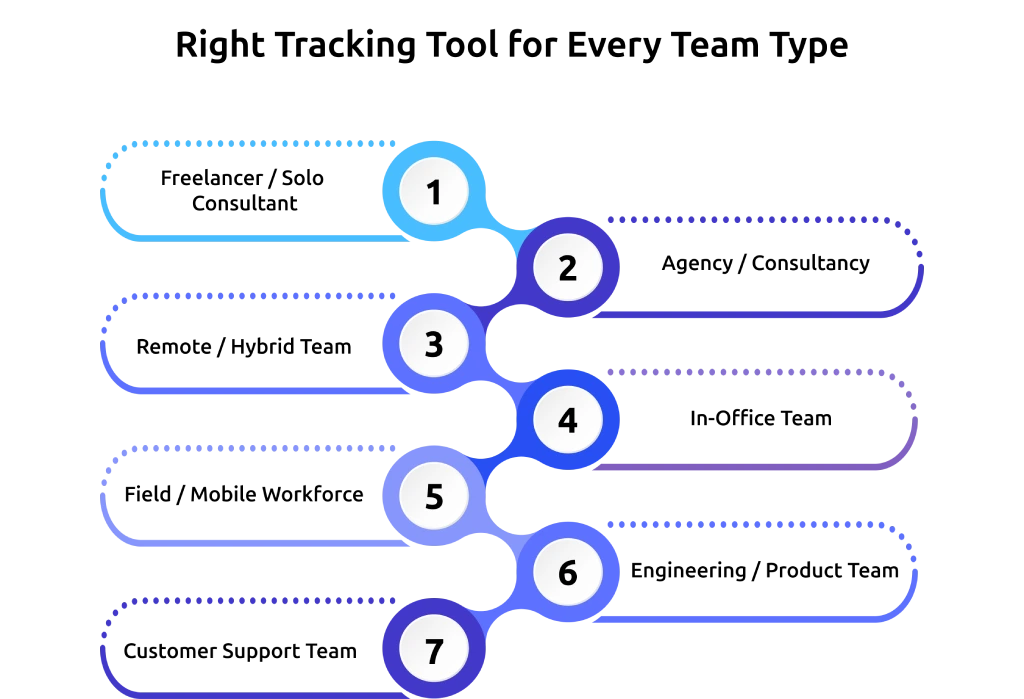
Freelancer / Solo Consultant
If you work as a freelancer or solo consultant, you mainly need accurate billing and client transparency. Time tracking usually comes first because it helps you create invoices, track billable hours, and measure project time.
Productivity tracking can still help you improve focus and reduce distractions, but it is often secondary. It can also help you understand how you spend your workday and identify habits that affect your productivity.
Agency / Consultancy
If you run an agency or consultancy, you will likely need both systems. Time tracking helps you improve project profitability, manage client billing, and allocate resources more effectively. Productivity tracking helps you understand workload balance and identify burnout risks within your team.
Using both together gives you better visibility into team performance and project efficiency. It also helps you make better staffing and project planning decisions as your agency grows.
Remote / Hybrid Team
If you manage a remote or hybrid team, productivity tracking often becomes more important first. You may struggle with visibility, communication gaps, and focus challenges when employees work from different locations.
Productivity tracking helps you identify work patterns, focus time, and collaboration issues. Time tracking still supports attendance, payroll, and scheduling accuracy. Together, they help you maintain accountability without relying on constant check-ins.

Did You Know?
A Deloitte study found that 96% of digital workers are willing to accept monitoring when it provides clear benefits such as career development, IT support, or workflow improvement.
In-Office Team
If your team works from the office, you may rely less on strict hour tracking and more on performance visibility. Productivity tracking helps you improve coaching, workload planning, and operational efficiency.
Time tracking can still support attendance management and payroll processes. It can also help you identify time-related workflow issues that affect overall team performance.
Field / Mobile Workforce
If you manage field employees or mobile teams, time tracking is usually the bigger priority. Attendance, location tracking, and shift monitoring matter most for employees working outside the office.
GPS tracking and work-hour verification help you maintain accountability across mobile teams. Productivity tracking can still support operational insights, but time tracking remains your primary requirement.
Engineering / Product Team
If you manage engineering or product teams, uninterrupted focus time is extremely important. Productivity tracking helps you identify context switching, meeting overload, and workflow interruptions that affect deep work.
Time tracking can still support sprint planning and project estimation. Productivity visibility often delivers more value because it helps you protect focus time and improve development efficiency.
Customer Support Team
If you manage a customer support team, both systems work best together. Time tracking helps you manage schedules, shifts, and attendance, while productivity tracking helps you evaluate ticket handling efficiency, focus time, and workload distribution.
Using both together helps you improve operational efficiency and employee performance. It also gives you better visibility into team responsiveness and service quality.
Tired of Managing Productivity and Time Tracking Separately?
Time Champ combines workforce visibility, attendance tracking, and productivity insights in one place.
Why Most Teams Need Both Time and Productivity Tracking
Many businesses start with either productivity tracking or time tracking based on their immediate needs. But over time, they realize that a single system shows only part of the picture. If you want complete visibility into both employee performance and work hours, you need both systems working together.
Time Tracking Without Productivity Tracking
Time tracking helps you measure hours, attendance, and project time, but it does not explain how effectively those hours were used. Two employees on your team may each work 8 hours a day, yet produce completely different outcomes. One employee may stay focused on meaningful work, while the other loses large amounts of time to distractions, unnecessary meetings, or workflow interruptions.
Without productivity insights, you may struggle to identify bottlenecks, workload imbalances, focus issues, or early signs of burnout across your team. This becomes even harder when you manage remote or hybrid employees because you cannot always see day-to-day work patterns clearly.
Productivity Tracking Without Time Tracking
Productivity tracking gives you visibility into work habits, focus levels, and activity trends, but it does not solve operational tracking challenges. Without time tracking, you may still face problems with payroll accuracy, attendance records, client billing, overtime calculations, and project costing.
You may understand how your employees work while still lacking visibility into how long tasks take, how billable hours are tracked, or whether projects remain financially efficient. If you run a service business, agency, or project-based team, that missing financial visibility can create serious operational gaps.
Combination of Time Tracking and Productivity Tracking
When productivity tracking and time tracking work together, you gain a more complete view of your team’s performance. Time tracking shows you when work happens. Productivity tracking shows you how work happens. Together, they help you understand why performance changes across teams, projects, and workflows.
You can connect work hours with output quality, identify inefficiencies earlier, improve workforce decisions, balance workloads more effectively, and support healthier work habits across your organization. Instead of relying on assumptions, you gain real workforce intelligence that helps you make smarter decisions, improve accountability, and support long-term business performance.
How Time Champ Combines Both in One Tool
Time Champ is an employee monitoring software, along with complete workforce intelligence features, designed to give you both productivity tracking and time tracking from a single dashboard. Instead of switching between multiple tools, your team can manage workforce visibility, attendance, productivity insights, and operational tracking in one place.
Productivity Tracking Features
Time Champ helps you monitor productivity trends through features such as the following:
- App and website usage tracking
- Productive and unproductive activity classification
- Focus tracking
- Productivity scores
- Idle time monitoring
- Activity intensity insights
These features help you understand work habits, improve focus, and support better team performance without relying on guesswork.
Time Tracking Features
Time Champ also includes complete time tracking capabilities, such as the following:
- Automatic time tracking
- Manual time entries
- Timesheet management
- Attendance tracking
- Billable and non-billable hour tracking
- Project allocation
- Payroll-ready reports
These features help you improve billing accuracy, reduce payroll errors, and simplify workforce management.
Combined Workforce Intelligence
Using productivity tracking and time tracking together gives you a clearer understanding of your team’s performance. Time Champ combines work-hour data with productivity insights so you can see not just how long employees work, but how effectively that time is used.
From a single dashboard, you can spot workflow inefficiencies, attendance gaps, workload pressure, and productivity trends earlier. This helps you make faster decisions, improve accountability, and support better team performance without switching between multiple tools.
Ready to Improve Team Performance and Accountability?
See how Time Champ helps you understand work hours, productivity trends, and workload patterns more clearly.
Conclusion
Productivity tracking and time tracking solve different problems, but your business will often benefit from using both together. Time tracking helps you understand where your team’s time goes, while productivity tracking shows how effectively that time is used.
When combined, you get a clearer view of team performance, workload, and operational efficiency, helping you make better workforce decisions with more confidence.

Guna Lakshmi

Table of Content
 Quick Definitions
- Productivity Tracking vs Time Tracking: Side-by-Side Comparison
- The Right Tracking Tool for Every Team Type: A Decision Matrix
- Why Most Teams Need Both Time and Productivity Tracking
- How Time Champ Combines Both in One Tool
- Conclusion

Related Blogs
Explore the top benefits of productivity tracking software for better visibility, balanced workloads, smarter planning, and improved business decisions.
Guna Lakshmi | Apr 30, 2026
A practical guide to choosing productivity tracking software for your team, with comparisons of features, pricing, privacy, security, and rollout risks.
Jahnavi Pulluri | May 01, 2026
Learn how time tracking works, its benefits, common challenges, and how to choose the right software to improve productivity.
Thasleem | 2025-06-12
Understand how AI productivity tracking turns activity data into real insights. Explore use cases, benefits, and how to choose the best tool for your team.
Guna Lakshmi | May 06, 2026
Discover how employee productivity tracking builds accountability, drives ownership, and turns daily activity into measurable team performance.
Guna Lakshmi | May 01, 2026
Learn the key pros and cons of time tracking to enhance employee productivity and manage challenges effectively.
Thasleem Shaik | Aug 17, 2024


 4.7/5 avg.
Ready to Manage Your Workforce Smarter?
Join our family of 1500+ companies using smart insights to redefine workforces!

Free Trial
No Credit Card Required