AI Productivity Tracking: Measure What Actually Matters
Understand how AI productivity tracking turns activity data into real insights. Explore use cases, benefits, and how to choose the best tool for your team.
Today, many employees use AI to finish work faster and smarter. A study by Gallup found that half of US employees use AI at work, and 65% say it helps them get more done.
They track time, clicks, and app usage, but they miss the real insights, especially as AI makes work faster and more efficient. So even when productivity increases, your tracking data does not reflect it. This creates a gap between what your tools show and what your team actually achieves.
In this guide, you will learn how AI is changing productivity tracking, where it makes the biggest impact, and how it compares to traditional tools.
What Is AI in Productivity Tracking?
AI in productivity tracking uses machine learning and predictive analytics inside workforce monitoring tools. It turns raw activity data into clear insights about how, when, and why work gets done. Instead of just logging hours and apps, AI tracking learns from each team's workflow. It analyzes activity and automatically identifies patterns in work habits, time usage, and productivity levels.
AI in productivity tracking works differently from regular AI tools used at work. Tools like ChatGPT, Microsoft Copilot, and Google Gemini help you do the work by creating content, writing code, or completing tasks. Other AI systems are trained through simulated settings, where RL environments provide a space for models to learn from actions and feedback.
AI in productivity tracking works inside the system that tracks work and helps you understand how the work gets done. While these tools create the output, AI in tracking measures it, explains it, and shows where you can improve.
How AI Is Transforming Productivity Tracking
AI is changing productivity tracking in four main ways. It turns simple reports into useful insights that you can act on quickly.
Shift 1: From Hours Logged to Focus Quality
Most tracking systems rely on login time and active hours. AI shifts the focus to how well work gets done during that time. It can clearly tell the difference between deep focus and distracted work with frequent task switching.
You can clearly see when your team is doing meaningful work and when they are getting interrupted. This helps you improve focus and get better results without asking your team to work longer hours.
Shift 2: From Static Dashboards to Predictive Insights
Older dashboards only show what has already happened. AI helps you see what is likely to happen next. It can alert you about burnout risks, workload issues, or delays before they affect your work. This gives you time to take action early instead of fixing problems later.
You can take action early instead of reacting to problems later. This helps you keep projects on track, support your team better, and avoid last-minute pressure.
Shift 3: From Manual to Context-Aware Categorization
Fixed categories often fail to match how your team actually works, which leads to inaccurate reports.
AI learns from your team’s workflow and categorizes work more accurately. You get a clearer view of what counts as productive work, even for creative or research tasks. This makes your data more reliable and useful.
Shift 4: From Individual Activity Monitoring to Team-Wide Insight
Focusing only on individual activity can lead to over-monitoring and missed insights.
AI gives you a complete view of your team instead of scattered individual data. You can quickly see when your team is most productive, where time is being spent, and where focus drops. This helps you manage workloads better, improve team performance, and make smarter decisions without tracking every small action.
7 Core Use Cases of AI in Productivity Tracking
AI in productivity tracking helps you understand work better and make faster decisions. These seven use cases show how AI improves tracking in simple, practical ways.
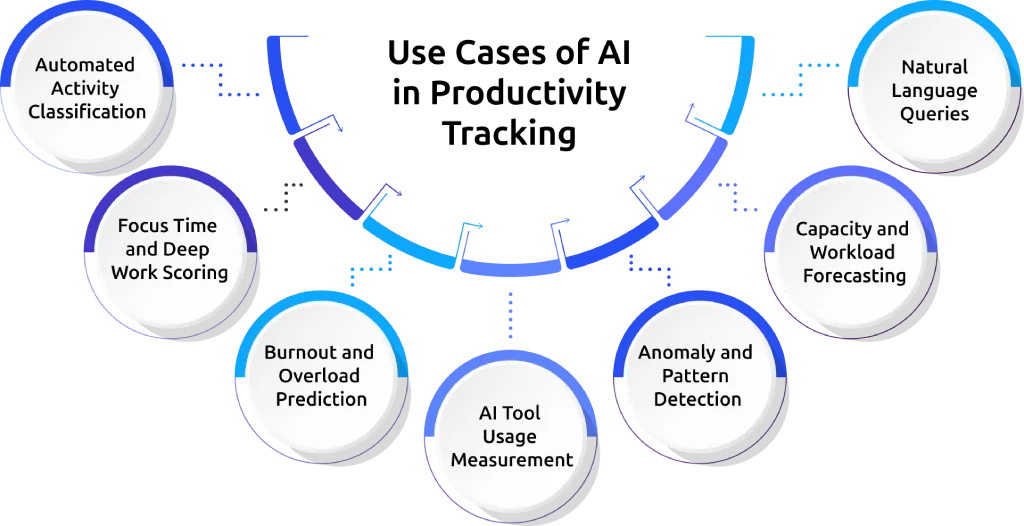
1. Automated Activity Classification
AI automatically understands what work your team is doing. It looks at apps, documents, and tasks, then labels them as productive, neutral, or non-productive. The system adjusts based on your team’s work, so you don’t need to update it often. This reduces manual effort and ensures your data stays accurate without constant setup or changes.
2. Focus Time and Deep Work Scoring
AI measures how focused your team is, not just how long they work. It checks things like app switching and interruptions. This helps you see how much time goes into deep, active work versus distracted work. You can use this insight to improve work habits and reduce unnecessary interruptions.
3. Burnout and Overload Prediction
AI helps you spot early signs of burnout before they impact your team. It analyzes patterns like long working hours, reduced focus, and rising workload to give you timely signals. You can step in early, rebalance workloads, and support your team when it matters most. This helps you protect productivity, improve employee well-being, and reduce the risk of losing valuable team members.
4. AI Tool Usage Measurement
AI tracks how your team uses AI tools. You can see which teams use them the most, where they improve work, and where adoption is low. This helps you understand the real impact of AI on productivity. It also helps you decide where to invest more in AI tools and training.
5. Anomaly and Pattern Detection
AI detects unusual changes in work patterns. For example, a sudden drop in productivity or a spike in overtime. Instead of manually checking reports, you get clear alerts about what needs attention.
This helps you respond quickly and prevent small issues from becoming bigger problems.
6. Capacity and Workload Forecasting
AI predicts future workload based on past data and current work. You can see where your team has extra capacity or where they may get overloaded. This helps you plan better and avoid delays. You can also distribute work more effectively and maintain a balanced workload across the team.
7. Natural Language Queries
You can ask simple questions like “Why did productivity drop?” or “Who is overloaded?” AI gives clear answers without needing to go through dashboards. This saves time and makes decision-making easier. It also helps you get insights quickly without needing to analyze complex reports.
These use cases show how AI moves productivity tracking from basic monitoring to real insights. When used effectively, AI helps you improve focus, manage workloads better, and make faster, smarter decisions across your team.
AI Productivity Tracking vs Legacy Productivity Tracking
This comparison shows how productivity tracking improves when you add AI. It helps you understand the difference between traditional tracking and AI-powered tracking in a simple way.
You can use this to see where your current tool may be lacking and what improvements you can expect with AI. It also helps you make better decisions when choosing or upgrading your tracking system.
| Capability | Legacy Tracking | AI-Powered Tracking |
|---|---|---|
| App classification | You manually assign and update app categories | Automatically learns and updates based on your team’s workflow |
| Output measurement | Tracks hours worked and basic active time | Measures focus quality along with AI tool usage and output value |
| Pattern detection | You manually review dashboards to spot issues | Automatically detects and highlights unusual patterns and trends |
| Burnout signals | Issues are identified only after they occur | Predicts burnout risk 30–60 days in advance using behavior data |
| Reporting | Static dashboards with limited, fixed insights | Lets you ask questions and get instant, clear answers |
| Manager workflow | Requires daily manual checks and monitoring | Provides weekly summaries with key insights and recommendations |
| Privacy posture | Tracks all data without flexible control | Uses context-aware tracking to protect sensitive information |
Benefits of AI Productivity Tracking
AI-powered tracking goes beyond basic monitoring. It helps you understand work better, act faster, and make smarter decisions. Here are five key benefits explained simply:
1. Closes the AI Measurement Gap
AI tracking shows the real impact of AI tools on your team’s work. It captures how much time is saved and how productivity improves. Workers using AI save 5.4% of work hours and produce 33% more output per hour, according to Federal Reserve Bank of St. Louis research.
With AI tracking, you turn these improvements into clear, measurable data that helps you understand ROI.
2. Reduces Manager Dashboard Time
Instead of spending time checking dashboards every day, AI highlights what actually matters. It brings important patterns and issues directly to your attention. This saves time and lets you focus more on decision-making instead of data checking.
3. Improves Data Accuracy
AI automatically classifies work based on context, so you do not need to manually update categories. This reduces errors and keeps your data reliable. Accurate data builds trust and helps you make better decisions without second-guessing your data.
4. Surfaces Hidden Capacity
AI shows where your team has unused capacity and where they are overloaded. It gives you a clear view of workload distribution across the team. This helps you balance work better, avoid burnout, and use your team’s time more effectively.
5. Predicts Attrition and Burnout Early
AI identifies early warning signs like increased workload, lower focus, or longer work hours. It helps you act before burnout or employee resignations happen. This allows you to support your team in time, improve retention, and maintain steady performance.
Key Features to Look for in an AI Productivity Tracking Tool
Not every tool labeled as “AI-powered” actually delivers real value. When you evaluate options, focus on these six key criteria to identify tools that truly use AI effectively.
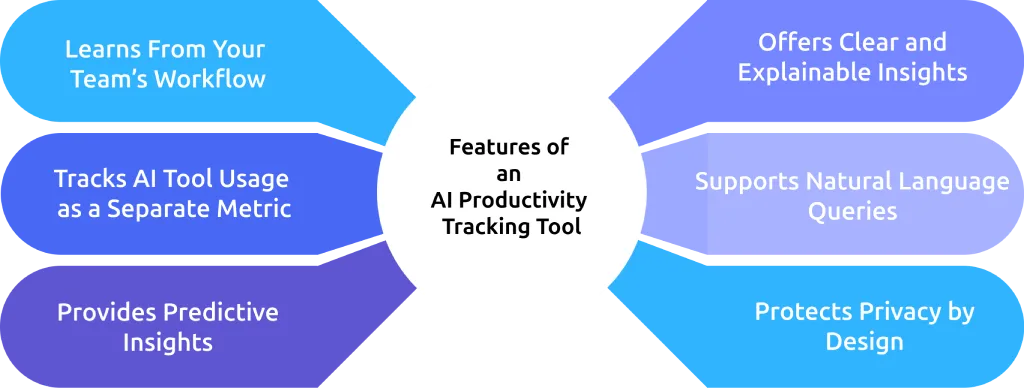
1. Learns From Your Team’s Workflow
A good AI tool should understand how your team works and adjust automatically. It should classify activities based on real usage instead of relying on fixed categories. This reduces manual setup and keeps your data accurate over time.
2. Tracks AI Tool Usage as a Separate Metric
AI tools like ChatGPT, Copilot, and Gemini should be tracked separately, not mixed with general app usage. This helps you clearly see how AI tools impact productivity and where they add the most value.
3. Provides Predictive Insights
A strong AI tool should not just show past data. It should predict future risks like burnout, workload issues, and capacity gaps. This helps you take action early instead of reacting after problems occur.
4. Offers Clear and Explainable Insights
AI results should always come with clear reasons. When a tool flags an issue, it should explain why it happened. This builds trust and helps you take the right action based on accurate insights.
5. Supports Natural Language Queries
The tool should allow you to get insights by simply typing what you need. You should be able to understand performance, trends, and issues without navigating complex dashboards. This makes it easier for managers to use the system regularly.
6. Protects Privacy by Design
A reliable AI tracking tool should respect employee privacy. It should automatically exclude or hide sensitive data like personal browsing or private messages. This ensures transparency and builds trust while still providing useful insights.
Ready to move from tracking activity to understanding real work?
See how Time Champ turns your team’s data into clear, actionable insights that improve performance.
Common Concerns About AI in Productivity Tracking
AI in productivity tracking often raises concerns from both employees and managers. Here’s a simple and clear view of those concerns and what they actually mean in practice.
AI and Privacy Concerns
When used correctly, AI reduces the need for constant monitoring instead of increasing it. It focuses on patterns and insights, which means less manual tracking and more meaningful data. The level of privacy depends on how the tool is designed, so choosing a tool with strong privacy controls is important.
Trust in AI Predictions
AI predictions are reliable when they are transparent. A good system shows why it flags something, such as workload changes or reduced focus. This helps you understand the reasoning behind the insights and builds confidence in the data you use for decisions.
Impact on Managers’ Roles
AI does not replace managers. It supports them by highlighting important signals and saving time on analysis. Your managers still make decisions, guide teams, and handle conversations, while AI simply provides better insights to act on.
Employee Acceptance and Adoption
How you introduce AI in your team matters. When you position it as a tool to support employees rather than monitor them, adoption becomes easier. Giving employees access to their own insights helps build transparency and makes AI feel like a helpful system instead of something working against them. For the full playbook on this, see our guide on how to address employee concerns about productivity tracking.
How Time Champ Uses AI in Productivity Tracking
Time Champ is an employee monitoring software with built-in workforce intelligence. It combines productivity tracking with AI-driven insights in one platform, so every insight connects to a decision you can act on.
AI analyzes how your team works by looking at focus, activity, and behavior patterns. It separates deep work from distracted work using signals like application usage, task switching, and work patterns. This gives you a clearer view of real productivity. It classifies work based on how your team actually uses tools, and adapts as your team adopts new tools. This reduces manual effort and keeps data accurate over time.
AI-powered productivity classification labels activities as productive, unproductive, or neutral based on real usage patterns. It provides detailed reports that turn this data into clear insights. You can view productivity trends, focus time, app usage, and team performance in one place. Time Champ also identifies early signs of burnout and workload issues. It shows patterns across your team and explains the reasons behind each signal. This helps you take timely action and support your team before problems grow.
Ready to upgrade your tracking with built-in AI?
Try Time Champ free for 7 days and unlock powerful AI-driven productivity insights.
The Future of AI in Productivity Tracking
AI in productivity tracking is evolving quickly, with clear stages over the next few years. Research shows that 77% of businesses are already using or exploring AI, and 72% of leaders report noticeable productivity gains from it. It is moving from simple insights to more advanced and automated decision support.
In 2026, AI focuses on helping you understand work better by showing patterns and insights inside dashboards. AI tools already help teams save hours of work each week, with many users reporting significant time savings from automation. It highlights what is working well and where improvements are needed.
Predictive models are already being developed to detect issues like burnout early by analyzing work patterns, behavior, and performance signals. This means teams can act before problems affect performance or retention. As adoption grows, workplace use of AI is becoming standard. Recent data shows that around 50% of employees now use AI at work, and 65% feel it improves productivity.
Conclusion
AI is changing how teams measure and understand productivity. You are no longer limited to tracking hours and activity. You can now understand focus quality, predict burnout early, measure AI impact, and see patterns your current tools never surface. This gives you a complete and accurate view of how work actually happens. This helps you make faster, more confident decisions and build a more productive, balanced, and resilient team.

Guna Lakshmi

Table of Content
 What Is AI in Productivity Tracking?
- How AI Is Transforming Productivity Tracking
- 7 Core Use Cases of AI in Productivity Tracking
- AI Productivity Tracking vs Legacy Productivity Tracking
- Benefits of AI Productivity Tracking
- Key Features to Look for in an AI Productivity Tracking Tool
- Common Concerns About AI in Productivity Tracking
- Impact on Managers’ Roles
- How Time Champ Uses AI in Productivity Tracking
- The Future of AI in Productivity Tracking
- Conclusion

Related Blogs
Implement a productivity tracking tool with clear steps, setup tips, and best practices to track employee productivity and improve team performance.
Thasleem Shaik | Apr 30, 2026
Struggling with remote work productivity challenges? Learn what’s slowing your team down and how to improve focus, communication, and performance.
Guna Lakshmi | Apr 15, 2026
Workforce productivity analytics turns daily work data into clear decisions. Learn the key metrics, monitoring signals, and AI tools that improve team output.
Thasleem Shaik | Apr 21, 2026
Learn how to analyze productivity data, identify patterns, avoid common mistakes, and build reports that turn insights into clear, actionable decisions.
Thasleem Shaik | May 01, 2026
Explore the top benefits of productivity tracking software for better visibility, balanced workloads, smarter planning, and improved business decisions.
Guna Lakshmi | Apr 30, 2026
A practical guide to choosing productivity tracking software for your team, with comparisons of features, pricing, privacy, security, and rollout risks.
Jahnavi Pulluri | May 01, 2026


 4.7/5 avg.
Ready to Manage Your Workforce Smarter?
Join our family of 1500+ companies using smart insights to redefine workforces!

Free Trial
No Credit Card Required