What Is a Time Log? Examples, Benefits & Business Uses
Learn what a time log is, how it works, common examples, and how businesses use it to track productivity, projects, and employee work hours.

Do you really know where your team’s work hours go every day? Even when tasks are completed, and employees stay constantly busy, you may still struggle to identify what consumes the most time, why projects get delayed, or where productivity starts to slow.
Without clear visibility into daily work patterns, improving efficiency becomes difficult. This is where a time log helps you track how time is spent and uncover the insights behind your team’s productivity.
In this blog, you’ll learn what a time log is, how it differs from timesheets and activity logs, and what a well-structured time log looks like. You’ll also explore the business insights time logs can reveal and how automated tools simplify time tracking and analysis.
What Is a Time Log and Why Does It Matter?
A time log is a structured record that tracks how work hours are spent throughout the day. It captures tasks, activities, start and end times, and daily work patterns. This helps you monitor productivity, improve time management, and gain better visibility into how employees and teams use their working hours.
A time log matters because it helps you understand where time is actually spent across projects, tasks, and daily operations. You can identify productivity gaps, workload imbalances, time-consuming activities, and operational inefficiencies without relying on assumptions. This visibility helps you improve resource planning, team performance, accountability, and overall productivity.

Did You Know?
According to the U.S. Bureau of Labor Statistics Productivity and Costs Report, non-farm business labor productivity increased by 2.2%, highlighting how businesses are placing greater focus on work efficiency, productivity visibility, and smarter time management practices.
Time Log vs Timesheet vs Activity Log: What’s the Difference?
Many businesses use the terms time log, timesheet, and activity log interchangeably, even though they serve different purposes. Understanding the difference helps you choose the right method for tracking work hours, monitoring productivity, and analyzing daily operations more accurately. While a time log focuses on how time is spent throughout the day, the other two tools are designed for different types of work tracking and reporting.
| Aspect | Time Log | Timesheet | Activity Log |
|---|---|---|---|
| Purpose | Tracks how time is spent on tasks and activities | Records total working hours for payroll or billing | Monitors user actions and system activities |
| Focus | Productivity and time usage insights | Attendance and billable hours | Activity monitoring and audit tracking |
| Data Included | Tasks, start/end times, duration, work patterns | Total hours worked per day or week | App usage, clicks, logins, online activity |
| Level of Detail | Detailed task-level tracking | Summary-level reporting | Behavioral or system-level tracking |
| Primary Users | Managers, teams, productivity analysts | HR, payroll, and finance teams | IT teams, compliance, and security monitoring |
| Main Goal | Improve productivity and workflow visibility | Calculate employee work hours | Track activities for monitoring and records |
| Example Use Case | Identifying time spent on projects | Processing employee salaries | Monitoring application or system usage |
Struggling to understand where your team’s work hours are actually going?
Use Time Champ to track work hours and productivity automatically.
What Does a Time Log Look Like? Structure and Example
Understanding the structure of a time log helps you track employee activities, project time, and daily work patterns more accurately. This section explains the essential fields included in a time log and shows a practical example of how businesses track and analyze daily work activity.
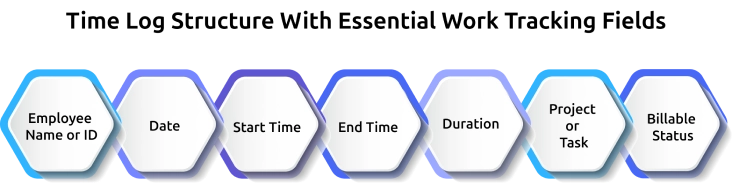
A properly structured work record usually includes the following fields:
1. Employee Name or ID: This identifies who completed the work and helps maintain accountability and payroll accuracy.
2. Date: The date shows when the work activity happened and helps organize entries by shift, week, or pay period.
3. Start Time: This records when the employee began working on a task, project, or shift.
4. End Time: The end time shows when the work stopped and helps calculate the total work duration.
5. Duration: This represents the total time spent on the activity. Many tools calculate this automatically to reduce manual errors.
6. Project or Task: This field explains what the work was related to, such as client projects, meetings, administrative tasks, or internal operations.
7. Billable Status: This identifies whether the work can be billed to a client or should be categorized as non-billable internal work.
Here’s an example of what a structured time log looks like for one employee during a typical workday:
| Employee | Date | Start | End | Duration | Project | Billable |
|---|---|---|---|---|---|---|
| Sarah K. | May 15 | 9:02 AM | 10:48 AM | 1h 46m | Acme Co | Yes |
| Sarah K. | May 15 | 10:48 AM | 11:30 AM | 0h 42m | Internal Meeting | No |
| Sarah K. | May 15 | 1:15 PM | 3:45 PM | 2h 30m | Beta Corp | Yes |
| Sarah K. | May 15 | 3:45 PM | 4:20 PM | 0h 35m | Email + Admin | No |
| Sarah K. | May 15 | 4:20 PM | 5:55 PM | 1h 35m | Acme Co | Yes |
6 Important Business Questions Time Logs Can Answer
Time logs are not just records of employee work hours. They help you answer important operational and productivity questions that directly affect payroll accuracy, project profitability, workload distribution, and workforce performance. When analyzed properly, the data inside a time log can reveal patterns that help you make smarter business decisions and improve overall efficiency.
1. How Accurate Is Your Payroll?
You can measure payroll accuracy by comparing logged work hours with actual payroll records. Even small tracking mistakes can lead to overtime errors, incorrect payments, or revenue loss over time. Reviewing work-hour data regularly helps you identify inconsistencies early and maintain more accurate payroll processing across your organization.
2. What Is Your Actual Billable Utilization Rate?
Billable utilization shows how much employee time is spent on revenue-generating work compared to internal or administrative tasks. A higher billable percentage usually indicates better operational efficiency, while lower numbers may reveal excessive meetings, admin work, or project scope issues that reduce profitability and team productivity.
3. Which Clients Generate the Most Profit?
By analyzing work hours by client or project, you can identify which accounts consume the most time compared to the revenue they generate. Some projects may appear profitable initially, but require excessive non-billable effort behind the scenes. This visibility helps you improve pricing strategies and client resource allocation.
4. Where Is Productive Capacity Being Lost?
Time data often reveals hidden productivity drains that are difficult to notice in daily operations. Frequent meetings, repetitive administrative work, excessive context switching, or project delays can consume valuable work hours. Identifying these patterns helps you reclaim productive time and improve workforce efficiency across teams.
5. Are Your Project Estimates Realistic?
Comparing estimated project hours with actual work duration helps you understand whether your planning process is accurate. If projects consistently exceed estimated timelines, your business may be under-pricing services, overloading teams, or allocating resources inefficiently. Historical work-hour data improves forecasting and future project planning decisions.
6. Which Employees May Be at Risk of Burnout?
Consistently long work hours, late-night activity, or repeated overtime patterns may indicate workload imbalance and employee burnout risk. Monitoring these trends helps you identify overworked team members before productivity, engagement, or employee well-being starts declining. Early visibility supports healthier workload management and better workforce sustainability.
How Time Champ Automatically Captures and Analyzes Time Logs
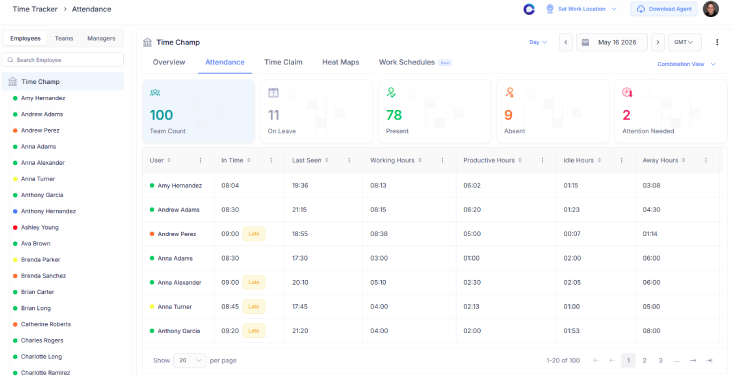
While managing the work records manually, you can easily face missed entries, inaccurate timesheets, payroll inconsistencies, and limited visibility into how your team actually spends work hours. As your business grows, tracking projects, billable work, employee productivity, and workload distribution manually becomes more difficult and time-consuming. Time Champ is an employee monitoring software with built-in workforce intelligence features that help you automatically capture work activity and turn daily work data into actionable productivity insights for your remote, hybrid, and in-office teams.
Time Champ automatically logs work hours without requiring manual timers or repeated employee updates, ensuring accurate records across all seven essential time log fields. Every entry can be tagged to specific clients, projects, or tasks while tracking billable and non-billable work at the activity level. The platform also helps you understand how work hours are spent by tracking app usage, websites visited, idle time, and daily work patterns, giving you clearer insights into employee activity and productivity. With real-time dashboards, automated timesheets, burnout alerts, capacity forecasting, and profitability insights, Time Champ helps you monitor workforce productivity and make faster, data-driven decisions.
Tired of inaccurate timesheets and missed work entries?
Manage time logs and team productivity easily with Time Champ.
Conclusion
Understanding how work hours are spent is essential for improving productivity, managing workloads, and making better business decisions. Without clear visibility into daily work patterns, it becomes difficult to identify inefficiencies, control project timelines, or maintain operational balance across teams. A structured approach to tracking work activity helps you move beyond assumptions and make decisions based on actual work data. Start analyzing your work patterns consistently, identify where time is being lost, and take action to improve efficiency across your teams and projects.

Anjali

Table of Content
 What Is a Time Log and Why Does It Matter?
- Time Log vs Timesheet vs Activity Log: What’s the Difference?
- What Does a Time Log Look Like? Structure and Example
- 6 Important Business Questions Time Logs Can Answer
- How Time Champ Automatically Captures and Analyzes Time Logs
- Conclusion

Related Blogs

Learn how automated time tracking improves team productivity, reduces manual work, builds trust, and delivers smarter workforce insights for managers today.
Anjali | May 15, 2026
Learn how to introduce productivity monitoring with clear policies, employee communication, rollout planning, and trust-focused implementation steps.
Anjali | May 12, 2026
Learn how to calculate employee productivity ratio using formulas, examples, benchmarks, and practical tips to improve team performance across departments.
Anjali | May 14, 2026
Learn how to track productivity in the workplace using proven methods, role-based metrics, and tools. A practical 2026 guide for modern managers and teams.
Jahnavi Pulluri | May 06, 2026
Unorganized work hours? Time tracking categories bring clarity, optimize workflows, and boost productivity. Learn how to set them up effectively.
Thasleem Shaik | Nov 08, 2024
Want to boost productivity? Uncover 20 time tracking best practices that can transform your workflow and help you achieve more with less effort.
Guna Lakshmi | July 01, 2025


 4.7/5 avg.
Ready to Manage Your Workforce Smarter?
Join our family of 1500+ companies using smart insights to redefine workforces!

Free Trial
No Credit Card Required