Visual Proof of Work for Remote Teams: A Complete Guide
Proof of work screenshots for remote teams help you see how work gets done and track real activity. Learn when to use screenshots effectively.
Managing a remote team brings a different way of understanding work. You no longer have quick visibility into what people are doing throughout the day. Most of the time, you rely on updates, messages, and completed tasks to figure out progress. The detail here sits inside a wider conversation covered in our enterprise employee monitoring guide.
Proof of work screenshots for remote teams help fill that gap. They give you a simple way to see how work is happening without chasing constant updates. But if used the wrong way, they can also feel intrusive and reduce focus. MIT Sloan & UC San Diego study found that digital monitoring reduces output by 17% when implemented without explanation.
The key is finding the right balance between visibility and monitoring. This guide shows you how to build that balance using a clear and practical proof-of-work system that gives you confidence while keeping your employees comfortable.
What is Visual Proof of Work?
Visual proof of work is a clear record that shows a remote employee actually worked during their scheduled hours. It goes beyond simple tracking and creates a structured, reliable view of how work happens across the day. At its core, visual proof of work answers three key things. It shows whether the employee was present and actively working. It helps you see if they were focusing on the right tasks. It also confirms whether the expected work was actually completed.
The table below shows what each data layer captures, what it proves, and why it is insufficient on its own.
| Data Layer | What It Captures | What It Proves | Limitation |
|---|---|---|---|
| Time tracking | Login time, logout time, session duration, break periods, overtime, and idle periods | Shows that the employee was active during scheduled hours | Does not show what was worked on or whether the work was productive |
| Activity data | Which applications and websites were used, time spent in each, and productive versus non-productive classification. | Shows how time was spent across tools and tasks during the workday | Does not reflect the actual output or quality of the work completed |
| Screenshots | Visual snapshots of the screen at configured intervals, showing what was on screen at specific moments | Shows visual proof of what was being worked on at specific points in time | Does not capture output quality on its own; provides context for the time and activity data. |
| Task and project data | Task assignment, completion timestamps, project progress, and milestone updates | Shows that assigned work was completed within timelines | Does not show the effort distribution or how the work was done; no visual verification without screenshots |
Struggling to balance visibility and trust in your remote team?
Use Time Champ to track work clearly without making your team feel monitored.
Why Remote Teams Need a Structured Visibility System
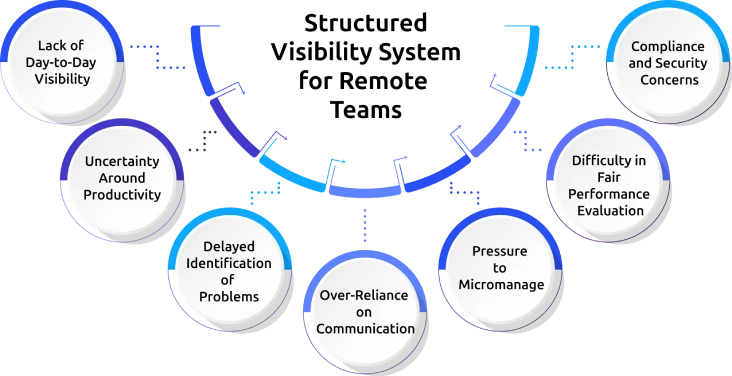
Managing a remote team often feels different from managing one in an office. You do not get quick visual cues about how work is moving or where things might be slowing down. Over time, this lack of visibility can make even simple decisions feel uncertain, especially when you do not have access to real-time reporting.
Lack of Day-to-Day Visibility
You do not have continuous visibility into how work progresses throughout the day. In a remote setup, there are no real-time workplace indicators such as active collaboration and on-screen activity. This makes it more difficult to accurately assess whether work is progressing as expected.
Uncertainty Around Productivity
Without clear data, you will find it difficult to know if your team is fully engaged. You often rely on updates or completed tasks, which do not always show how time is actually being used. Limited data can lead to ongoing uncertainty about employee productivity.
Delayed Identification of Problems
You may only notice issues after they start affecting deadlines or quality. Without continuous visibility, it becomes harder for you to identify blockers, delays, or performance gaps early.
Over-Reliance on Communication
You depend heavily on messages, calls, and status updates to stay informed. However, workplace communication can sometimes be unclear or delayed, which increases the chances of missing important details.
Pressure to Micromanage
Limited visibility often pushes you to check in more frequently to stay updated. This constant need to monitor can interrupt your team’s workflow and reduce their sense of autonomy.
Difficulty in Fair Performance Evaluation
Without objective data, you may end up relying on memory or limited inputs during performance reviews. This can make it harder for you to evaluate your team fairly and consistently.
Compliance and Security Concerns
In some cases, you need proper records of work to meet compliance requirements. Remote work can make this difficult without a structured system. It can also limit your ability to track activity when you need to investigate issues or ensure policies are followed.
These challenges show why you cannot rely only on updates or assumptions. You need a structured visibility system to bring clarity, consistency, and accountability to your remote team.
When Screenshots Are Necessary in Remote Work
Screenshots are often seen as a key part of remote proof of work, but they are not always required. Their value depends on the situation and the type of visibility you need. The section below clearly shows where screenshots are useful and where other data is enough to understand the work.
| Situation | Screenshots Needed | Why | Screenshot Only or Combined? |
|---|---|---|---|
| Client billing disputes | Yes | Visual record confirms work was performed during invoiced hours. Screenshots are the most defensible evidence in billing disagreements. | Combined with time tracking logs |
| Regulatory compliance audit | Yes | Financial services, healthcare, and legal industries require documented work activity records for regulatory submissions. | Combined with activity logs and DLP data |
| Performance review evidence | Optional | Screenshots provide context for productivity discussions, but should not be the primary performance metric. Task completion and output quality matter more. | Combined with productivity scores and task data |
| Freelancer or contractor verification | Yes | External workers without an employment relationship need objective activity records to support payment and dispute resolution. | Combined with time tracking |
| Security incident investigation | Yes | Screenshots capture what was on screen during a flagged security event, supporting forensic analysis of the incident. | Combined with DLP and alert logs |
| New employee onboarding verification | Optional | Short-term higher visibility during probation periods is common. Should be disclosed and time-limited. | Combined with activity data |
| General remote productivity management | No | For standard remote work management, activity data and productivity scores provide better operational insight than screenshots. | Activity data and productivity scoring are sufficient. |
Tired of constantly checking in on your team?
Time Champ gives you visibility without interrupting their workflow.
Step-by-Step Process to Build Proof of Work in Remote Teams
A proof-of-work system only works when your team understands it and feels comfortable using it. The difference between a helpful system and one that feels like surveillance comes down to how you introduce it, what you track, and how you use the data. When you follow the right steps, your team understands the purpose, feels comfortable with the system, and uses it without resistance.
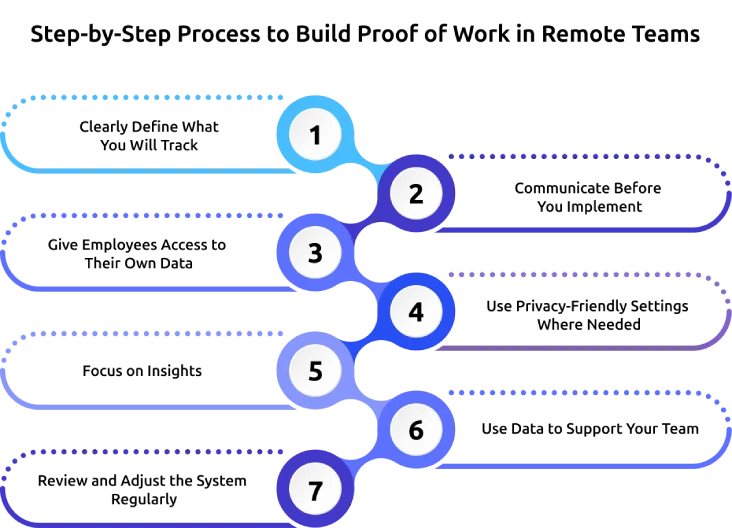
Step 1: Clearly Define What You Will Track
Start by deciding what data you actually need. Focus on essentials like time tracking, activity data, task progress, and screenshots only where required. Avoid tracking everything without purpose, as it can create unnecessary pressure on your team. This keeps your system simple and ensures every data point has a clear reason.
Step 2: Communicate Before You Implement
Before turning on any system, explain it to your team. Tell them what you will track, why you need it, and how you will use the data. Clear communication at this stage builds trust and prevents confusion later. When employees understand the purpose, they are more likely to accept the system without resistance.
Step 3: Give Employees Access to Their Own Data
Make sure your team can see their own work data. When employees can view their time logs, activity, and performance, they feel more in control and can improve on their own without waiting for feedback. This also reduces misunderstandings and builds transparency across the team.
Step 4: Use Privacy-Friendly Settings Where Needed
For roles that deal with sensitive information, apply settings like screenshot blur. This protects confidential data while still giving you enough visibility into work. It shows that you respect privacy while maintaining accountability. It also helps employees feel safe while working with sensitive information.
Step 5: Focus on Insights
Use the system to understand patterns, not to watch every action. Look at trends in productivity, workload management, and engagement instead of checking every detail. This helps you stay informed without micromanaging. It allows you to make better decisions without interrupting your team’s workflow.
Step 6: Use Data to Support Your Team
When you notice issues, use the data to start supportive conversations. Help your team solve problems instead of using the system to control or punish them. This encourages better performance and builds trust. Employees are more likely to improve when they feel supported rather than judged.
Step 7: Review and Adjust the System Regularly
As your team grows, your needs may change. Review your proof-of-work setup regularly and make improvements. Keep it simple, relevant, and aligned with your team’s work style. Regular updates ensure the system continues to add value without becoming outdated or complex.
Manage Remote Team Visibility Effectively with Time Champ
To build clear visibility in a remote team requires a system that brings together time, activity, and work data in one place so you can understand how work is actually happening without relying on guesswork.
Time Champ is an employee monitoring software that pairs activity tracking with workforce intelligence analytics, combining all key proof-of-work data into a single system. It automatically tracks work hours, including start time, end time, breaks, idle time, and overtime, so you get accurate and automated timesheets without manual effort. It also shows how your team spends their time by tracking app and website usage, giving you a clear view of productivity patterns. You can understand where time is going and identify trends without needing constant check-ins.
The platform includes flexible screenshot monitoring, allowing you to set capture intervals based on your needs. For roles that handle sensitive information, screenshot blur protects private data while still maintaining visibility. Employees can also access their own data, which makes the system more transparent and builds trust. With built-in security standards and easy-to-export reports, you can also use the data for client billing, audits, and internal reviews, ensuring you always have reliable proof of work when needed.
Looking for a simpler way to improve remote team visibility?
Time Champ brings time, activity, and screenshots into one system.
Conclusion
Proof of work screenshots give you a clearer view of how work is happening in your remote teams, as you cannot see it directly. They help you move away from assumptions and understand your team’s work with more confidence. Using proof of work screenshots in remote teams in the right way lets you understand progress without constant follow-ups. It gives you visibility while still allowing your team to work independently.

Guna Lakshmi


Table of Content
-
 What is Visual Proof of Work?
-
Why Remote Teams Need a Structured Visibility System
-
When Screenshots Are Necessary in Remote Work
-
Step-by-Step Process to Build Proof of Work in Remote Teams
-
Manage Remote Team Visibility Effectively with Time Champ
-
Conclusion
Instant Signup
Thank you for your request!
We have received your signup request and our team will get back to you soon. In the meantime, you can book a demo to see Time Champ in action.
Book a DemoFree trial. No credit card required. Prefer a walkthrough? Book a demo.
Related Blogs
Performance evaluation in remote workforces: 7 metrics that matter, common biases to avoid, and how to run reviews your team trusts.
Guna Lakshmi | Apr 14, 2026
Learn how to choose the right remote employee monitoring software with the right features, scalability, and usability to manage remote teams effectively.
Guna Lakshmi | Apr 14, 2026
Struggling with remote work productivity challenges? Learn what’s slowing your team down and how to improve focus, communication, and performance.
Guna Lakshmi | Apr 15, 2026
Learn how to legally implement employee monitoring software. Covers legal requirements, policy steps, best practices, and what to tell your employees.
Thasleem Shaik | Apr 16, 2026
Employee screen monitoring captures work activity in real time. Learn all monitoring types, how they boost productivity, and how to implement them ethically.
Jahnavi Pulluri | Apr 17, 2026
Learn how to address employee monitoring concerns with transparency, clear policies, and trust-building practices that improve engagement and reduce resistance.
Anjali | Apr 17, 2026


 4.7/5 avg.
Ready to Manage Your Workforce Smarter?
Join our family of 1500+ companies using smart insights to redefine workforces!

Free Trial
No Credit Card Required