How to Ensure Data Privacy When Using Productivity Tracking Software
Learn how to ensure data privacy in productivity tracking with key controls, vendor evaluation, and setup steps that reduce risk and protect employee data.

When you start using productivity tracking software, you need to think about one important thing. Are you handling employee data correctly?
These tools give you better visibility into how work gets done, but they also collect sensitive information. If you do not manage this properly, it can lead to privacy risks and loss of employee trust. You might already have policies in place, but applying them in real situations is not always easy. Small mistakes in setup or daily use can quickly turn into bigger problems.
In this guide, you will learn how to manage data privacy effectively when using productivity tracking software and understand the key factors involved in choosing the right tool.
Why Productivity Tracking Comes with High Privacy Risks
When you use productivity tracking software, it automatically collects data related to your employees. Activity logs, app usage, and timestamps directly link to individual employees, which makes this information personal. Because of this, data protection rules like GDPR and UK GDPR apply from the start.
Each of these factors increases your responsibility when you collect and manage this data.
- Excess Data Collection
Many productivity tracking tools collect large amounts of data by default. When you gather more data than you actually need, you increase the risk of misuse and exposure. You should always limit tracking to what is necessary for your purpose. - Uncontrolled Access
If you allow too many people to access employee data, you lose control over who can view sensitive information. This can lead to misuse or unnecessary monitoring. You need to define clear access rules and restrict data visibility. - Long Data Storage
Keeping data for too long increases risk. The longer you store it, the higher the chances of leaks, misuse, or compliance issues. You should set clear data retention limits and remove data when it is no longer needed. - Lack of Transparency
If employees do not know what you track and why, they may feel uncomfortable or lose trust. You should clearly explain your tracking practices so employees understand how their data is used. - Data Combination Risks
When you combine productivity data with HR records or payroll, you create a more sensitive dataset. This increases the impact if something goes wrong. You need to handle combined data with extra care and proper controls.

Did You Know?
Studies report 45% stress levels in high-surveillance settings, compared to 28% in less monitored environments.
The 7 Software Controls That Protect Data Privacy
Your productivity tracking tool has a few key settings that decide whether you protect employee privacy or put it at risk. If you set these up correctly, you can create a safe and reliable system. If you miss even one, it can cause problems.
Here are the seven most important controls and why they matter.
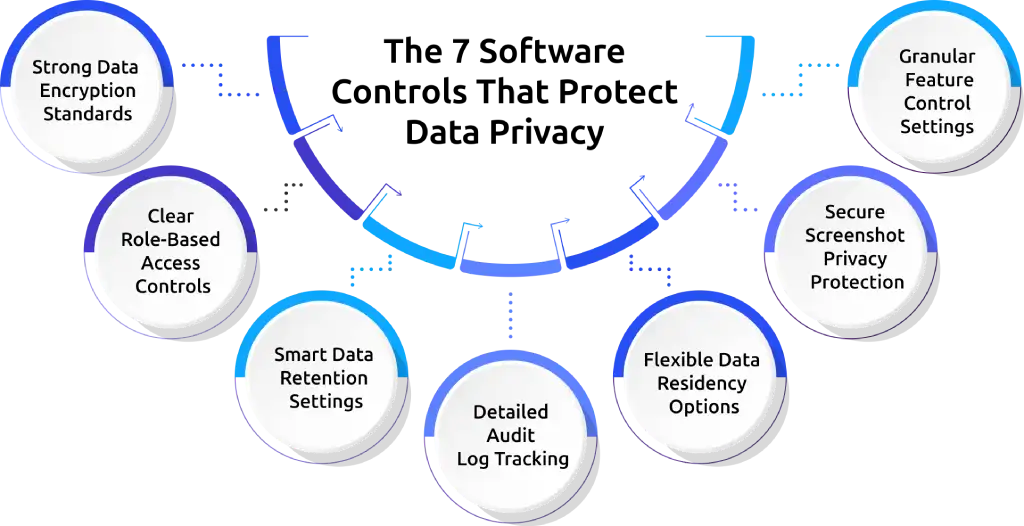
Control 1. Strong Data Encryption Standards
Encryption protects your data from unauthorized access. The productivity tracking software should secure data both when it is stored and when it moves between systems.
You also need to check how the system manages encryption keys. If the same system stores both data and keys, it becomes easier for attackers to access everything. A strong encryption setup reduces the impact of a breach. It also shows that you take data protection seriously.
Tip: Make sure your data stays protected at every stage, from storage to transfer.
Control 2. Clear Role-Based Access Controls
This control decides who can see what data. Not everyone in your company should have access to all employee data. For example, managers should see only their team’s data, and HR should see only what they need.
This reduces misuse and keeps data more secure. You should review access regularly to avoid unnecessary exposure. Limiting access helps you maintain better control over sensitive information.
Tip: Give access only to the people who truly need it.
Control 3. Smart Data Retention Settings
You should not store employee data forever. The longer you keep it, the higher the risk. A good system lets you set a time limit, after which the data gets deleted automatically.
Shorter retention periods reduce the chances of misuse or leaks. It also helps you stay aligned with data protection requirements.
Tip: Keep data only for as long as you actually need it.
Control 4. Detailed Audit Log Tracking
Audit logs track the accessed data and when it was accessed. If something goes wrong, these logs help you understand what happened. Without them, you cannot prove compliance or investigate issues properly.
You should make sure logs cannot be edited or deleted easily. Strong audit tracking helps you detect and prevent misuse.
Tip: Track every access so you always know who did what.
Control 5. Flexible Data Residency Options
This control tells you where your data is stored. If your employees work in different countries, storing data in the wrong location can create legal issues. A good productivity tracking tool lets you choose where your data stays.
Choosing the right data location helps you meet legal requirements. It also reduces risks related to cross-border data transfers.
Tip: Store data in the right location to avoid legal risks.
Control 6. Secure Screenshot Privacy Protection
Some tools take screenshots, which can capture private information by mistake. The advanced systems automatically hide or blur sensitive content and control who can view it.
This reduces the chances of exposing personal or confidential information. It also helps you avoid privacy complaints from employees.
Tip: Protect sensitive content before anyone can view it.
Control 7. Granular Feature Control Settings
Not every feature should be turned on. Some tools track too much by default. You should be able to turn features on or off based on your needs. Only use what you can clearly justify.
This approach helps you avoid collecting unnecessary data. It also makes your tracking setup more balanced and privacy-friendly.
Tip: Enable only the features that support your purpose.
These seven controls form the foundation of data privacy in productivity tracking. When you configure them properly, you reduce risks and build a system that is both effective and trustworthy.
Are you confident your tracking setup truly protects employee data?
See how Time Champ helps you track productivity and stay compliant with built-in privacy controls.
The Vendor Evaluation Scorecard (25 Criteria)
Most companies choose a productivity tool based on features. But if you care about privacy, you need to look deeper. You should focus on how well the tool protects data and how much control it gives you.
This scorecard helps you evaluate vendors in a simple and structured way. It includes 25 criteria, grouped into five categories. Each category has equal importance, so you get a balanced view of the tool.
Category 1: Security Certifications
- ISO 27001 certified
- SOC 2 Type II report available
- GDPR compliance documented and current
- HIPAA compliance (if you operate in healthcare or handle PHI)
- Annual penetration testing reports available on request
Category 2: Encryption and Data Handling
- AES-256 encryption at rest
- TLS 1.2 or higher in transit
- Customer-managed encryption keys, or BYOK option
- Data segregation between customers is documented
- Regular backup and disaster recovery tested annually
Category 3: Access and Audit
- Role-based access controls configurable to the field level
- SSO and SAML support
- Multi-factor authentication enforced for admin accounts
- Immutable audit logs covering every data access event
- Audit logs exportable for SIEM integration
Category 4: Privacy Controls
- Configurable data retention windows
- Granular feature toggles for screenshot, keystroke, and app usage
- Screenshot blur for sensitive content
- Employee-visible dashboards available before any manager view
- Data residency choice with region selection
Category 5: Operational Maturity
- Documented incident response process with named contacts
- Subject access request workflow built into the platform
- Right to erasure and data deletion process documented
- DPO or named privacy contact at the vendor
- Annual security review and roadmap shared with customers
Run this scorecard against any vendor on your shortlist before signing. If the vendor cannot answer half of these questions on the first call, that is its own answer.
The Pre-Deployment Configuration Checklist (Before You Go Live)
You need to set up privacy controls before you start using the tool, not after problems appear. A well-planned setup helps you avoid risks and builds trust from the beginning.
This checklist includes 25 important steps, grouped into five phases. You should complete all of them before any employee starts using productivity tracking software. This approach helps you stay in control, reduce privacy risks, and make sure your system works the right way from day one.
Phase 1: Account and Access Configuration (Day 1)
- Configure SSO and enforce multi-factor authentication for all admin accounts
- Set up role-based access groups: HR enforcement, manager view, IT operations, employee self-view
- Disable any default "view all" permissions
- Document who has what access, mapping each role to specific data fields
- Test the access matrix with a dummy account in each role
Phase 2: Feature Configuration (Day 2)
- Toggle off any features you do not need today. Start with a minimal setup and add features only when needed.
- Configure screenshot interval if enabled, or disable screenshots entirely
- Enable screenshot blur for sensitive content fields
- Set keystroke intensity capture to off unless you have a documented reason to keep it
- Configure productive versus non-productive app categories per role
Phase 3: Data Retention and Residency (Day 3)
- Set the retention period in line with your policy (typically 90 to 180 days for active records)
- Choose the data residency region (EU for EU employees, US for US-only operations)
- Configure automatic deletion at the end of the retention window
- Test the deletion flow with a dummy record and verify that the data is unrecoverable
- Document the retention rationale in your DPIA or privacy notice
Phase 4: Audit and Monitoring (Day 4)
- Enable audit logging for every data access event, not just configuration changes
- Configure log export to your SIEM if you have one
- Set up alerts for suspicious access patterns (mass exports, off-hours admin access, multiple failed logins)
- Document the alert escalation path so the right person sees the right alert
- Run a test alert to verify the path works end-to-end
Phase 5: Employee Visibility (Day 5)
- Enable employee-visible dashboards so employees can see their own data
- Test that an employee account can view its own data without seeing anyone else's
- Verify that the data the employee sees matches what is being captured
- Document the Subject Access Request flow with the named owner in HR or DPO
- Run a test SAR end-to-end to confirm the response time meets your obligations
Run through these 25 steps before any employee logs in. The full checklist is what separates a defensible deployment from one that breaks down in the first audit.
The Privacy Operations Cadence (After You Go Live)
You need to manage privacy regularly as part of your daily work. You should follow a routine that includes daily, weekly, monthly, quarterly, and yearly checks. This helps you keep everything under control and avoid future issues.
Many systems fail over time because teams stop paying attention after setup. Small tasks may seem unimportant, but together they keep your system secure and compliant.
Daily
- Review audit log alerts for anomalies such as mass data exports or unusual admin activity
Weekly
- Verify that no new users have been granted "view all" access without a documented reason
- Confirm retention deletions are running on schedule with no failures
- Review any new SARs received and the response status
Monthly
- Review who has admin and elevated access roles; deprovision anyone who has changed roles or left
- Pull a sample audit log and verify the access patterns make sense for the business
- Test the SAR flow with a dummy employee record to confirm it still works
- Review and approve any feature toggle changes from the previous month
Quarterly
- Re-run the vendor evaluation scorecard against any new features the vendor has shipped
- Review the data retention policy against actual legal and business needs
- Conduct an internal privacy audit with HR, legal, and IT in the room together
- Sample employees for feedback on what the tool is and is not capturing
Annually
- Re-do the full Data Protection Impact Assessment (UK and EU)
- Re-run the Legitimate Interest Assessment with current evidence
- Re-evaluate the vendor against the 25-criterion scorecard
- Update the policy document and re-issue for employee acknowledgment
- Refresh manager training on what the tool captures and how to handle employee questions
None of these tasks takes more than a few hours individually. The discipline is in doing them on schedule. A privacy operations calendar belongs in the same place as your security review calendar.
Can your current vendor meet all 25 privacy criteria?
See how Time Champ meets every requirement with clear and proven data protection.
Key Factors of Privacy-Compliant Productivity Tracking Software
The software you choose makes a big difference. The right productivity tracking software makes privacy easier to manage. The wrong one makes every step harder and increases your risk.
If you focus on the most important things, here is what you should look for:

- Verified Security StandardsChoose tools that follow trusted standards like ISO 27001, SOC 2, and GDPR. These show that the vendor follows strong security and privacy practices.
- Strong EncryptionThe software needs to protect data when it is stored and when it is shared. This keeps sensitive information safe from unauthorized access.
- Flexible Control SettingsYou have to be able to control access, set data retention limits, and turn features on or off based on your needs. This helps you avoid collecting unnecessary data.
- Clear Audit TrackingThe tool should track every action, like who accesses data and when. This helps you monitor activity and handle any issues quickly.
- Employee VisibilityAllow your employees to see their own data. This builds transparency and trust within your team.
- Data Location ControlYou should be able to choose where your data is stored. This helps you meet legal requirements, especially if your team works in different regions.
How Time Champ Supports Privacy-Compliant Tracking
Time Champ is an employee monitoring software, along with productivity tracking features, that helps you manage productivity while protecting employee privacy. It follows trusted standards like ISO 27001, SOC 2, and GDPR, so you work with a platform that meets strong security and compliance requirements. The software uses advanced encryption to protect your data both when it is stored and when it is transferred, which reduces the risk of unauthorized access.
This helps you avoid collecting unnecessary information. At the same time, Time Champ keeps a clear record of all important actions, so you can track who accessed data and when.
To build transparency, employees can view their own data through their dashboards before anyone else. You also get the flexibility to manage where your data is stored, which helps you meet legal requirements across different regions. With these features, Time Champ makes it easier for you to balance productivity tracking with strong data privacy practices.
Looking for a productivity tracking tool that meets privacy standards without adding complexity?
Get clear control over privacy, access, and compliance with Time Champ.
Conclusion
Data privacy in productivity tracking requires continuous attention and regular management. It depends on the choices you make at every stage, from selecting the right tool to configuring it properly and managing it over time. When you focus on the right controls, limit unnecessary data collection, and follow a clear process, you reduce risks and build a system you can trust. At the same time, you create a more transparent environment where employees feel confident about how their data is handled.
If you apply what you have learned in this guide, you can use productivity tracking software in a way that supports both business goals and employee privacy without compromise.

Guna Lakshmi


Table of Content
-
 Why Productivity Tracking Comes with High Privacy Risks
-
The 7 Software Controls That Protect Data Privacy
-
The Vendor Evaluation Scorecard (25 Criteria)
-
The Pre-Deployment Configuration Checklist (Before You Go Live)
-
The Privacy Operations Cadence (After You Go Live)
-
Key Factors of Privacy-Compliant Productivity Tracking Software
-
How Time Champ Supports Privacy-Compliant Tracking
-
Conclusion
Related Blogs

Explore the top benefits of productivity tracking software for better visibility, balanced workloads, smarter planning, and improved business decisions.
Guna Lakshmi | Apr 30, 2026
Implement a productivity tracking tool with clear steps, setup tips, and best practices to track employee productivity and improve team performance.
Thasleem Shaik | Apr 30, 2026
Track the right remote worker productivity metrics to understand performance, improve output, and avoid micromanagement with clear insights.
Thasleem Shaik | Apr 24, 2026
Learn what workforce productivity is, key factors, metrics, and ways to measure and optimize it. Discover AI’s role in improving workforce efficiency.
Chetana Choudary | October 1, 2025
Learn how employee productivity monitoring software can boost your company with key features, usage tips, and advantages of using tools like Time Champ.
Tarun Kumar | June 24, 2024
Learn how to calculate and boost your Employee Productivity Ratio. Improve workplace efficiency and drive success with these practical tips.
Shabana Shaik | June 28, 2024


 4.7/5 avg.
Ready to Manage Your Workforce Smarter?
Join our family of 1500+ companies using smart insights to redefine workforces!

Free Trial
No Credit Card Required