What Is IAM and How Does Employee Monitoring Fit?
Learn how IAM and employee monitoring work together to manage access, track activity, and reduce risks across your systems.

You give access to tools, systems, and data every day. But without clear control, that access slowly turns into risk. Too many permissions, outdated accounts, and unclear ownership create gaps you cannot see. That is where identity and access management come in. IAM helps you define who can access what and keeps that control structured as your team grows.
But access control alone does not show what happens after login. You need visibility into what happens after login, which tools your team uses, what files they access, and where behavior starts to drift. This is where employee monitoring fits. It helps you track activity, understand usage patterns, and catch unusual behavior early. In this guide, you will see how IAM and employee monitoring work together to give you complete control over access and clear visibility into how your team uses it.
What Is Identity Access Management (IAM)?
Identity and Access Management (IAM) is a security framework that helps you control who can access your tools, data, and systems, and what they can do inside them. It verifies user identities, assigns the right level of access, and updates or removes that access as roles change to reduce the risk of a data breach.
Every time someone logs into a company tool, opens a file, or uses an application, IAM works in the background. It checks the user’s identity, confirms they have permission, and allows access based on their role.
IAM handles four things at its core:
- Identity Management creates and maintains a digital profile for every user in your organization, from the day they join to the day they leave. That profile holds their role, their team, and the systems they need access to.
- Authentication confirms that the person logging in matches the identity they present. This includes passwords, multi-factor authentication (MFA), and single sign-on (SSO). Modern identity management solutions also check factors like device health, login location, and access time to identify suspicious activity early.
- Authorization decides what an authenticated user can do. Role-based access control assigns permissions based on job roles, so each user accesses only what their work requires. This follows the principle of least privilege, where access stays limited to what is necessary and supports data loss prevention by restricting unnecessary access.
- Access governance keeps permissions accurate over time. As team members change roles, move between teams, or leave the organization, governance updates or removes their access to match their current role instead of keeping access they no longer need.
What Is the Difference Between IAM and Employee Monitoring?
IAM controls who gets into your systems. Employee monitoring tracks what they do once they're in. They solve two different problems, but you need both to stay in control of your systems. Here is how they differ:
| Aspect | IAM | Employee Monitoring |
|---|---|---|
| What it Controls | Who can access which systems, apps, and data | What users do with that access during work sessions |
| Core Function | Authentication, authorization, provisioning, and lifecycle management | Activity tracking, productivity visibility, and behavioral anomaly detection |
| When it Operates | At the point of access, such as login, permission grant, and session start | Throughout the session, continuous monitoring of work activity |
| Data it Produces | Access logs, login events, permission changes, and provisioning records | Activity timelines, app usage, productivity scores, and behavioral baselines |
| Compliance Role | Shows who accessed systems and when, and ensures access follows defined policies | Shows what users did after access and creates clear audit trails |
| Insider Threat Coverage | Flags credential anomalies, unusual logins, and failed attempts | Flags behavioral anomalies, unusual file access, activity spikes, and scope deviation |
A user with valid login credentials can still go beyond their normal access, which increases the risk of insider threats. They might open files outside their role, download sensitive data, or perform actions that do not match their responsibilities. IAM will not flag this because it has already approved the access. The result is a visibility gap. Employee monitoring fills that gap by showing how access is actually used.
Get clear visibility into access and post-login activity.
Use Time Champ to track actions, validate usage, and stay in control.
How IAM Works Across the Employee Identity Lifecycle?
Identity management is not a one-time setup. It works across every stage of an employee’s journey, from when they join to when they leave the organization. Each stage carries its own access requirements and its own risks, and understanding how IAM handles each one is what makes the whole system work.
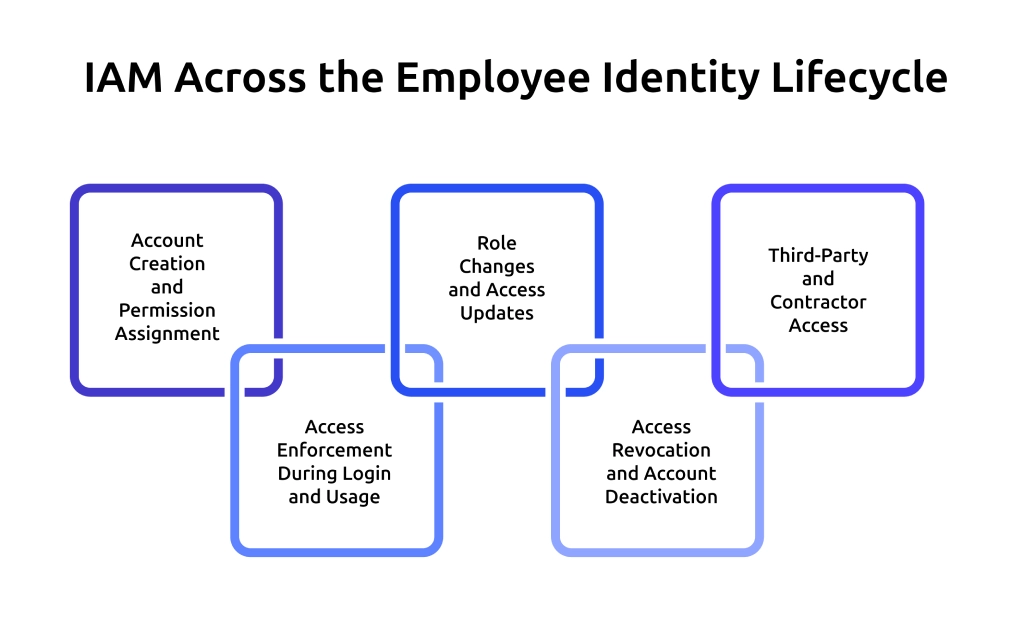
1. Account Creation and Permission Assignment
When a new hire joins, IAM creates accounts across all required systems and assigns permissions based on a predefined role. This step sets the access baseline from day one. A well-structured identity management system handles this automatically, reduces manual setup errors, and prevents giving more access than the role actually needs.
2. Access Enforcement During Login and Usage
When a user logs in and starts working, IAM checks their identity and allows only the actions their role permits. It verifies identity, checks assigned permissions, and allows only the actions that match the user’s role, especially in systems that require privileged access management. Real-time enforcement keeps access controlled while your team works across tools, aligning with a zero-trust approach that requires continuous verification during usage.
3. Role Changes and Access Updates
Roles change as your team takes on new responsibilities and moves across tasks. The identity management system updates permissions to match the current role and removes access that no longer applies. If you do not remove outdated permissions, users can keep access beyond what they need.
Accumulated permissions lead to privilege creep, a common risk in identity and access management solutions. Regular access reviews help you identify and correct this. They ensure every user keeps only the access required for their current role.
4. Access Revocation and Account Deactivation
When someone leaves, IAM deactivates their accounts and revokes access immediately. The harder problem is the window between resignation and departure. During a notice period, a departing employee still holds legitimate credentials and can access everything their role allows. IAM does not flag this because the access is technically authorized. That is the window that needs a separate layer of visibility.
5. Third-Party and Contractor Access
Contractors and vendors need access to specific systems for a limited time. Identity and access management (IAM) handles this by giving limited access for a specific period based on what the role requires. The challenge is that third-party users operate outside regular team structures.
They often receive fewer access reviews, and their activity is not always closely monitored. Identity and access management solutions can control what they can access, but they do not show how they use that access during their work.
How Time Champ Supports IAM with Employee Monitoring?
Controlling access is only one part of the picture. You also need to see how your team uses that access during actual work. Employee monitoring software adds this visibility layer. It gives you visibility into activity across tools, highlights unusual behavior, and helps you understand whether access aligns with the user’s role.
Time Champ bridges this gap with real-time activity tracking that shows exactly what happens after login. It tracks app and website usage, captures screenshots and screen recordings, and records keystrokes and mouse clicks to give you clear visibility into daily work. It also supports data loss prevention through file activity tracking, upload and download restrictions, and alerts for USB usage. These capabilities work alongside your IAM controls and help you identify risks that access permissions alone cannot reveal.
Conclusion
Identity and Access Management (IAM) gives you control over who can access your systems and what they can do. But control alone is not enough if you cannot see whether daily actions match the permissions you granted. Employee monitoring completes the picture. It helps you track activity, identify risks early, and ensure access stays aligned with actual responsibilities. When you use both together, you move from just managing access to maintaining clear, ongoing control over how it works in practice.
Understand employee activity across tools and platforms.
Try Time Champ for simple and reliable real‑time tracking.

Thasleem Shaik


Table of Content
-
 What Is Identity Access Management (IAM)?
-
What Is the Difference Between IAM and Employee Monitoring?
-
How IAM Works Across the Employee Identity Lifecycle?
-
How Time Champ Supports IAM with Employee Monitoring?
-
Conclusion
Instant Signup
Thank you for your request!
We have received your signup request and our team will get back to you soon. In the meantime, you can book a demo to see Time Champ in action.
Book a DemoFree trial. No credit card required. Prefer a walkthrough? Book a demo.
Related Blogs

The AI employee monitoring software goes beyond basic tracking. It predicts risks, reveals patterns, and gives you real clarity to lead your team better.
Shabana Shaik | Apr 17, 2026
Learn if your employer can monitor your personal phone after hours. Explore legal rules, real examples, and how to protect your privacy beyond work time.
Anjali | Apr 17, 2026
Find the best employee monitoring tools for 2026. Compare features, pricing, pros & cons to manage workforce performance and improve productivity.
Thasleem Shaik | Apr 17, 2026
Learn how to monitor employee internet usage with effective tips and tools to boost productivity, enhance security, and promote responsible online behavior.
Jahnavi Pulluri | Apr 17, 2026
Use a RACI matrix to plan employee monitoring to define roles, accountability, and governance. Get a free template, sample chart, and step-by-step guide.
Anjali | Apr 16, 2026
Explore how to implement employee monitoring software effectively with clear steps, legal tips, best practices, ROI metrics, and key pitfalls to avoid.
Anjali | Apr 15, 2026


 4.7/5 avg.
Ready to Manage Your Workforce Smarter?
Join our family of 1500+ companies using smart insights to redefine workforces!

Free Trial
No Credit Card Required