AI Employee Monitoring Software: What It Is & Why It Matters
The AI employee monitoring software goes beyond basic tracking. It predicts risks, reveals patterns, and gives you real clarity to lead your team better.
Scenario alert: Imagine a manager who has 40 remote employees. She has a dashboard full of data, screenshots, time logs, attendance, and everything an employee monitoring tool can offer. But on a Tuesday morning, when her best designer quietly starts a job search, nothing flags it, but three weeks later, a resignation letter randomly appears on her table. The thing is, the data was always there. The intelligence was not. Sector-specific work like employee monitoring financial services introduces requirements that differ sharply from general-purpose deployments.
That gap, between the data and intelligence, is exactly what AI employee monitoring software is designed to close.
In fact, according to an MIT study, 80% of companies now monitor remote or hybrid workers. Yet only a fraction says the data they collect is actually useful for decisions. The problem is not a lack of data. It is a lack of intelligence layered on top of it.
I am going to tell you how you can excel in AI employee monitoring in this blog, from the definition to strategies, and tools, everything will be covered. If you just want a particular piece of content, you can navigate through the table of contents.
What Is AI Employee Monitoring Software and How Is It Different from Regular Employee Monitoring?
Standard monitoring tracks what happened, AI monitoring figures out why it actually happened, and it even predicts what might happen next as well. Let’s take an example so that you understand better: an employee who used to spend 80% of their time in project tools is now spending most of it on non-work apps for three weeks straight, that’s exactly what you need to focus on, this is the early signal you need for clarity. Without AI, no manager would catch it across a 50-person team. AI brings this to your notice automatically.
To put it very simply:
- Standard monitoring tracks what happened
- AI monitoring analyzes why it happened and what it predicts
Traditional Monitoring vs AI Employee Monitoring Software
| Feature | Traditional Monitoring | AI Employee Monitoring Software |
|---|---|---|
| What it captures | Raw logs, time, apps, URLs | Behavioral patterns, trends, and anomalies |
| How it reports | Historical dashboards | Predictive alerts and actionable insights |
| Manager effort | High, manual analysis needed | Low, AI surfaces what matters |
| Attrition signals | Not detected | Flagged 30 or more days in advance |
| Security detection | Rule-based alerts | Behavioral anomaly detection |
| Productivity view | Activity volume | Focus on quality and tool efficiency |
| Automated reporting | Basic exports | AI-generated summaries and recommendations |

Did You Know?
Workers using generative AI tools save an average of 5.4% of their work hours (Federal Reserve Bank of St. Louis, 2025). AI monitoring software tells you which teams are actually capturing that gain and which are leaving it on the table.
Why Are So Many Businesses Moving Toward AI-Powered Employee Monitoring in 2026?
There are strong reasons why businesses nowadays are moving towards AI, like speed and accuracy that save more than 70% of the time spent doing manual tasks. Here are more reasons, if you want to understand this shift better:
Remote and Hybrid Work Changed Everything
More than 39% of knowledge workers now operate in hybrid or fully remote roles. When people are not in the same room, visibility does not happen naturally. It has to be built, and without the right systems in place, managers lose sight of how their teams are truly performing across distributed environments.
AI Tool Usage at Work is Growing Faster than Governance
Companies are adopting AI tools swiftly, in fact, 37.4% of US workers now use generative AI at work, up from 33.3% just a year earlier. Most companies have no idea how their employees are actually using tools like ChatGPT, Copilot, or Perplexity during work hours. AI monitoring software is built to track this specifically. As businesses begin introducing Custom AI agents for specialized workflows, visibility into how employees use these systems becomes even more important for governance, security, and productivity.
The Data Gap is Real and Expensive
Gone are the days when businesses used gut feeling to make workforce decisions, and nobody is doing those reports manually now because that costs time. Organizations are trying to automate every part of the business, so they can move things a lot faster, and when things move this fast, they need a faster tool that can log everything and keep leaders updated. That’s where AI employee monitoring covers all gaps and proves its efficiency. That’s why 61% of the companies use AI-powered analytics to measure employee productivity and behaviors.
What Can AI Employee Monitoring Software Actually Track?
Real-Time Activity and Productivity Monitoring
AI monitoring shows managers a real-time view of how each employee's workday is structured, which apps are active, for how long, and in what ratio to productive versus non-productive time. Research from WorkTime (2026) suggests most employees are genuinely productive for fewer than five hours in an eight-hour day. AI monitoring doesn't punish that, it shows where the gap lives so managers can fix conditions, not blame people.
Anomaly Detection: The AI Feature That Changes Everything
Anomaly detection is what separates AI monitoring from basic time tracking. The AI learns what the normal activity looks like for each employee individually and flags the moment something awkwardly shifts.Let's take a few examples here:
- A team member who typically logs seven active hours but has dropped to three for two weeks is flagged.
- A finance employee who suddenly accesses folders they've never opened before is flagged.
- And a doctor who knows your baseline vitals.
These alerts fire up not because a number crossed a universal threshold, but because your specific pattern changed. The software doesn't just record, it notices patterns.
Predictive Alerts Before Problems Become Crises
Predictive alerts come up before a situation becomes a problem, not the other way around. They're like these forward-looking signals triggering based on employee work pattern shifts, such as productivity declining over three weeks, idle time slowly creeping up while session length stays flat, and schedule compliance dropping across a team.The most valuable alert categories are attrition risk, burnout risk, compliance anomalies, and security anomalies. When the manager is finally able to spot a problem without data, they're usually two to four weeks behind where they needed to act.
Attrition Prediction and Disengagement Signals
Attrition prediction is what HR leaders care about most, and it's for good reason. Replacing an employee costs 50% to 200% of their annual salary, depending on the role.The AI watches behavioral signals over time, like lower active hours, reduced tool engagement, and longer idle periods. When multiple signals converge, the platform generates a risk score and surfaces that employee to HR, typically 30 or more days before a departure. That's enough time for a real conversation, a role adjustment, or a workload review.
Sentiment Analysis: Reading the Signals Between the Lines
Workforce monitoring sentiment analysis does not directly mean reading employee's personal messages. It involves the analysis of trends in employee interaction with work over time, is the response time slowing down? Is the use of project tools declining? Is there a change in session patterns that indicates frustration?The AI then combines these soft signals to create a trend line that informs the managers about whether a team is fired up or is quietly burning out. It is among the least used and least understood capabilities in the market.
Automated Reporting: From Raw Data to Ready Decisions
In the absence of AI, data monitoring will require a human to read, filter, and interpret dashboards manually before they become useful. Automated reporting removes that step. The platform generates productivity summaries, anomaly digests, and attendance reports on a schedule, landing in inboxes before the Monday standup, without anyone pulling the data manually.
Screen Monitoring with Privacy Built In
AI-powered screen monitoring is trigger-based, not the continuous type. In case the AI identifies weird behavior, it will record it, and managers do not need to go through thousands of random screenshots. Modern platforms have screenshot blur on sensitive data, role-based access controls, and employee visibility into their own data.
GPS Tracking and Field Workforce Monitoring
For the field teams, AI monitoring is expanded to GPS tracking, geo-verified attendance, and automated field reporting. A field manager overseeing 30 technicians across five cities sees in real time who is at the right site, when they clocked in, and whether any geofence alerts have fired, all without morning coordination calls or manual spreadsheet updates.
Data Loss Prevention and Insider Threat Detection
A single USB insertion is a log entry, that same USB insertion, plus large file transfers, plus after-hours access, is a behavioral anomaly that triggers an alert. The AI links dots between seemingly innocent events but creates a worrying pattern when combined.
Insider security threats are named as one of the major concerns in 71% of organizations. Rule-based DLP catches obvious violations, and AI-driven DLP catches the contextual, subtle patterns that represent the real risk.
AI Tool Usage Tracking
Organizations are deploying ChatGPT, Copilot, and Gemini within their organizations, yet the majority lack any idea of whether or how much employees are using them, or whether they are using them in the most suitable way. AI monitoring that tracks application usage highlights this data, showing who is adopting AI tools effectively and who needs training or guardrails
Keystroke and Mouse Activity Intensity
The AI systems do not read what employees type using keystroke monitoring. It measures engagement intensity, the rhythm of activity that indicates whether someone is actively working or idle. It's one signal among many, not a judgment on its own.
Did You Know?
The employee monitoring software market is projected to reach $23.1 billion by 2034. The growth is driven by businesses that need to manage distributed, AI-assisted workforces with real data, not assumptions.
Want to See How Time Champ Tracks All of This in One Place?
How Does AI Employee Monitoring Software Protect Employee Privacy?
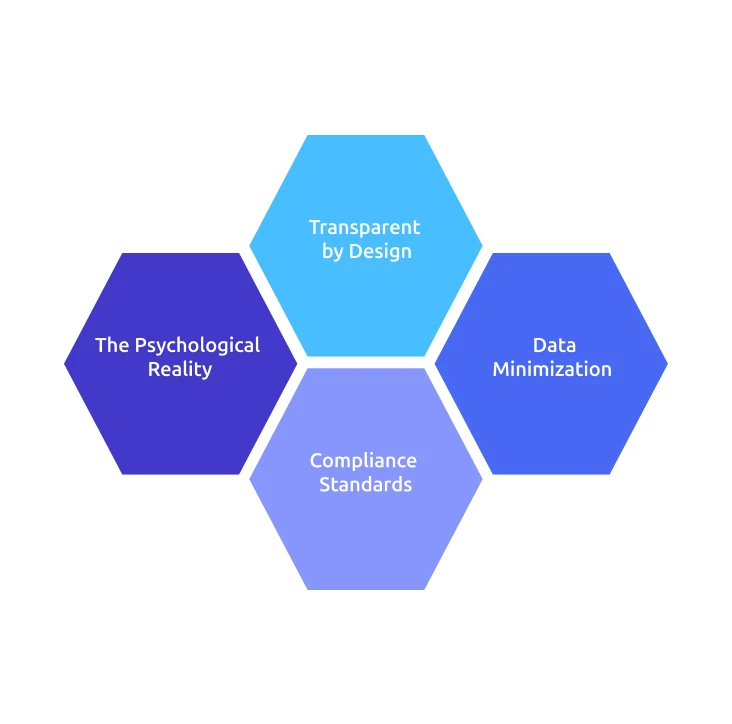
This deserves a genuine answer, not a checklist, so here it is:
Transparent by Design: 92% of employees accept productivity monitoring when it's transparent, and they have access to their own data. The discomfort almost never comes from the monitoring itself, it comes from opacity.
Data Minimization: Good platforms track what matters operationally. They don't record personal communications or capture content that has no business relevance.
Compliance Standards: SOC 2 Type II means an independent auditor has verified the platform's controls work as claimed. GDPR and CCPA compliance means employee data rights are managed according to law, including the right to access and understand personal data.
The Psychological Reality: 54% of employees would consider leaving over excessive monitoring. The solution isn't to stop monitoring, it's to implement it transparently. Only 30–40% of employees are comfortable with monitoring by default, but 92% accept it when it's tied to improving their performance or wellbeing. Which tells us the technology isn't the issue, but the implementation is everything.
Who Gets the Most Out of AI Employee Monitoring Software?
There are multiple industries that benefit from AI employee monitoring, here are a few for reference:
Agencies and BPOs: Billing Accuracy and Agent Performance
Agencies billing by the hour lose revenue every time the tracking is manual, billable hours get missed, projects run over without warning, and invoicing becomes reconciliation. AI monitoring captures every hour automatically, classified against the right project and client. For BPOs, real-time productivity visibility and audio tracking for QA adds the layer that keeps agent performance consistent and coaching data-backed.
Remote and Hybrid Teams: Visibility Without Micromanagement
Remote work created a visibility gap that most managers filled with either constant check-ins or operating blind. AI monitoring closes that gap without adding overhead, managers can see activity, tool usage, productivity trends, and early disengagement signals without needing anyone to stop working to give an hourly status update.
Construction and Field Service: GPS, Geofencing, and Compliance
Attendance verification across multiple sites is one of the most time-consuming admin tasks in field operations. Geo-verified clock-ins, geofence alerts, and automated field reports change this entirely. Compliance is verified automatically, and site managers spend less time on administration.
HR Leaders and People Teams: Attrition and Engagement Intelligence
When the disengagement becomes visible without data, it's usually been building for weeks. AI monitoring gives HR a 30-plus-day early warning window through behavioral pattern analysis. Combined with burnout and overutilization signals, people teams can shift from responding to departures to preventing them.
IT and Security Teams: Insider Threat Detection and DLP
Always know that the most dangerous security threats are often the least visible. AI-driven DLP monitors behavioral patterns across file activity, USB connections, website access, and application usage, flagging contextual anomalies in real time before a data loss event occurs.
See how teams like yours are using Time Champ to close the visibility gap.
What Should You Look for When Choosing AI Employee Monitoring Software?
Make sure you check this list off when choosing an AI employee monitoring tool:
AI Insights vs. Raw Data Dashboards: Ensure that the platform tells you what to act on, or does it show you data and leave interpretation to you? This is the most important distinction in the market.
Attrition and Burnout Prediction: Verify that it uses multi-signal behavioral analysis, not just a single metric.
Privacy Controls: Screenshot blur, configurable monitoring scope, role-based data access, and employee-facing data visibility are non-negotiable.
Anomaly Detection: Individual baselines beat global thresholds. Ask whether alert sensitivity is personalised or uniform across all employees.
Automated Reporting Quality: Reports should surface insights, not just export raw data.
Compliance Certifications: SOC 2 Type II, GDPR, and CCPA are the minimum bar for any platform handling employee data.
Integration Capabilities: Monitoring data is most useful when it connects to your existing HR, payroll, and project management tools.
Mobile and GPS for Field Teams: If any part of your workforce is in the field, GPS tracking and offline time capture are requirements, not add-ons.
How Time Champ Approaches AI-Powered Workforce Monitoring
If you have already experienced it, you will know that most teams end up stitching 3 to 5 tools together because
Most teams evaluating monitoring software end up stitching together three to five separate tools, a time tracker, an attendance system, a productivity monitor, a project tool, and something for HR analytics. None of them talk to each other, and the manager who needs a clear picture ends up manually reconciling dashboards that never quite align with the actual needs.
Instead of juggling five different tools that never quite talk to each other, Time Champ brings everything into one place, so you always know what's going on
Attrition prediction in Time Champ is built as people intelligence, not surveillance, a unified risk index per employee, built from activity patterns, work-life balance signals, and burnout indicators, with enough lead time for HR to act meaningfully. Screen monitoring comes with privacy controls built in from the start: screenshot blur, role-based access, encrypted storage, and configurable frequency. Productivity classification is real-time, with every app and website labeled against what productivity actually means for your team's specific work.
Predictive alerts, automated reporting, and DLP behavioral analysis are all part of Time Champ, not separate modules you configure independently.
Common Misconceptions About AI Employee Monitoring Software
Someone is Watching Employees All the Time: AI monitoring does not ask anyone to watch a live feed. The platform monitors patterns, surfaces anomalies, and delivers automated alerts. Managers only engage with it when it has something worth their attention.
Employees Always Push Back: Resistance is almost always about implementation, and never about principle. When you introduce monitoring transparently, with clear communication and employee access to their own data, acceptance rates go consistently high.
It's Only for Large Enterprises: AI monitoring scales from teams of five to five thousand. Smaller teams often see the fastest return because the automation layer removes admin overhead that takes a disproportionate amount of time at a smaller scale.
It Creates a Culture of Distrust: A culture of distrust comes from how the management behaves with employees, not monitoring tools. When managers use data to remove friction and support the employees fairly tend to find that monitoring is what makes the environment more equitable for all.
Screenshots are Inherently Invasive: Context changes everything here. Taking periodic screenshots in a billing environment? That's just standard practice. Recording activity when something unusual happens? That's a security measure. Neither one is the same as silently watching someone's every move, and with Time Champ, you decide which approach makes sense for your team.
Time Champ Gives You That Clarity, From day one, Zero Complex Setup, Zero Guesswork.
Conclusion
AI employee monitoring software doesn't replace the human side of management, it just strengthens it. When you can see what's actually happening across your team, you stop reacting to unnecessary stuff and start leading.
So, choose a tool that works with your policies, not against them. Also, don’t forget to look out for easy setup and navigation, I mean, who really wants to struggle with a complex tool, right.
Always Remember: Better visibility means better decisions for your team and for your business.

Shabana Shaik


Table of Content
-
 What Is AI Employee Monitoring Software and How Is It Different from Regular Employee Monitoring?
-
Why Are So Many Businesses Moving Toward AI-Powered Employee Monitoring in 2026?
-
What Can AI Employee Monitoring Software Actually Track?
-
How Does AI Employee Monitoring Software Protect Employee Privacy?
-
Who Gets the Most Out of AI Employee Monitoring Software?
-
What Should You Look for When Choosing AI Employee Monitoring Software?
-
How Time Champ Approaches AI-Powered Workforce Monitoring
-
Common Misconceptions About AI Employee Monitoring Software
-
Conclusion
Related Blogs
Learn about employee monitoring laws, what they mean for businesses, and how they protect employee privacy and rights.
Shabana Shaik | Jul 10, 2024
Explore the top questions about employee monitoring, including legal requirements and best practices to ensure compliance and protect privacy.
Thasleem Shaik | Jul 29, 2024
Learn about the detailed pros and cons of employee monitoring to better understand its overall impact on employees and employers.
Shabana Shaik | Oct 16, 2024
Choose the right employee monitoring tool for your team with this 2026 guide. Explore types, key features, a 5-step framework, and top software options.
Jahnavi Pulluri | Apr 13, 2026
Find the best employee monitoring tools for 2026. Compare features, pricing, pros & cons to manage workforce performance and improve productivity.
Thasleem Shaik | Apr 02, 2026
Uncover the chaos of a day without time tracking. Explore how managers struggle with productivity, accountability, and team coordination in this insightful read.
Jahnavi Pulluri | Oct 25, 2024


 4.7/5 avg.
Ready to Manage Your Workforce Smarter?
Join our family of 1500+ companies using smart insights to redefine workforces!

Free Trial
No Credit Card Required