A Day Without Time Tracking: A Manager's Nightmare
A day without time tracking can create chaos for managers. Learn how to improve visibility, reporting accuracy, and productivity with time tracking.

Everything seems normal, until someone asks a simple question: “How much progress did we make yesterday?”
You check the reports, look for updates, and try to piece together what happened across projects, but there's a problem, no time entries, no activity records, and no clear view of where the team's hours went.
That's when uncertainty starts creeping in. A simple progress update now requires multiple conversations and getting a clear understanding of what's happening across the team takes far more effort than it should.
A single day without time tracking is often all it takes to expose gaps in visibility, accountability, and project planning. Let's take a closer look at what happens when that visibility disappears.
What Happens When You Stop Tracking Time for a Day?
A day without time tracking may seem manageable at first, but the cracks appear quickly. Progress becomes harder to measure, workloads are difficult to balance, and simple questions suddenly take far too long to answer.
Let's walk through a typical day.
9 A.M: Progress Updates Without Proof
Everyone says they're on track, and the updates sound positive enough. Still, you're left thinking about which tasks are genuinely moving forward, and which ones are simply taking longer than expected. Without time data, it's hard to know for sure.
12 P.M: Deadlines Start Slipping
The design project was estimated at 20 hours, but it's clearly taken more time than planned. A few extra revisions, a last-minute change, and suddenly the hours start adding up. The problem is that nobody knows exactly where the extra time went, and by the time the issue becomes obvious, the deadline is already approaching, and the team is scrambling to catch up.
3 P.M: Missing Hour Breakdown
A client asks for a breakdown of project hours. Normally, you'd pull up a report and send it over. Instead, you're piecing together timelines from emails, meetings, and chat messages, trying to remember who worked on what. What should have been a quick response now takes far longer than it needs to.
6 P.M: Hours Left Uncounted
It's the end of the day, and payroll needs to be finalized. A few employees put in extra hours, but not all of them reported it. When it's time to process payroll, there's no reliable record to check. You're left relying on conversations and memory to fill in the gaps, making it easier for overtime hours to be missed or miscalculated.

Did You Know?
According to the Grand View Research Report, the time tracking software market is expected to nearly triple in size, growing from USD 6.13 billion in 2025 to USD 17.39 billion by 2033, driven by the rise of digital workplaces.
Challenges of Working Without Time Tracking
The effects of not tracking time don't always show up immediately. Projects still move forward, meetings still happen, and deadlines may even seem under control. Under the surface, small gaps in visibility start creating bigger problems.
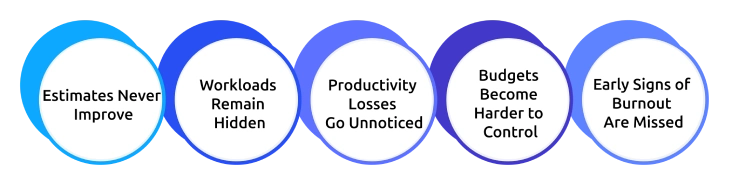
1. Estimates Never Improve
Have you ever set a deadline and then seen the project take twice as long as expected? Without historical time data, it's difficult to know how much effort similar work took in the past. As a result, future estimates turn into guesses, which leads to missed deadlines and unrealistic expectations.
2. Workloads Remain Hidden
A status meeting can make everyone sound equally busy, but reality might often be different. One employee may be handling multiple priorities while another has room to take on more work. Without visibility into time spent, these imbalances can go unnoticed, leading to bottlenecks, frustration, and eventually burnout.
3. Productivity Losses Go Unnoticed
A few extra meetings, constant interruptions, and frequent context switching may not seem like a major problem individually. However, they can consume hours of productive time each week. Without tracking how work hours are actually spent, these hidden productivity drains are easy to overlook.
4. Budgets Become Harder to Control
Project costs rarely exceed budgets overnight. More often, they increase gradually through untracked hours, unexpected revisions, and scope changes. Without clear visibility into where time is being spent, you may not recognize the problem until resources and budgets are already stretched thin.
5. Early Signs of Burnout or Disengagement Are Missed
Employees don't usually announce that they're overwhelmed or losing motivation. The first signs often appear in their work patterns, such as slower progress, declining output, or inconsistent activity. Without time data, these warning signs are harder to find, making it more difficult to provide support before problems escalate.
When time isn't tracked, work doesn't suddenly stop, it simply becomes harder to manage. Small visibility gaps can lead to inaccurate estimates, uneven workloads, budget overruns, and missed warning signs. The longer those gaps remain hidden, the harder they become to fix.
Impact of Implementing Time Tracking
Things don’t suddenly become perfect, but they become clearer. Instead of depending on memory and scattered updates, you start seeing actual hours, real progress, and visible workloads.
Here’s what changes before and after implementing time tracking.
| Without Time Tracking | With Time Tracking |
|---|---|
| Work progress is unclear, and isn’t defined the same way across teams. | Progress is measured through actual logged hours and real task activity. |
| Delays are usually identified close to deadlines. | Slippage can be detected earlier through time data. |
| Payroll and billing rely on manual inputs or memory. | Hours are recorded and available for reporting. |
| Workload distribution is not always visible. | Workload distribution is visible across the team. |
| Status updates are requested repeatedly. | Status information is readily available. |
Want to Maximize Productivity with Better Visibility and Smarter Planning?
Track every hour effortlessly and get complete workforce visibility.
How to Roll Out Time Tracking without Breaking Trust?
If your team doesn’t trust the reason behind time tracking, they won’t trust the system either. How you roll it out makes all the difference.
Here are a few simple steps you can follow.
1. Explain the Purpose Before the Tool
Start with the problems you’re trying to solve, like unclear workloads, unreliable estimates, and last-minute deadline pressure. When employees understand the reason behind the change, they’re more likely to adopt the software.
2. Be Clear About What Is Tracked
Avoid ambiguity, clearly communicate what the system records, how it works, and what it does not track. Transparency helps remove unnecessary assumptions and concerns.
3. Use the Data to Improve, Not to Monitor
When the data highlights overloads or imbalances, don’t just observe it, act on it. Use these insights to redistribute workloads, support teams that are under pressure, and fix gaps early.
4. Start Small and Refine
Start with a small group, review the data, and improve the process before rolling it out to everyone. This keeps the approach practical and based on real feedback.
For more details on implementation, refer to our blog on time tracking best practices.
Why Time Champ is the Right Time Tracking Solution for Managers
Time tracking only works when it gives you clarity, not extra workload. And that is possible with Time Champ.
Time Champ is a time tracking and employee monitoring software designed to help you gain clear visibility into how work happens across the organization, without depending on manual updates or constant follow-ups. It brings all work-related information into one place so you can manage teams, projects, and priorities with ease.
Here are the key features:
- Automatic Time Tracking: Automatically records work hours as users perform tasks across the system. It captures start time, end time, and ongoing activity in real time without manual entry.
- Idle Time Tracking: Monitors user activity and identifies inactive periods during working hours. It separates idle time from active work time, helping you clearly understand how work hours are actually spent.
- Attendance Management: Records employee login and logout times, and generates reports, helping you get quick and accurate workforce insights.
- Project & Task Management: Tracks and records time entries against specific projects and individual tasks. It logs how time is distributed across different work items within a project.
- Automatic Timesheet Generation: Generates recorded work activity into structured timesheets and organizes time entries into daily, weekly, or project-based records.
- Budget Threshold Alerts: Allows you to set project budgets and get alerts when costs cross the threshold, helping you avoid overspending.
- Reports & Analytics: Generates detailed reports on productivity, attendance, and project performance and provides structured insights for better decision-making.
- Seamless Integrations: Integrates well with HR, payroll, and project management tools, allowing seamless data sharing across applications.
See Exactly Where Time Goes and Improve Every Project Decision
Get started with Time Champ today for smarter time tracking!
Conclusion
Without time tracking, you struggle with limited work visibility, leading to missed deadlines, uneven workloads, and unclear progress across projects. Small inefficiencies go unnoticed and gradually turn into bigger challenges that affect productivity and planning. With Time Champ, you get structured visibility into how time is spent across teams and projects. It brings clarity through real data, helping you plan better, balance workloads, and make more informed decisions.

Jahnavi Pulluri

Table of Content
 What Happens When You Stop Tracking Time for a Day?
- Challenges of Working Without Time Tracking
- Impact of Implementing Time Tracking
- How to Roll Out Time Tracking without Breaking Trust?
- Why Time Champ is the Right Time Tracking Solution for Managers
- Conclusion

Related Blogs
Looking for the best freelance time tracking software? Explore the top free and paid tools to track work hours, manage projects, and improve productivity.
Guna Lakshmi | May 18, 2026
Discover essential time-tracking features that improve productivity, payroll accuracy, and workforce visibility, and learn how to use them effectively.
Guna Lakshmi | May 16, 2026
Create a clear time tracking policy to boost productivity and ensure accurate work-hour reporting. Download a free customizable template.
Thasleem Shaik | Oct 04, 2024
Discover effective time tracking methods to boost efficiency, manage resources, and ensure timely project delivery. Find the best method for your organization.
Tarun Kumar Reddy | Aug 16, 2024
Unorganized work hours? Time tracking categories bring clarity, optimize workflows, and boost productivity. Learn how to set them up effectively.
Thasleem Shaik | Nov 08, 2024
Time tracking software vs manual timesheets: compare accuracy, cost, effort, and ROI to pick the right solution for improving your team's productivity.
Jahnavi Pulluri | May 15, 2026


 4.7/5 avg.
Ready to Manage Your Workforce Smarter?
Join our family of 1500+ companies using smart insights to redefine workforces!

Free Trial
No Credit Card Required