Productivity Styles: 4 Types + How to Find Yours in 5 Minutes
Discover the 4 productivity styles, learn how to identify yours, and explore the best methods and tools to improve focus, teamwork, and work performance.

Some team members start their day with the hardest task, follow a detailed schedule, and finish work early with everything planned out. Others move between multiple projects, avoid rigid plans, and still complete important work on time. Both approaches work well because they reflect different productivity styles.
Problems begin when teams force the same way of working on everyone. When your natural workflow conflicts with team expectations or daily processes, work starts feeling difficult and exhausting. That mismatch often leads to missed deadlines, lower motivation, communication gaps, and the constant feeling of falling behind even after putting in extra effort.
Understanding different types of productivity styles helps you work in a way that matches how you naturally think, plan, communicate, and complete tasks. This guide explains the four core productivity styles, shows how to identify your own style, and breaks down how mixed-style teams can collaborate more effectively.
What Are Productivity Styles?
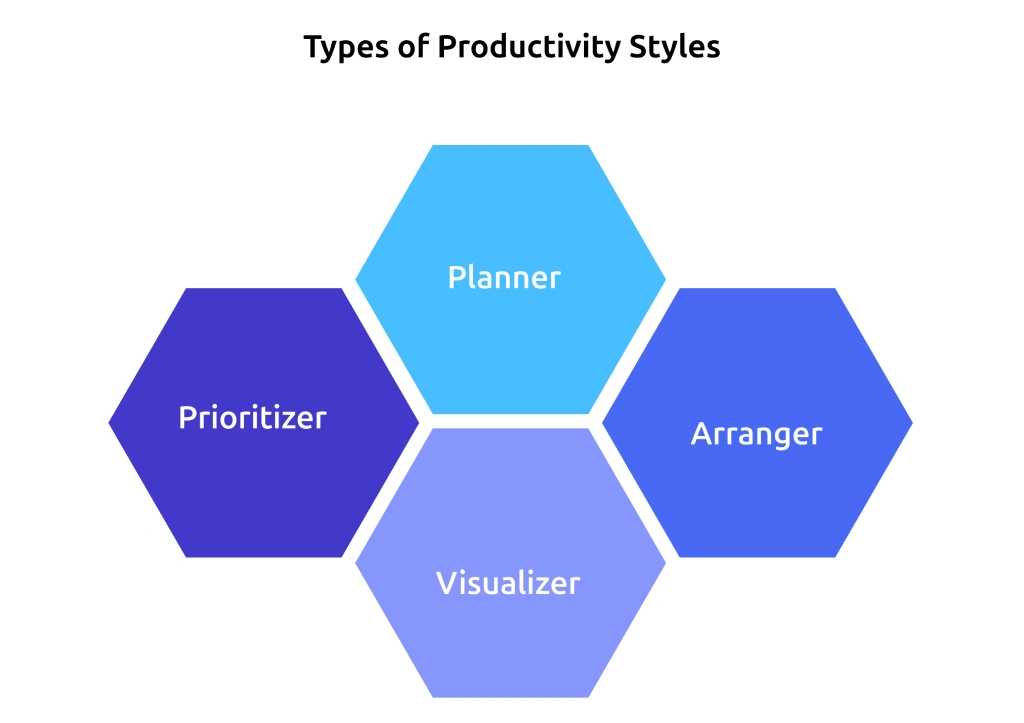
Productivity styles describe the natural way you process information, organize tasks, communicate with others, and complete work. Productivity expert Carson Tate developed one of the most widely used frameworks for this concept, identifying four core styles: Prioritizer, Planner, Arranger, and Visualizer.
Most productivity systems fail because they assume everyone works the same way. Some team members prefer structure, schedules, and step-by-step execution, while others perform better with flexibility, collaboration, or big-picture thinking. A method that improves focus for one person may slow someone else down completely.
That is why understanding different productivity styles matters. Once you recognize how your brain naturally approaches work, planning becomes easier, communication improves, and daily tasks feel more manageable instead of overwhelming. Instead of forcing yourself into systems that do not fit, you can build workflows that match how you already think and operate.
According to Carson Tate, the Productivity Style Assessment uses a 28-item framework to identify how different individuals approach work and productivity. The assessment helps you understand which work strategies, planning methods, and communication styles align best with your natural thinking preferences.
What Are the 4 Productivity Styles?
Not everyone organizes work in the same way. Some team members prefer detailed schedules and clear goals, while others perform better with flexibility and fast-moving ideas. That difference is not random. It comes down to your productivity style.
Carson Tate developed the four core types of productivity styles through her 28-item Productivity Style Assessment. Tate built the framework through years of research and real workplace observations. Each style reflects how your brain naturally processes information, structures tasks, communicates with others, and completes work. Here is what each productivity style looks like in real work environments.
1. Prioritizer
The Prioritizer thinks analytically. This productivity style focuses on results, efficiency, and fast decision-making. Prioritizers quickly identify what matters most and avoid spending time on unnecessary discussions or distractions.
Give a Prioritizer a project, and the first questions usually sound like this: What is the goal? What does the data show? What is the fastest way to complete this? They prefer direct communication, clear expectations, and measurable outcomes.
You can often spot a Prioritizer through their communication style. Emails stay short, direct, and focused on action. Conversations move quickly toward decisions and next steps. That approach may feel intense in collaborative settings, but Prioritizers simply value speed and clarity.
Where They Perform Best: Data-driven projects, fast-paced environments, deadline-focused work, and operational planning.
Where They Struggle: Slowing down for lengthy discussions, emotional conversations, or unclear decision-making processes.
Common Roles: Financial analyst, operations lead, project manager.
Useful Resource: Creating a strong time management plan helps Prioritizers organize work efficiently while staying focused on high-impact tasks.
2. The Planner
The Planner does not just prefer a plan. This style depends on structure, order, and step-by-step execution. Planners feel most comfortable when every task, deadline, and process follows a clear sequence.
Their signature question is HOW. How will this work? How long will each step take? How has this process worked before? Before starting a project, Planners usually want timelines, detailed instructions, and a clear roadmap.
Carson Tate notes that some Planners even write down tasks they have already completed just to cross them off the list. The satisfaction comes from staying organized and seeing visible progress.
Where They Perform Best: Structured projects, process-driven work, compliance tasks, and long-term planning.
Where They Struggle: Unclear priorities, unpredictable changes, or workflows that change daily.
Common Roles: Project manager, event coordinator, operations specialist.
Useful Resource: Time blocking templates fit naturally with how Planners already organize their work and schedules.
3. The Arranger
The Arranger focuses heavily on relationships and collaboration. This productivity style pays close attention to team communication, group alignment, and how everyone works together before moving a project forward.
Their signature question is WHO. Who needs to know about this? Who can support this project? Who should join the discussion? Arrangers naturally build strong connections across teams and help communication flow more smoothly during collaborative work.
You can usually spot an Arranger through their communication habits. Their emails often include multiple team members, and their calendars stay filled with discussions, check-ins, and collaboration sessions. They prefer talking through ideas instead of working in isolation.
Where They Perform Best: Stakeholder communication, team collaboration, relationship-focused work, and culture-building activities.
Where They Struggle: Independent deep-focus work or highly isolated tasks.
Common Roles: HR, customer success, account manager, team lead.
Useful Resource: Flexible work schedules give Arrangers more room to manage collaborative and relationship-driven responsibilities effectively
4. The Visualizer
The Visualizer notices the bigger picture before others do. This productivity style connects ideas across different areas, explores new possibilities quickly, and loses interest when work becomes repetitive or overly structured.
Visualizers constantly ask questions that challenge the process. Why does this matter? Why are we approaching it this way? Why not explore a different idea? They enjoy brainstorming, creative thinking, and finding connections that others may overlook.
This style often brings fresh ideas and innovative solutions into teams. At the same time, Visualizers jump between ideas quickly, send long, thought-heavy emails, or leave projects unfinished while exploring the next opportunity. According to Carson Tate’s research, Visualizers perform best in short, focused bursts of work instead of long, rigid schedules.
Where They Perform Best: Strategy, innovation, creative direction, and early-stage problem-solving.
Where They Struggle: Repetitive detail work, process-heavy tasks, and highly structured workflows.
Common Roles: UX designer, founder, creative director, strategist.
Useful Resource: Building continuous feedback loops helps Visualizers stay connected to progress and outcomes without limiting creativity.
5. The Adapter (Bonus Style)
This productivity style falls outside Carson Tate’s original four styles. The Adapter does not rely on one dominant approach. Instead, Adapters shift between the Prioritizer, Planner, Arranger, and Visualizer styles depending on the task, project, or team environment.
That flexibility makes Adapters highly effective in cross-functional and generalist roles. At the same time, constant switching between styles can create confusion during high-pressure situations when no clear working approach takes priority.
If you relate to parts of all four productivity styles, you may fall into the Adapter category.
How Do You Find Your Productivity Style in 5 Minutes?
Knowing your productivity style helps you optimize your workflow and reach goals faster. Here are some practical steps that will help you identify your natural approach to work:
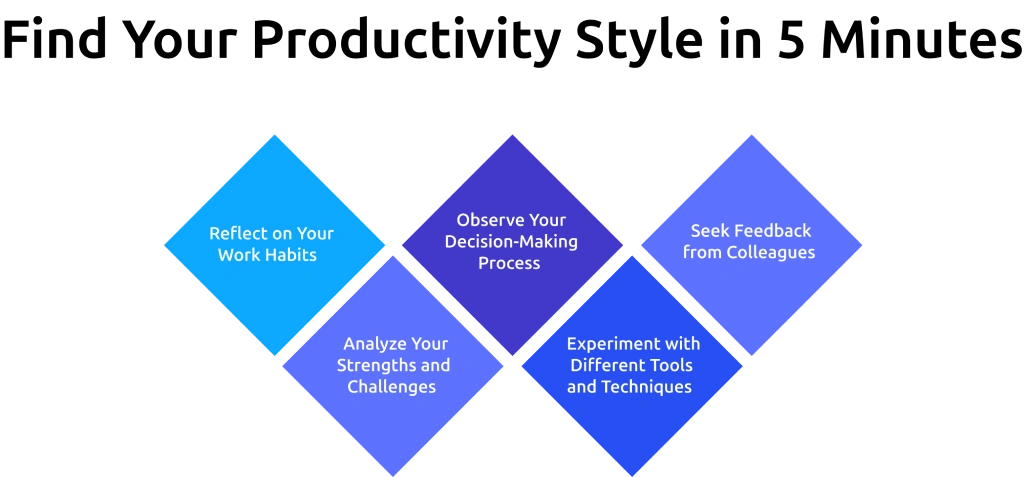
1. Reflect on Your Work Habits
Pay attention to how you approach your tasks and projects. Do you find yourself doing better with a structured, detailed plan or by working in flexible, fast-changing environments? Knowing your preference reveals your working style.
2. Analyze Your Strengths and Challenges
Consider areas where you are at your best and where challenges lie. For example, are you great at prioritizing tasks but struggle with creativity, or do you prefer brainstorming ideas over execution? These traits help reveal your dominant style.
3. Observe Your Decision-Making Process
Think about how you make decisions and solve problems. Do you rely on data and logic, emphasize relationships and teamwork, or focus on the bigger picture? Your decision-making tendencies can reveal whether you’re a Prioritizer, Planner, Arranger, or Visualizer.
4. Experiment with Different Tools and Techniques
Test several productivity tools, such as to-do lists, planners, Kanban boards, or mind maps. See which ones feel most natural and produce the best results. The methods you are drawn to tend to align with your productivity style.
5. Seek Feedback from Colleagues
Sometimes, other people might see patterns in your work habits that you miss. Ask colleagues for feedback on how you approach tasks and collaborate with the team.
Explore your tendencies to find out which productivity style fits you best. Once you know what your style is, you can begin adopting strategies and tools that are fit for your strengths.
What Tools and Methods Fit Each Productivity Style?
Knowing your productivity style is only half the work. The next step is choosing methods and tools that match how you naturally think and work. When your workflow aligns with your style, planning feels easier, tasks become more manageable, and work becomes easier to handle consistently.
1. For the Prioritizer Style
The Prioritizer style focuses on data, speed, and clear outcomes. Prioritizers work best with methods that prioritize tasks quickly and maintain focus.
Methods to Try
- The Eisenhower Matrix to separate urgent work from important work quickly.
- Eat the Frog to complete the highest-priority task before other work takes attention.
- Time blocking techniques to protect focused work hours from interruptions.
Tools That Fit
- A simple task manager with clear priorities and deadlines.
- A calendar with dedicated time blocks for focused work.
2. For the Planner Style
The Planner style works best with structure, sequence, and clear visibility into upcoming tasks and deadlines. Organized systems and predictable workflows help Planners stay focused and consistent.
Methods to Try
- GTD (Getting Things Done) to capture tasks and organize them into a reliable system.
- Time blocking with dedicated slots for specific projects or task categories.
- Weekly reviews to track progress, clear pending tasks, and prepare for the upcoming week.
Tools That Fit
- A detailed project management app with task dependencies and deadlines.
- Daily and weekly planning templates to organize schedules and priorities clearly.
3. For the Arranger Style
The Arranger style focuses heavily on relationships and collaboration. Arrangers thrive with methods and tools that support communication, teamwork, and shared visibility.
Methods to Try
- Day theming to dedicate specific days for similar types of work, such as team discussions, planning sessions, or focused work.
- Collaborative Kanban boards to track shared tasks in a visible team workspace.
- Async check-ins to maintain communication without adding unnecessary meetings to the calendar.
Tools That Fit
- Shared boards where teams can track progress together in real time.
- Communication tools for quick updates and ongoing team collaboration.
- Video stand-ups for short face-to-face discussions without long meetings.
4. For the Visualizer Style
The Visualizer style runs on big ideas, creative connections, and short bursts of intense focus. Visualizers thrive with flexible methods that support brainstorming, visual thinking, and focused execution.
Methods to Try
- Mind mapping to explore ideas visually before narrowing them into a clear plan. For visual projects such as video, AI storyboarding can extend this approach by helping teams organize concepts, plan scenes, and create a clearer structure before production.
- Vision boards or project roadmaps to keep larger goals visible during execution.
- Pomodoro Technique for focused execution, since Visualizers often work best in 20 to 30-minute productivity sprints.
Tools That Fit
- Visual workspace platforms and digital whiteboards for brainstorming and idea generation.
- Project roadmap tools that highlight goals, progress, and long-term direction instead of only detailed task lists.
One important point across all four productivity styles is that distraction management looks different for each one. According to the American Psychological Association, switching between tasks can reduce productivity by up to 40%. That impact affects Prioritizers and Planners more because both styles depend heavily on uninterrupted focus time. This is why learning how to manage distractions becomes a style-specific skill instead of a one-size-fits-all solution.
For a broader breakdown of productivity systems beyond style-specific methods, the guide to top productivity methods explains each approach with detailed examples and practical use cases.
How Does Time Champ Support Different Productivity Styles?
Teams work differently, and productivity tracking becomes ineffective when every role follows the same monitoring structure. Different work styles need different types of visibility, reporting, and workflow support to measure productivity accurately. Prioritizers usually focus on output and focused work hours; planners depend on deadline visibility and structured workflows. Arrangers need collaboration visibility across teams, and Visualizers prefer broader productivity trends and visual insights. Time Champ is an employee monitoring software with built-in workforce intelligence that adapts to these different work patterns instead of forcing everyone into the same reporting structure.
With Time Champ, productivity tracking goes beyond login hours and mouse activity. Prioritizers can track productivity reports, focused work sessions, and idle time patterns clearly. Planners benefit from structured dashboards, project timelines, task tracking, and workforce analytics that improve workflow organization. Arrangers gain visibility into collaboration patterns, shared workloads, and team productivity trends, while Visualizers can understand performance through heatmaps, visual reports, and broader activity insights. If you want to understand how different productivity styles operate during the workday, Time Champ’s employee productivity software gives you that visibility in one place.
Conclusion
No productivity style is better than another. Each one approaches work differently, solves problems differently, and contributes value in its own way. Once you understand your productivity style, it becomes easier to choose the right methods, communicate more effectively, and build work routines that actually fit how you think. The same applies to teams as well. When different productivity styles work with the right structure, collaboration becomes smoother, workloads feel more balanced, and productivity improves naturally instead of feeling forced.
Enhance your work style with Time Champ.
Maximize efficiency and achieve more effortlessly.

Thasleem Shaik

Table of Content
 What Are Productivity Styles?
- What Are the 4 Productivity Styles?
- How Do You Find Your Productivity Style in 5 Minutes?
- What Tools and Methods Fit Each Productivity Style?
- How Does Time Champ Support Different Productivity Styles?
- Conclusion

Related Blogs

Find practical tips to improve team productivity, reduce distractions, and help your team stay organized, focused, and accountable throughout the workday.
Thasleem Shaik | May 08, 2026
Explore how employee engagement impacts productivity with real data insights, trends, and what teams should focus on to improve performance.
Thasleem Shaik | May 06, 2026
Discover 10 productivity tracking challenges, why they happen, and how to fix them with clear steps that improve accuracy and team performance.
Thasleem Shaik | May 06, 2026
Align business goals with employee performance using productivity tracking. Close the visibility gap and keep strategy in sync with daily work.
Thasleem Shaik | May 11, 2026
Explore 8 key trends shaping the future of employee productivity tracking, including AI, workforce intelligence, hybrid work, and wellbeing analytics.
Thasleem Shaik | May 13, 2026
Understand the role of productivity tracking in remote work and how it improves team clarity, workload balance, and performance with real insights.
Thasleem Shaik | May 01, 2026


 4.7/5 avg.
Ready to Manage Your Workforce Smarter?
Join our family of 1500+ companies using smart insights to redefine workforces!

Free Trial
No Credit Card Required