10 Productivity Tracking Challenges: Causes and Fixes
Discover 10 productivity tracking challenges, why they happen, and how to fix them with clear steps that improve accuracy and team performance.

Productivity tracking is the process of measuring how your team spends work time, completes tasks, and whether output matches effort. It gives you clear data to make faster, confident decisions on capacity, performance, and priorities.
Most teams that struggle with productivity tracking software do not face a tool problem. The issue comes from setup, adoption, or how teams use the data for decisions. Data keeps collecting, but it does not connect to real actions, and over time, the system loses credibility.
This guide covers the 10 most common productivity tracking challenges, what causes each one, and how to fix them with steps your team can act on today.
The Most Common Productivity Tracking Challenges
Below are the key productivity tracking challenges that teams face at different stages, from rollout to daily use and decision-making. Each one highlights a specific issue and shows how to fix it.
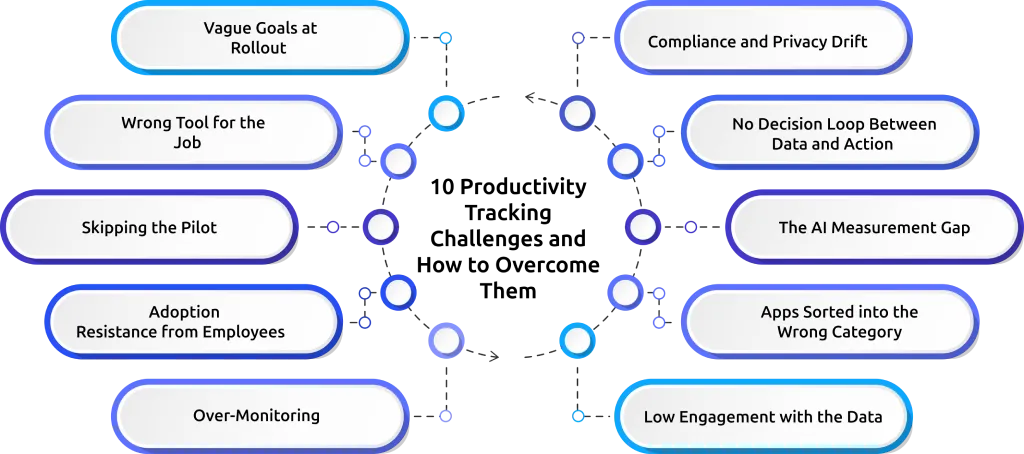
Challenge 1: Vague Goals at Rollout
- What Happens:You set up productivity tracking and start collecting data, but no one can clearly say what success looks like. Weeks pass, dashboards fill up, and still, there is no clear answer to whether the system is working.
- Why It Happens:The decision to startproductivity tracking is often based on a general need to improve performance, without defining what needs to change. Without clear outcomes, the data collected does not point to any specific goal or direction.
- How to Fix It: Before starting, define 2 to 3 clear outcomes you want from productivity tracking software. For example, reduce idle time, improve on-time delivery, or balance team workload. Tie each outcome to a measurable metric and review it after a fixed period.
- Leading Signal:Your kickoff meeting ends without anyone defining what success looks like in measurable terms.
Challenge 2: Wrong Tool for the Job
- What Happens: You buy a time tracking tool when you actually need a productivity tracking tool. The dashboard cannot answer the questions you set out to answer, even though the reports look detailed.
- Why It Happens: There is confusion between time tracking and productivity tracking tools. Time tracking measures hours spent on tasks. Productivity tracking captures focus, app usage, and work patterns. When the selection focuses on features instead of actual needs, the tool fails to deliver the right insights.
- How to Fix It: Define the exact questions before choosing any productivity tracking software. For example:
- How much focused work time does the team have each day?
- Which apps or tools take up most of the work hours?
- Where does time get lost during the day?
- How balanced is the workload across the team?
Match each question to a feature or report. If the tool cannot clearly answer even one of these, it is not the right fit.
- Leading Signal: Your evaluation criteria look like a feature checklist rather than a list of questions you need answered.
Choosing the wrong productivity tracking tool leaves you with data that does not answer your questions.
Use Time Champ productivity tracking software to track work clearly and make better decisions from day one.
Challenge 3: Skipping the Pilot
- What Happens: Rolling out to 200 people on day one damages trust before the program proves any value.
- Why It Happens: Teams push for quick implementation or treat the system as a simple installation. But tracking affects workflows, expectations, and daily habits, which require testing before a full rollout.
- How to Fix It: Start with a small group. Run a 30-day pilot with a selected team. Check out three things: system stability, data accuracy, and team feedback. Move to a full rollout only after these are tested, reviewed, and working as expected.
- Leading Signal: The rollout plan has only one phase, with no testing period before full implementation.
Challenge 4: Adoption Resistance from Employees
- What Happens: Employees avoid using employee productivity tracking, engage less with dashboards, or find ways to work around the system. Usage drops over time, and the data no longer reflects actual work.
- Why It Happens: The rollout explains what the system tracks, but does not clarify what it does not track, what employees can see, or how teams use the data. This creates uncertainty and reduces trust.
- How to Fix It: Clearly communicate three things from the start: what the system tracks, what it does not track, and how teams will use the data. Give every employee access to their own dashboard so they can view their data. Keep communication simple and consistent.
- Leading Signal: Team members give short or unclear responses when asked about the system, instead of openly discussing it.
Challenge 5: Over-Monitoring
- What Happens: Individual dashboards get checked too often, and small changes trigger quick reactions instead of looking at overall patterns. This shifts the focus from improvement to constant checking.
- Why It Happens: Real-time data creates a habit of frequent checking. Without clear guidelines, attention moves to short-term activity instead of long-term trends.
- How to Fix It: Set a clear review pattern. Focus on weekly or every two weeks trends instead of daily activity. Start discussions with team-level data before looking at individual data.
- Leading Signal: Top performers begin to question how the system tracks or interprets their activity.
Challenge 6: Low Engagement with the Data
- What Happens: Dashboards exist, but they are not checked regularly or used during reviews. Decisions continue based on assumptions instead of actual data, and the insights available do not influence daily work.
- Why It Happens: The data is available, but it does not match the questions that need answers. There is no clear habit or structure for reviewing it regularly.
- How to Fix It: Create simple views that answer key questions, such as team trends, individual progress, and workload balance. Set a fixed time each week to review this data and connect it to decisions.
- Leading Signal: When asked about recent performance, answers come from memory instead of the dashboard.
Challenge 7: Wrong App Category Assignments
- What Happens: The system marks work tools as unproductive, while actual distractions appear as productive. The dashboard shows a lower productivity score even when focused work is happening.
- Why It Happens: Default settings in productivity tracking tools do not match every team’s workflow. Without adjustment, important tools fall into the wrong category.
- How to Fix It: Review the top apps used in daily work and classify them correctly. Involve the team in this process to reflect actual usage. Repeat this review regularly as new tools enter the workflow.
- Leading Signal:The dashboard shows low productivity during periods of focused work, and team members point out incorrect classifications.
Challenge 8: The AI Measurement Gap
- What Happens: Your team uses AI tools every day, and output increases, but the productivity tracking system shows lower active time. Research from the Federal Reserve Bank of St. Louis shows that workers using generative AI save 5.4% of their work hours. They also produce 33% more output per hour, yet most tracking tools do not capture this gain. The data shown in the dashboard does not match the actual work being delivered.
- Why It Happens: Most productivity tracking software does not account for how AI changes work patterns. Tasks that earlier took multiple steps and more time now get completed faster with fewer interactions. The system reads this as reduced activity instead of higher efficiency.
- How to Fix It: Mark AI tools as productive and track output along with activity. Add AI usage as a separate metric, so it does not get mixed with general app data. This gives a clearer view of both effort and results.
- Leading Signal: The dashboard shows a drop in active time, while completed tasks, deliverables, or output continue to increase.
Challenge 9: No Decision Loop Between Data and Action
- What Happens: Teams create and store reports, but decisions do not change. Planning, reviews, and resource allocation continue without using insights from productivity tracking.
- Why It Happens: Teams collect data but do not define which decisions it should influence. There is no clear link between the data and the actions that need to follow. As a result, tracking becomes a reporting activity instead of a system that supports decisions.
- How to Fix It: List the key decisions that productivity tracking software should support, such as capacity planning, project timelines, performance reviews, and hiring. Define what data should trigger each decision. Review these regularly and update the actions or thresholds based on what the data shows over time.
- Leading Signal: When asked what changed after using the system, the only answer is that more data is available, but no decisions have changed.
For more on turning data into decisions, see the guide on how to analyze productivity data and build effective reports.
Challenge 10: Compliance and Privacy Drift
- What Happens: The initial setup follows all policies, but over time, teams add new tracking features without updating rules or documentation. This creates gaps between what the system tracks and what the policy allows.
- Why It Happens: Employee productivity tracking involves legal and internal policies. As features change, teams fail to review and update these policies regularly. The system evolves, but the rules do not.
- How to Fix It: Review compliance policies regularly and document every feature change. Update internal guidelines whenever teams introduce new tracking elements. Confirm that everyone is handling the data.
- Leading Signal: New tracking features are active, but the policy documents still reflect the older setup.
For the legal foundation, see the guide on employee monitoring legal compliance.
Quick Reference: All 10 Challenges
This summary brings all productivity tracking challenges into one place. It helps you quickly identify the issue, understand how long it takes to fix, and spot early signals before it grows.
| Challenge | Category | Time to Fix | Leading Signal |
|---|---|---|---|
| Goals never defined | Setup | 1 week | Kickoff ends without success metrics |
| Tool picked on features | Setup | 4–8 weeks | Buying decision skips the real questions |
| Rolled out, never tested | Setup | 30 days | Full launch without a pilot group |
| Team pushes back | Adoption | 2–4 weeks | Short, vague answers about the system |
| Managers watch the wrong things | Adoption | 2 weeks | Top performers question how they're tracked |
| Dashboards go unused | Adoption | 1 month | Performance answers come from memory |
| Apps tagged incorrectly | Data Quality | 2 weeks | Productivity drops during focused work |
| AI work isn't counted | Data Quality | 1–2 months | Active time falls, output keeps rising |
| Data with no follow-through | Governance | 1 quarter | More data exists, no decision change |
| Policies fall behind features | Governance | 1 month | New tracking is live, policy docs are old |
How Time Champ Addresses These Productivity Tracking Challenges?
Time Champ is an employee monitoring software with built-in workforce intelligence. It helps you fix key productivity tracking challenges by turning tracking data into actions you can apply in daily work. You can categorize apps and websites based on how they contribute to work, so the system clearly separates productive tools from distractions. This improves accuracy in productivity tracking and removes confusion in reports. Idle time settings and alerts help you identify long inactive periods and take timely action to maintain a steady workflow.
Time Champ also gives you clear reports at both team and individual levels, so you can understand performance without extra effort. It tracks time, activity, and task flow in a structured way, which helps you identify gaps and improve consistency. With accurate tracking and flexible controls, Time Champ makes productivity tracking more reliable and easier to manage across your team.
Conclusion
Productivity tracking only works when it gives you clarity, not just data. When you focus on the right metrics, avoid overtracking, and connect insights to real decisions, the system starts to add value to daily work. Most challenges come from unclear setup, poor interpretation, or lack of action. Once you fix these, tracking becomes a way to improve workflows, balance workloads, and keep work moving in the right direction without confusion.
Struggling to turn productivity data into clear actions?
Try Time Champ to track work, understand patterns, and improve team performance with clarity.

Thasleem Shaik

Table of Content
 The Most Common Productivity Tracking Challenges
- Quick Reference: All 10 Challenges
- How Time Champ Addresses These Productivity Tracking Challenges?
- Conclusion

Related Blogs

Address employee concerns about productivity tracking with clear communication, rollout steps, and practical scripts that build trust and transparency.
Thasleem Shaik | May 01, 2026
Understand the role of productivity tracking in remote work and how it improves team clarity, workload balance, and performance with real insights.
Thasleem Shaik | May 01, 2026
Learn how to get employee buy-in for monitoring. Understand resistance, address concerns, and build trust before and after implementation effectively.
Anjali | Apr 24, 2026
A practical guide to choosing productivity tracking software for your team, with comparisons of features, pricing, privacy, security, and rollout risks.
Jahnavi Pulluri | May 01, 2026
Discover how employee productivity tracking builds accountability, drives ownership, and turns daily activity into measurable team performance.
Guna Lakshmi | May 01, 2026
Align employee performance with productivity tracking using a practical framework, clear metrics, and a 90-day plan to turn your data into measurable growth.
Jahnavi Pulluri | Apr 30, 2026


 4.7/5 avg.
Ready to Manage Your Workforce Smarter?
Join our family of 1500+ companies using smart insights to redefine workforces!

Free Trial
No Credit Card Required