12 Proven Tips to Improve Developer Productivity in 2026
Is poor developer productivity slowing your business growth? Discover 12 proven tips to improve developer productivity and reduce bottlenecks.

Ever feel like your developers are busy all day, but progress still seems slower than expected? Small distractions, unclear priorities, and inefficient workflows can quietly slow development and delay releases. The longer these issues go unchecked, the harder it becomes to maintain momentum and deliver quality software on time.
In this guide, you'll learn 12 proven tips to improve developer productivity, avoid common bottlenecks, and measure success using the metrics high-performing engineering teams rely on.
5 Things That Destroy Developer Productivity
Even the most talented developers can struggle to stay productive when the wrong processes and habits get in their way. Before exploring ways to improve productivity, let's look at the five biggest factors that may be slowing your engineering team down.
1. Context Switching
If your developers are constantly responding to Slack messages, attending unscheduled meetings, or handling frequent interruptions, their productivity will suffer. Every time they switch tasks, they need time to regain focus and rebuild their understanding of the work.
2. Excessive Meeting Load
While meetings are important for alignment, too many can leave your developers with little time for actual development work. When their day is filled with standups, status updates, planning sessions, and ad hoc discussions, it becomes difficult to maintain momentum. If you want your team to be more productive, consider whether every meeting is necessary and look for opportunities to communicate asynchronously.
3. Slow CI/CD Pipelines
Slow build, testing, and deployment processes can quickly become a productivity bottleneck. When your developers spend time waiting for feedback from CI/CD pipelines, they often switch to other tasks, making it harder to stay focused.
4. Technical Debt Accumulation
Technical debt may help your team move quickly in the short term, but it often creates bigger challenges later. As debt accumulates, developers spend more time fixing bugs, working around outdated code, and dealing with increasing complexity. If you consistently postpone maintenance work, productivity will gradually decline.
5. Vague Requirements and Unclear Tickets
When requirements are unclear, your developers are forced to spend time asking questions, making assumptions, or reworking completed tasks. Ambiguous tickets, missing acceptance criteria, and incomplete documentation often lead to delays and frustration.
Struggling to Improve Developer Performance?
Identify productivity trends, track project progress, and make data-driven decisions with Time Champ!
12 Tips to Improve Developer Productivity
Improving developer productivity starts with removing bottlenecks and creating better ways of working. Here are 12 proven tips to help your team stay focused, work efficiently, and achieve better results.
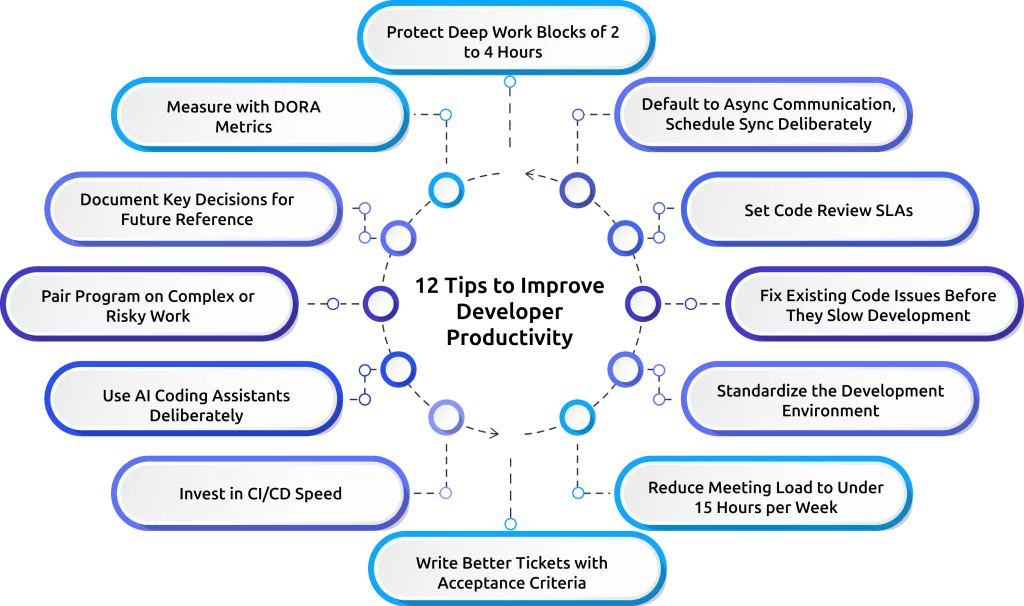
Tip 1: Protect Deep Work Blocks of 2 to 4 Hours
If you want your developers to produce high-quality work, they need uninterrupted time to focus. Constant meetings, messages, and unexpected requests can break their concentration and slow progress. Protecting dedicated deep work blocks gives your team the space they need to solve complex problems, write better code, and complete tasks more efficiently.
Why It Works:
When your developers can work without frequent interruptions, they spend less time regaining focus and more time making meaningful progress. This leads to higher productivity, fewer mistakes, and faster project delivery.
How to Apply:
Schedule 2 to 4 hours of uninterrupted focus time for your team each day or create designated no-meeting periods during the week. Limit non-urgent interruptions during these hours and encourage team members to pause notifications so they can stay focused on their work.

Did You Know?
Tech World Newsletter revealed that developers need an average of 23 minutes to regain focus after an interruption.
Tip 2: Default to Async Communication, Schedule Sync Deliberately
Frequent interruptions can make it difficult for developers to stay focused on complex tasks. This is especially true for distributed or remote engineering teams, where async-first habits often make the biggest difference. While collaboration is important, not every discussion requires an immediate response.
Why It Works:
Async communication reduces interruptions and helps your developers maintain focus on complex tasks. It also creates a written record of discussions and decisions, making it easier for your team to stay aligned.
How to Apply:
Encourage your team to use project management tools, shared documents, and chat channels for routine updates and discussions. Reserve meetings for brainstorming, planning, and decisions that genuinely require real-time collaboration.
Tip 3: Set Code Review SLAs
Code reviews are essential for maintaining quality, but long review cycles can quickly become a bottleneck. When your developers wait days for feedback, progress slows, and valuable momentum is lost.
Why It Works:
Faster reviews help your developers move work forward without unnecessary delays. Timely feedback also makes it easier to address issues while the code is still fresh in their minds.
How to Apply:
Set clear expectations for review turnaround times, such as providing initial feedback within four working hours. Regularly monitor review performance and ensure review responsibilities are shared across the team.
Tip 4: Fix Existing Code Issues Before They Slow Development
When teams focus only on delivering new features, existing code issues can gradually pile up. Over time, these unresolved problems can make development slower, increase the risk of bugs, and make it harder for developers to work efficiently.
Why It Works:
Fixing existing code issues improves code quality, reduces rework, and makes systems easier to maintain. It also helps developers spend less time troubleshooting and more time building valuable features.
How to Apply:
Reserve approximately one day in each two-week sprint to fix bugs, improve existing code, and address maintenance tasks. Regularly resolving these issues helps your team maintain development speed and avoid larger problems in the future.
Tip 5: Standardize the Development Environment
If every developer uses a different setup, your team may spend unnecessary time troubleshooting environment-related issues instead of building software. These inconsistencies can also slow down and make onboarding new developers more challenging.
Why It Works:
A standardized environment reduces setup problems, speeds up onboarding, and ensures your developers can collaborate without compatibility issues.
How to Apply:
Provide a documented, approved development environment using tools such as Docker or development containers. Make sure your developers follow the same setup process and update documentation as needed.
Tip 6: Reduce Meeting Load to Under 15 Hours per Week
Meetings can support collaboration, but too many of them leave your developers with little time for focused work. Constantly switching between meetings and coding tasks can significantly reduce productivity. A balanced schedule allows your developers to spend more time building and less time attending discussions.
Why It Works:
Reducing meeting time gives your developers more uninterrupted time to solve problems, write code, and complete important work. This leads to better focus and faster delivery. It also helps reduce context switching throughout the day.
How to Apply:
Review recurring meetings regularly and eliminate those that provide limited value. Replace routine status meetings with written updates whenever possible and keep essential meetings focused and concise.
Tip 7: Write Better Tickets with Acceptance Criteria
Your developers can only work efficiently when they clearly understand what needs to be built. Vague tickets often lead to confusion, rework, and unnecessary back-and-forth discussions. Well-written tickets provide the clarity needed to start work without delays.
Why It Works:
Clear requirements help your developers start work with confidence and reduce the risk of misunderstandings. This improves delivery speed and overall quality. It also minimizes the need for constant clarification during development.
How to Apply:
Make sure every ticket includes a detailed description, acceptance criteria, relevant business context, and a clear definition of done before work begins. Reviewing tickets before sprint planning can further improve clarity.
Tip 8: Invest in CI/CD Speed
Slow builds, tests, and deployments can frustrate your developers and create unnecessary delays throughout the development process. Long wait times often interrupt workflows and reduce productivity. Over time, these delays can add up and significantly impact your team's ability to deliver software efficiently.
Why It Works:
Faster CI/CD pipelines provide quicker feedback, helping your developers identify issues sooner and maintain momentum throughout the development cycle. This allows teams to deliver updates more efficiently and with greater confidence.
How to Apply:
Regularly evaluate pipeline performance, remove bottlenecks, optimize testing processes, and automate repetitive tasks wherever possible. Even small improvements in build times can have a significant impact over time.
Tip 9: Use AI Coding Assistants Deliberately
AI coding tools can help your developers complete routine tasks more efficiently, but they should be used thoughtfully rather than relied on blindly. When integrated properly, these tools can become valuable productivity boosters.
Why It Works:
When used correctly, AI can reduce repetitive work, speed up development tasks, and allow your developers to focus on higher-value activities. It can also help accelerate learning and problem-solving.
How to Apply:
Provide access to approved AI tools and establish guidelines for their use. Encourage your developers to review and validate all AI-generated code before it reaches production. Regular training can help your team use these tools more effectively. You can also check out our guide on tracking AI productivity to better understand how AI tools affect developer productivity and performance.
Tip 10: Pair Program on Complex or Risky Work
Some projects involve challenges that are easier to solve when two developers work together. Pair programming can be especially valuable for high-risk or technically complex tasks. It also creates opportunities for collaboration and shared learning.
Why It Works:
Having two developers collaborate in real time often leads to better problem-solving, earlier issue detection, and stronger knowledge sharing across your team. This can improve both code quality and team capability.
How to Apply:
Use pair programming selectively for critical features, complex implementations, and high-priority fixes rather than applying it to every task. Focus on situations where collaboration provides the greatest value.
Tip 11: Document Key Decisions for Future Reference
While code shows what was built, it rarely explains why certain decisions were made. Without proper documentation, important knowledge can disappear when team members move on.
Why It Works:
Documenting key decisions helps your developers understand the reasoning behind past choices, onboard faster, and avoid repeating the same discussions. It also improves consistency across projects and teams.
How to Apply:
Encourage your team to document important decisions, technology selections, and process changes. Keep documentation concise, accessible, and up to date. Regular reviews can ensure information remains accurate and useful.
Tip 12: Measure Productivity with DORA Metrics
Instead of relying on metrics such as hours worked, commits, or lines of code, focus on measures that reflect how effectively your developers deliver software. Tracking the right indicators gives you a clearer understanding of your team's performance and helps you identify opportunities for improvement.
Why It Works:
DORA metrics provide a more accurate view of engineering performance by focusing on delivery speed, reliability, and operational effectiveness. They help teams identify areas that need improvement and track progress over time.
How to Apply:
Track key DORA metrics, including deployment frequency, lead time for changes, change failure rate, and mean time to restore service. Use these insights to identify bottlenecks and continuously improve your team's performance. Review these metrics regularly to support data-driven decision-making.
Want to Know What's Really Slowing Down Your Developers?
See how Time Champ helps you identify productivity bottlenecks, protect focus time, and improve your developers' performance.
How Time Champ Helps Development Teams Improve Productivity
Improving developer productivity requires visibility into how your team works. Time Champ gives you the visibility and insights needed to understand how your developers spend their time, identify areas for improvement, and create a more productive team.
Time Champ is an employee monitoring and productivity tracking software that helps you understand your team’s work patterns, identify productivity bottlenecks, reduce distractions, and improve overall efficiency.
Key Features of Time Champ Productivity Tracking Software:
- Smart Productivity Tracking: Track productive and non-productive activities to understand how your developers spend their time and identify opportunities to improve focus.
- Workforce Analytics: Gain actionable insights into productivity trends, workload distribution, and performance patterns across your engineering team.
- Accurate Time Tracking: Monitor time spent on projects and tasks to improve sprint planning, project estimation, and resource allocation.
- App and Website Usage Tracking: Understand which tools your developers use most and identify distractions that may impact productivity.
- Project and Task Monitoring: Track project progress in real time and identify delays early to keep development work on schedule.
- Integrations with Development Tools: Connect Time Champ with the tools your developers already use to centralize data and gain a more complete view of team performance.
Ready to Improve Your Developers' Productivity?
Discover how Time Champ helps you track productivity and create a more focused and efficient engineering team.
Conclusion
To improve developer productivity, you must reduce distractions, simplify workflows, and provide developers with the resources they need to do their best work. Addressing common productivity challenges and tracking important metrics like DORA can help your team deliver software faster and more efficiently.

Guna Lakshmi

Table of Content
 5 Things That Destroy Developer Productivity
- 12 Tips to Improve Developer Productivity
- How Time Champ Helps Development Teams Improve Productivity
- Conclusion

Related Blogs

12 proven methods to improve employee productivity. Diagnose your biggest time leak first, then fix it with clarity, trust, focus, and the right tools.
Shabana Shaik | Jun 18, 2026
Discover essential time-tracking features that improve productivity, payroll accuracy, and workforce visibility, and learn how to use them effectively.
Guna Lakshmi | May 16, 2026
Find out the causes of low productivity, the warning signs to watch for, how to identify the root cause, and proven ways to fix it to improve performance.
Jahnavi Pulluri | Jun 11, 2026
Explore 20 proven productivity hacks to improve employee focus, reduce workplace distractions, and help your teams work more efficiently in 2026.
Guna Lakshmi | May 14, 2026
Best productivity tools for teams in 2026, ranked and compared by features, pricing (from $3/user/mo) and G2 ratings. Find the right fit for your team.
Anjali | May 30, 2026
Learn how to calculate productivity using simple formulas, practical methods, and real examples to measure employee performance accurately.
Thasleem Shaik | May 20, 2026


 4.7/5 avg.
Ready to Manage Your Workforce Smarter?
Join our family of 1500+ companies using smart insights to redefine workforces!

Free Trial
No Credit Card Required