Time Champ > Blog > 5 Free Project Status Report Templates (Excel, Word & PDF) > Content
5 Free Project Status Report Templates (Excel, Word & PDF)
Download 5 free Project Status Report Templates in Excel, Word, and PDF to track progress, spot risks early, and keep stakeholders aligned.

Projects often go off track due to unorganised, inconsistent, or delayed updates, making it difficult to see real progress. In the absence of a clear project reporting structure, stakeholders fail to recognize risks early enough, and teams waste more time explaining than doing. Project status report templates are useful because they provide you with a ready-made format to monitor progress, risks, milestones, and next steps in a clean and consistent manner.
In this blog, you'll get 5 free project status report templates for weekly, monthly, executive, client, and simple reporting. You can also download these reports in your preferred format, whether in Excel, Word, or PDF. By the end, you'll be able to choose the right template for your project, save time on reporting, and keep everyone aligned on what matters most.
What Are the 5 Types of Project Status Report Templates?
Good status reporting is important because projects that lack clear tracking tend to fail. Indeed, 52% of project failures occur due to poor communication between teams and stakeholders, which involves unclear reports and updates. Proper status reporting keeps projects on track, helps identify risks early, and supports better decision-making. A project status report template assists you in developing regular, clear reports throughout the business.
Here are the 5 key types of project status report templates:
- Weekly Project Status Report Template
- Monthly Project Status Report Template
- Executive Project Status Report Template
- Client Project Status Report Template
- Simple Project Status Report Template
1. Weekly Project Status Report Template
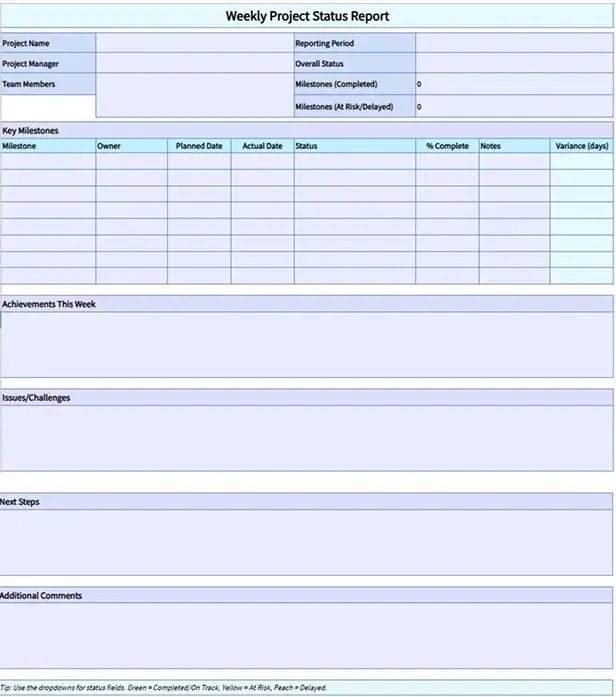
A weekly project status report keeps you in touch with the flow of work each week. You use it to monitor what your team has completed, what they are currently doing, and what may slow them down in the future. This report assists you in identifying problems early, changing priorities fast and ensuring work flows without any surprises accumulating in the future.
Key Features
- Project Summary: Shows reporting period, overall status, and milestone count.
- Milestone Progress: Tracks key milestones with dates, completion, and variance.
- Weekly Update: Highlights achievements, issues, and next steps.
- Notes: Captures additional comments for stakeholders.
Best For
Ongoing projects that change frequently and need regular updates to keep work balanced and delays under control.
2. Monthly Project Status Report Template
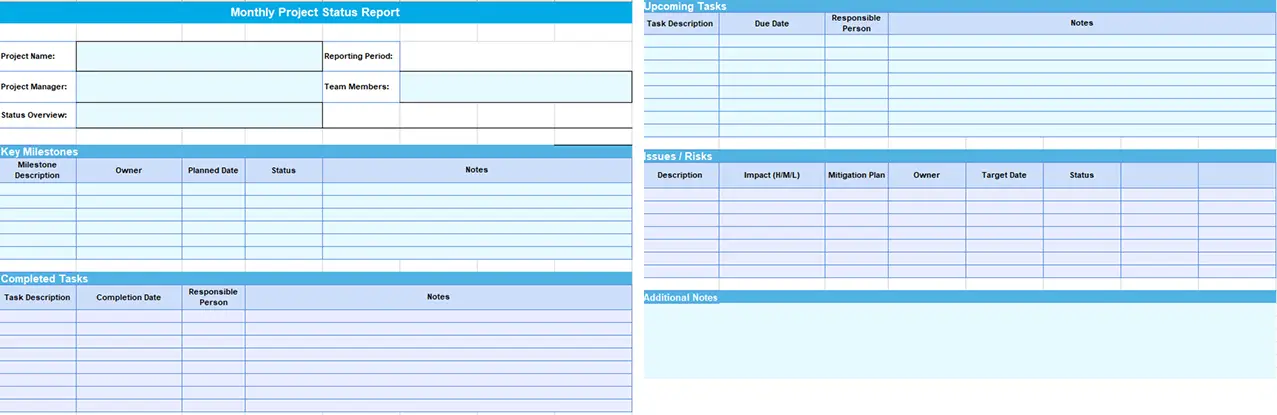
A monthly project status report helps you review progress over a longer period and stay focused on outcomes. Instead of tracking daily updates, you summarize completed work, milestone progress, upcoming tasks, and key risks in one clear report. This helps you confirm whether the project is moving as planned and take corrective action early when needed.
Key Features
- Status Overview: Summarizes overall project progress for the month.
- Milestone Progress: Records key milestones with owners, dates, and status.
- Completed Tasks: Captures what the team finished during the month.
- Upcoming Tasks: Lists the next tasks with due dates and responsibility.
- Issues and Risks: Highlights risks with impact level, mitigation plan, and target date.
- Additional Notes: Adds important updates for stakeholders.
Best For
Long-term projects where progress, cost, and timelines need a structured monthly review without operational detail.
3. Executive Project Status Report Template
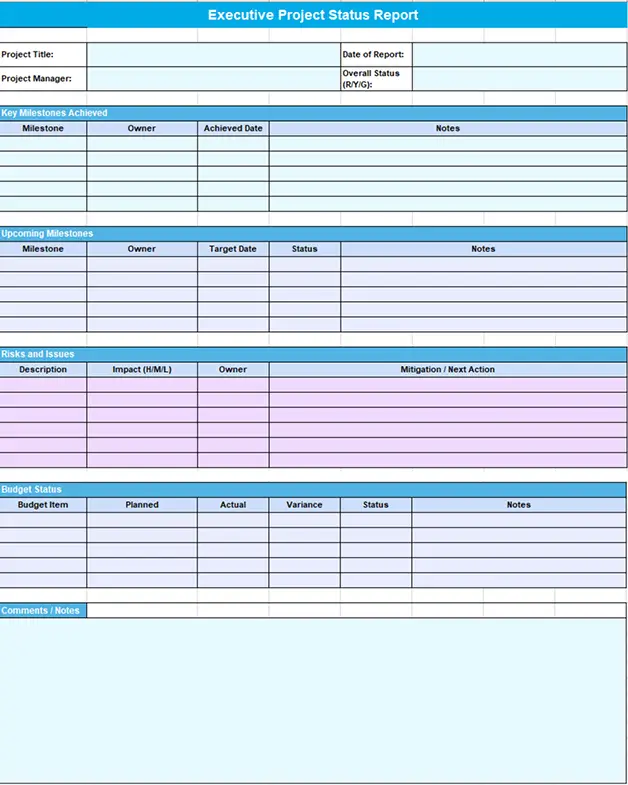
An executive project status report provides you with immediate clarity. You highlight only the most important issues like project health, major risks, budget status, and required decisions. This report helps you act quickly without wasting time on task-level information.
Key Features
- Project Health Indicator: Shows overall status at a glance (R/Y/G).
- Milestones Achieved: Summarizes key milestones completed with dates and notes.
- Upcoming Milestones: Lists next milestones with target dates and status.
- Risks and Issues: Highlights high-impact risks with owners and next actions.
- Budget Status: Compares planned vs actual spend and shows variance.
- Comments and Notes: Captures updates leaders need for quick review.
Best For
Projects that require leadership oversight and quick decision-making based on high-level project health.
4. Client Project Status Report Template
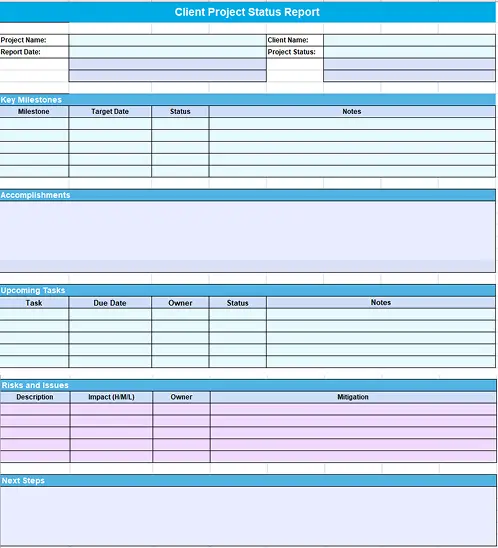
A client project status report helps you communicate progress clearly and professionally. You highlight key milestones, completed work, upcoming tasks, and any risks that may impact delivery. This report keeps clients informed and confident while keeping internal workflows and team-level details private.
Key Features
- Milestone Updates: Shows progress, target dates, and status for key milestones.
- Accomplishments: Highlights completed work and major progress updates.
- Upcoming Tasks: Lists upcoming tasks with due dates, owners, and status.
- Risks and Issues: Summarizes client-impact risks with mitigation steps.
- Next Steps: Defines what happens next and what the client can expect.
Best For
Client-facing projects where transparency and clear communication matter more than internal execution details.
5. Simple Project Status Report Template
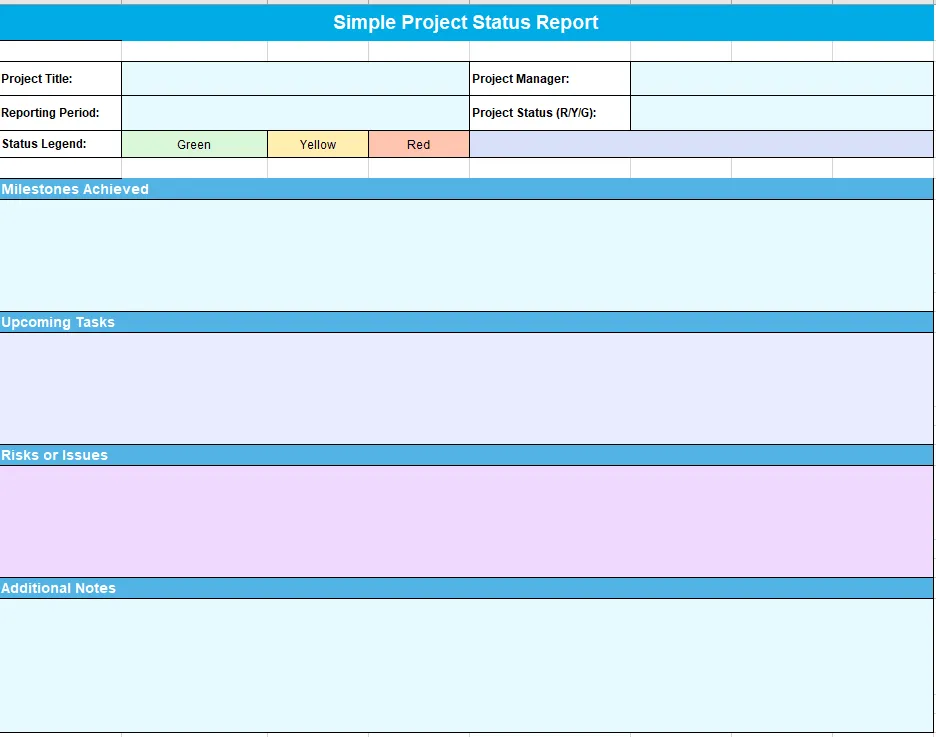
A simple project status report gives you a quick snapshot of where the project stands. You capture only the most important updates, including project status, milestones achieved, upcoming tasks, and key risks. This template keeps reporting fast and easily.
Key Features
- Project Status (R/Y/G): Shows overall status at a glance.
- Milestones Achieved: Summarizes recent progress in a clear way.
- Upcoming Tasks: Lists immediate next steps and priorities.
- Risks or Issues: Highlights blockers and concerns early.
- Additional Notes: Captures any important updates for stakeholders.
Best For
Small projects or fast-moving work where quick updates are enough to keep everyone aligned.
Want to stop guessing and start reporting with real data?
Use Time Champ to fill your status reports with accurate work visibility.
What Are the Pros and Cons of Project Status Report Templates?
Project status report templates help you keep updates consistent and save effort, but they also come with a few limitations. Here are the pros and cons of project status report templates.
| Pros | Cons |
|---|---|
| You save time by starting with a ready-made reporting structure. | Templates may not fully match unique project needs |
| Reporting stays consistent across teams and reporting periods. | Rigid formats can limit flexibility as projects change |
| You track progress, risks, and next steps in one clear layout. | Important details can be overlooked if sections feel restrictive. |
| Stakeholders understand project status quickly without follow-ups. | Templates rely on accurate input to remain useful. |
| You reduce confusion by using the same reporting format every time. | Poorly chosen templates can create unnecessary reporting effort. |
How Time Champ Makes Project Status Reports Reliable?
Project status report templates give you a clear structure, but they still depend on how accurately teams report progress. When updates rely on memory or manual input, reports quickly drift away from reality. Time Champ is a workforce intelligence software which closes this gap by showing you how work actually happens. You see time spent, progress trends, workload pressure, delays, and early risk signals as work unfolds. This helps you fill weekly, monthly, executive, or simple reports with facts instead of assumptions.
Time Champ turns reporting into a decision tool rather than a reporting task. You analyze progress without chasing updates, identify risks before they escalate, and present clear updates that stakeholders trust. When your reports reflect real capacity, utilization, and work patterns, you reduce confusion and act faster. This connection between structured templates and workforce intelligence keeps your projects on track and makes every status report meaningful.
Struggling to keep stakeholders updated without chasing your team?
Try Time Champ and make project reporting faster and more reliable.
Conclusion
Project status report templates can assist you in bringing structure, clarity and focus to your project updates. You save time, identify risks early, and align everyone on what really matters by selecting the appropriate template. You combine these templates with workforce intelligence to gain real visibility into how work happens and transform reporting into a practical way of supporting decisions instead of merely updating people. This will assist you to remain in control, be confident in your actions and keep your projects on the right track.

Tarun Kumar Reddy


Table of Content
-
 What Are the 5 Types of Project Status Report Templates?
-
1. Weekly Project Status Report Template
-
2. Monthly Project Status Report Template
-
3. Executive Project Status Report Template
-
4. Client Project Status Report Template
-
5. Simple Project Status Report Template
-
What Are the Pros and Cons of Project Status Report Templates?
-
How Time Champ Makes Project Status Reports Reliable?
-
Conclusion
Related Blogs
Get 8 free pay stub templates with built-in calculators in Excel, PDF, and Word formats instantly. Customize as needed, save time, and simplify payroll.
Sai Keerthi Uppala | November 25, 2025
Explore 13 free expense report templates in Excel, Word, and PDF, including daily, weekly, monthly, petty cash, and business expense tracking options.
Thasleem Shaik | November 11, 2025
Explore 7 free project planning templates to plan, schedule, and manage projects effectively. Download in Excel, Word & PDF and boost your project success.
Chetana Choudary | November 11, 2025
Download 7 free project timeline templates in Excel, Word & PDF to plan, organize, and track projects efficiently, ensuring your team stays on schedule.
Guna Lakshmi | November 07, 2025
Explore 6 free project charter templates in Excel, Word, and PDF, including simple, agile, and six sigma formats for clear project starts.
Thasleem Shaik | November 07, 2025
Explore 12 free project schedule templates in Excel, Word, and PDF, including simple, construction, tracking, timeline, and multi-project options.
Thasleem Shaik | November 03, 2025


 4.7/5 avg.
Ready to Manage Your Workforce Smarter?
Join our family of 1500+ companies using smart insights to redefine workforces!

Free Trial
No Credit Card Required