15 Remote Work Mistakes and Simple Ways to Fix Them
Avoid remote work mistakes that affect focus, communication, time, and boundaries. Get simple tips to stay productive and in control of your workday.

Remote work gives you flexibility, but it also changes how you manage your time, focus, and daily routine. Without clear boundaries, small habits can quickly turn into distractions, missed deadlines, or longer workdays.
The tricky part is that most remote work mistakes do not feel like mistakes when you make them. They often start with simple choices that slowly become part of your routine.
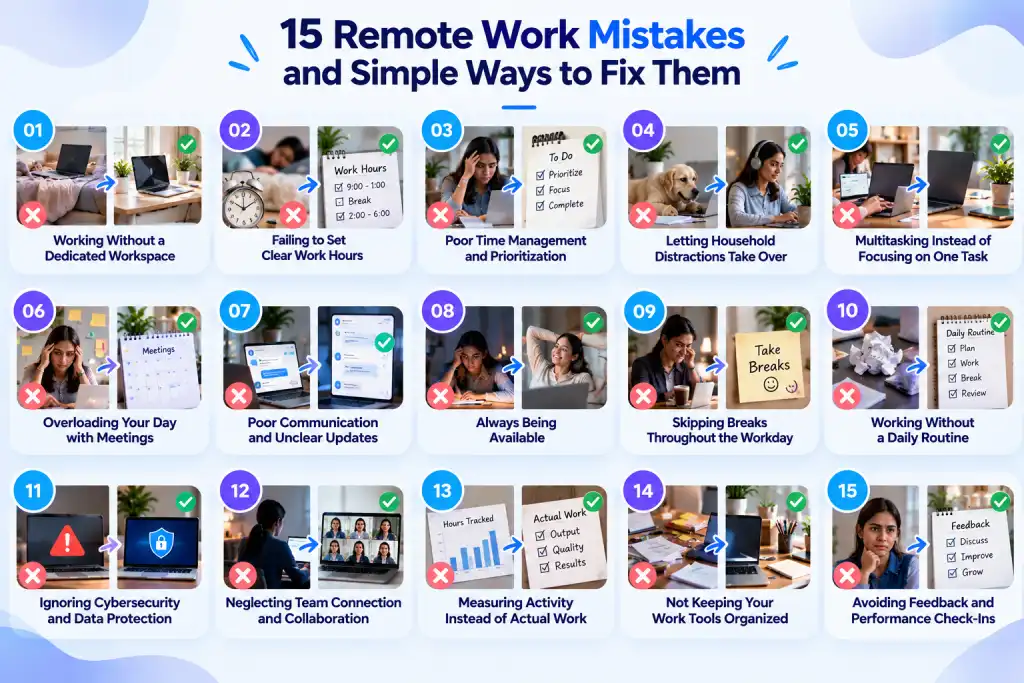
In this blog, you’ll see the most common remote work mistakes and simple ways to fix them before they start affecting your workday.
1. Working Without a Dedicated Workspace
Your workspace can shape how easily you settle into work. When you move between the couch, bed, dining table, or any available corner, work can start to feel mixed in with everything else happening at home. You may also deal with more noise, clutter, or interruptions that make it harder to stay focused.
How to Set Up a Dedicated Workspace
You do not need a separate home office to create a better setup. Choose one spot that you can use mainly for work. Keep your laptop, charger, notebook, and other essentials there, so you do not have to rebuild your setup every morning.
If space is limited, even a small section of a table can work. The goal is to create a clear signal that tells you, "This is where I work." When your workday ends, put your work items away if possible. That simple habit can also make it easier to switch from work mode to personal time.
Pro Tip
If you want to create a comfortable and practical remote workspace, check out our work-from-home essentials to make sure you have the right setup for a focused workday.
2. Failing to Set Clear Work Hours
Remote work can make your schedule flexible, but flexibility can quickly turn into an endless workday. You may start checking emails before your day officially begins, answer messages during dinner, or keep working because your laptop is always within reach.
According to Buffer, 81% of remote workers check work emails outside their work hours, including 63% who do so on weekends and 34% while on vacation. Buffer also reports that 48% frequently work outside traditional work hours. These habits can make it harder to maintain a healthy work-life balance and create a clear boundary between your job and personal time.
How to Protect Work Hours
Set a real start time and a real end time, and treat both as appointments you can't skip. Block them on your calendar so meetings don't creep into them. Turn off notifications after your end time and let your team know your hours, so they aren't guessing when you're available. A time tracking tool can help here too, since it gives you a clear picture of how many hours you're actually logging each day, which makes it much easier to notice when your hours are quietly stretching too far.
3. Poor Time Management and Prioritization
Not every task deserves the same amount of your attention, but without a plan, you can end up treating them as if they do. You may jump into whatever lands in your inbox first instead of focusing on the work that actually matters. Too many meetings can make this even harder by taking away the time you could spend on focused, high-value work.
This is one of the biggest remote work challenges because it can go unnoticed throughout the day. You may feel busy from morning to evening, yet reach Friday without making enough progress on the work that matters most.
How to Prioritize Most Important Tasks
Start each day by choosing two or three tasks that matter most, and work on them before you open your inbox or check messages. Time-block your calendar so focused work gets the same protection as a meeting.
Review your priorities at the end of each day so you can start tomorrow with clarity instead of guesswork. If you use a productivity tracking tool, review your work patterns at the end of the week. This can show you where your time goes and help you identify where your time management starts to break down.
4. Letting Household Distractions Take Over
Working from home puts everyday distractions within easy reach. A pile of laundry, a quick kitchen task, a delivery, or a television in the background can pull your attention away from work. One small interruption may seem harmless, but several interruptions can leave you constantly switching between work and home tasks. Recent research from Durham University found that interruptions from domestic tasks can disrupt focus and make it harder to complete work.
How to Reduce Household Distractions
Separate household tasks from your working hours as much as you can. If the dishes need washing or the laundry needs folding, handle them before work, during a planned break, or after you finish the day.
You can also set simple boundaries at home. Let your family know when you need quiet, uninterrupted time for work, and keep your phone notifications limited during focused work. If noise remains a problem, move to a quieter spot or use headphones when appropriate. The goal is not to remove every distraction from your home. It is to stop those distractions from deciding how your workday goes.
Pro Tip
If distractions keep getting in the way of your focus, check out our guide on how to avoid work-from-home distractions for more practical ways to stay focused while working from home.
5. Multitasking Instead of Focusing on One Task
You open your laptop to finish a report, then check an email, reply to a message, switch to a meeting, and return to the report several minutes later. It may feel like you handled several things at once, but your attention keeps moving from one task to another. Frequent switching can make it harder to maintain focus.
How to Stay Focused on One Task
Give one important task your full attention for a set period. Close unrelated tabs, mute nonessential notifications, and keep your communication apps out of sight when you need deep focus.
You can also set specific times to check email and messages instead of reacting to every notification. When the focus period ends, take a short break or move to your next task.
You do not need to work on one thing all day. You just need to stop treating every notification as a reason to switch tasks.
6. Overloading Your Day with Meetings
Meetings can help you make decisions, solve problems, and stay aligned. The problem starts when they take over the parts of your day you need for actual work. You may finish one call, join another, and then spend the remaining time trying to catch up on tasks between meetings.
According to Microsoft’s data, about half of all meetings take place between 9 and 11 a.m. or 1 and 3 p.m., which can take up the hours when you may need your strongest focus. This can leave you with fewer uninterrupted periods to work on tasks that need your full attention.
How to Reduce Unnecessary Meetings
Before scheduling a meeting, ask whether you can handle the same issue through a short message or a shared document. When a meeting makes sense, keep the purpose clear and invite only those who need to contribute.
Set blocks of uninterrupted time on your calendar for important tasks. You can also group meetings together instead of spreading short calls across the entire day. This gives you larger periods to focus without constantly switching between conversations and tasks.
Pro Tip
Good remote meetings need more than a calendar invite. Check out our best tips for holding remote meetings and simple ways to make every meeting count.
7. Poor Communication and Unclear Updates
Remote work removes many of the quick conversations you normally have when you work in the same space. A question that could take two minutes in person may turn into several messages when the context is unclear. Unclear updates can lead to missed information, repeated work, delayed decisions, and confusion about what needs attention next.
How to Improve Remote Communication
Make your updates easy to follow. When you share a project update, explain what changed, what you completed, what you need, and what comes next. Use the right channel for the situation instead of sending important details across multiple chats.
For ongoing work, keep key decisions and instructions in a shared location. This gives you a reliable reference when you need to check what was agreed on instead of searching through old messages.
8. Always Being Available
You keep your laptop open after dinner and respond to messages the moment they arrive. It may feel like a commitment, but staying connected throughout your personal time can quickly lead to burnout.
When you make yourself available at all hours, your team may start following the same pattern. Even without directly asking for it, your actions can create an expectation that everyone should stay connected beyond their working hours.
How to Set Healthy Availability Boundaries
Set clear working hours and make them visible through your calendar, Slack status, or email signature. Agree with your team on what qualifies as urgent enough to interrupt personal time and what can wait until the next working period.
Turn off work notifications when your day ends and make sure truly urgent matters have a clear escalation path. You should not need to stay glued to your screen just in case something comes up.
9. Skipping Breaks Throughout the Workday
When you have a busy schedule, skipping a break can feel like the easiest way to get more done. You may eat lunch at your desk, stay in front of your screen for hours, or move directly from one task to the next without stepping away. That approach can leave you feeling drained as the day continues.
How to Take Effective Breaks
Treat breaks as part of your workday instead of something you take only when you finish everything. Step away from your screen, get some water, stretch, walk around, or simply sit somewhere else for a few minutes.
You can also place breaks between longer work blocks, so you do not rely on yourself to remember them when the day gets busy. A short pause can give you the space to return to your next task with more energy and attention.
10. Working Without a Daily Routine
Remote work gives you more control over your schedule, but too much flexibility can leave your day without a clear structure. You may start at different times, handle tasks in no particular order, or decide what to work on only after your messages start coming in. Without a routine, your day can quickly become reactive.
How to Build a Daily Remote Work Routine
Create a basic routine that gives your day a predictable shape. Set a regular start time, decide what you want to accomplish, block time for focused work, and leave room for meetings and breaks.
You do not need to plan every minute. Give yourself enough structure to know what comes next without making your schedule rigid. At the end of the day, review what you completed and set your priorities for tomorrow. That small habit can make your next morning much easier to start.
11. Ignoring Cybersecurity and Data Protection
Working remotely can mean accessing work files, accounts, and company systems from different locations and networks. If you use weak passwords, leave devices unlocked, connect through unsafe networks, or click suspicious links, you can create security risks without realizing it.
The Cybersecurity and Infrastructure Security Agency recommends clear remote work security policies, secure remote access, regular device maintenance, and training on phishing, social engineering, and other remote work risks.
How to Protect Remote Work Data
Use strong, unique passwords and turn on multi-factor authentication for important accounts. Keep your devices, operating systems, and work applications updated so you do not leave known security gaps open. You can also use data loss prevention tools to monitor and control how sensitive files and information move across your remote work environment.
Avoid accessing sensitive data through unsecured networks. Lock your device whenever you step away, and treat unexpected emails, links, and file requests with caution. Make sure everyone who works remotely knows the basic security practices they need to follow.
12. Neglecting Team Connection and Collaboration
Remote work removes many of the small interactions that happen naturally in a shared workplace. You may have regular meetings and daily communication with your team, yet still lack the personal connection that helps build trust and stronger collaboration. Over time, that distance can affect collaboration and make it harder to build trust.
How to Strengthen Team Connection
If you want to close this gap, try building in:
- Short, informal virtual hangouts that have nothing to do with deadlines.
- Regular one-on-ones where you ask about more than just task status.
- In-person meetups or hybrid days for teams that can manage them.
- Peer recognition channels where wins get noticed in real time.
Connection does not happen by accident when you no longer share the same hallway. You have to make it part of how your team works.
Pro Tip
Keeping a remote team connected takes more than regular meetings. Our collaboration tools guide covers practical options that can make everyday teamwork easier.
13. Measuring Activity Instead of Actual Work
It is easy to mistake an active status, a busy screen, or long hours online for meaningful work. But activity and output are not the same. Instead of focusing on whether your team looks busy, focus on the results their work produces. Measuring visible activity alone can lead to wrong conclusions, create unnecessary pressure, and damage trust.
How to Measure Results Instead of Activity
Shift your focus from activity to outcomes. Check whether your team finishes tasks on time, meets the quality standards you set, and makes steady progress toward shared goals.
Look at task completion and delivery timelines, assess work against clear quality standards, and track progress toward the goals you set together. These measures give you a clearer view of actual results than simply watching online activity.
When you measure what matters, you can recognize meaningful contributions instead of rewarding your team for simply looking busy.
14. Not Keeping Your Work Tools Organized
Remote work can leave you jumping between email, chat, project management platforms, file storage, calendars, and other tools throughout the day. When every tool has a different purpose, but no clear system connects them, you can waste time searching for information or switching between platforms.
How to Organize Work Tools
Choose tools that make your daily work easier to manage instead of adding more places to check. You can bring time tracking, task management, work activity, and productivity insights together with Time Champ, giving you a clearer view of your work without jumping between multiple platforms.
With the right setup, you can spend less time searching for information and more time working on what matters. The key is to keep your workflow simple and give every tool a clear role.
15. Avoiding Feedback and Performance Check-Ins
Remote work can make feedback easier to postpone. You may assume everything is going well because no urgent issues have come up, while your team may have questions, blockers, or areas where they need more direction. Without regular conversations, small issues can stay hidden until they become harder to address.
How to Make Time for Feedback and Check-Ins
Schedule regular check-ins and give them a clear purpose. Use the time to discuss progress, challenges, priorities, feedback, and support rather than turning every conversation into a status update.
Make feedback a two-way conversation, too. Ask what is working, where you can provide more support, and what could make the work easier. Consistent conversations give you a better chance to address issues early and recognize good work when it happens.
How Time Champ Helps You Avoid Common Remote Work Mistakes
Remote work becomes harder to manage when your work data sits across different tools, and you have limited visibility into how your team spends its time. Time Champ brings time tracking, attendance, productivity insights, task activity, and work patterns into one place, so you can spot issues without relying on constant follow-ups.
You can use these insights to identify patterns such as excessive idle time, uneven workloads, distractions, or work hours that regularly stretch beyond the planned schedule. Automated timesheets and productivity reports also give you a clearer view of how work progresses across tasks and projects.
The goal is not to watch every minute of your team's day. It is to give you useful information that helps you address problems early, support your team, and make better decisions about how work gets done. With the right visibility in one place, you can tackle common remote work mistakes before they become everyday habits.
Still relying on assumptions to manage remote work?
Try Time Champ to bring time, productivity, and workforce insights into one place.
Conclusion
Remote work gives you flexibility, but small habits can quickly make your workday harder than it needs to be. When you set clear boundaries, protect your focus, and keep your routine organized, you can avoid many common remote work mistakes.
If you want clearer visibility into how work happens across your team, Time Champ can help you track work patterns, time, attendance, and productivity from one place. The right insights can help you spot issues early and take action before they become routine.
Table of Content
 1. Working Without a Dedicated Workspace
- 2. Failing to Set Clear Work Hours
- 3. Poor Time Management and Prioritization
- 4. Letting Household Distractions Take Over
- 5. Multitasking Instead of Focusing on One Task
- 6. Overloading Your Day with Meetings
- 7. Poor Communication and Unclear Updates
- 8. Always Being Available
- 9. Skipping Breaks Throughout the Workday
- 10. Working Without a Daily Routine
- 11. Ignoring Cybersecurity and Data Protection
- 12. Neglecting Team Connection and Collaboration
- 13. Measuring Activity Instead of Actual Work
- 14. Not Keeping Your Work Tools Organized
- 15. Avoiding Feedback and Performance Check-Ins
- How Time Champ Helps You Avoid Common Remote Work Mistakes
- Conclusion

Related Blogs

Create an effective and simple remote work policy with practical steps, proven best practices, helpful examples, and a free downloadable template.
Thasleem Shaik | Jul 27, 2026
Boost productivity with remote work best practices that improve communication, overcome challenges, and help you manage remote teams more effectively.
Anjali | Jul 23, 2026
Understand the role of productivity tracking in remote work and how it improves team clarity, workload balance, and performance with real insights.
Thasleem Shaik | May 01, 2026
Performance evaluation in remote workforces: 7 metrics that matter, common biases to avoid, and how to run reviews your team trusts.
Guna Lakshmi | Apr 14, 2026
Don't let remote work myths hold your team back. Learn how to overcome challenges and build a productive, engaged remote workforce.
Guna Lakshmi | August 4, 2026
Strengthen remote work security with proven best practices, reduce security risks, protect your remote teams, and keep business data secure from threats.
Anjali | Jul 30, 2026


 4.7/5 avg.
Ready to Manage Your Workforce Smarter?
Join our family of 1500+ companies using smart insights to redefine workforces!

Free Trial
No Credit Card Required