20 Essential Time Management Techniques You Need to Know
Discover practical time management techniques to improve focus, prioritize tasks, reduce distractions, and manage your workday more effectively.
Have you ever ended a busy day wondering where all the time actually went? Tasks keep moving from one day to the next, notifications keep breaking your focus, and the work that mattered most somehow stays unfinished. After a while, staying productive starts feeling less like progress and more like constantly trying to catch up.
Working longer hours does not solve that pressure. Real improvement comes from knowing how to structure your time, protect your focus, and handle priorities with more intention. The right time management techniques help you stop reacting to every distraction and start working with clarity and control.
This guide covers 20 practical time management techniques that can help you handle distractions, reduce procrastination, and stay consistent without feeling overwhelmed. Each method explains how it works, when to use it, and how to make it fit naturally into your daily workflow.
What are Time Management Techniques?
Time management techniques are structured methods that help you plan, organize, and use your time more effectively during the day. These techniques focus on improving how you prioritize tasks, manage distractions, stay focused, and complete work without feeling constantly rushed or overwhelmed.
Different time management techniques solve different productivity problems. Some help you handle procrastination, while others improve focus, scheduling, decision making, or workload management. Methods like the Pomodoro Technique, Time Blocking, and the Eisenhower Matrix give you a practical system to work with more clarity and consistency.
Instead of trying to work longer hours, effective time management strategies help you work with better structure and intention. The goal is not to stay busy all day. The goal is to spend more time on work that actually matters while reducing unnecessary stress and distractions.
20 Proven Time Management Techniques
Most workdays feel full. Meetings, tasks, notifications, and constant interruptions make the hours disappear quickly. However, a Vouchercloud survey of almost 2,000 office workers revealed that the typical office workers only log 2 hours and 53 minutes of actual productive work in their 8-hour day. The remaining time often goes into distractions, context switching, and low-value activities. The techniques below can help you take back control of your time, improve focus, and work with more clarity.
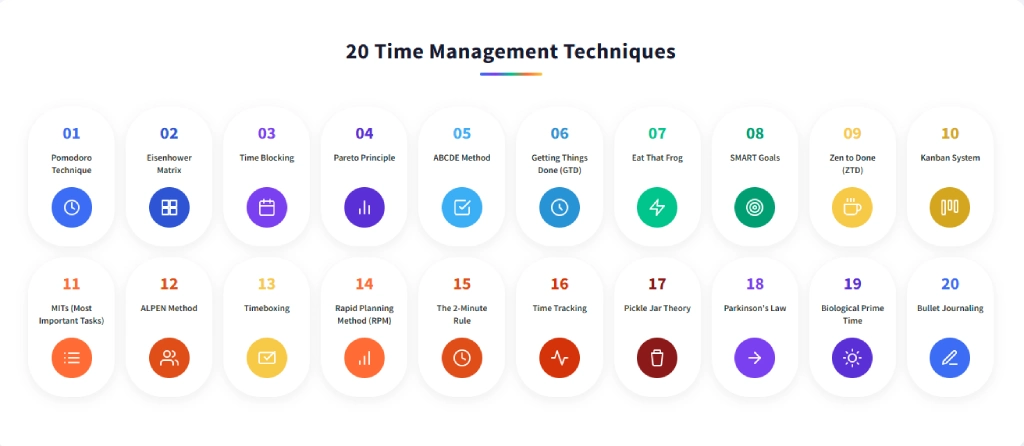
1. Pomodoro Technique: Focused Work in Short Sprints
Francesco Cirillo created this Pomodoro technique in the late 1980s while using a tomato-shaped kitchen timer (pomodoro is Italian for tomato) to break his study sessions into manageable chunks.
How it Works: Pick one task. Set a 25-minute timer. Work on nothing else until it rings. Take a 5-minute break. Repeat four times, then take a 15 to 30-minute break. Each 25-minute block is one Pomodoro.
Best For: Anyone who struggles to start hard tasks or loses focus after a few minutes. Works especially well for writing, coding, research, or any work that needs sustained attention.
Common Mistake: Interrupting a Pomodoro for "just a quick thing." Once you break the block, the reset cost wipes out the benefit. Protect the 25 minutes like a meeting you cannot leave early.
2. Eisenhower Matrix: Sort Tasks by Urgency and Importance
Named after President Dwight D. Eisenhower, this Eisenhower Matrix method is based on the idea that important tasks and urgent tasks are not always the same. Productivity expert Stephen Covey later expanded this concept in “The 7 Habits of Highly Effective People.”
How it Works: Draw a 2x2 grid. Label the columns "Urgent and Not Urgent". Label the rows "Important and Not Important". Place every task in one of the four quadrants:
- Urgent + Important → Do it now
- Important + Not Urgent → Schedule it
- Urgent + Not Important → Delegate it
- Neither → Drop it
Best For: Handling multiple priorities without a clear way to decide what needs attention first. This method works well when sudden requests, messages, and small urgent tasks keep taking attention away from important long-term work.
Common Mistake: Marking every task as Urgent and Important. When everything falls into the same category, the matrix loses its purpose. Question whether a task truly needs immediate attention because many tasks feel urgent even when they are not.
3. Time Blocking: Schedule Tasks in Calendar Blocks
Cal Newport, author of Deep Work, popularized Time Blocking as a practical way to protect focused work in a distraction-heavy environment. The method helps you assign clear time slots for important tasks instead of constantly switching between different types of work.
How it Works: At the start of each week or the night before, assign specific tasks to specific calendar slots. Each block should focus on one type of work without multitasking inside it. Treat each block with the same importance as a scheduled commitment. Many professionals also use time blocking apps to organize and manage their schedules more consistently.
Best For: Handling schedules that feel overcrowded with meetings, interruptions, and shifting priorities. This method works well when focused work keeps getting pushed aside by constant calendar changes and small incoming tasks.
Common Mistake: Filling every hour of the day. Leave 20 to 30% of your calendar unblocked. That buffer handles overflows, urgent requests, and the mental reset time your brain actually needs between focused sessions.
When meetings and small tasks keep taking over, focused work starts losing time.
Time Champ helps you plan smarter and turn blocked time into productive time.
4. Pareto Principle: Focus on the 20% That Drives 80% of Results
Italian economist Vilfredo Pareto noticed in 1896 that 80% of Italy’s land belonged to 20% of the population. Later, quality management expert Joseph Juran applied the same pattern to business and productivity, showing that a small number of actions often create most of the results.
How it Works: Look at your full task list. Ask: which 20% of these tasks will produce 80% of the results I actually need? Prioritize those tasks first and spend more time on them. Reduce time spent on the remaining tasks by delegating, delaying, or removing work that adds little value.
Best For: Consultants, business owners, and project management roles where results matter more than simply completing more tasks. This method works well when low-priority work starts taking up most of the week, while important tasks keep getting pushed aside.
Common Mistake: Applying Pareto only to comfortable tasks. The 20% that drives real results is often the work you find hardest to start. If your high-impact tasks keep sliding, that is the signal.
5. ABCDE Method: Prioritize Tasks by Consequence
Created by productivity author Brian Tracy, the ABCDE Method helps you rank tasks based on the consequences of not completing them, instead of simply focusing on what feels urgent at the moment.
How it Works: Write down every task on your list and assign a letter to each one.
A: Tasks with serious consequences if ignored.
B: Tasks with smaller consequences.
C: Tasks that are nice to complete but not important.
D: Tasks you can delegate.
E: Tasks you can remove completely.
After that, rank your A tasks as A1, A2, and A3. Start with A1 and move to the next task only after finishing it.
Best For: Consultants, team leads, business owners, and professionals handling multiple priorities at the same time. This method works well when the day feels busy, but the most important work still remains unfinished.
Common Mistake: Assigning letter A to too many tasks. If every task becomes a top priority, the method stops helping you prioritize. Keep only a few tasks in the A category and move the remaining work into lower priority groups.
6. Getting Things Done (GTD): Capture Everything, Decide Later
David Allen introduced GTD in his 2001 book Getting Things Done, and it is still considered one of the most complete time management techniques today. The main idea is simple. Your brain should focus on thinking and decision-making, not on remembering every task and commitment. GTD helps by moving everything out of your head into a trusted system.
How it Works: GTD runs on five steps. Here are those steps:
- Capture every task, idea, reminder, and responsibility in one place, either digitally or on paper.
- Clarify each item and decide whether it needs action. If it does, identify the next step. If not, store it, delay it, or remove it.
- Organize tasks into categories like Next Actions, Projects, Waiting For, and Someday or Maybe.
- Review your lists every week to keep the system updated and useful.
- Work from your lists based on your priorities, available time, and energy level.
The weekly review is what keeps the entire GTD system running properly. Skip it for a few weeks, and the entire system starts falling apart within 60 days.
Best For: Professionals handling multiple projects and responsibilities at the same time without a clear separation between tasks. GTD works well when work starts feeling scattered across too many priorities and systems.
Common Mistake: Spending too much time building the perfect GTD setup while ignoring the weekly review. The review is what keeps the system useful. Without it, task lists become outdated, inboxes fill up again, and important work becomes easy to miss.
7. Eat That Frog: Do the Hardest Task First
Brian Tracy popularized this method in his book Eat That Frog, inspired by a quote often linked to Mark Twain that says, “If it’s your job to eat a frog, it’s best to do it first thing in the morning.” The frog represents your most important and most avoided task. Finish it before anything else starts taking your attention.
This is considered one of the most effective time management techniques for procrastination because it removes the habit of delaying difficult work.
How it Works: The night before, choose one task that truly needs your attention the next day, especially the one you keep delaying. Write it down clearly. The next morning, start working on that task before checking emails, messages, or notifications. Continue working on it until you complete it or make meaningful progress.
The important part is deciding the task the night before. That way, your morning starts with action instead of overthinking.
Best For: Professionals who do their best thinking in the morning and struggle with delaying difficult or high-impact work. This method also works well for team leads and business owners trying to build stronger accountability and focus within daily work routines.
Common Mistake: Picking the easiest important task instead of the hardest one. If you finish it in 10 minutes and feel nothing, you picked the wrong frog. The right frog is usually the task you have been avoiding for days.
8. SMART Goals: Make Goals Specific and Measurable
SMART stands for Specific, Measurable, Achievable, Relevant, and Time-bound. This method turns unclear intentions into goals you can track, measure, and complete. Among different time management techniques, SMART Goals focus more on defining clear outcomes and measuring progress toward them.
How it Works: Take any goal and check it against all five SMART elements.
- Specific: What exactly do you want to accomplish? Goals should clearly define the outcome. For example, “Publish two long-form articles per week” gives more clarity than “Improve my writing.”
- Measurable: How will you track progress or know when the goal is complete? Goals should include something measurable.
- Achievable: Check whether the goal is realistic based on your current resources, workload, and limitations. The goal should challenge you without becoming unrealistic.
- Relevant: Make sure the goal connects to your current priorities and important work. Goals without relevance usually become distractions.
- Time-bound: Set a deadline for completion. Goals without timelines often keep getting postponed.
Best For: Professionals and teams who are setting quarterly, monthly, or annual targets and looking for a clearer way to track progress. This is one of the most practical time management techniques for work because it helps define what success actually looks like and when you should complete it.
Common Mistake: Making goals too easy to achieve. If the goal does not require any real improvement or change in how you work, it is probably just another task instead of a meaningful goal.
9. Zen to Done (ZTD): A Simpler Version of GTD
Leo Babauta created ZTD as a simpler alternative to GTD. GTD gives you a complete productivity system, but many find it difficult to maintain. ZTD keeps the important parts like capturing tasks and reviewing them regularly while focusing more on simple habits and routines. If GTD felt too complicated or difficult to follow consistently, ZTD offers a simpler structure that feels easier to maintain over time.
How it Works: ZTD runs on six core habits:
- Capture tasks, ideas, and reminders in one notebook or inbox.
- Process the inbox daily instead of letting tasks pile up.
- Choose your MITs (1-3 most important tasks) each morning and protect time for them.
- Focus on one task at a time without constant switching.
- Review your tasks, goals, and priorities every week.
- Remove unnecessary projects and commitments so you can focus only on important work.
The biggest difference between GTD and ZTD is the pace. ZTD encourages you to build one habit at a time before adding another instead of changing your entire system all at once.
Best For: Professionals who found GTD too overwhelming or struggled to maintain complicated productivity systems. This is one of the more effective time management techniques for beginners because it builds habits gradually instead of introducing everything together.
Common Mistake: Switching repeatedly between GTD and ZTD without staying consistent with either system. Both methods need time and regular practice before you can properly judge whether they work for your routine.
Switching between tasks all day can quickly drain your focus and momentum.
Try Time Champ to organize work better and stay focused on the tasks that matter most.
10. Kanban System: Visualize Workflow with Cards
Taiichi Ohno developed Kanban in the 1940s to manage manufacturing workflows. Software teams later adopted it in the early 2000s, and today it remains one of the most widely used time management tools and techniques for both individual and team workflows because it makes work easier to track visually.
The main idea behind Kanban is simple. Work becomes easier to manage when you can clearly see what is pending, what is active, and what is already completed.
How it Works:
- Create a Kanban board with three columns called To Do, In Progress, and Done.
- Write each task on a separate card.
- Move cards from left to right as work progresses.
- Set a WIP limit for the In Progress column. Most individuals keep it to around three active tasks, while teams usually limit it to one or two tasks per person.
- When the In Progress column reaches the limit, finish an active task before starting a new one.
The WIP limit is what makes Kanban effective. Without it, the In Progress column quickly fills with unfinished tasks.
You can also explore different Kanban board templates and setup styles across various tools based on how you want to organize and manage your workflow.
Best For: Teams managing collaborative projects where everyone needs visibility into task progress and responsibilities. This method also works well for individuals who prefer a visual workflow instead of a traditional task list.
Common Mistake: Ignoring the WIP limit completely. When too many tasks pile up in the In Progress column, it becomes difficult to identify what actually needs attention, and task completion slows down.
11. MITs (Most Important Tasks): Focus on 1-3 Daily Priorities
Identify 1 to 3 most important tasks each day and complete those before other tasks start competing for your attention. The idea sounds simple, but following it consistently can quickly improve focus and productivity.
How it Works: At the end of each workday, write down 1 to 3 tasks that absolutely need your attention the next day. Place those tasks at the top of your schedule and start working on them before emails, meetings, and smaller tasks begin taking your attention.
Best For: Professionals whose schedules fill up quickly while high-priority work keeps moving to the next day. MITs work well for maintaining focus on daily priorities and also fit smoothly into existing task management workflows.
Common Mistake: Writing five or six MITs instead of limiting the list. When too many tasks become priorities, the method turns into a regular to-do list. Keep the list to three tasks maximum, or two if the tasks require deep focus and more time.
12. ALPEN Method: A 5-Step Daily Planning System
Developed by German productivity expert Lothar J. Seiwert, the ALPEN Method turns daily planning into a simple 10-minute process instead of planning your day at the last minute. The name stands for Activities, Length, Prioritize, Eliminate, and Next steps.
How it Works: Write down every task you want to complete the next day. Estimate how long each task will take. Rank tasks based on priority. Remove tasks that do not fit your schedule or priorities. Decide on your first task for the next morning so you can start working immediately.
Best For: Professionals whose mornings feel rushed and unorganized because the day starts without a clear plan. This method works well alongside workload management strategies when multiple projects demand attention at the same time.
Common Mistake: Estimating tasks with less time than they actually need. Most schedules take longer than expected, so adding an extra 30 to 40% time margin helps keep the plan realistic throughout the day.
13. Timeboxing: Set Fixed Time Limits for Tasks
Timeboxing gives every task a fixed amount of time and ends the task once that time finishes, even if the work still feels incomplete. This is one of the most effective techniques for time management because it helps prevent spending too much time on low-value work.
How it Works: Choose a task and assign a fixed time limit, such as 30 minutes or 90 minutes, based on the size of the work. Focus only on that task during the assigned time. Once the time ends, stop working, review the progress, and move to the next task. For a deeper understanding of how this method works, the timeboxing guide explains advanced ways to use it more effectively.
Best For: Professionals who spend too much time refining tasks even after the work stops improving. Works well for maintaining clearer boundaries between tasks and preventing a single task from consuming the entire schedule.
Common Mistake: Setting time limits shorter than the task actually requires. Most tasks usually take 40 to 50% more time than expected. Track your estimates for a few days and adjust them gradually to create more realistic schedules.
14. Rapid Planning Method (RPM): Results-Focused Planning
Tony Robbins developed RPM to move the focus away from staying busy with tasks and toward achieving meaningful results. RPM stands for Results, Purpose, and Massive Action Plan. The idea is simple. You should clearly know what you want, why it matters, and what actions will help you achieve it.
How it Works: Define the result you want as clearly as possible. Write down why that result matters to you personally. Create a Massive Action Plan with specific steps that help you move toward the result. Then focus on following the action plan consistently instead of only completing random tasks.
Best For: Goal-driven professionals who stay busy throughout the day but lose clarity around their larger goals and priorities. This method also works well for improving team planning and supporting efforts focused on how to increase employee productivity.
Common Mistake: Skipping the Purpose step. Without a strong reason behind the goal, the Massive Action Plan quickly loses momentum when challenges and obstacles start appearing. The Purpose step keeps the plan meaningful and easier to stay committed to.
15. The 2-Minute Rule: Do It Now If It Takes 2 Minutes
The 2 Minute Rule comes from David Allen’s Getting Things Done framework and focuses on completing small tasks immediately before they start piling up. If a task takes less than two minutes, complete it right away instead of adding it to your schedule or task list.
How it Works: When a task appears, such as a short reply, quick approval, or small update, ask yourself one question. Can you finish it in two minutes? If yes, complete it immediately and move on. If not, add it to your actual task list and handle it later.
Best For: Professionals whose task lists keep filling with small unfinished tasks and pending replies. This method works especially well for email-heavy workflows where small pending actions slowly create unnecessary clutter.
Common Mistake: Using the rule to spend all your time on small and easy tasks while larger important work stays unfinished. It becomes easy to clear dozens of quick tasks and still make little progress on real priorities.
16. Time Tracking: Measure Where Your Time Actually Goes
Many workdays feel productive until you look closely at where the hours actually went. Time tracking helps you see how much time goes into focused work, meetings, emails, interruptions, and low-value activities. In many cases, productivity drops because you cannot clearly see how you spend your time throughout the day.
How it Works: Use time tracking software to record how you spend your workday and organize activities into categories like deep work, meetings, emails, and routine tasks. Review the reports weekly to identify which activities consume more time than expected. Then adjust your schedule to spend more time on meaningful work and reduce unnecessary distractions and interruptions.
Best For: Busy schedules where the day feels productive but important work still remains unfinished. This method also fits freelancers tracking billable hours and teams monitoring workload distribution and employee productivity.
Common Mistake: Relying completely on manual tracking methods. Missing entries, incorrect estimates, and inconsistent tracking often make the data unreliable. Automated time tracking creates a more accurate view of how you actually spend your time.
Most workdays feel busy, but the hours often disappear without clear results.
Try Time Champ to track work hours accurately and understand where your time actually goes.
17. Pickle Jar Theory: Big Rocks Before Small Ones
Think of your day as a jar. If you fill it with sand first, the big rocks will not fit. But if you place the big rocks first, the sand settles around them naturally. This idea became popular through Stephen R. Covey in The 7 Habits of Highly Effective People.
The big rocks represent your high-impact work. The sand represents smaller, low-priority tasks that feel productive but add little value. Many schedules fill up with smaller tasks first, which leaves little space for important work later.
How it Works: At the start of each week, identify your 3 to 5 highest impact tasks or goals. Schedule those tasks first before other work starts filling your calendar. Then place smaller tasks around them. If certain tasks still do not fit into the schedule, they probably are not priorities.
Best For: Long-term planning and heavy workloads where urgent tasks keep pulling attention away from important priorities. Strong fit for workload management across teams.
Common Mistake: Adding too many big rocks into the schedule. If you identify seven or eight priorities, the list stops working as a prioritization system and starts looking like another task list. Most weeks only have space for three to five major priorities.
18. Parkinson's Law: Work Expands to Fill Available Time
Cyril Northcote Parkinson introduced this principle in 1955 through a satirical essay in The Economist with the line, “Work expands to fill the time available for its completion.” The idea explains how tasks often take longer simply because more time is available to complete them. A report that could take two hours may stretch across an entire week if the deadline allows it.
How it Works: Estimate how much time a task should realistically take, then reduce that estimate by around 20 to 25 percent and treat the shorter duration as your actual deadline. Set a timer and focus only on completing that task within the assigned time. In many cases, you will finish the work faster without reducing the quality.
Best For: Freelancers, founders, and roles where deadlines depend mostly on self-discipline and personal planning. Also useful for project-based work where timelines slowly keep extending without strong time boundaries.
Common Mistake: Reducing the available time too aggressively at the beginning. Cutting half the time often creates rushed work and unnecessary stress. Start by reducing the timeline by 20 to 25 percent and adjust gradually as you improve your estimates.
19. Biological Prime Time: Work During Your Peak Energy Hours
Not all hours of the day feel the same. Your focus, energy, and mental performance follow a natural rhythm, and most individuals only experience a few hours of peak concentration each day. Work that takes 30 minutes during high-energy periods can easily take much longer during low-energy periods. Biological Prime Time focuses on scheduling your hardest work during your most productive hours instead of filling that time with meetings and routine tasks.
How it Works: Track your energy and focus levels every two hours across two weeks. Notice when your concentration feels strongest, when your energy drops, and when your focus improves again later in the day. After a couple of weeks, clear patterns usually appear. Schedule your most demanding work during your peak energy hours and move routine tasks, emails, and calls to lower energy periods.
Best For: Writers, designers, analysts, developers, and roles with flexible schedules where focused work matters more than constant availability. This technique helps improve time efficiency by aligning difficult work with your highest energy periods.
Common Mistake: Filling your peak energy hours with meetings and routine discussions. A morning meeting can easily consume the same energy many reserve for their most important work. Block those hours carefully and protect them the same way you would protect an important client meeting.
20. Bullet Journaling: Analog Capture and Planning
Ryder Carroll created Bullet Journaling as a flexible notebook-based system for task tracking, scheduling, and note-taking. It uses a simple shorthand method called Rapid Logging, where dots represent tasks, circles represent events, and dashes represent notes. For many, writing tasks by hand create more clarity and focus than constantly switching between digital apps.
How it Works: Start with a blank notebook and create an index at the front. Set up a Future Log for upcoming months, a Monthly Log for current priorities, and a Daily Log for everyday tasks and notes. Use symbols to organize different types of entries. At the end of each month, move unfinished tasks forward or remove tasks that no longer matter.
Best For: Creative roles, writers, designers, and individuals who think more clearly with pen and paper than digital tools. Also useful as a time management and organizational skills system for staying organized without relying completely on apps.
Common Mistake: Spending too much time decorating and designing the journal instead of using it to manage work and tasks. A notebook should support productivity, not turn into a separate project that consumes more time than the work itself.
Manage Your Time Effectively Using Time Champ
Managing time becomes much easier when you stop relying on memory, manual planning, and constant follow-ups. A structured time tracking software can help you track work hours, organize priorities, understand where time goes, and reduce the daily confusion that slows work down. Time Champ is an employee time tracking and monitoring software with workforce intelligence features that help you bring all of that into one place. It combines time tracking, attendance, productivity insights, workload visibility, and workforce analytics, so you can clearly understand how work happens throughout the day.
With Time Champ, you can automatically track work hours, monitor clock-in and clock-out times, manage shifts, review project-based timesheets, and generate detailed workforce reports without manual effort. The platform also helps you identify productive hours, interruptions, workload imbalances, and time-consuming activities through real-time reports and dashboards. Whether you are applying time management techniques at work, improving project planning, or building stronger productivity habits across teams, Time Champ gives you the visibility and structure needed to manage time more effectively.
Tracking work hours manually often leads to errors and inconsistent reports.
Try Time Champ to get real-time visibility into productivity and work patterns.
Conclusion
Time management is not about filling every hour with more work. It is about knowing what deserves your attention, protecting your focus, and using your time with more clarity and intention. The right techniques help you stop reacting to every task and start making better decisions about how you work each day. Start with the method that matches your current challenge, stay consistent with it, and adjust your approach as your workload changes over time.

Thasleem Shaik

Table of Content
 What are Time Management Techniques?
- 20 Proven Time Management Techniques
- Manage Your Time Effectively Using Time Champ
- Conclusion

Related Blogs

Discover how remote team communication and accountability improve with time tracking, helping teams build trust, visibility, and better work habits.
Anjali | May 19, 2026
Looking for the best freelance time tracking software? Explore the top free and paid tools to track work hours, manage projects, and improve productivity.
Guna Lakshmi | May 18, 2026
Learn how to measure the ROI of digital time tracking software with a practical cost benefit analysis template for productivity and cost savings.
Jahnavi Pulluri | May 15, 2026
Time tracking software vs manual timesheets: compare accuracy, cost, effort, and ROI to pick the right solution for improving your team's productivity.
Jahnavi Pulluri | May 15, 2026
Get answers to the most common questions about automated time tracking, including accuracy, privacy, productivity benefits, reporting, and team management.
Anjali | May 14, 2026
Learn the difference between productivity tracking and time tracking, how they work, and which approach helps improve team performance and visibility.
Guna Lakshmi | May 09, 2026


 4.7/5 avg.
Ready to Manage Your Workforce Smarter?
Join our family of 1500+ companies using smart insights to redefine workforces!

Free Trial
No Credit Card Required