Cost Benefit Analysis Template for Digital Time Tracking
Learn how to measure the ROI of digital time tracking software with a practical cost benefit analysis template for productivity and cost savings.

Your budget request came back with three words: “Justify the spend.”
You already know your team needs better time tracking software. The cost of the current system shows up every week in chased timesheets, rounded hours, payroll corrections, and projects that quietly exceed budget, but recognizing the problem is not the same as proving it financially.
That is where a cost benefit analysis helps. It gives you a structured way to compare the cost of digital time tracking against the operational and financial benefits it can deliver.
In this guide, you will learn how to run a practical cost benefit analysis for digital time tracking software, and you will also get a reusable template to help you build a financial justification for your organization.
What Is a Cost-Benefit Analysis, and Why Use One for Digital Time Tracking?
A cost benefit analysis is a decision-making method used to compare the total costs of an investment against its expected benefits. The goal is to determine whether the value gained from the investment outweighs the overall expense.
In the context of digital time tracking, a cost benefit analysis helps you evaluate whether the software delivers measurable operational and financial value. Instead of depending on assumptions, you can assess factors such as reduced administrative effort, fewer payroll errors, improved productivity visibility, and time savings against the actual implementation and subscription costs.
This process also helps you avoid investing in tools that may not provide a meaningful return. At the same time, it creates a stronger justification for adopting software that demonstrates clear operational benefits and long-term value.
For the analysis to be accurate, both the costs and the benefits need to be evaluated realistically. The first step is understanding the different costs involved in implementing digital time tracking software.
What Goes on the Cost Side of the Analysis?
The cost side of a cost-benefit analysis includes all expenses involved in implementing and maintaining digital time tracking software. This typically includes software subscriptions, setup and onboarding, employee training, temporary productivity adjustments during adoption, and ongoing administration.
1. Direct Software Costs
The most visible cost is the software subscription itself. This includes the per-user pricing, annual or monthly licensing fees, paid integrations, premium features, and any additional add-ons required for your workflow. Calculating these recurring expenses provides the baseline investment amount for the analysis.
2. Implementation and Training Costs
Beyond the subscription, you also need to account for implementation-related costs. Initial setup requires administrative time for configuring projects, permissions, reporting structures, and workflows. Employee onboarding and training also consume working hours, especially during the first few weeks of adoption.
3. Temporary Productivity Adjustment
Most teams experience a short adjustment period when switching to a new system. Employees may take time to adapt to updated workflows, tracking habits, or reporting processes. While usually temporary, this transition period can slightly affect productivity and should be considered in the analysis.
4. Ongoing Administrative Effort
Even automated systems require some level of ongoing management. This may include reviewing reports, maintaining settings, handling approvals, or managing user access over time. Although significantly lower than manual timesheet administration, it still represents an operational cost.
Including both direct and indirect costs creates a more accurate analysis and helps you calculate the true investment required for digital time tracking software.
What Goes on the Benefit Side of the Analysis?
The benefit side of the analysis includes all the measurable and operational value gained from using digital time tracking software. This can include recovered billable hours, reduced payroll errors, lower administrative effort, improved productivity visibility, and better project planning.
1. Measurable Financial Benefits
Some benefits can be directly quantified in terms of cost savings or revenue improvement. For example, automated time tracking helps reduce unbilled or underreported work hours, minimizes payroll correction costs, and reduces the administrative time spent collecting, reviewing, and correcting timesheets. For service-based businesses, recovering lost billable hours alone can create significant financial value.
2. Productivity and Operational Improvements
Digital time tracking also improves visibility into how work hours are distributed across tasks, projects, and teams. This helps you identify inefficiencies, improve workload management, and make more informed operational decisions based on actual time data.
3. Long-Term Strategic Benefits
Certain benefits may not show an immediate value but still contribute to long-term operational improvements. These can include better project estimation, improved resource planning, reduced reporting friction, and increased accountability across teams. While these benefits are harder to measure precisely, they still play an important role in evaluating the overall impact of the software.
Once both the cost and benefit sides are clearly defined, the next step is organizing the information into a structured cost-benefit analysis template.
Cost–Benefit Analysis Template
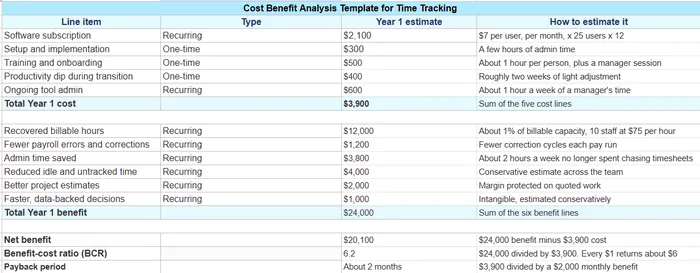
To make the evaluation practical, this template helps you to translate all cost and benefit categories into a structured format you can actually fill in. The template below organizes everything into a simple spreadsheet-style layout so you can enter your own numbers, calculate totals, and immediately see whether the investment is worthwhile.
How to Evaluate the Results of a Cost-Benefit Analysis?
A cost benefit analysis is typically evaluated using three key metrics: benefit-cost ratio, net benefit, and payback period.
- A benefit-cost ratio above 1 indicates that the benefits outweigh the costs.
- A positive net benefit shows that the investment generates overall value.
- A shorter payback period means the investment can recover its cost more quickly.
The benefit-cost ratio is often the primary indicator. It is calculated by dividing total benefits by total costs. While any ratio above 1 is technically positive, a stronger ratio provides a larger margin for uncertainty and makes the investment easier to justify.
It is also useful to run a sensitivity analysis by reducing projected benefits and checking whether the investment remains financially viable. This helps test whether the analysis is realistic under less favorable conditions.
Common Mistakes in a Time Tracking Cost-Benefit Analysis
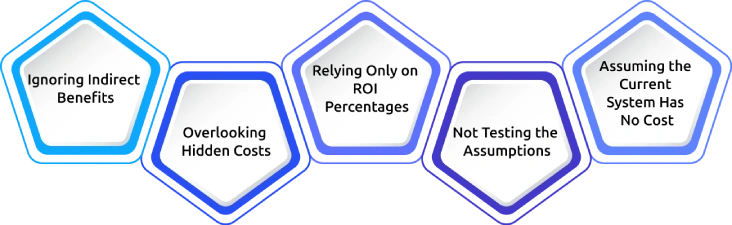
Several common mistakes can reduce the accuracy and reliability of a cost-benefit analysis.
1. Ignoring Indirect Benefits
Benefits such as improved project planning, operational visibility, or reduced reporting friction are often excluded because they are difficult to measure. However, these factors still contribute meaningful operational value.
2. Overlooking Hidden Costs
Setup time, employee training, onboarding effort, and temporary productivity adjustments have to be included in the analysis. Excluding these costs can create unrealistic projections.
3. Relying Only on ROI Percentages
A high ROI percentage alone does not always reflect a practical investment. Net benefit, operational impact, and payback period often provide a more complete picture.
4. Not Testing the Assumptions
Sensitivity testing helps validate whether the analysis still holds under lower-than-expected benefits or higher implementation costs.
5. Assuming the Current System Has No Cost
Manual systems and spreadsheets also create operational costs through administrative effort, lost billable hours, and reporting inaccuracies. These existing inefficiencies have to be included in the comparison.
Why Time Champ Stands Out as a Time Tracking Software
A cost benefit analysis is only effective when the software you choose can actually deliver measurable improvements in productivity, reporting, and operational efficiency. That is where Time Champ stands out.
Time Champ is an employee monitoring software with built-in workforce intelligence, which consists of time tracking features that help you accurately record work hours, reduce manual effort, and improve visibility into team performance. It has automated tracking, productivity insights, attendance management, reporting, and project monitoring within a single system.
Unlike manual timesheets that depend on memory and delayed entries, Time Champ records work activity in real time. This helps you reduce reporting inaccuracies, minimize payroll corrections, and gain more reliable operational data.
Key Features
Accurate Time Tracking
Time Champ records work hours automatically in real time, reducing the dependency on manual entries and memory-based reporting. This helps you improve timesheet accuracy across teams while minimizing missing logs, duplicate entries, and estimation errors that commonly occur with manual tracking methods.
Reduces Administrative Work
Automated timesheets, attendance tracking, and reporting significantly reduce the time spent on manual follow-ups, corrections, approvals, and payroll preparation. By centralizing time and attendance data in one platform, you can simplify administrative processes and reduce repetitive operational tasks.
Better Productivity Visibility
The platform provides detailed insights into active time, idle time, application usage, and workflow patterns, which help you understand how work hours are being utilized. These visibility insights make it easier to identify inefficiencies, improve focus time, and optimize overall team productivity.
Project & Task Tracking
It can track time across projects, tasks, and clients from a centralized dashboard, making workload management and project monitoring more efficient. This also helps you estimate project timelines more accurately, allocate resources effectively, and maintain clearer records for billing and reporting purposes.
Data-Driven Reporting
Detailed productivity, attendance, and work-hour reports help you evaluate whether the expected operational improvements are actually being achieved. These reports support better decision-making by providing measurable data for workforce planning, payroll processing, project analysis, and performance evaluation.
Ready To Measure the Real Impact of Digital Time Tracking?
Use Time Champ to improve timesheet accuracy and reduce manual effort with automated time tracking
Conclusion
A cost-benefit analysis helps you evaluate whether digital time tracking software delivers measurable operational and financial value. When you compare implementation costs against productivity, reporting, and administrative improvements, you can make more informed investment decisions. Using a structured template also makes the evaluation process more organized, practical, and easier to present to decision-makers. With the right software and a clear analysis approach, you can improve time tracking accuracy, operational visibility, and overall efficiency.

Jahnavi Pulluri

Table of Content
 What Is a Cost-Benefit Analysis, and Why Use One for Digital Time Tracking?
- What Goes on the Cost
Side of the Analysis?
- What Goes on the Benefit
Side of the Analysis?
- Cost–Benefit Analysis Template
- How to Evaluate the Results of a Cost-Benefit Analysis?
- Common Mistakes in a Time Tracking Cost-Benefit Analysis
- Why Time Champ Stands Out as a Time Tracking Software
- Conclusion

Related Blogs

Familiarize yourself with the basics of Project Cost Management, including budgeting, and estimating the costs. Make sure that your projects are profitable.
Jahnavi Pulluri | May 21, 2024
Maximize your business
Shabana Shaik | Mar 23, 2024
A cost center is a part of an organization which is responsible for costs incurrence but is not directly involved in revenue generation.
Sai Keerthi Uppala | Apr 27, 2024
Boost productivity with time tracking for virtual assistants. Discover tools to stay organized, manage tasks, and track billable hours accurately.
Thasleem Shaik | Mar 15, 2025
Unorganized work hours? Time tracking categories bring clarity, optimize workflows, and boost productivity. Learn how to set them up effectively.
Thasleem Shaik | Nov 08, 2024
Discover effective ways to build employee trust in automatic time tracking software and create a transparent, productive, and positive work environment.
Thasleem Shaik | Mar 13, 2025


 4.7/5 avg.
Ready to Manage Your Workforce Smarter?
Join our family of 1500+ companies using smart insights to redefine workforces!

Free Trial
No Credit Card Required