What is Resource Planning? Examples, Steps & Tools (2026)
Discover what resource planning is, its importance, examples, templates, strategies, pros & cons, and software to optimize project resources effectively.

Project management without resource planning is like building a house without knowing how many workers, materials, or tools you need. You can begin well, but soon you can fall behind on schedules, overspend, and burn out. In fact, IT projects typically exceed their budgets by an average of 33-34%, and overrun costs are the norm in 71% of cases, leading to significant financial waste for organizations globally. Misunderstandings about capacity planning guide are responsible for more late-stage scope changes than any technical issue. Anyone weighing this decision usually starts with our best project management software guide for the full landscape.
Effective planning can help you tackle these challenges. It enables you to identify the right resources, allocate them accurately, manage the budgets, and complete projects successfully. In this guide, you’ll quickly understand what it is, why it matters in 2026, practical examples, key steps, formulas, strategies, templates, and how to select the right software.
Also Read: Free Resource Planning Templates (Excel & Word)
What is Resource Planning?
Resource planning refers to the process of identifying, allocating, scheduling, and managing the resources needed to complete a project. These resources can be people, equipment, budget, materials, tools, and time.
Hard to understand? Don’t worry, I will simplify this further!
In simple words, resource capacity planning answers three important questions:
- What resources do we need?
- How much do we need?
- When do we need them?
The main purpose of this planning is to ensure the right resources are available at the right time, without overloading teams or exceeding the budget. When properly applied, it enhances productivity, minimizes wastage and increases the success rate of projects.
Example:
If a company is launching a new product, then planning looks like this:
- 5 developers for 3 months
- $50,000 marketing budget
- 2 designers
- 1 project manager
Without proper planning, the project may run late or exceed the budget. According to the American Psychological Association (APA), chronic workplace stress significantly increases employee burnout and disengagement.
Why is Resource Planning Important?
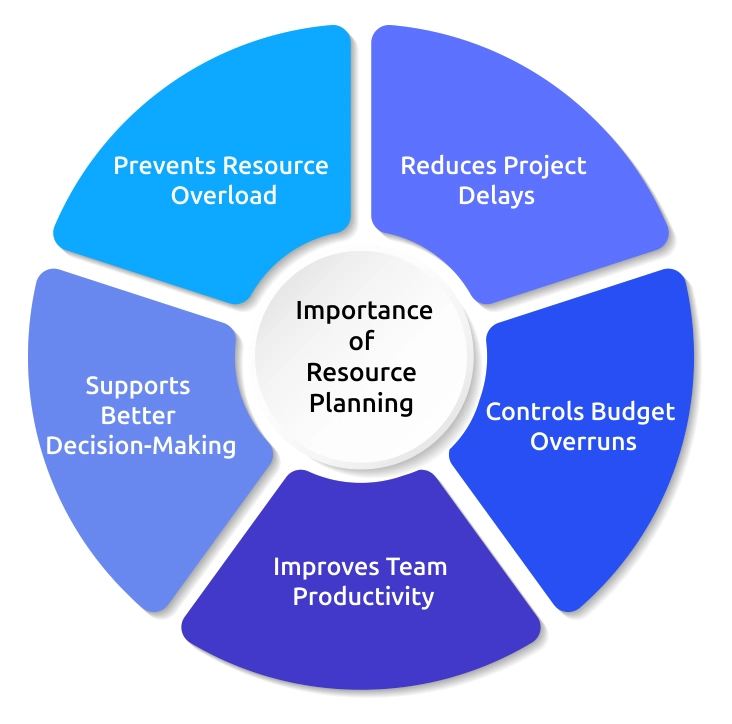
It is important because it keeps your projects organized, your team balanced, and your budget under control. Without proper planning, projects become stressful, deadlines slip, and costs increase. Let’s understand why it truly matters.
1. Prevents Resource Overload
Lack of proper planning of work leads to overworking of some employees and underutilized for others. This causes stress, quality loss, and negatively impacts your team morale. Effective workforce resource planning will ensure that there is equal distribution of the tasks based on skills and availability, so that your team remains productive and motivated.
2. Reduces Project Delays
Most of the delays occur due to the unavailability of the right resources at the right time. It helps you in mapping task dependencies and scheduling people, tools, and materials in advance.
3. Controls Budget Overruns
Unplanned overtime, urgent hiring, and repeated work can quickly increase your project costs. Business resource planning helps you estimate expenses early and track them throughout the project, reducing unnecessary spending and keeping budgets under control.

Did You Know?
The U.S. Government Accountability Office (GAO) has reported that inadequate planning is a key reason for cost overruns in public sector projects.
4. Improves Team Productivity
Resource capacity planning brings visibility, minimizes repetition, and enhances teamwork, resulting in enhanced productivity. It also helps you prioritize tasks effectively, ensuring important work gets completed on time without unnecessary pressure.
5. Supports Better Decision-Making
Proper planning gives information about present workloads and future requirements. This helps you in hiring plans, investments, and growth strategies without making rushed decisions. With accurate data and clear insights, you can make informed decisions that align with both short-term goals and long-term business objectives.
Ready to plan your resources more effectively?
Start managing resources and team productivity with Time Champ.
Is Resource Planning the Same as Capacity Planning?
No, resource planning and capacity planning are not the same. Resource planning deals with the allocation of particular resources (people, tools, and budget) to particular tasks. Capacity planning, on the other hand, explains how much total work your team can handle over a period of time. For example, think of it like planning a road trip. Capacity planning checks whether your car has enough fuel for the journey. Resource planning decides who will drive, who will navigate, and how the trip will be managed.
In simple terms, capacity planning protects you from overloading your team, while it ensures work is distributed in the most efficient and organized way. When both are used together, projects run more smoothly, teams feel more balanced, and deadlines become more realistic and achievable.
What Are Some Examples of Resource Planning?
To get a better idea of resource capacity planning, let’s look at situations you may actually face in your business. These examples will help you clearly see how planning resources can make your work smoother and more controlled.
1. Product Launch Planning
When a company prepares to launch a new product, resource planning starts with clearly identifying what is needed to make the launch successful. This includes identifying the required people, predictive budget, selecting necessary tools, and defining a clear timeline. For example, the launch may require a project manager to organize tasks, a marketer to deal with campaigns, and the designer to develop promotional materials and a fixed advertising budget. You can avoid pressure, prevent budget overspending, and ensure a smoother product launch by planning resources effectively.
2. Website Development Planning
During a website revamp, resource planning helps you divide work into stages such as design, development, testing, and deployment. The design team works first to create layouts, followed by developers who build the site structure, and finally testers who check functionality. Without clear planning, teams may overlap unnecessarily or face delays waiting for approvals. Structured allocation keeps tasks aligned and improves workflow efficiency.
3. Corporate Event Planning
Suppose you are organizing a company event. You need to manage the venue, catering, equipment, guest invitations, and on-site coordination. If staff availability and vendor schedules are not planned properly, it leads to errors. With clear resource capacity planning, you assign team members specific responsibilities, confirm vendor timelines early, and allocate the budget carefully.
Remote Team Project Planning
If you manage a remote team, resource planning becomes even more important. You must consider time zones, employee availability, skill levels, and deadlines. Without proper planning, meetings may overlap, deadlines may clash, and some team members may feel overloaded while others remain underutilised. When you plan effectively, you assign tasks based on capacity, schedule realistic deadlines, and ensure collaboration tools are in place.
How to Create and Manage Resource Planning for Projects?
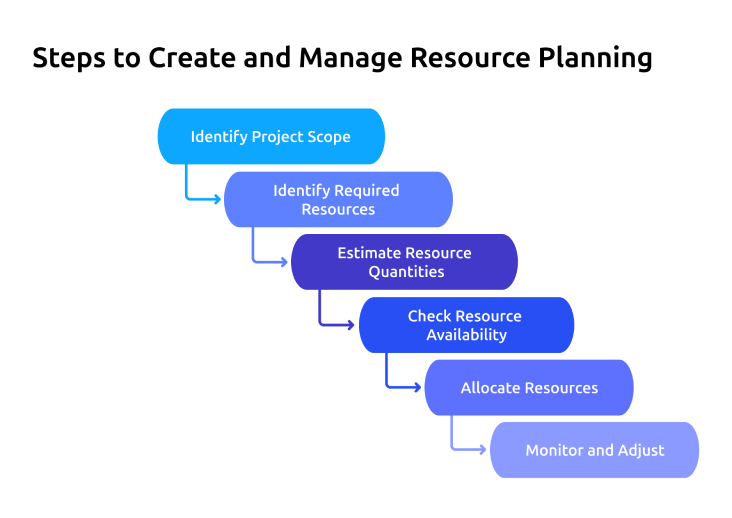
Resource planning is about ensuring your team, tools, time, and budget are aligned with your project goals from start to finish. When you create and manage project planning properly, you can reduce delays, improve team utilization, and avoid budget overruns. Let’s understand this step by step, clearly and practically.
Step 1: Identify Project Scope
Start by setting a clear objective for the project. Set goals, deadlines, and key deliverables. Break the project into smaller tasks so you understand exactly what needs to be done. Using resource capacity planning templates helps you document tasks clearly, avoid confusion, and prevent delays.
Step 2: Identify Required Resources
Next, find out the resources required to accomplish each task. This includes people, equipment, budget, and technology. For example, a software project may require developers, testing tools, and software licenses. Documenting everything in project resource planning templates ensures nothing is missed and improves planning accuracy.
Step 3: Estimate Resource Quantities
Now, calculate how much time and effort each task requires. If a task needs 80 hours and one employee works 40 hours per week, it will take two weeks. Accurate estimation helps avoid overloading team members or underestimating timelines. Adding a small buffer for unexpected delays makes the plan more realistic.
Step 4: Check Resource Availability
Before assigning work, confirm whether the required resources are available or not. Employees may already be working on other projects. Using resource capacity planning tools helps compare the planned workload with actual availability. Identifying gaps early prevents overbooking and project delays.
Step 5: Allocate Resources
Assign the right person to the right task based on their skills and availability. Balanced allocation improves productivity and reduces burnout. Structured resource plan templates help track responsibilities and ensure clarity across the team.
Step 6: Monitor and Adjust
These templates are not a one-time task. Continuously track planned and actual progress, monitor utilization, and adjust assignments when needed. Regular monitoring ensures the project stays on schedule and within budget.
When these steps are followed consistently, resource planning becomes simple, structured, and highly effective.
Pro Tip:
Make It a Continuous Process
Successful organizations treat this planning as an ongoing cycle:
| Plan → Allocate → Monitor → Adjust → Improve |
|---|
With the rise of AI planning and modern workforce intelligence tools, you can now predict conflicts before they happen and make proactive decisions.
How Do You Calculate Resource Planning Effectively?
Resource capacity planning is powerful when you calculate correctly. With this, you can reduce burnout, avoid budget overruns, and improve delivery timelines. To calculate the resources effectively, four important measurements are required: utilization, capacity, cost, and forecasting. Let’s understand each one in a simple and practical way.
- Resource Utilization Rate
Resource utilization tells you how efficiently your team members are being used during a specific time period. It helps you identify whether employees are underworked, balanced, or overloaded.
Formula:
| Resource Utilization (%) = (Actual Work Hours / Available Work Hours) × 100 |
|---|
For example, if an employee worked 35 hours in a week and their total available hours were 40, the calculation would be:
(35 / 40) × 100 = 87.5% utilization
An ideal utilization rate usually falls between 75% and 90%.
- Below 60% may indicate underutilisation.
- Above 95% may increase the risk of burnout.
2. Resource Capacity Calculation
Capacity calculation helps you understand how much total work your team can handle within a specific period, such as a week or a month. Without knowing your team’s capacity, it is easy to overcommit to deadlines.
Formula:
| Capacity = Number of Resources × Available Hours |
|---|
For example, if you have 5 developers and each one is available for 160 hours per month, your total capacity is:
5 × 160 = 800 hours per month
Now, if a project requires 950 hours, but your capacity is only 800 hours, you clearly know there is a 150-hour gap. This allows you to make smart decisions early, such as hiring temporary staff, redistributing tasks, or extending the deadline.
3. Cost Estimation Formula
Cost estimation helps you calculate how much your project will actually cost based on resource usage.
Formula:
| Total Resource Cost = Hourly Rate × Total Hours Required |
|---|
For example, if a developer charges $50 per hour and the task requires 200 hours, the total cost will be:
50 × 200 = $10,000
If multiple roles are involved, then you can simply calculate each cost separately and then add them together. When you calculate costs properly, you can easily protect your budget and avoid unexpected financial stress.
4. Resource Forecasting Formula
Forecasting helps you prepare for future workload demand. Instead of reacting to problems later, forecasting allows you to plan and make confident decisions about hiring, budgeting, and timelines.
Formula:
| Future Demand = Historical Average × (1 + Growth Rate) |
|---|
For example, if your team handled 500 hours of work last quarter and you expect a 10% growth in workload, the future demand would be:
500 × (1 + 0.10) = 550 hours
This means you need to plan for at least 550 hours next quarter.
What Are the Best Strategies for Planning Project Resources?
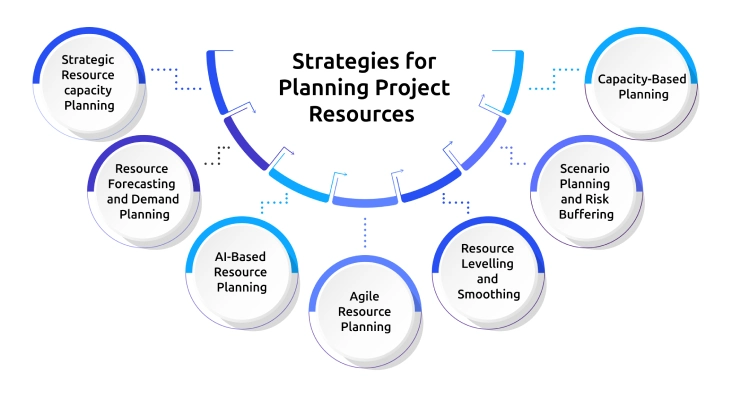
Planning project resources is about ensuring that people, budget, and tools are aligned with your business goals. Here are 7 Resource Planning Strategies and Techniques that can significantly improve project outcomes:
1. Strategic Resource capacity Planning
Strategic planning aligns your project resources with long-term business goals. Instead of planning only for current projects, you forecast future needs based on growth plans.
In this approach, you can:
- Forecast future skill requirements
- Plan hiring in advance
- Allocate budgets strategically
- Invest in training programs
A company that matches business strategy with resource planning is much better in its ROI and has lower costs of last-minute hiring. This strategy promotes your sustainability and scalability.
2. Resource Forecasting and Demand Planning
Resource forecasting helps you predict future resource needs based on past data and expected growth. It reduces uncertainty and helps your teams to prepare for upcoming workload increases.
This technique includes:
- Analyzing historical project data
- Calculating average resource usage
- Adjusting based on projected demand
3. AI-Based Resource Planning
AI planning uses advanced analytics and machine learning to optimize allocation decisions. It helps you make smarter decisions and gives you a competitive advantage.
AI-powered systems can:
- Detect workload imbalances
- Predict deadline risks
- Suggest better task assignments
- Identify resource conflicts automatically
This strategy is especially valuable for large teams and remote work environments that need real-time operational visibility.
4. Agile Resource Planning
Agile resource capacity planning gives you flexibility and continuous improvement. Don’t lock resources for months, simply plan in short sprints and adjust them regularly.
With this method, you:
- Allocate resources for 2-4 weeks
- Review outcomes after each sprint
- Reassign tasks based on real-time performance
This strategy helps to reduce bottlenecks and improve adaptability. If the sprint reveals a higher-than-expected workload, additional resources can be reassigned quickly.
5. Resource Levelling and Smoothing
Resource levelling ensures that no team member is overburdened while others are underutilised. It helps you maintain balance, prevent burnout, maintain productivity, and improve your employee well-being.
With this strategy, you can:
- Shift tasks between team members
- Adjust deadlines
- Balance workloads evenly
This strategy helps you make adjustments by balancing your employee workload. Balanced workloads lead to better performance and higher job satisfaction.
6. Scenario Planning and Risk Buffering
Scenario planning prepares organizations for unexpected challenges. Projects rarely go exactly as planned, so you must be prepared for the unexpected disruptions.
With this strategy, you can:
- Create backup resource plans
- Set contingency budgets
- Prepare alternatives for key roles
For example, if a key employee resigns, having a replacement plan prevents delays. With this strategy, you can proactively manage risks and reduce project failure.
7. Capacity-Based Planning
Capacity-based planning ensures that project commitments align with actual team availability. Before approving new projects, you need to evaluate whether sufficient resources exist or not.
Formula:
| Total Capacity = Number of Employees × Available Work Hours |
|---|
If a team has 5 developers working 160 hours per month:Total capacity = 800 hours
Capacity-based planning prevents overcommitment, improves delivery reliability, and protects your team's productivity.
Looking for a smarter way to manage project resources?
Simplify planning, tracking, and team productivity with Time Champ.
What Are the Pros and Cons of Resource Planning?
It is a powerful management practice that helps you use your people, time, and budget effectively. When done properly, it improves efficiency and reduces project risks. Here is a clear comparison of the major advantages and disadvantages of it:
| Pros | Cons |
|---|---|
| Improves project success rate by ensuring the right resources are available at the right time. | Requires accurate forecasting, wrong estimates can cause overallocation or shortages. |
| Reduces budget overruns by tracking resource usage carefully. | Initial setup and planning can be time-consuming. |
| Prevents employee burnout through balanced workload distribution. | Needs continuous monitoring as project scope changes. |
| Increases visibility and transparency across teams. | Require investment in planning software or advanced tools. |
| Supports better decision-making using data and forecasting. | Can become rigid if plans are not updated regularly. |
| Improves overall productivity by minimizing delays and resource conflicts. | Teams resist change if new planning processes are introduced. |
How to Choose the Right Project Planning Software
Choosing the right resource planning software is about improving visibility, reducing workload stress, and delivering projects on time. Here’s what to look for in project planning software:
1. Clear Visual Dashboard
An efficient project planning software needs to have an intuitive dashboard with a clear health display of the project. Dashboards show KPIs, timelines, task progress, resource allocation, and workload distribution in a single view. With visual dashboards, you can immediately see which tasks lag, which resources are overutilised, and where changes are necessary, and you can get rid of guesswork and enhance the accuracy of the plan.
2. Capacity and Workload Tracking
A core function of resource planning software is the ability to track capacity and workload in real time. This helps in ensuring that your team does not get overwhelmed and all resources are used optimally. Capacity planning tools compare your team’s availability with assigned work, so you can avoid overutilising or underutilising resources. When workload is balanced effectively, performance and morale automatically improve.
3. Real-Time Monitoring and Updates
In most projects, things don’t stay the same for long. Requirements can change, priorities can move, and new tasks may come up at any time. Because of this, having real-time monitoring in your project planning software is essential. It helps you stay updated on what’s happening right now, so you can adjust quickly instead of dealing with problems later.
4. Forecasting and Planning Capabilities
Beyond managing current work, Time Champ workforce intelligence platform combines productivity tracking with project planning insights. It helps you:
- Monitor employee productivity trends
- Analyze workload distribution
- Improve resource allocation accuracy
- Support hybrid and remote workforce management
Time Champ provides insights into how work is distributed, which teams are overloaded, and where improvements can be made. This helps you make better decisions about task assignments and resource allocation without relying on assumptions.
If you connect workforce data with project metrics, you can plan more effectively, balance team capacity, and improve overall efficiency. When workforce insights are integrated naturally into project planning, you can gain a clearer understanding of both performance outcomes and the factors influencing them.
Want better visibility into your team’s workload and project progress?
Plan, track, and optimize your projects easily with Time Champ.
Conclusion
Effective resource planning is essential for managing projects successfully. When you clearly plan your people, budget, tools, and time, you reduce delays, control costs, and prevent employee burnout. Poor planning often leads to overruns and stress, while structured planning improves productivity and decision-making. You can allocate resources more accurately and keep projects on track by applying the right strategies, calculations, and tools along with workforce intelligence tools.

Table of Content
-
 What is Resource Planning?
-
Why is Resource Planning Important?
-
Is Resource Planning the Same as Capacity Planning?
-
What Are Some Examples of Resource Planning?
-
How to Create and Manage Resource Planning for Projects?
-
How Do You Calculate Resource Planning Effectively?
-
What Are the Best Strategies for Planning Project Resources?
-
What Are the Pros and Cons of Resource Planning?
-
How to Choose the Right Project Planning Software
-
Conclusion
Related Blogs
Explore 7 free project planning templates to plan, schedule, and manage projects effectively. Download in Excel, Word & PDF and boost your project success.
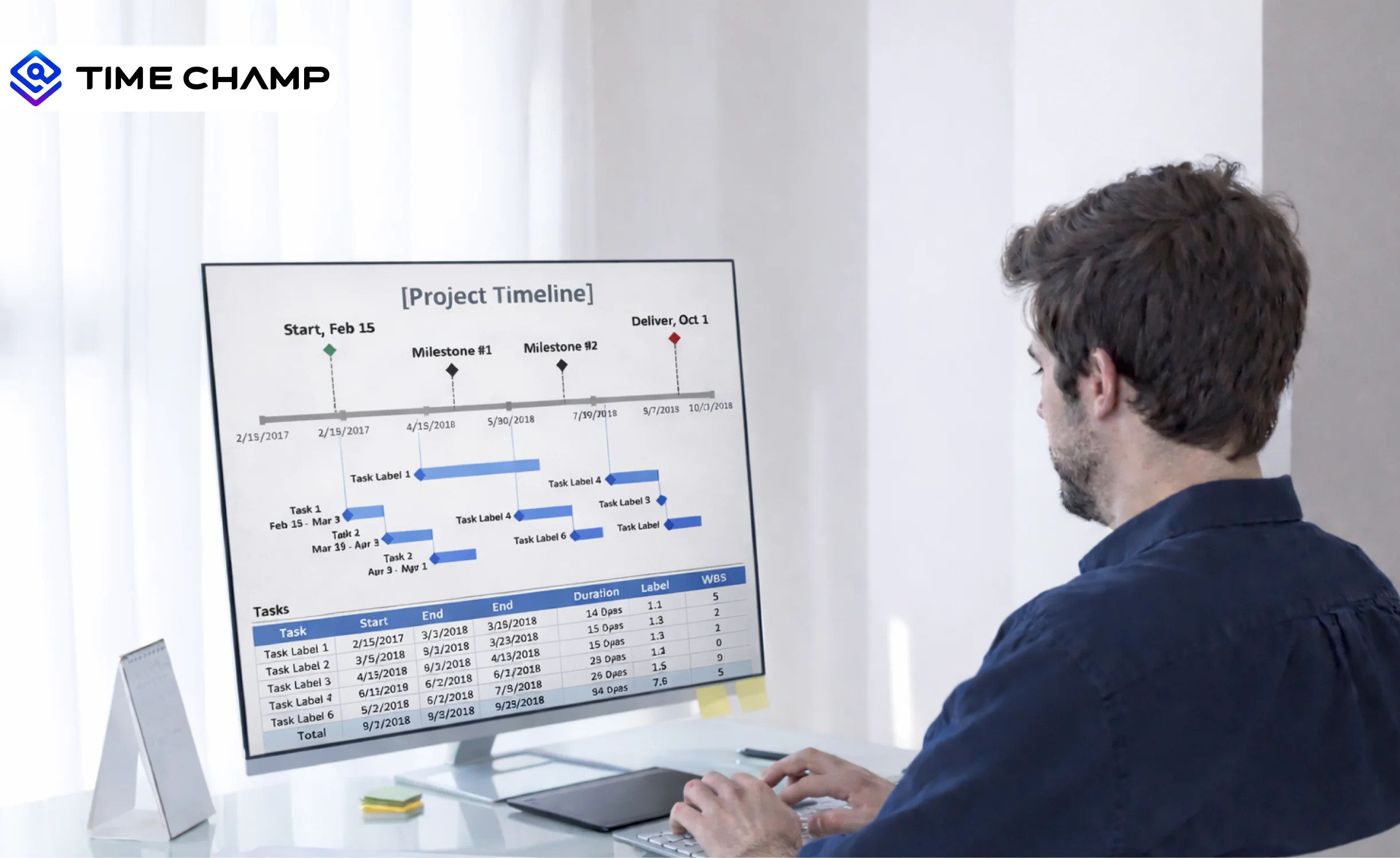
Understand project timelines, key components, examples, benefits, and step-by-step methods to create, manage, and optimize schedules.
Learn to create and leverage SMART goals effectively in project management for better planning, execution, and success. Get expert insights now!
Familiarize yourself with the basics of Project Cost Management, including budgeting, and estimating the costs. Make sure that your projects are profitable.

Access free downloadable Project Estimate Templates in Excel, Word, and PDF to plan costs, track budgets, and create accurate project estimates easily.
Explore 6 free project charter templates in Excel, Word, and PDF, including simple, agile, and six sigma formats for clear project starts.


 4.7/5 avg.
Ready to Manage Your Workforce Smarter?
Join our family of 1500+ companies using smart insights to redefine workforces!

Free Trial
No Credit Card Required