12 Essential Remote Work Best Practices for Productive Teams
Boost productivity with remote work best practices that improve communication, overcome challenges, and help you manage remote teams more effectively.

Working remotely often means dealing with communication gaps, distractions at home, and limited visibility into daily work. Without a structured routine, staying productive, collaborating effectively, and maintaining a healthy work-life balance can become challenging. Remote work best practices provide a practical framework to help you stay organized, communicate clearly, manage your time effectively, and perform consistently regardless of where you work. Following the right habits helps you build a productive and sustainable remote work routine.
Here, you’ll discover the biggest remote work challenges and 12 essential best practices to overcome them effectively. You’ll also see how the right tools can help you stay focused, manage work efficiently, and achieve better results every day.
What Are the Biggest Challenges of Remote Work Today?
Remote work gives you greater flexibility and freedom, but it also comes with challenges that can affect your productivity, collaboration, and overall well-being. Identifying these common obstacles helps you build better work habits and create a more successful remote work experience.
Communication Gaps Across Teams
Working remotely means most conversations happen through emails, chat platforms, or video meetings. Delayed responses, unclear instructions, or missing context can easily create misunderstandings. Keeping communication clear and providing regular updates can help everyone stay aligned and reduce unnecessary confusion.
Difficulty Staying Productive
Home environments often include distractions such as household responsibilities, family members, or social media notifications. These interruptions can make it difficult to stay focused on important tasks. Creating a structured routine and planning your day can help to maintain consistent productivity.
Limited Visibility into Work Progress
When working remotely, your daily efforts are not always visible to teammates or managers. Without regular progress updates, completed work and ongoing tasks can easily go unnoticed. Sharing updates proactively helps others understand your progress and keeps projects moving forward smoothly.
Blurred Work-Life Boundaries
Working from home can make it difficult to separate professional responsibilities from personal time. Checking emails after work hours or extending your workday can gradually lead to stress and burnout. Setting clear working hours and disconnecting after work helps you maintain a healthier work-life balance.
Weaker Team Collaboration and Engagement
Remote work reduces the spontaneous conversations that naturally happen in an office. Over time, this can make you feel less connected to your team. Participating actively in meetings, collaborating with colleagues, and joining informal team discussions help to strengthen relationships and improve teamwork.
Technology and Security Challenges
Productivity depends on reliable internet access, secure devices, and the right collaboration tools. Technical issues, outdated software, or poor security practices can interrupt work and put company data at risk. Keeping the devices updated and following security guidelines helps to work confidently.
Reduced Career Visibility
Working remotely may provide fewer opportunities to showcase your contributions through everyday workplace interactions. Taking initiative, sharing achievements, asking for feedback, and participating in team discussions help highlight your work and support long-term professional growth.
Addressing these challenges starts with building better daily habits. Following the right remote work best practices can help you communicate effectively, stay productive, collaborate confidently, and perform consistently, no matter where you work.
Struggling to stay productive while working remotely?
Use Time Champ to identify time-wasting habits and build more productive workdays.
12 Best Practices for Remote Employees
Building a successful remote work routine takes more than a reliable internet connection. The following remote work best practices can help you stay productive, communicate effectively, maintain a healthy work-life balance, and consistently deliver high-quality results, no matter where you work.
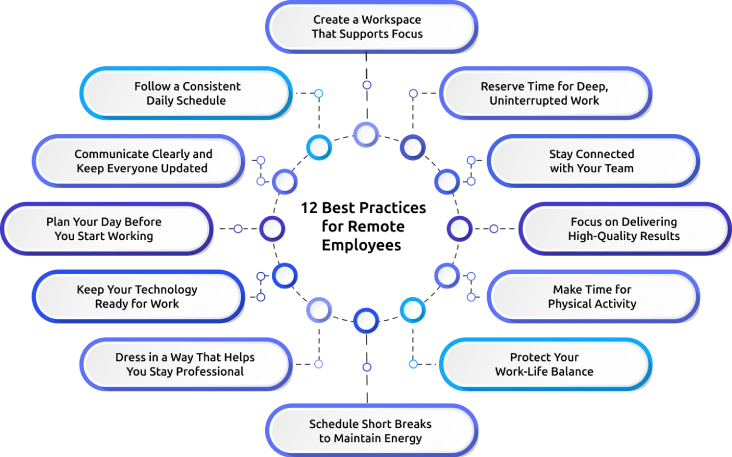
1. Create a Workspace That Supports Focus
Choose a dedicated area in your home where you can work comfortably every day. A well-organized workspace helps you stay focused, minimizes distractions, and signals the start of your workday. Keep your desk clean, ensure proper lighting, and have everything that you need within reach to maintain consistent productivity.
2. Follow a Consistent Daily Schedule
Set clear working hours and stick to them as much as possible. Starting and ending work at the same time each day helps you stay disciplined, manage the tasks efficiently, and communicate your availability to teammates. A predictable schedule also makes it easier to balance work responsibilities with your personal life.
3. Communicate Clearly and Keep Everyone Updated
Effective communication is one of the most important best practices of remote work. Share progress updates regularly, ask questions when something is unclear, and respond to important messages on time. Clear communication reduces confusion, keeps projects moving forward, and helps you stay aligned on priorities.
4. Plan Your Day Before You Start Working
Begin each workday with a clear list of priorities. Break large projects into smaller tasks and focus on completing the most important work first. Having a daily plan helps you stay organized, avoid unnecessary delays, and manage your workload with greater confidence throughout the day.
5. Keep Your Technology Ready for Work
Your laptop, internet connection, and work applications play a critical role in your productivity. Regularly update your software, secure your devices with strong passwords and multi-factor authentication, and test your equipment before important meetings. Reliable technology helps you avoid interruptions and protects company information.
6. Dress in a Way That Helps You Stay Professional
What you wear can influence your mindset during workdays. Choosing comfortable yet professional clothing helps you transition into work mode, especially when attending virtual meetings. It also prepares you to handle unexpected client calls or team discussions with confidence.
7. Schedule Short Breaks to Maintain Energy
Working continuously for long hours can reduce concentration and increase fatigue. Take short breaks between tasks to stretch, walk around, or rest your eyes from the screen. Regular breaks help you recharge, improve focus, and maintain a steady level of productivity throughout the day.
8. Protect Your Work-Life Balance
Set clear boundaries between work and personal time. Turn off work notifications after your working hours, avoid checking emails late at night, and establish a routine that marks the end of your workday. Healthy boundaries reduce stress and help prevent burnout over the long term.
9. Make Time for Physical Activity
Remote work often involves sitting for extended periods, which can affect both your physical and mental well-being. Include simple activities such as stretching, walking, or exercising in your daily routine. Staying active improves energy levels, supports better concentration, and helps you remain productive.
10. Focus on Delivering High-Quality Results
Measure your success by the quality and impact of your work. Complete tasks on time, maintain accuracy, and communicate any challenges before they affect deadlines. Consistently delivering reliable results builds trust with your manager and strengthens your professional reputation.
11. Stay Connected with Your Team
Strong relationships are essential for successful remote work. Participate in team meetings, join informal conversations when possible, and check in with colleagues regularly. Building meaningful connections improves collaboration, encourages knowledge sharing, and creates a more supportive remote work environment.
12. Reserve Time for Deep, Uninterrupted Work
Block dedicated time on your calendar for tasks that require full attention. Silence unnecessary notifications, close unrelated applications, and let your teammates know when you need focused work time. Protecting these periods helps you complete complex work faster while maintaining a high standard of quality.

Did You Know?
The U.S. Bureau of Labor Statistics reports that research using 2023 productivity data found a positive relationship between remote work and productivity, showing that well-managed remote work can improve employee performance when supported by the right practices and tools.
How Can Time Champ Help Remote Employees Stay Productive?
You may struggle to stay productive while working remotely due to distractions, unclear progress tracking, and communication gaps. You need the right tools to stay focused, manage time effectively, and maintain a healthy work-life balance. Time Champ is smart employee monitoring software with built-in workforce productivity features that track time, analyze work patterns, and provide insights to help you stay organized, improve efficiency, and manage tasks effectively.
Here are the key features of Time Champ that help you stay focused and productive throughout your remote workday.
- Automatic Time Tracking: Records work hours automatically, helping you focus on tasks while maintaining accurate timesheets without manual entries.
- Productivity Monitoring: Tracks productive, unproductive, and neutral activities to help you understand how the workday is spent and improve daily performance.
- Project and Task Time Tracking: Measures the time spent on individual projects and tasks, making it easier for you to prioritize work, manage deadlines, and stay accountable.
- Attendance and Work Hours Management: Automatically records clock-in, clock-out, active hours, idle time, and breaks to maintain accurate attendance records and healthy work routines.
- Application and Website Usage Insights: Provides visibility into application and website usage, helping you identify distractions, improve focus, and spend more time on meaningful work.
- Detailed Productivity Reports and Analytics: Generates comprehensive reports on productivity trends, work patterns, and time utilization, enabling you and your manager to make informed decisions and continuously improve performance.
Finding it hard to stay organized every day?
Time Champ helps you manage tasks, track productivity, and work smarter.
Conclusion
Building a successful remote work routine requires consistency, clear communication, effective time management, and healthy work habits. Following these remote work best practices can help you stay focused, collaborate more effectively, maintain a better work-life balance, and deliver consistent results every day. Small improvements in your daily routine often lead to long-term professional growth and stronger team performance. Start by adopting one or two practices today, evaluate what works best, and gradually make them part of your routine. Consistent action today creates a more productive, balanced, and successful remote work experience tomorrow.

Anjali

Table of Content
 What Are the Biggest Challenges of Remote Work Today?
- 12 Best Practices for Remote Employees
- How Can Time Champ Help Remote Employees Stay Productive?
- Conclusion
Instant Signup
Thank you for your request!
We have received your signup request and our team will get back to you soon. In the meantime, you can book a demo to see Time Champ in action.
Book a DemoFree trial. No credit card required. Prefer a walkthrough? Book a demo.
Related Blogs

Avoid remote work mistakes that affect focus, communication, time, and boundaries. Get simple tips to stay productive and in control of your workday.
Thasleem Shaik | Oct 06, 2026
Always stuck in work mode at home? Learn how to set clear work-life boundaries, reduce stress, and and stay productive while working from home!
Jahnavi Pulluri | Mar 12, 2025
Build a strong communication culture in remote teams to improve collaboration, trust, and productivity. Explore key strategies for seamless teamwork!
Sai Keerthi Uppala | Feb 24, 2025
Protect your remote team's data with essential remote work security policies, risk mitigation strategies, and trends. Boost your setup and keep data safe.
Tarun Kumar Reddy | Oct 16, 2024
Productivity Tracking Software helps remote teams stay on top, track progress, streamline workflows & boost efficiency effortlessly. Learn more!
Shabana Shaik | Mar 15, 2025
Struggling to improve your remote workplace? Uncover six powerful strategies to boost productivity, enhance collaboration, and keep your team engaged!
Tarun Kumar Reddy | Mar 14, 2025


 4.7/5 avg.
Ready to Manage Your Workforce Smarter?
Join our family of 1500+ companies using smart insights to redefine workforces!

Free Trial
No Credit Card Required