Screenshots
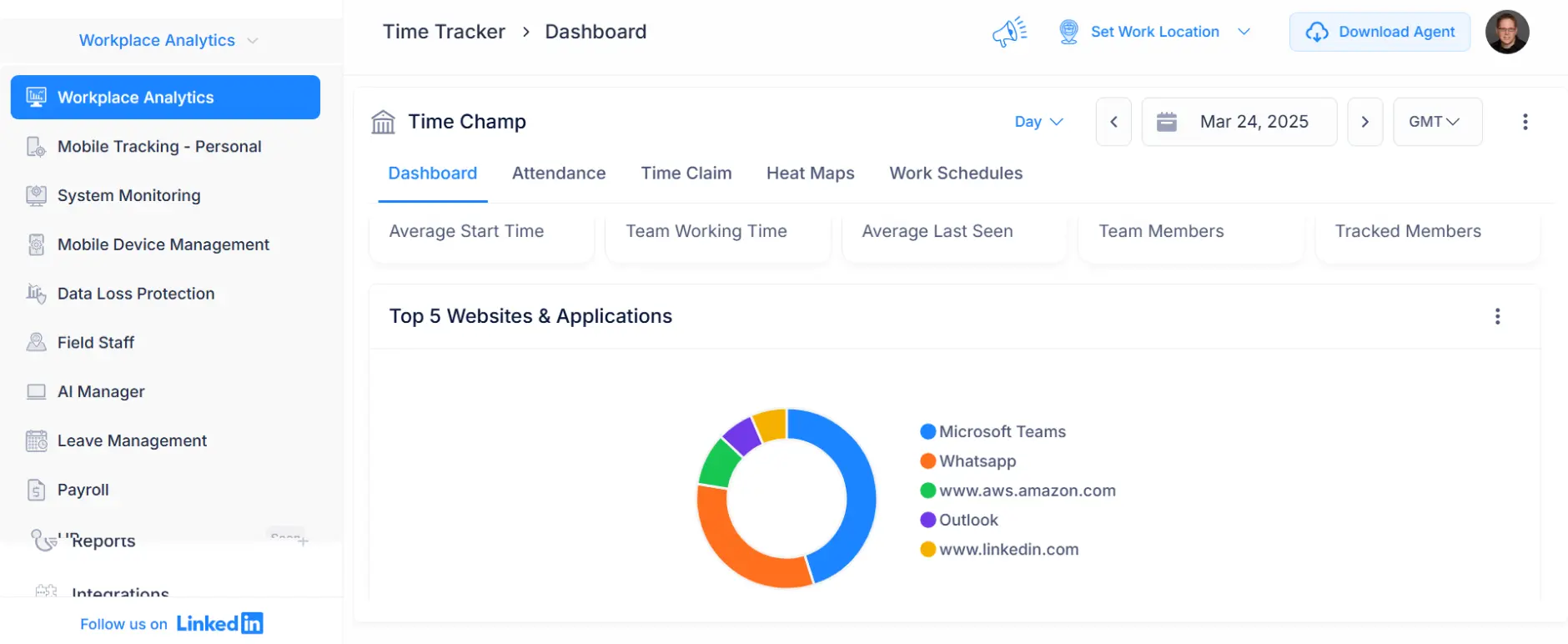
8 Screenshots

4 Screenshots
Choosing the right workforce tool depends on how you track work and protect business data. Time Champ brings these needs together with workforce analytics, employee monitoring, and data loss prevention, while Hubstaff focuses on time tracking, team management, and employee payments. Compare their capabilities to see which aligns with your daily operations.











 Offers time tracking, employee monitoring, attendance, project management, and workforce analytics in one platform.
Captures work activity through screenshots, screen recordings, live screen monitoring, and app and website tracking.
Offers detailed reports on work hours, productivity, attendance, and employee activity to help you review daily operations.
 Connects time tracking with timesheets, time approvals, invoicing, and payroll workflows.
Records app and website usage, activity levels, idle time, and optional screenshots.
Offers reports on tracked hours, activity, utilization, and project costs.
An employee monitoring software with a workforce intelligence layer, covering time tracking, attendance, productivity, workforce analytics, and data loss prevention in one place.
A time tracking and workforce management tool that connects tracked hours to timesheets, invoicing, and payroll.
8 Screenshots
4 Screenshots
| Workforce Analytics |
| Employee Monitoring |
| Automated Time Tracking |
| Attendance Management |
| Productivity Tracking |
| Activity Tracking |
| Project Management |
| Task Tracker |
| Field Staff Management |
| Hybrid Work Management |
| Data Loss Prevention (DLP) |
| Reports |
| Alerts |
| Product Updates |
| Product Quality |
| Support |


 Automated Tracking with Clear Insights
I like having time tracking, productivity reports, and activity monitoring in one place. The real-time updates and easy-to-read dashboards help me understand how work progresses across the team without relying on manual updates.
 Easy Time Tracking and Detailed Reports
Time Champ makes it simple to track hours across different projects and review team performance. The automated reports save time, while the productivity insights help me see how work hours are spent throughout the day.
Takes Time to Get Familiar with the Interface
Time Champ has plenty of features, so finding the right settings can take a little time when we're using it for the first time. Once I get familiar with the layout, navigating the platform becomes easier.
Initial Setup Requires Some Time
The range of reporting and customization options is useful, but getting everything configured the way I need takes some time at first. After understanding the available settings, it's easier to work with the reports and dashboards.
Easy Remote Team Coordination
Hubstaff makes it easier to manage a distributed team by keeping work hours, timesheets, and productivity data in one place. I can review team activity, check reported hours, and prepare payroll without switching between multiple tools.
Simple Tracking with Clear Timesheets
Starting a timer for each task is straightforward, and the app runs quietly while I work. The reports help me explain how I spend my time across projects, and the lightweight desktop app doesn't noticeably slow down my system.
Reports Can Be Hard to Navigate
Finding the exact details I need in Hubstaff's reports sometimes takes more time than expected, especially when reviewing specific work hours and team data.
Idle Detection Can Be Inaccurate
I've noticed that Hubstaff sometimes stops the timer while I'm still working, especially when reading documents or reviewing designs. I have to add those hours manually, and the random screenshots can feel intrusive.
Create your free Time Champ account. No credit card required.

Export your employee data and reports from Hubstaff in a .csv format.
Upload your .csv file into Time Champ & start tracking instantly. Our support team is happy to assist you.
Control USB access, restrict file transfers, block websites, and monitor file activity from one platform. Time Champ helps you identify suspicious actions and protect sensitive business data.
Along with screenshots and app tracking, Time Champ supports live screen monitoring, screen recording, and configurable audio tracking for teams that need closer visibility into work activities.
Review team performance, work patterns, tool usage, time utilization, and potential attrition risks through workforce analytics that help you spot issues and understand what affects results.
Plan projects, assign tasks, manage resources, track deadlines, and record project hours without relying solely on separate project management tools.


Agilisium Boosted Workforce Productivity by 70% - How Time Champ Made It Possible


Driving Growth and Efficiency: Young Decade’s Journey with Time Champ










 4.7/5 avg.
Join our family of 1500+ companies using smart insights to redefine workforces!

Free Trial
No Credit Card Required