How to Create a DLP Policy: Steps, Rules & Examples
Learn how to create a DLP policy with step-by-step guidance, policy rules, real-world examples, and best practices to protect sensitive data effectively.
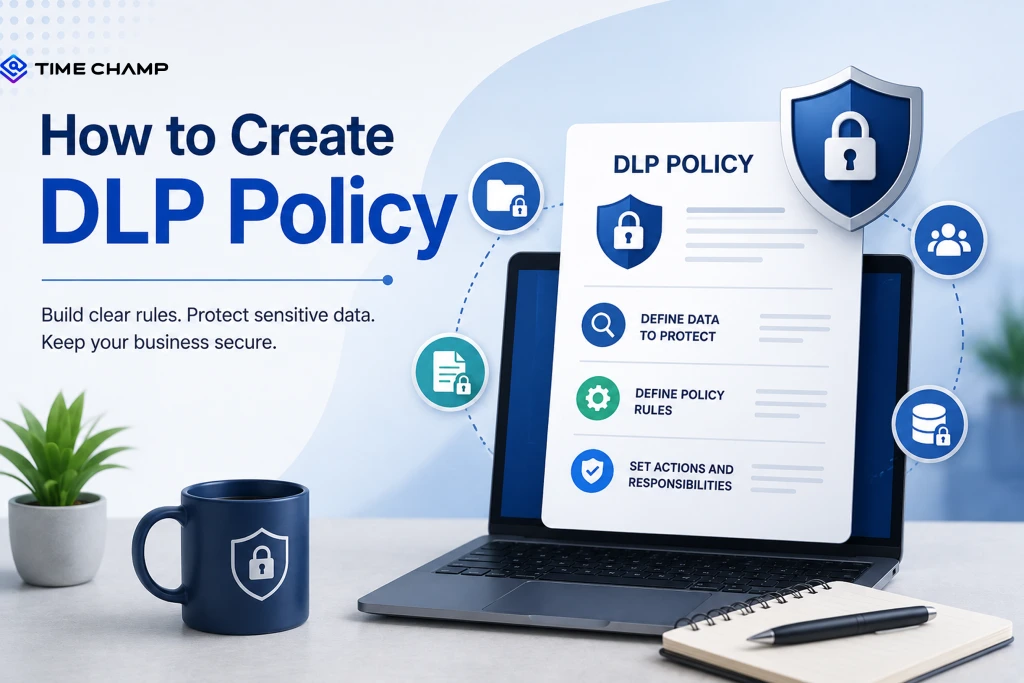
Buying a DLP solution without creating a policy is like building a fence without closing the gate. You have protection, but the biggest gap is still open. A strong DLP policy defines what data to protect, who can access it, and what actions to take when risks arise.
Whether you're creating your first DLP policy or improving an existing one, this guide gives you the steps, rules, examples, and best practices to get it right.
What Is a DLP Policy?
A Data Loss Prevention (DLP) policy is a set of rules that defines how your organization protects sensitive data. It identifies what data needs protection, who can access or share it, and the actions your DLP solution should take when it detects a potential data leak. A well-designed DLP policy helps prevent unauthorized access, supports regulatory compliance, and reduces the risk of accidental or intentional data loss.

Did You Know?
According to Gartner, only 14% of security leaders effectively balance data security with business objectives. This shows why a well-defined DLP policy is essential for protecting sensitive data without slowing down employees.
Why Does DLP Policy Quality Matter More Than DLP Tool Quality?
A powerful DLP solution can only do what your policy tells it to do. Without clear rules, even the most advanced tool can generate unnecessary alerts, block legitimate work, or overlook real data risks. A well-defined DLP policy ensures your security tools protect sensitive data accurately while keeping business operations running smoothly.
- Defines What to Protect: Clearly identifies sensitive data such as PII, financial records, healthcare data, and intellectual property.
- Reduces False Positives: Well-crafted rules minimize unnecessary alerts, helping security teams focus on genuine threats.
- Prevents Business Disruption: Balanced policies avoid blocking legitimate workflows while still protecting critical data.
- Supports Regulatory Compliance: Aligns data handling practices with standards like GDPR, HIPAA, PCI DSS, and other industry regulations.
- Improves Incident Response: Clear actions for alerts, blocking, encryption, or notifications help teams respond quickly to potential data leaks.
- Adapts to Changing Risks: Regular policy updates keep your DLP strategy effective as business processes, regulations, and cyber threats evolve.
- Maximizes Your DLP Investment: A strong policy enables your DLP solution to deliver accurate protection instead of becoming an expensive alert generator.
Don't wait for a policy violation to expose a security gap.
Discover how Time Champ helps you enforce DLP policies in real time.
What Are the 8 Core Components of a DLP Policy?
A DLP policy is only effective when all its key components work together. Each component plays a specific role in protecting sensitive data, reducing security risks, and helping your organization respond consistently to potential data loss incidents. Missing even one of these elements can create security gaps or lead to unnecessary policy violations.
Start by defining what your DLP policy covers. This includes the departments, systems, users, and types of sensitive data protected by the policy. You should also clearly state its objectives, such as preventing data breaches, protecting intellectual property, or meeting regulatory requirements.
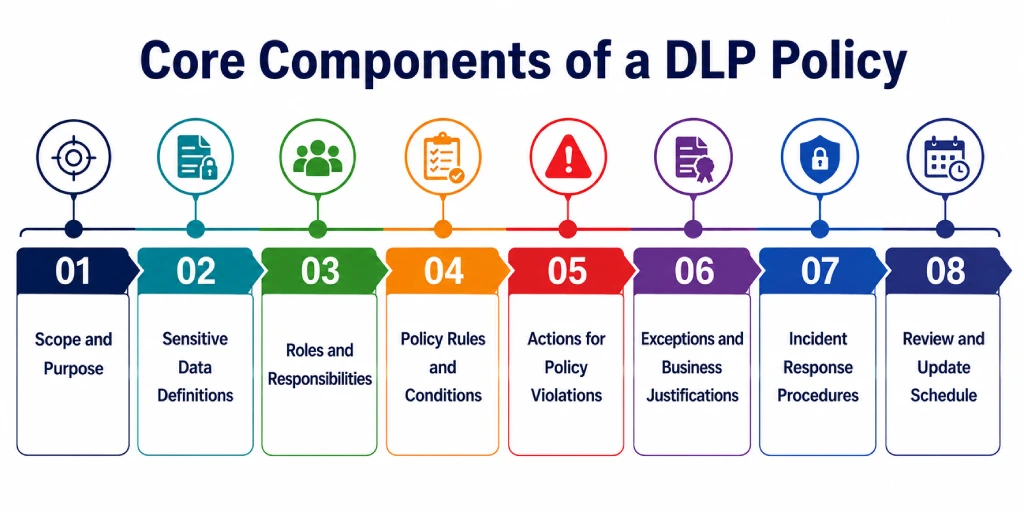
Component 2: Sensitive Data Definitions
Identify the types of data your organization needs to protect, such as personally identifiable information (PII), protected health information (PHI), payment card data (PCI), financial records, credentials, or intellectual property. Using a data classification framework also helps your DLP solution identify sensitive information more accurately.
Component 3: Roles and Responsibilities
Assign clear responsibilities for managing and enforcing the policy. Define who owns different types of data, who approves policy updates and exceptions, and what employees must do to handle sensitive information securely.
Component 4: Policy Rules and Conditions
Specify the conditions that trigger a policy violation. Most DLP policies use simple IF/THEN logic. For example, if confidential data is shared outside the organization, then block the action or alert the security team. Rules can also consider factors such as the user, destination, communication channel, or amount of data involved.
Component 5: Actions for Policy Violations
Define how your DLP solution should respond when it detects a violation. Depending on the severity, it can:
- Block the action
- Encrypt sensitive data
- Quarantine files for review
- Display a warning to the user
- Log the activity for auditing and investigation
Component 6: Exceptions and Business Justifications
Not every situation requires the same response. Include approved exceptions for legitimate business activities while maintaining proper approval workflows and audit trails. This helps prevent your DLP policy from disrupting day-to-day operations.
Component 7: Incident Response Procedures
Your policy should clearly explain how your team handles security incidents across devices. Define the response team, investigation process, containment steps, notification requirements, and recovery procedures so everyone knows how to respond when a serious violation occurs.
Component 8: Review and Update Schedule
A DLP policy should evolve with your business. Review it regularly to address new security threats, regulatory changes, and business requirements. Monitoring metrics such as false positives, security incidents, and user feedback helps you fine-tune the policy and keep it effective over time.
Did You Know?
Organizations generate approximately 402.7 million terabytes of data every day. As data volumes continue to grow, clearly defining what data needs protection becomes a critical part of every DLP policy.
How Do You Create a DLP Policy? The 7-Step Process
Creating an effective DLP policy isn't about writing a long list of security rules. It's about understanding how your data moves, identifying potential risks, and defining actions that protect sensitive information without disrupting everyday work. Follow these seven steps to build a practical and effective DLP policy.
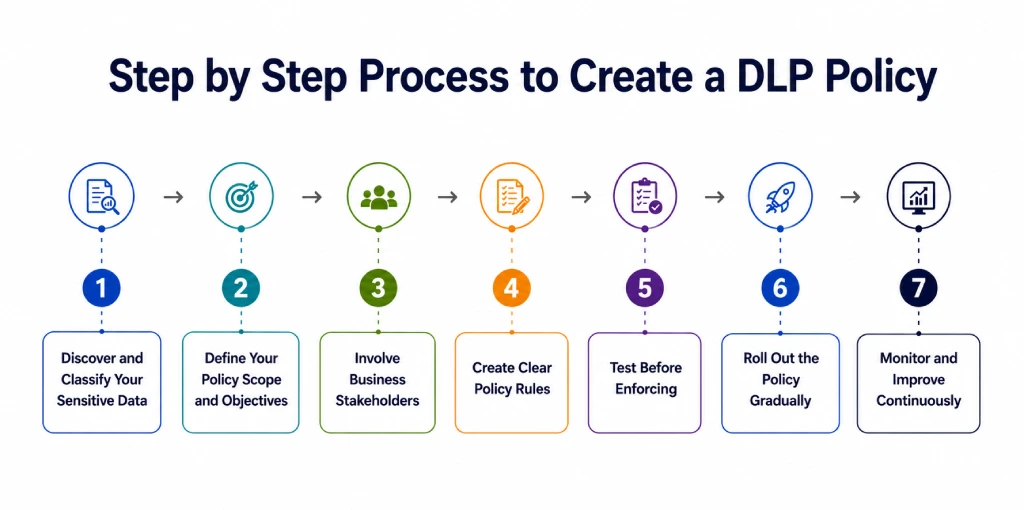
Step 1: Discover and Classify Your Sensitive Data
Start by identifying where sensitive data is stored across your organization, including endpoints, servers, cloud storage, SaaS applications, and email systems. Classify this data based on its sensitivity, such as Public, Internal, Confidential, or Restricted, so you can prioritize protection for your most valuable information.
Step 2: Define Your Policy Scope and Objectives
Determine what your DLP policy will cover, including the departments, users, systems, and data types within its scope. Set clear objectives, such as preventing data breaches, protecting intellectual property, or meeting compliance requirements, and communicate these goals across the organization.
Step 3: Involve Business Stakeholders
Collaborate with business leaders and department heads to understand how employees use and share data. Their input helps you identify legitimate workflows, reduce unnecessary restrictions, and create policies that support business operations.
Step 4: Create Clear Policy Rules
Define the conditions that trigger a policy and the actions that follow. A simple IF/THEN approach works well. For example, if confidential files are shared outside the organization, then block the transfer and notify the security team. Keep your initial rules straightforward and expand them as needed.
Step 5: Test Before Enforcing
Before applying the policy to all users, run it in monitoring or simulation mode. Review alerts, identify false positives, and adjust rules based on real user behavior. This helps you fine-tune the policy without interrupting day-to-day work.
Step 6: Roll Out the Policy Gradually
Instead of enforcing every rule at once, introduce the policy in phases. Start with warnings to educate users, then gradually enable blocking for high-risk activities. Rolling out one department or data type at a time makes it easier to gather feedback and refine the policy.
Step 7: Monitor and Improve Continuously
A DLP policy should evolve as your business and security landscape change. Regularly review policy performance, monitor incidents, analyze false positives, and update rules to address new threats, regulatory requirements, and changing business needs. Continuous improvement keeps your policy effective over time.
A single policy violation can undo weeks of planning.
See how Time Champ helps you detect and stop risky behavior before it leads to data loss.
What Are Real Examples of DLP Policy Rules?
DLP policies use simple IF/THEN rules to decide when to protect sensitive data. Here are some common examples that show how these rules work in real business situations.
1. Preventing Employees From Sharing Personal Information
- Rule: If an employee tries to email a file containing customer or employee personal information to someone outside the company, the email is blocked, and the security team is notified.
- Why it matters: This helps prevent sensitive personal data from being accidentally or intentionally shared.
- Common in: HR, finance, and healthcare organizations.
Did You Know?
According to IBM’s Cost of a Data Breach Report, data breaches initiated by malicious insiders were the most costly at $4.99 million on average.
2. Blocking Credit Card Information from Being Uploaded
- Rule: If someone uploads a file containing credit card details to an unapproved cloud storage service, the upload is blocked, and the activity is recorded.
- Why it matters: This protects payment information and helps your organization meet PCI DSS compliance requirements.
- Common in: Retail, e-commerce, and financial services.
3. Protecting Source Code and Company Files
- Rule: If an employee tries to send source code or confidential project files to a personal email address, they receive a warning and must provide a valid reason before the email goes out.
- Why it matters: This reduces the risk of losing valuable intellectual property while still allowing legitimate collaboration.
- Common in: Software companies and R&D teams.
4. Encrypting Sensitive Healthcare Information
- Rule: If an email contains patient records or other healthcare information, the email is automatically encrypted before it is sent.
- Why it matters: Encryption keeps sensitive medical data secure and helps organizations comply with healthcare regulations.
- Common in: Hospitals, healthcare providers, and insurance companies.
5. Detecting Unusual File Downloads
- Rule: If an employee downloads a large number of confidential files outside normal working hours, the security team is alerted and the activity is logged.
- Why it matters: Large downloads at unusual times can be an early sign of data theft or insider threats.
- Common in: Organizations that handle confidential business information.
6. Controlling External Sharing of Confidential Documents
- Rule: If an employee shares a confidential document with someone outside the company, manager approval is required before the document is sent.
- Why it matters: This prevents accidental data leaks while allowing employees to share information when there's a legitimate business need.
- Common in: Legal firms, consulting companies, and professional services.
Did You Know?
According to Verizon's 2026 Data Breach Investigations Report, unauthorized use of external AI tools has become the third most common non-malicious insider action detected by DLP systems, with 3.2% of DLP policy violations.
What Are the Common Mistakes When Creating a DLP Policy?
A well-designed DLP policy protects sensitive data without disrupting everyday work. However, a few common mistakes can reduce its effectiveness and create unnecessary challenges. Avoid these mistakes to build a stronger and more reliable DLP policy.
Creating Rules Before Discovering Your Data
Creating DLP rules before understanding your data can leave sensitive information unprotected or cause unnecessary restrictions. First, identify where sensitive data is stored, how employees use it, and where it is shared. Then create rules based on these findings.
Skipping the Testing Phase
Enforcing a DLP policy without testing can lead to false alerts, blocked business activities, and employee frustration. Run the policy in monitoring or simulation mode before enforcement. Review the results, adjust the rules, and make sure they work as expected.
Letting IT Create the Policy Alone
When IT creates a DLP policy without input from other teams, the rules may not reflect actual business processes. Involve department managers and data owners to understand how employees handle sensitive information. This helps you create rules that protect data without affecting legitimate work.
Using Templates Without Customizing Them
Applying a DLP template without making changes can leave gaps in protection or create rules that do not suit your business. Use templates as a starting point, then adjust them to match your data, workflows, users, and compliance requirements.
Failing to Review and Update the Policy
An outdated DLP policy may not address new risks, business changes, or regulatory requirements. Review your policy regularly and update the rules when your data, workflows, or security needs change. Regular updates also help reduce false alerts and keep the policy effective.
How Does Time Champ Support Your DLP Policy?
A well-written DLP policy defines how your organization protects sensitive data, but it also needs the right tools to enforce those rules. Time Champ helps you apply your DLP policy across employee endpoints by providing real-time visibility, configurable controls, and detailed audit trails that strengthen data security.
Time Champ is an employee monitoring and data loss prevention software that gives you complete visibility into employee activities, helping you enforce DLP policies from a single platform.
File Activity Monitoring
Monitor file creation, access, modification, deletion, and transfers involving sensitive data. Receive real-time alerts for bulk downloads, unauthorized transfers, and unusual activity to identify policy violations quickly.
USB and Removable Media Control
Control how employees use USB drives and other removable devices. Block or restrict file transfers, copying, and printing to prevent sensitive data from leaving your organization.
Website and Cloud Application Control
Block access to unauthorized websites and cloud storage platforms. Restrict file uploads to approved applications to keep sensitive data within trusted channels.
Application Access Control
Control application access based on user roles and business needs. Prevent employees from using unauthorized software that could bypass your DLP policies.
Activity Monitoring and Audit Trails
Maintain detailed audit logs of employee activities involving sensitive data. Investigate incidents, support compliance, and improve your DLP policies with complete activity records.
Real-Time Visibility and Reporting
View employee activities through real-time dashboards and reports. Identify risky behavior, evaluate policy effectiveness, and strengthen your data protection strategy.
Ready to strengthen your data protection strategy?
Try Time Champ and gain the visibility and controls you need to prevent data loss.
Conclusion
A strong DLP policy helps you protect sensitive data, reduce security risks, and meet compliance requirements. Create clear rules, test them regularly, and update them as your business evolves to keep your data secure without disrupting daily work.
Combining a well-defined DLP policy with the right security solution like Time Champ helps you reduce data loss risks while maintaining productivity and compliance.

Guna Lakshmi

Table of Content
 What Is a DLP Policy?
- Why Does DLP Policy Quality Matter More Than DLP Tool Quality?
- What Are the 8 Core Components of a DLP Policy?
- How Do You Create a DLP Policy? The 7-Step Process
- What Are Real Examples of DLP Policy Rules?
- What Are the Common Mistakes When Creating a DLP Policy?
- How Does Time Champ Support Your DLP Policy?
- Conclusion

Related Blogs
Protect sensitive business data in hybrid work environments with strong security controls and practical strategies to prevent data breaches.
Guna Lakshmi | Jun 10, 2026
Learn how to ensure data privacy in productivity tracking with key controls, vendor evaluation, and setup steps that reduce risk and protect employee data.
Guna Lakshmi | May 02, 2026
Protect your business from insider risks with insider threat prevention best practices for monitoring, access control, employee security, and data protection.
Guna Lakshmi | May 08, 2026
Discover how network data loss prevention protects sensitive data and shields your business from costly breaches and regulatory risks
Thasleem Shaik | Jan 18, 2025
Implement data loss prevention practices to protect sensitive data, reduce security risks, prevent breaches, and strengthen your organization's security.
Thasleem Shaik | Aug 24, 2026
Data loss prevention helps protect sensitive business data from leaks, theft, and misuse. See how DLP works, its benefits, challenges, and best practices.
Thasleem Shaik | Aug 21, 2026


 4.7/5 avg.
Ready to Manage Your Workforce Smarter?
Join our family of 1500+ companies using smart insights to redefine workforces!

Free Trial
No Credit Card Required