Network Data Loss Prevention (nDLP): A Complete Guide
Concerned about sensitive data leaving your network? See how network data loss prevention helps to reduce risks with the right features and practices.
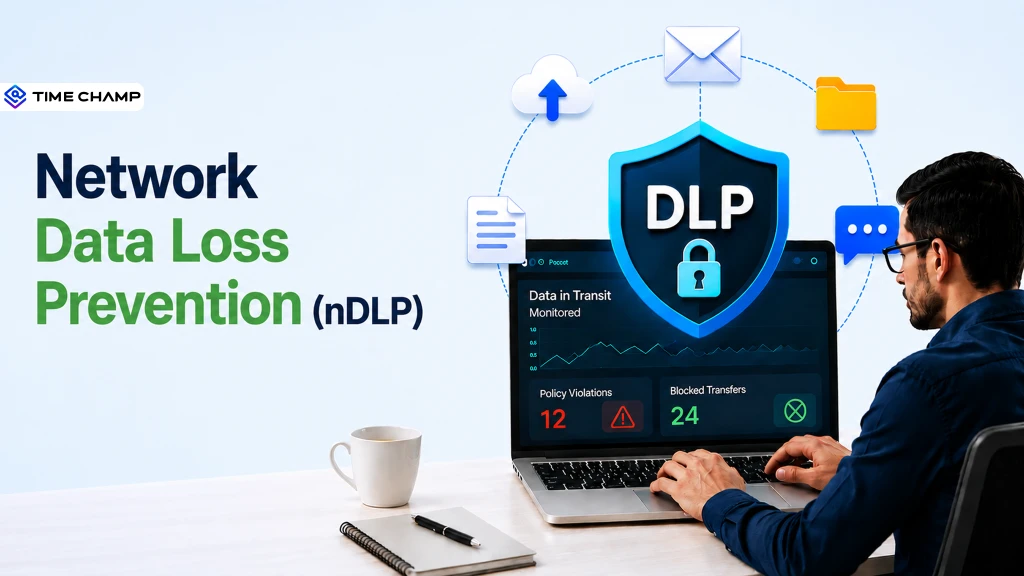
Running a business means sensitive information is constantly moving across your network through emails, file transfers, cloud applications, and employee devices. Without the right protection, accidental sharing or unauthorized access can expose critical information. Network data loss prevention helps reduce these risks by monitoring data in transit, detecting leaks, and enforcing security policies before data leaves your organization.
Here you’ll understand what nDLP is, how it works, and its key features. You’ll also see the common use cases, challenges organizations should know about, and a comparison between different DLP approaches.
What Is Network Data Loss Prevention?
Network DLP is a security solution that monitors and protects sensitive data as it moves across an organization’s network. It identifies unauthorized data transfers, applies predefined security policies, and blocks or alerts on risky activities to help prevent data leaks, maintain compliance, and safeguard confidential business information.

Did You Know?
According to the FBI’s 2025 Internet Crime Report, the Internet Crime Complaint Center (IC3) received more than 1 million cybercrime complaints, with reported losses exceeding $20 billion. This growing threat highlights why organizations need stronger data protection controls and compliance strategies.
How Does Network DLP Work?
Sensitive business data travels through emails, cloud platforms, messaging apps, and file-sharing services every day. Network DLP monitors data in transit to detect risky transfers and prevent sensitive information from leaving approved channels, avoiding security and compliance issues.
Here’s how Network DLP works:
- Maps Sensitive Business Data: Network DLP scans network traffic to find and identify sensitive information as it moves. It then classifies the data so each type gets the right level of protection.
- Examines Every Data Transfer: The solution monitors files, emails, and web activity in real time. It checks whether any transferred content contains confidential or regulated data.
- Checks Every Transfer Against Security Rules: Network DLP compares each transfer against predefined security policies. It evaluates data type, destination, and user access before allowing it.
- Responds to Suspicious Activity: If a rule is violated, the system immediately takes action based on policy settings. It can block, encrypt, quarantine, or alert the user.
- Notifies Security Teams and Records Incidents: Every violation triggers an alert for security teams with full details of the event. It also logs the incident for audits and future investigations.
- Improves Protection Over Time: Security teams analyze past incidents to identify patterns and risks. They then refine and update policies to enhance security measures and minimize false alerts.
What Are the Key Features of Effective Network DLP Solutions
A Network DLP solution is only effective when it can accurately detect sensitive data, apply the right security controls, and give you clear visibility into how data moves across your network. The following features help you prevent data leaks while maintaining compliance and enabling secure collaboration.

1. Continuous Monitoring of Data in Transit
An effective Network DLP solution monitors data moving through emails, web applications, cloud services, messaging platforms, and file transfers in real time. This constant visibility helps you identify unauthorized or suspicious data movement before sensitive information leaves your network.
2. Intelligent Sensitive Data Identification
Modern Network DLP solutions help you recognize confidential information using techniques such as pattern recognition, keyword matching, file fingerprinting, and machine learning. They can identify both structured and unstructured data, including customer records, financial information, intellectual property, and personally identifiable information (PII).
3. Flexible Policy-Based Protection
You can create customized security policies based on data type, user role, department, destination, or compliance requirements. When a transfer violates these policies, the solution automatically applies the configured action to protect sensitive information.
4. Automated Response to Security Risks
Effective Network DLP solutions take immediate action when risky data transfers are detected. Depending on your policies, they can block transmissions, encrypt sensitive files, quarantine content, generate warnings, or notify you for further investigation.
5. Comprehensive Incident Visibility
Every policy violation is recorded with detailed information about the user, device, application, destination, and affected data. You can use these insights to investigate incidents faster, identify recurring risks, and strengthen your security policies.
6. Compliance Reporting and Security Integrations
Network DLP solutions generate detailed reports that help you meet regulatory requirements such as GDPR, HIPAA, and PCI DSS. They also integrate with security platforms like SIEM and SOAR, helping you streamline incident response, improve threat visibility, and simplify compliance management.
Struggling to meet GDPR, HIPAA, or PCI DSS requirements?
Use Time Champ to monitor sensitive data, enforce DLP policies, and simplify compliance.
Network DLP vs Endpoint DLP vs Cloud DLP: What Is the Difference
Although all three types of Data Loss Prevention (DLP) solutions protect sensitive information, each secures data at a different stage. Choosing the right approach depends on where your data resides, how employees access it, and where the greatest risk of data exposure exists.
| Key Aspect | Network DLP | Endpoint DLP | Cloud DLP |
|---|---|---|---|
| Primary focus | Protects data as it moves across the network. | Protects data stored and used on employee devices. | Protects data stored and shared across cloud applications and services. |
| Protects | Data in transit | Data in use and at rest on endpoints. | Data stored and shared in cloud environments. |
| Where it monitors | Email traffic, web uploads, file transfers, messaging apps, and network communications. | Laptops, desktops, servers, USB devices, and mobile endpoints. | SaaS applications, cloud storage, and collaboration platforms. |
| Common security controls | Monitors, detects, blocks, encrypts, or quarantines unauthorized data transfers. | Restricts copying, printing, screen capture, USB transfers, and local file movement. | Monitors cloud activity, controls file sharing, manages access permissions, and protects cloud data. |
| Best suited for | Organizations that need visibility into data moving across their corporate network. | Businesses managing office devices, remote employees, or BYOD environments.. | Organizations that rely heavily on Microsoft 365, Google Workspace, Dropbox, Salesforce, and other cloud platforms. |
| Main limitation | Limited visibility into activity occurring directly on endpoints or within encrypted cloud services without additional controls. | Focuses only on managed devices and does not monitor all network communications. | Primarily protects cloud environments and does not secure all on-premises network traffic or local device activity. |
| Works best when | Combined with Endpoint DLP and Cloud DLP for complete data protection. | Used alongside Network DLP and Cloud DLP to cover device-level risks. | Integrated with Network DLP and Endpoint DLP to protect data across hybrid environments. |
What Are the Common Use Cases for Network Data Loss Prevention
Sensitive business data can be exposed through emails, file uploads, and online sharing. Network data loss prevention monitors these activities, enforces policies, and prevents unauthorized or accidental data leaks.
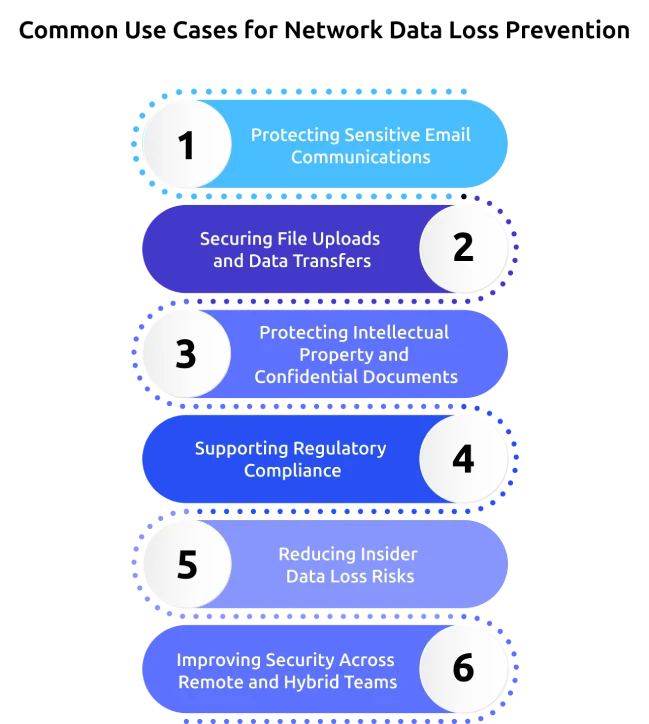
1. Protecting Sensitive Email Communications
If your teams frequently exchange contracts, financial reports, or customer information through email, Network DLP helps prevent confidential data from being sent to unauthorized recipients. It scans outbound emails and attachments, then blocks or flags messages that violate your security policies.
2. Securing File Uploads and Data Transfers
Employees regularly upload files to websites, cloud storage platforms, and external business applications. Network DLP monitors these transfers in real time and helps stop sensitive files from being shared through unauthorized channels.
3. Protecting Intellectual Property and Confidential Documents
Business assets such as product designs, source code, research documents, pricing strategies, and contracts are valuable targets for data theft. Network DLP helps you detect and prevent unauthorized attempts to move these confidential files outside your organization’s network.
4. Supporting Regulatory Compliance
If your organization handles personal, healthcare, or payment information, meeting compliance requirements is essential. Network DLP helps enforce policies that protect regulated data and maintains records of security events to support standards such as GDPR, HIPAA, and PCI DSS.
5. Reducing Insider Data Loss Risks
Not every data leak comes from an external attacker. Employees can accidentally or intentionally expose sensitive information through emails, messaging platforms, or file-sharing services. Network DLP gives you visibility into these activities and alerts your security team when suspicious data transfers are detected.
6. Improving Security Across Remote and Hybrid Teams
As employees access business data from different locations and applications, maintaining consistent protection becomes more challenging. Network DLP helps you apply the same security policies across approved network communications, making it easier to reduce data exposure in distributed work environments.
What Are the Limitations of Network DLP in Remote and Hybrid Work
As more employees work remotely and business data moves across cloud applications and personal networks, protecting sensitive information becomes more complex. While nDLP remains an important security layer, it also has some limitations for remote and hybrid data protection strategies.
Limited Visibility Beyond the Corporate Network
Network DLP works best when employee traffic passes through your organization's network. If remote employees connect directly to cloud applications or work without a corporate VPN, those data transfers may fall outside its visibility.
Challenges Inspecting Encrypted Traffic
Most business applications use HTTPS and other encrypted communication methods to protect data. Without SSL/TLS inspection, nDLP cannot examine encrypted content, creating blind spots where sensitive information may pass undetected.
No Control Over Local Device Activities
Network DLP cannot monitor actions that occur directly on employee devices, such as copying files to USB drives, printing confidential documents, taking screenshots, or moving files between local folders. These activities require endpoint-level protection.
Reduced Visibility into Cloud-Native Workflows
Your teams may share files, change permissions, or collaborate directly within cloud platforms like Microsoft 365 or Google Workspace. Since many of these actions occur inside cloud applications, Network DLP alone may not detect or control every risky activity.
Limited Coverage for BYOD and Unmanaged Devices
If employees use personal laptops or unmanaged devices, routing all traffic through your security infrastructure can be difficult. This reduces your ability to consistently monitor data movement and enforce security policies across every device.
Requires Additional Security Layers
Network DLP is designed to protect data in transit, but it cannot secure every stage of the data lifecycle on its own. For stronger protection across remote and hybrid environments, you should combine Network DLP with Endpoint DLP, Cloud DLP, identity controls, and user awareness training to close security gaps.
How Time Champ Supports Network Data Loss Prevention
Protecting sensitive business data has become more challenging as employees work across remote, hybrid, and office environments. If you rely only on network-level controls, you may miss risky activities occurring on employee devices, USB drives, websites, or file transfers. Time Champ is a comprehensive employee monitoring software with built-in data loss prevention capabilities that gives greater visibility into how sensitive data is accessed, transferred, and handled, helping you identify risks early and strengthen overall data protection strategy.
Here are the key Time Champ features that complement your Network DLP strategy:
- Monitors File Activity with Complete Visibility: Tracks all file actions like creation, modification, deletion, renaming, and movement, helping you easily detect unauthorized access and protect sensitive data.
- Controls Uploads and Downloads: Manages and restricts file transfers based on your security rules, which helps to prevent sensitive information from being shared with unapproved websites or external platforms.
- Prevents Unauthorized USB Data Transfers: Detects and blocks unapproved USB devices while logging all activity, helping you stop data leaks through removable storage.
- Restricts Risky Website Access: Blocks access to unsafe or unauthorized websites, helping you reduce the risk of data exposure through untrusted online platforms.
- Delivers Instant Alerts for Suspicious Activity: Sends real-time notifications on unusual or policy-violating actions, helping your team respond quickly before issues escalate.
- Strengthens Insider Threat Detection: Identifies unusual user behavior and potential insider risks, helping you prevent data leaks before they happen.
- Simplifies Compliance with Detailed Reports: Provides ready-to-use reports on all key activities, helping you stay audit-ready and meet compliance requirements with ease.
Worried about compliance gaps putting your business at risk?
Time Champ helps protect sensitive data and keeps your compliance efforts on track.
Conclusion
Protecting sensitive business data requires a layered security approach that combines network, endpoint, cloud, and user monitoring controls. As organizations adopt remote, hybrid, and cloud-based work, combining the right technologies becomes essential to reduce security risks and maintain compliance. Network data loss prevention helps secure data in transit, while endpoint, cloud, and employee monitoring solutions provide the visibility needed to protect information across every stage of its lifecycle. Assess your current data protection strategy, identify security gaps, and implement layered controls that match your business needs. A proactive approach today can help prevent costly data breaches, strengthen compliance, and build a more robust security posture for the future.

Anjali

Table of Content
 What Is Network Data Loss Prevention?
- How Does Network DLP Work?
- What Are the Key Features of Effective Network DLP Solutions
- Network DLP vs Endpoint DLP vs Cloud DLP: What Is the Difference
- What Are the Common Use Cases for Network Data Loss Prevention
- What Are the Limitations of Network DLP in Remote and Hybrid Work
- How Time Champ Supports Network Data Loss Prevention
- Conclusion

Related Blogs

Learn how remote employee tracking and DLP work together to prevent data leaks, secure remote teams, and support privacy, compliance, and safer workflows.
Anjali | May 09, 2026
Employee monitoring software can catch insider data breaches early, if you configure it right. See what it catches, what it misses, and how to roll it out.
Jahnavi Pulluri | Apr 16, 2026
Discover the top 10 Data Loss Prevention tools to safeguard sensitive information and ensure workplace security with essential features and practical tips for selection.
Tarun Kumar Reddy | Jan 21, 2025
Data loss costs more than you think. Learn what causes it, how employee monitoring reduces data exfiltration risk, and how to protect your business.
Thasleem Shaik | Apr 17, 2026
Discover effective data loss prevention strategies to protect sensitive information, enhance security, and safeguard your business from data breaches.
Shabana Shaik | Jan 22, 2025
Learn about the impact of data loss on business, including its consequences, real-world examples, and ways to reduce its impact.
Guna Lakshmi | Aug 14, 2026


 4.7/5 avg.
Ready to Manage Your Workforce Smarter?
Join our family of 1500+ companies using smart insights to redefine workforces!

Free Trial
No Credit Card Required