12 Types of Employee Monitoring: Find the Best Fit
Not all employee monitoring methods are the same. Explore 12 common types of employee monitoring and find the best fit for your workforce!
With so many types of employee monitoring systems available, knowing which ones your business actually needs can be difficult. From time tracking and activity monitoring to application usage and data protection, each method serves a specific purpose.
Choosing the wrong monitoring methods can lead to wasted resources, compliance risks, and limited insight into how work gets done.
Now, let's explore the 12 most common types of employee monitoring and see how each one can help you improve productivity, strengthen accountability, and manage your workforce more effectively.
Types of Employee Monitoring at a Glance
Before exploring each method in detail, use this table to compare the 12 most common types of employee monitoring, what they track, and their level of intrusiveness.
| Monitoring Type | What It Monitors | Intrusiveness |
|---|---|---|
| Time Tracking | Work hours, attendance, project time | Low |
| Activity Tracking | Active and idle time | Low-Medium |
| Screen Monitoring | Screenshots and screen recordings | Medium-High |
| Internet & Web Activity Monitoring | Websites visited and browsing activity | Medium |
| Email Monitoring | Business email communications | High |
| Communication Tools Monitoring | Slack, Teams, and chat activity | Medium |
| Application & Software Usage Monitoring | Application usage and time spent | Low-Medium |
| Keystroke Logging | Keyboard inputs and typing activity | Very High |
| GPS & Location Tracking | Employee location data | Medium |
| Biometric & Keycard Access Monitoring | Physical access and attendance records | Medium |
| Video Surveillance | Workplace video footage | High |
| Network & Data Loss Prevention (DLP) | File transfers, downloads, USB activity | Medium-High |

Did You Know?
96% of digital workers said they would accept monitoring in exchange for clear benefits like training, career growth, or IT support, per a Gartner survey of 4,861 workers.
The 12 Types of Employee Monitoring (In Detail)
Employee monitoring comes in many forms, and each type serves a different purpose. Some help you track time and productivity, while others focus on security, compliance, or workforce visibility. Understanding these monitoring methods can help you choose the right combination for your remote or hybrid teams.
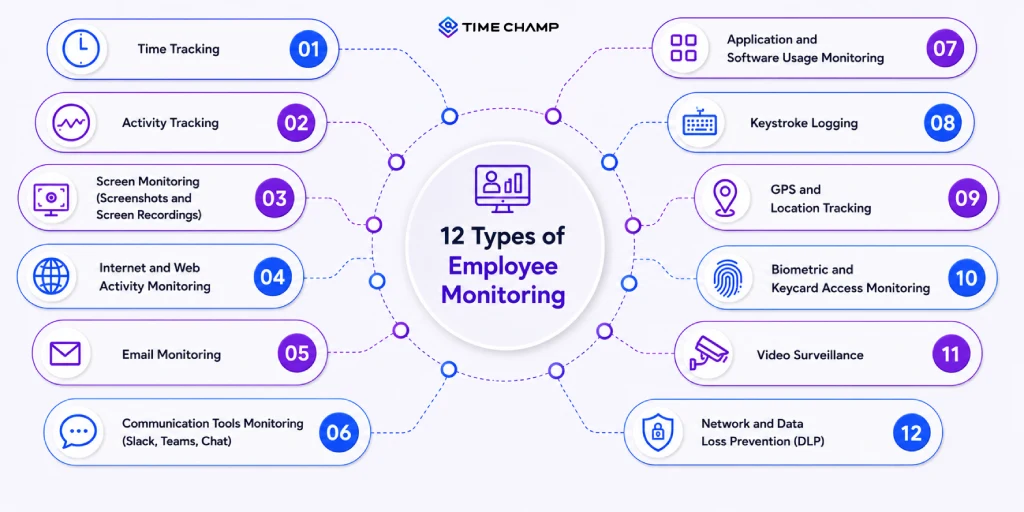
1. Time Tracking
Time tracking records employees' work hours, including start times, end times, breaks, and time spent on projects or tasks. It helps you improve payroll accuracy, monitor attendance, and understand how work hours are allocated. It also allows you to identify time-consuming tasks and improve project planning.
Key Benefits:
- Improves payroll accuracy
- Simplifies attendance management
- Enhances project planning
- Supports client billing and compliance
Best Tools:
Time Champ, Toggl Track, Clockify, Hubstaff
Want accurate time tracking without the manual work?
Automate time tracking, simplify payroll, and improve productivity with Time Champ.
2. Activity Tracking
Activity tracking monitors how you interact with your devices during work hours, including active and idle time. It helps you understand your work patterns, identify productivity trends, and detect potential inefficiencies. Analyzing this data allows you to balance workloads more effectively, address bottlenecks, and provide timely support to improve overall team performance.
- Identifies productivity patterns
- Detects idle time and bottlenecks
- Helps balance workloads
- Supports performance improvement efforts
Best Tools:
Time Champ, GlassWire, and Activity Watch
3. Screen Monitoring (Screenshots and Screen Recordings)
Screen monitoring captures screenshots or records employee screens at specific intervals. It gives you visibility into work activities, supports compliance requirements, and helps verify task completion when needed. It can also help you understand workflows and improve process efficiency.
Key Benefits:
- Increases visibility into work activities
- Supports compliance requirements
- Verifies task completion
- Helps optimize workflows
Best Tools:
Time Champ, Teramind, Controlio
4. Internet and Web Activity Monitoring
This type of employee monitoring tracks the websites employees visit, and the time spent on them. It helps you identify productivity blockers, enforce acceptable usage policies, and reduce security risks from unsafe websites.
The insights can help you create a more focused and secure work environment. You can also use this data to manage distractions in the workplace more effectively.
Key Benefits
- Reduces workplace distractions
- Improves internet usage visibility
- Strengthens cybersecurity
- Supports acceptable use policies
Best Tools:
Time Champ, CurrentWare, Pingdom, Zabbix
5. Email Monitoring
Email monitoring allows you to oversee business email communications, attachments, and activity logs. It is commonly used to support compliance requirements, protect sensitive information, and detect potential security threats. This can help you reduce the risk of data leaks and policy violations.
Key Benefits
- Protects sensitive business information
- Detects potential security threats
- Supports regulatory compliance
- Reduces data leakage risks
Best Tools:
Mailsuite, Mixmax, Yesware
6. Communication Tools Monitoring (Slack, Teams, Chat)
Communication monitoring tracks activity within workplace collaboration platforms such as Slack, Microsoft Teams, and Google Chat.
It helps you maintain compliance, improve collaboration visibility, and identify communication gaps. You can also use the data to improve team responsiveness and communication workflows.
Key Features
- Improves collaboration visibility
- Identifies communication gaps
- Supports compliance monitoring
- Enhances team responsiveness
Best Tools:
Geekbot, Jibble, Time Champ, Hubstaff
7. Application and Software Usage Monitoring
Application monitoring tracks which software and tools employees use and how much time they spend on them.
It helps you understand software adoption, optimize licenses, and identify opportunities to improve workflows. This ensures you get maximum value from your technology investments.
Key Benefits
- Optimizes software investments
- Identifies underutilized applications
- Improves workflow efficiency
- Supports license management
Best Tools:
Time Champ, Datadog, Dynatrace, New Relic
Get complete visibility into application usage and software adoption withTime Champ!
8. Keystroke Logging
Keystroke logging records keyboard inputs made on company devices. Organizations typically use it for high-security environments, investigations, or compliance purposes where detailed activity records are required. Due to privacy concerns, it should be implemented only when there is a clear business need.
Key Benefits
- Provides detailed activity records
- Supports security investigations
- Helps detect insider threats
- Assists with compliance requirements
Best Tools:
Time Champ, Syteca, Hoverwatch
9. GPS and Location Tracking
GPS tracking monitors the real-time location of employees or company devices. It is particularly useful for field service teams, delivery personnel, sales representatives, and mobile workforces. It helps you verify attendance and enhance field operations management. Additionally, it enables better coordination and faster response times in dynamic work environments.
Key Benefits
- Improves field workforce management
- Verifies employee locations
- Optimizes routes and schedules
- Enhances service delivery
Best Tools:
Life360, iSharing, SafetyCulture, Time Champ
10. Biometric and Keycard Access Monitoring
Biometric and Keycard Access Monitoring tracks employee access to physical locations using keycards, fingerprints, facial recognition, or other biometric systems.
It helps you strengthen security, manage attendance, and control access to restricted areas. It also creates a complete record of who accessed the workplace. Additionally, it can help identify unusual access patterns that may indicate potential security risks.
Key Benefits
- Strengthens workplace security
- Prevents unauthorized access
- Improves attendance accuracy
- Creates reliable access records
Best Tools:
Avigilon Alta, LenelS2 OnGuard, Verkada
11. Video Surveillance
Video surveillance uses cameras to monitor workplaces and company facilities. It helps improve workplace safety, protect assets, investigate incidents, and maintain security across business locations.
Recorded footage can also provide valuable evidence during workplace investigations. It can also act as a deterrent against theft and misconduct.
Key Benefits
- Enhances workplace safety
- Protects company assets
- Supports incident investigations
Best Tools:
Eagle Eye Cloud VMS, Lumana, Verkada
12. Network and Data Loss Prevention (DLP)
Network and DLP monitoring track file transfers, USB activity, cloud uploads, and access to sensitive data. It helps you prevent data breaches, protect intellectual property, and maintain compliance with security regulations.
These tools play a critical role in strengthening your organization's overall cybersecurity. They also provide real-time alerts to quickly respond to potential threats.
Key Benefits
- Prevents data breaches
- Protects intellectual property
- Supports compliance requirements
- Detects suspicious activities
Best Tools:
Time Champ, Broadcom, Trellix DLP
Why manage 12 different tools when one platform can do it all?
Time Champ brings together every monitoring method to improve productivity and manage your workforce with confidence.
Legal Considerations for Employee Monitoring Types
Employee monitoring can help you improve productivity, security, and accountability, but it also comes with legal responsibilities. Each location has unique employee monitoring laws, so it’s important to know the rules that apply to your employees.
Before implementing any monitoring system, ensure that your policies are transparent, lawful, and aligned with local data protection requirements.
United States: State-Level Patchwork
The United States has no single federal law for employee monitoring, so you must follow a mix of federal and state rules. The Electronic Communications Privacy Act (ECPA) generally allows employers to monitor communications on company-owned systems when there is a legitimate business purpose.
Some states, like Connecticut and Delaware, require prior notice of employee monitoring, while New York requires you to notify employees about the monitoring of phone, email, and internet usage. Because requirements vary by state, you should clearly communicate your monitoring practices and maintain documented policies.
EU: GDPR and the AI Act
Organizations operating in the European Union must comply with GDPR, which requires a lawful basis for collecting and processing employee data. Monitoring activities must follow principles such as transparency, data minimization, and purpose limitation.
The EU AI Act introduces additional obligations for AI systems used in employment and workplace monitoring, particularly those considered high-risk. Employers must also provide transparency when deploying certain AI-powered monitoring systems.
India: DPDP Act 2025
India'sDigital Personal Data Protection (DPDP) Act, 2025, establishes a detailed framework for protecting digital personal data, including employee information. Organizations must clearly inform employees about what personal data is collected, why it is collected, and how it will be used.
They are also required to implement reasonable security safeguards such as encryption, data masking or obfuscation, maintain activity logs and audit trails of data access, and promptly notify affected individuals in the event of a personal data breach. These measures help reduce compliance risks and strengthen employee trust.
UK, Australia, and Canada
The UK, Australia, and Canada have privacy frameworks that regulate employee monitoring and the handling of workplace data. In the UK, employers must follow data protection principles that closely align with GDPR.
Australian and Canadian privacy laws similarly require organizations to collect employee data responsibly, maintain transparency, and ensure monitoring practices are proportionate to business needs.
Across these regions, having a legitimate business purpose and informing employees about monitoring activities are key compliance requirements.
Disclaimer: This information is for educational purposes only and should not be considered legal advice. Employee monitoring laws may change over time, so consult qualified legal counsel and review official government guidance before implementing monitoring technologies.
How Time Champ Helps You Monitor Employees Effectively
Time Champ is a employee monitoring software with workforce intelligence layer that gives you complete visibility into how work gets done across remote, hybrid, and in-office teams.
Instead of relying on a single monitoring method, it combines multiple monitoring capabilities in one platform, helping you make informed decisions without switching between tools.
Key Employee Monitoring Features in Time Champ:
| Monitoring Type | How Time Champ Helps |
|---|---|
| Time Tracking | Automatically records work hours, breaks, and project time to improve attendance and payroll accuracy. |
| Activity Tracking | Monitors active and idle time to help you identify productivity trends and bottlenecks. |
| Screen Monitoring | Captures screenshots and screen recordings at configurable intervals to provide visibility into work activities. |
| Internet Monitoring | Tracks website usage to identify distractions and encourage productive work habits. |
| Application Monitoring | Shows which applications employees use and how much time they spend on them, helping you optimize software investments and workflows. |
| GPS Tracking | Provides real-time location visibility for field and mobile employees, making it easier to verify attendance and manage routes |
| Data Loss Prevention (DLP) | Monitors file transfers, USB activity, downloads, and other sensitive actions to help prevent data leaks. |
Still figuring out which monitoring methods are right fit for your business?
Join 1500+ teams already using Time Champ to build more accountable, productive, and secure workplaces.
Conclusion
Understanding the different types of employee monitoring helps you choose the right approach for improving productivity, enhancing security, and gaining better visibility into your workforce. The key is to choose monitoring methods that align with your business needs while respecting employee privacy and complying with applicable laws.
Solutions like Time Champ make it easier by bringing multiple employee monitoring capabilities together in a single platform.

Guna Lakshmi

Table of Content
 Types of Employee Monitoring at a Glance
- The 12 Types of Employee Monitoring (In Detail)
- Legal Considerations for Employee Monitoring Types
- How Time Champ Helps You Monitor Employees Effectively
- Conclusion

Related Blogs
Learn how to choose the right remote employee monitoring software with the right features, scalability, and usability to manage remote teams effectively.
Guna Lakshmi | Apr 14, 2026
Learn the pros and cons of employee monitoring and discover when monitoring improves productivity and when it creates workplace risks.
Guna Lakshmi | May 06, 2026
Managing digital nomads? Learn how digital nomad employee monitoring works, what to track, and how to stay fair while keeping your team productive.
Guna Lakshmi | Apr 15, 2026
Data encryption in employee monitoring is non-negotiable. Learn the standards, certifications, and six questions to ask before signing with any vendor.
Sai Keerthi Uppala | May 07, 2026
Managing an async team? Learn how asynchronous work employee monitoring works and what to track to keep your team productive.
Guna Lakshmi | Apr 16, 2026
Learn why remote employee monitoring matters, its key pros and cons, and how to overcome challenges with the right approach for better productivity and trust.
Anjali | Apr 28, 2026


 4.7/5 avg.
Ready to Manage Your Workforce Smarter?
Join our family of 1500+ companies using smart insights to redefine workforces!

Free Trial
No Credit Card Required