Data Encryption in Employee Monitoring: The Standards to Meet
Data encryption in employee monitoring is non-negotiable. Learn the standards, certifications, and six questions to ask before signing with any vendor.

Your employee monitoring tool is capturing screenshots, activity logs, keystrokes, and attendance data right now. If that confidential data goes into the wrong hands from these tools, then you need to spend lots of money on fines and legal exposure. According to IBM's Cost of a Data Breach Report 2025, the global average breach cost has reached $4.4 million. It is also telling organizations that lack proper data encryption controls face even higher losses in breach risks.
Data encryption in employee monitoring software has become an important security requirement no organization can skip. This blog covers the employee monitoring software data encryption standards and compliance certifications you need to know, and the important questions you need to ask your monitoring tool vendor before purchasing it.
What Data an Employee Monitoring Tool Generates and Why Encryption Matters
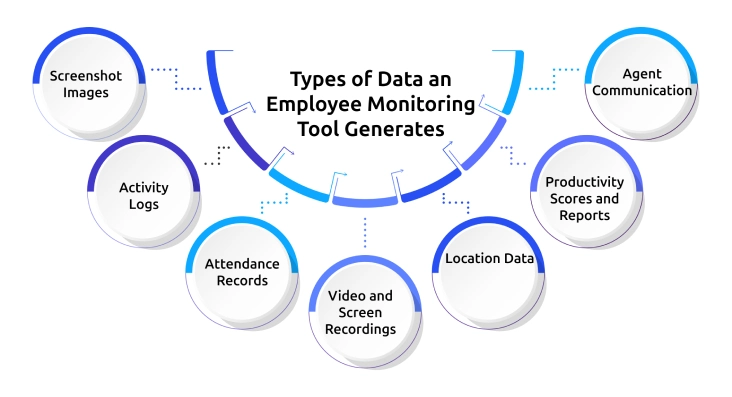
Employee monitoring platforms generate seven types of data, and each data type has its own level of sensitivity and encryption requirement. The table below shows each data type, what it contains, the encryption requirement, and the standard that should apply.
| Data Type | Examples in Monitoring | Encryption Requirement | At Rest | In Transit |
|---|---|---|---|---|
| Screenshot images | Periodic screen captures stored as image files | High: screenshots may contain passwords, financial data, and personal information | AES-256 | TLS 1.2+ |
| Activity logs | App usage, website URLs, active/idle time records, and keystroke counts | High: Behavioral records constitute personal data under GDPR and equivalent data protection legislation. | AES-256 | TLS 1.2+ |
| Attendance records | Login/logout timestamps, session duration, and absence records | Medium to High: Organizations must maintain tamper-evident records when using this data in payroll and HR decisions. | AES-256 | TLS 1.2+ |
| Video and screen recordings | Continuous or session-level screen video files | Very High: Must handle large files containing detailed behavioral and potentially personal content with the highest level of data protection. | AES-256 | TLS 1.2+ |
| Location data | GPS coordinates and geofence event logs for field employees | High: Location data qualifies as sensitive personal data under GDPR and demands stricter handling rules and compliance measures. | AES-256 | TLS 1.2+ |
| Productivity scores and reports | Aggregated analytics, dashboards, and exported reports | Medium: Derived data but still linked to identifiable individuals | AES-256 | TLS 1.2+ |
| Agent communication | Data is sent between the monitoring agent on the device and the platform server | Critical: unencrypted agent-to-server communication is a primary attack vector | N/A | TLS 1.2+ |
The first thing you should look for while selecting employee monitoring software is the connection between the agent and the server. The agent is a software installed on each worker’s computer, and it sends activity data, screenshots, and other behavior signals back to the server continuously.
If that data is not protected, then anyone can block and get real-time access to it. This isn't a sophisticated attack. It is one of the easiest ways to compromise data from monitoring systems, but you can prevent this by encrypting all data between the agent and the server with TLS.
At Rest vs In Transit: The Two Data Encryption States That Both Matter
1. Data Encryption at Rest: AES-256
Any data you store within the servers of your employee monitoring software is known as data at rest. Screenshots, activity logs, attendance data, and recordings are all examples of data at rest. This data must be protected with encryption using a key called AES-256, as banks, hospitals, and governments do.
What AES-256 actually means in practice is simple. Even if an attacker breaks into the server, the data they find is completely unreadable without the decryption key.
If your employee monitoring platform is hosted on enterprise-grade cloud computing providers such as Microsoft Azure, all of your screenshots and activity logs are encrypted at rest.
The keys to decrypt the data are kept separately, and auditors check this key management as part of ISO 27001 and SOC 2 audits.
2. Data Encryption in Transit: TLS 1.2 and TLS 1.3
Data in transit refers to any monitoring information that is actively moving, from your employee's device to the platform server, from the server to your manager dashboards, and between the server and any connected tools like payroll or HR systems. All of that traffic needs to be encrypted using TLS 1.2 or TLS 1.3.
If your platform supports TLS 1.3, that is the preferred protocol for any new setup. TLS 1.2 is still acceptable, but is gradually being phased out by major cloud providers. If your monitoring tool is still running on TLS 1.0 or TLS 1.1, that is a serious vulnerability, as both versions are outdated and no longer considered safe.
Verify whether TLS encryption covers all traffic, not just the browser-to-dashboard connection. If the agent on your employee's device is sending data to the server without encryption, that gap puts your organization at risk, especially if you are operating under GDPR or similar data protection regulations.
Compliance Certifications That Indicate Proper Employee Monitoring Encryption
Compliance certifications are not just badges on a provider's website. They mean that an auditor has gone through the platform, checked their security measures, and confirmed that they meet the defined standards. This is more reliable than self-reported security claims. There are four certifications you should look out for in employee monitoring software:
- ISO 27001:2022: This is the global standard for managing information security. ISO 27001:2022 certified means an independent auditor has checked and verified the platform’s entire security management system, including encryption policy, access controls, key management, incident response policies, and procedures. It's more than encryption. It tells you how they're managing and securing your data overall.
- SOC 2 Type II: SOC 2 Type II auditors assess a platform's security controls for a period of time (usually 6 to 12 months), and it is much better than SOC 2 Type I, which only captures a single point in time. If you choose a monitoring tool with SOC 2 Type II certification, it means their security controls were effective over a period of time, not just on the day the audit took place.
- GDPR Compliance Documentation: If you have employees or do business in the European Union (EU), your monitoring platform must provide a Data Processing Agreement that clearly outlines how they process, encrypts, stores, and transmits your employees' data. GDPR Article 32 requires appropriate technical security measures, such as data encryption. If that tool can't provide this information, remove it from your vendor list.
- HIPAA Compliance: Don’t neglect this certification if you are in healthcare. Any monitoring solution you implement on devices or networks that handle Protected Health Information (PHI) must comply with HIPAA's technical safeguards, including encryption of data at rest and in transit. Some monitoring vendors don't support HIPAA-compliant deployments, so make sure you ask and check this before purchasing the employee monitoring tool.
Access Controls: The Layer That Encryption Alone Cannot Provide
Encryption protects your monitoring data from outside attackers. Access controls are a core element of employee monitoring data security They protect it from misuse within your organization. Encryption and access controls solve different problems. You need both to keep your monitoring data fully protected from both external and internal risks.
Role-based access controls verify that every person in your organization only sees the data relevant to their role. A team lead should see their own team's activity. An HR director should access HR relevant data across the organization. A payroll officer should see attendance and hours only. An IT administrator should configure the platform without having default access to every employee record.
Without these controls in place, even strong encryption falls short. If anyone with a login can pull up any employee's data, your encryption is only solving half the problem. Adding a data loss preventionlayer strengthens this further by detecting unauthorized data transfers and flagging unusual access patterns before they turn into a serious incident.
For a complete framework on protecting employee data privacy through access controls, encryption, and policy, check out our dedicated best practices guide.
Six Data Encryption Questions to Ask Before You Deploy a Monitoring Platform
Before you deploy any monitoring platform, ask these six questions. The answers will quickly tell you whether a tool takes data security seriously or is just checking a box.
| Question to Ask | What a Good Answer Looks Like | Red Flag |
|---|---|---|
| What encryption standard do you use for data at rest? | AES-256 for all stored data, including screenshots, activity logs, and recordings. | Vague answers like "we use encryption," or mentions of older standards like AES-128 or DES. |
| What protocol do you use for data transmission between the agent and your servers? | TLS 1.2 or TLS 1.3 for all agent- to-server communication, encrypted end-to-end. | Any mention of HTTP instead of HTTPS, or the inability to specify the TLS version. |
| Where do you store monitoring data? | A named enterprise-grade cloud provider like Microsoft Azure, AWS, or Google Cloud, in a specific region with relevant compliance certifications. | Vague answers about "secure servers" with no provider name or region. |
| What compliance certifications does your platform hold? | SOC 2 Type I or II, ISO 27001, GDPR compliance documentation, and HIPAA, if relevant to your sector. | No certifications, or certifications that are self- assessed without an independent audit. |
| Who can access our organization's monitoring data? | Only your designated administrators and managers have access to role-based controls. Provider staff access is logged, limited to support, and governed by strict internal policy. | Any indication that provider staff have unrestricted access to your monitoring data. |
| How long do you retain monitoring data, and how do you delete it? | Configurable retention periods with automated deletion at the end of the retention window, and documented data deletion upon contract termination. | Indefinite retention, or no documented deletion process, when the contract ends. |
The sixth question is the one most organizations skip during evaluation, but it can be the most important. If your monitoring vendor cannot provide you with written evidence that they will destroy your data within a reasonable time frame after you cancel your subscription, your organization will remain legally liable for that data even though you are no longer using the service. For organizations operating under GDPR or CCPA, that is an ongoing compliance risk that does not disappear when the commercial relationship ends.
For the broader framework on what questions to ask before implementing monitoring, including employee data theft prevention and insider threat considerations, see our guide.
Your monitoring vendor can't answer the six questions above?
Switch to Time Champ - AES-256 encryption, ISO 27001:2022 certified. Start your free 7-day trial, no card required.
How Time Champ Encrypts and Secures Monitoring Data
Time Champ is an employee monitoring softwarewith complete workforce intelligence features. It stores your monitoring data on Microsoft Azure data centers, and uses AES-256 for data at rest and TLS 1.2 for data in transit between the monitoring agent, the server, and your dashboard. Microsoft Azure data centers operate 24/7 with both physical and digital security, so you can be assured the underlying infrastructure is secure.
Time Champ uses AES-256 encryption to secure all your screenshots and screen recordings. Time Champ's screenshot blur feature automatically hides sensitive data such as passwords, financial information, and personal details before capturing the screenshot, providing additional security in addition to encryption. Time Champ also encrypts your activity logs and attendance data. Access control makes sure that each manager only sees data from their team, HR users see only what they need to, and employees see only their own dashboard.
Time Champ is ISO 27001:2022 and SOC 2 Type I compliant, as well as GDPR compliant, with a Data Processing Agreement available for download and trusted by 1500+ companies and 200K+ users worldwide. Time Champ is also HIPAA compliant for healthcare providers. Customizable notifications and integrated DLP proactively monitor suspicious activity and data movement, so your IT team can identify and address threats before they escalate.
Ready to monitor your team effectively with role-based access controls?
Try Time Champ today for free and start monitoring your team with configured access controls!
Conclusion
Data encryption in employee monitoring is a must. Any data your monitoring software collects, such as screenshots, activity logs, time and attendance, and geo-location, has legal and security implications. AES-256 encryption-at-rest and TLS 1.2 encryption-in-transit are the bare minimum you should expect when implementing a solution. ISO 27001:2022 and SOC 2 Type II are the accreditations you need to confirm an independent auditor has verified adherence to the standard. Strong access controls and a clear data retention and deletion policy complete the framework and keep it effective in the long run.

Sai Keerthi Uppala

Table of Content
 What Data an Employee Monitoring Tool Generates and Why Encryption Matters
- At Rest vs In Transit: The Two Data Encryption States That Both Matter
- Compliance Certifications That Indicate Proper Employee Monitoring Encryption
- Access Controls: The Layer That Encryption Alone Cannot Provide
- Six Data Encryption Questions to Ask Before You Deploy a Monitoring Platform
- How Time Champ Encrypts and Secures Monitoring Data
- Conclusion

Related Blogs
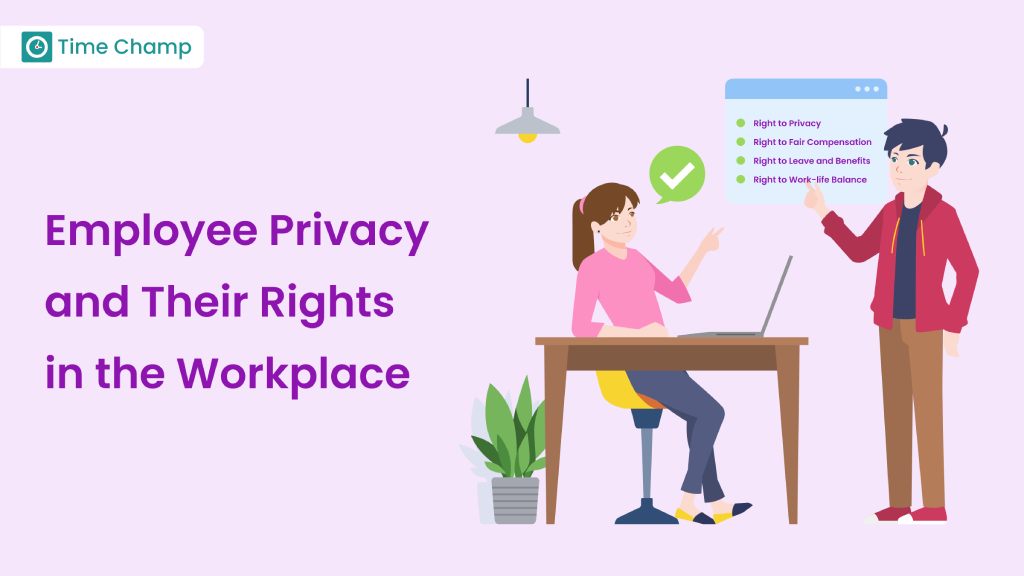
Learn about employee privacy rights, how to protect personal information, and balance company needs with privacy laws.
Jahnavi Pulluri | Sep 18, 2024
Understand how employee monitoring affects workplace morale, trust, and productivity, with practical ways to implement monitoring without reducing engagement.
Anjali | Apr 28, 2026
Learn about Data Loss Prevention (DLP), its types, challenges, and benefits to secure sensitive data, ensure compliance, and prevent costly breaches.
Tarun Kumar | Jan 20, 2025
Protect your business from data theft by understanding key risks and prevention strategies. Learn how to secure sensitive information effectively.
Sai Keerthi Uppala | Mar 12, 2025
Learn about employee monitoring laws, what they mean for businesses, and how they protect employee privacy and rights.
Shabana Shaik | Jul 10, 2024
Explore our complete guide on employee monitoring: understand its types, benefits, legalities, and best practices for workplace efficiency.
Mounika Sai | Jan 12, 2024


 4.7/5 avg.
Ready to Manage Your Workforce Smarter?
Join our family of 1500+ companies using smart insights to redefine workforces!

Free Trial
No Credit Card Required