Communication Challenges in Remote Work: Ways to Overcome
Misread messages, missed updates, endless pings? Learn how to overcome communication challenges in remote work and keep your team connected.

While remote work offers flexibility, it also brings communication challenges that can lead to misunderstandings, delayed decisions, and endless message threads. The good news is that these communication challenges in remote work are easy to overcome with the right approach.
To help you overcome these communication challenges, we've outlined the 10 most common issues remote teams face, along with practical tips to solve them.
Why Remote Work Creates Unique Communication Challenges
Managing a remote team gives you access to talent from anywhere, but it also makes communication more complex. Without a shared office, keeping everyone informed, aligned, and connected requires more planning and the right communication practices.
Here are some of the main reasons why communication becomes more challenging when managing remote teams:
- Lack of Face-to-Face Interaction: Without in-person conversations, it's harder for you to understand employees' tone, body language, and intent, increasing the chances of misunderstandings.
- Teams Work Across Different Time Zones: When your employees work in different time zones, getting quick responses and scheduling meetings can become difficult, slowing decisions and project progress.
- Heavy Reliance on Digital Communication Tools: Managing communication across emails, chat apps, video calls, and project management tools can make it difficult to keep conversations organized and ensure everyone receives important updates.
- Fewer Spontaneous Conversations: You can't simply walk over to an employee's desk to clarify an issue or provide quick feedback. Even simple discussions often require messages or scheduled meetings.
- Unclear Communication Expectations: Without clearly defined communication guidelines, your team may be unsure which tools to use, when to respond, or when a meeting is actually necessary.
- Information Becomes Scattered: Important updates can easily get buried across emails, chat threads, meeting notes, and shared documents, making it harder for your team to find the information they need.
- Limited Opportunities to Build Team Relationships: Building trust and maintaining strong relationships with remote employees takes more effort without regular face-to-face interactions and informal conversations.
- Technology Issues Interrupt Communication: Internet outages, software problems, or unreliable communication tools can disrupt meetings, delay work, and affect collaboration across your remote team.
The good news is that you can overcome these challenges with the right communication practices, clear expectations, and effective collaboration tools.
10 Communication Challenges in Remote Work and How to Solve Them
Many remote teams face communication challenges, but most of them can be prevented with the right approach. Here are the 10 most common communication challenges in remote work and practical ways to solve them.
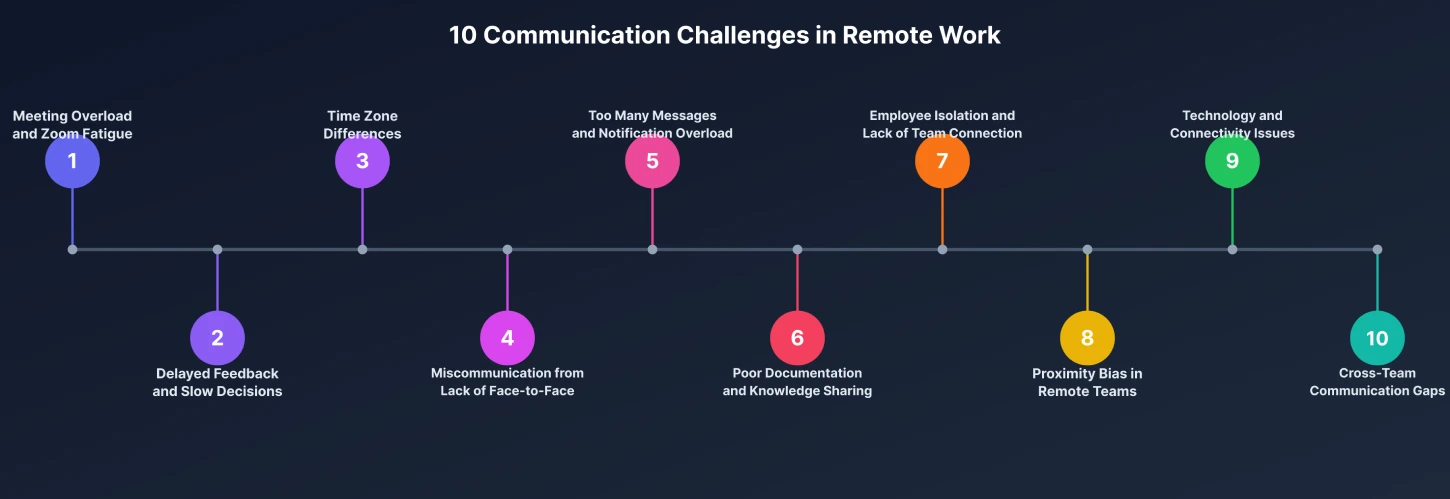
1. Meeting Overload and Zoom Fatigue
When your team works remotely, it's easy to replace every discussion with a meeting. Before you know it, your calendar is packed with back-to-back video calls, leaving little time to focus on actual work. Spending hours in virtual meetings can also lead to Zoom fatigue, making employees feel mentally exhausted and less productive.
How to Solve It
- Schedule meetings only when real-time discussion is necessary.
- Share status updates through chat or project management tools instead of meetings.
- Keep meetings short with a clear agenda and defined outcomes. Using meeting agenda templates helps structure discussions and keep everyone on track.
- Record important meetings so teammates in different time zones can watch them later.
- Block uninterrupted focus time on your calendar to reduce meeting overload.

Did You Know?
The average employee is interrupted every 2 minutes by meetings, emails, or messages during core working hours. This constant stream of communication makes it difficult to focus and contributes to meeting overload and communication fatigue.
2. Delayed Feedback and Slow Decision-Making
When managing a remote team, you can't simply walk over to an employee's desk to discuss an issue or get an update. Instead, you often have to wait for responses through chat or email, which can delay decisions and slow project progress. These delays can slow projects, create uncertainty, and make it harder to keep work moving.
How to solve it
- Set clear expectations for response times across different communication channels.
- Use instant messaging for quick questions and email for detailed discussions.
- Document decisions so everyone has access to the latest information.
- Encourage employees to ask questions early instead of waiting until work is blocked.
- Hold regular one-on-one check-ins to provide timely feedback.
3. Time Zone Differences
If your team works across different regions, finding a time that suits everyone can be challenging. Waiting for everyone in a team to come online may delay approvals, meetings, and project updates, making collaboration less efficient. Over time, these delays can affect productivity, create communication gaps, and make employees feel disconnected from the rest of the team.
How to solve it
- Define overlapping working hours when everyone is available for important discussions.
- Use asynchronous communication for updates that don't require immediate responses.
- Record meetings and share notes with teammates who couldn't attend.
- Clearly mention time zones when scheduling meetings or deadlines.
- Use shared calendars to make everyone's availability visible. Learn more about managing a remote team across different time zones to handle this challenge effectively.
4. Miscommunication Due to Lack of Face-to-Face Interaction
When your employees work remotely, you can't tell them in person as often. Without facial expressions, body language, or tone of voice, even simple messages can be misunderstood. This can lead to confusion, unnecessary back-and-forth conversations, and avoidable mistakes.
How to solve it
- Be clear and specific when writing messages.
- Use video or voice calls for sensitive or complex discussions.
- Avoid making assumptions if a message seems unclear, ask for clarification.
- Summarize important conversations to ensure everyone has the same understanding.
- Encourage open communication so the team feels comfortable asking questions.
Want to manage remote projects more effectively?
Time Champ gives you complete visibility into tasks, timelines, and team progress, all in one place.
5. Too Many Messages and Notification Overload
Remote teams often rely on multiple communication tools throughout the day. Constant notifications from emails, chat apps, and project management platforms can become distracting and make it difficult to focus on meaningful work. Over time, this can reduce productivity and make employees feel overwhelmed.
How to solve it
- Use each communication tool for a specific purpose (e.g., chat for quick questions, email for formal updates).
- Turn off non-essential notifications during focused work sessions. Understanding how to manage distractions in the workplace can help your team regain focus.
- Group non-urgent updates instead of sending multiple messages throughout the day.
- Set expectations for when an immediate response is required.
- Encourage employees to respect each other's focus time.
6. Poor Documentation and Knowledge Sharing
When important information isn't documented, employees spend time searching for answers or repeatedly asking the same questions. In remote teams, relying only on verbal conversations or chat messages can make it difficult to keep everyone informed. As your team grows, missing documentation can slow employee onboarding, delay projects, and create confusion.
How to solve it
- Document important decisions, processes, and meeting notes in a shared workspace.
- Keep files organized so employees can quickly find the information they need.
- Create a central knowledge base for policies, workflows, and project documentation.
- Update documents regularly to keep information accurate.
- Encourage team members to share knowledge instead of keeping it with one person.
7. Employee Isolation and Lack of Team Connection
When you manage a remote team, it's easy for employees to feel disconnected from their colleagues. Without casual office conversations or in-person interactions, building strong relationships takes more effort. Over time, this can reduce collaboration, engagement, and overall team morale.
How to solve it
- Schedule regular one-on-one meetings to check in with your employees.
- Encourage virtual team-building activities and informal conversations.
- Recognize employee achievements and celebrate milestones publicly.
- Create opportunities for cross-team collaboration on projects.
- Make sure every team member has a chance to share ideas and contribute during meetings.
8. Proximity Bias in Remote Teams
As a manager, you may naturally interact more with employees who are more visible or available. This can unintentionally lead to some team members receiving more recognition, feedback, or career opportunities than others. Over time, proximity bias can affect employee trust and workplace fairness.
How to solve it
- Evaluate employees based on their performance and results, not their online presence.
- Hold regular check-ins with every team member, regardless of location.
- Use transparent criteria for promotions, rewards, and recognition.
- Give everyone equal opportunities to participate in meetings and key projects.
- Use performance data to support fair and objective decisions.
9. Technology and Connectivity Issues
The tools and technology your team uses play a major role in keeping communication smooth. Slow internet connections, outdated devices, or unreliable communication tools can interrupt meetings and delay important work. Even small technical issues can have a significant impact on productivity if they happen frequently.
How to solve it
- Provide employees with reliable devices and communication software.
- Invest in tools that support seamless communication and collaboration.
- Encourage employees to test their equipment before important meetings.
- Have backup communication channels for unexpected technical issues.
- Offer IT support so technical problems can be resolved quickly.
10. Cross-Team Communication Gaps
As your organization grows, teams can easily become disconnected from one another. When departments don't share updates regularly, projects can become misaligned, work may be duplicated, and important information can be missed. Strong communication across teams keeps everyone working toward the same goals.
How to solve it
- Schedule regular cross-functional meetings to share project updates.
- Store important documents and decisions in a shared workspace.
- Clearly define roles, responsibilities, and communication channels.
- Encourage departments to share knowledge and best practices.
- Use collaboration tools that help teams stay connected and informed.
6-Step Framework to Improve Remote Team Communication
Managing communication in a remote team takes planning and consistency. When you establish clear processes and encourage effective communication habits, your team can collaborate more efficiently. The following six-step framework will help you improve collaboration, reduce misunderstandings, and keep your team connected.
1. Set Clear Communication Guidelines
Start by defining how your team should communicate. Decide which tools to use for different types of conversations, expected response times, and when meetings are necessary. Clear guidelines help everyone stay on the same page. Read more about how to manage your communication culture in a remote team for practical guidance on building these guidelines.
2. Choose the Right Communication Channels
Not every conversation needs a meeting. Use instant messaging for quick questions, email for detailed updates, and video calls for discussions that require collaboration or quick decision-making. Choosing the right channel prevents unnecessary interruptions.
3. Encourage Documentation
Document important decisions, meeting notes, and project updates in a shared workspace. This creates a single source of truth, making it easier for employees to find information without asking the same questions repeatedly.
4. Reduce Unnecessary Meetings
Review your meeting schedule regularly and remove meetings that don't add value. Encourage asynchronous communication whenever possible, so employees have more uninterrupted time to focus on their work. Understanding how to improve work efficiency helps you identify which meetings can be replaced with a quick message or document.
5. Build a Culture of Open Communication
Create an environment where employees feel comfortable asking questions, sharing ideas, and providing feedback. Regular one-on-one meetings and team check-ins help identify communication issues before they become bigger problems.
6. Measure and Continuously Improve
Regularly review how your team communicates. Gather employee feedback, identify communication bottlenecks, and monitor collaboration patterns to understand what's working and what needs improvement. Continuously refining your communication strategy helps your remote team stay productive and connected as it grows.
How Time Champ Helps You Improve Remote Team Communication
Clear communication is essential for keeping remote teams productive, but it's difficult to improve what you can't see. That's where Time Champ helps. Time Champ is an employee monitoring and remote team management software that helps you improve communication by giving you complete visibility into how your remote team works.
Instead of relying on assumptions, you can identify communication gaps, reduce unnecessary meetings, and improve collaboration using real-time insights and productivity data.
Key Time Champ features that help you overcome communication challenges in remote work:
Improve Team Visibility
When employees work from different locations, it can be difficult to know how projects are progressing. Time Champ gives you a clear view of work activities, project status, and employee productivity, making it easier to keep everyone aligned without constant follow-ups.
Optimize Meeting Time
Too many meetings can reduce productivity and interrupt focused work. Time Champ helps you understand how employees spend their work hours, making it easier to identify meeting overloads and create a better balance between collaboration and deep work.
Strengthen Team Collaboration
When your team works remotely, it's important that everyone stays updated on projects and tasks. Time Champ gives you a clear view of who is working on what and how projects are progressing. This helps you identify communication gaps, improve coordination, and keep your team aligned.
Increase Accountability
Managing a remote team doesn't mean you have to micromanage your employees constantly. Time Champ automatically records work hours, tracks task progress, and provides productivity insights. This helps you measure employee performance fairly while giving them the freedom to work independently.
Struggling to manage remote teams and keep projects on track?
Use Time Champ to simplify project communication, track work progress, and keep your distributed teams connected and productive.
Conclusion
Communication challenges in remote work are common, but they can be overcome with the right strategies. Building clear communication practices and setting the right expectations can help your team stay connected and work more efficiently. Solutions like Time Champ provide the visibility and insights you need to build a more connected and efficient remote workforce.

Guna Lakshmi

Table of Content
 Why Remote Work Creates Unique Communication Challenges
- 10 Communication Challenges in Remote Work and How to Solve Them
- 6-Step Framework to Improve Remote Team Communication
- How Time Champ Helps You Improve Remote Team Communication
- Conclusion

Related Blogs

Discover the hybrid work model, which blends office and remote environments for greater flexibility and productivity.
Thasleem Shaik | Oct 25, 2024
Struggling with managing hybrid teams? Explore practical tips to boost collaboration, prevent communication gaps, and improve team performance.
Guna Lakshmi | Jun 19, 2026
Struggling with remote work productivity challenges? Learn what’s slowing your team down and how to improve focus, communication, and performance.
Guna Lakshmi | Apr 15, 2026
Find the best team communication apps for 2026. Compare features, pricing, pros & cons to improve collaboration, productivity, and team alignment.
Guna Lakshmi | Apr 08, 2026
Learn how to choose the right remote employee monitoring software with the right features, scalability, and usability to manage remote teams effectively.
Guna Lakshmi | Apr 14, 2026
Performance evaluation in remote workforces: 7 metrics that matter, common biases to avoid, and how to run reviews your team trusts.
Guna Lakshmi | Apr 14, 2026


 4.7/5 avg.
Ready to Manage Your Workforce Smarter?
Join our family of 1500+ companies using smart insights to redefine workforces!

Free Trial
No Credit Card Required