Keystroke Logging Software: What It Is and How It Works
Understand how keystroke logging works, what it tracks, and where it is legal. Learn how to use it without crossing ethical boundaries.

If you want to understand how your team actually works during the day, keystroke logging software gives you a clear picture. It tracks keyboard activity on company devices, helping you see when your team is actively working, when activity slows down, and when something unusual happens. For the broader picture across this topic, our enterprise employee monitoring guide brings the moving parts together.
If you manage remote teams or handle sensitive data, this insight becomes even more valuable. Research from ExpressVPN highlights that tracking employee activity, including keyboard and app usage, has become a common practice for many businesses.
This guide helps you understand what keystroke logging software is, the types available, where it’s legal, and how to use it ethically.
What Is Keystroke Logging Software?
Keystroke logging software is a tool that records keyboard activity on a device. At a basic level, it tracks which keys are pressed and when. More advanced tools analyze this data to measure activity levels, identify unusual behavior, and create logs for security and reporting.
In workplaces, it is mainly used for two reasons: Productivity tracking and security monitoring. Productivity tracking helps to understand how actively employees are working during their shift. Security monitoring helps to detect unusual behavior that may indicate risks like unauthorized access. If you want a broader understanding of tracking methods, you can also read our guide on user activity monitoring.
Software vs. Hardware Keyloggers: What's the Difference?
Keystroke logging comes in two forms, software keyloggers and hardware keyloggers. One runs silently in the background, scales across your entire team, and feeds data straight to your dashboard. The other requires someone to physically walk up to each machine just to retrieve the data. Here's how they actually compare:
| Aspect | Software Keyloggers | Hardware Keyloggers |
|---|---|---|
| What it is | An application that runs on the device's operating system | A small physical device is plugged between the keyboard and the computer |
| How data is accessed | The data is automatically sent to a dashboard that you can access from anywhere. | Data is saved on the device, and you need to access it directly from that device |
| Scalability | Scales across an entire team with no physical interaction needed | Cannot scale, each machine must be handled individually |
| Antivirus detection | Can be detected by security scanning tools | Invisible to antivirus software, it operates below the OS level |
| Remote management | Fully manageable from a central location | Not remotely manageable |
| Primary use case | Standard workforce monitoring for businesses | Forensic investigations and physical security contexts |
| Best for business? | Yes, practical, scalable, and centrally controlled | No, impractical for day-to-day team monitoring. |
Worried about monitoring your team without breaking trust?
Time Champ focuses only on activity data, helping you stay transparent and fair.
Practical Use Cases of Keystroke Logging in the Workplace
Keystroke logging helps you understand how work happens in your team. It gives you clear insights into employee activity, helps you spot issues early, and supports better decisions. With the right approach, you can improve productivity, strengthen security, and stay compliant with industry rules. Strong security practices also help prevent risks like insider threats within your organization:
Here are some practical ways you can use keystroke logging in your business:
Measure Employee Engagement and Activity
You can see how active your employees are during work hours through keystroke data. This helps you understand work patterns without depending only on assumptions. For example, if someone’s activity drops during busy hours, you can check in and find out what’s causing it.
Detect Suspicious Behavior Early
You can identify unusual activity patterns before they turn into serious problems. Some common signs include:
- Activity at unusual hours
- Commands that don’t match regular work
- Sudden spikes or drops in activity
You can take quick action and avoid bigger issues by noticing this behavior early.
Support Forensic Investigations
If an issue occurs, you can use keystroke logs to understand what happened. They show a clear sequence of actions, including timing and user activity. This helps you investigate faster and take the right steps.
Maintain Compliance in Regulated Industries
If you work in industries like healthcare, finance, or legal services, you need to follow strict rules for handling data. Keystroke logs help you maintain records of employee activity, making it easier for you to meet compliance requirements and stay prepared for audits.
Common Mistakes You Should Avoid During Keystroke Logging
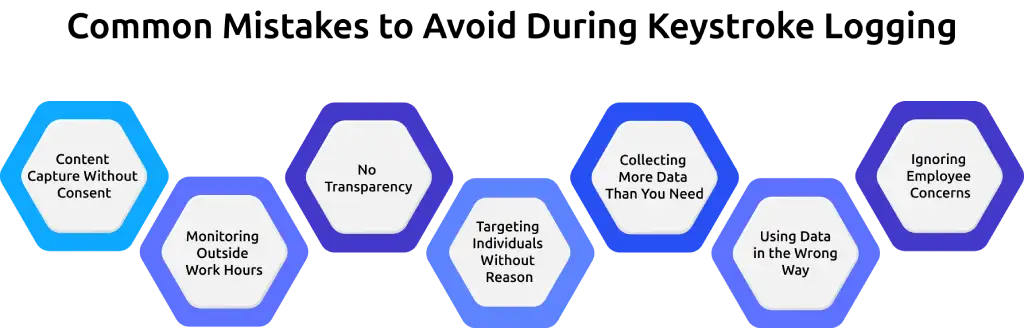
Keystroke logging can be useful, but it can also create serious problems if you use it in the wrong way. The line between responsible monitoring and invasion of privacy is very clear. If your team feels watched or uncomfortable, trust starts to break. And once trust is gone, productivity and morale drop quickly.
Here are some common mistakes that can cause issues:
Content Capture Without Consent
Recording everything your employees type without telling them is a major privacy violation. This includes messages, passwords, and personal conversations. In many places, this is illegal. Even on company devices, capturing personal content without clear consent can lead to serious legal trouble.
Monitoring Outside Work Hours
Tracking activity after work hours crosses a clear boundary. If employees use their devices for personal reasons, monitoring them during that time feels intrusive. You need to keep monitoring limited to work hours. This shows respect for your team’s personal space and helps maintain a healthy work-life balance.
No Transparency
If you use monitoring tools without informing your team, it becomes hidden surveillance. Employees may feel betrayed if they find out later, and this can damage your company culture. Clearly explaining what you track and why helps build trust and prevents confusion.
Targeting Individuals Without Reason
Focusing monitoring on specific employees without a valid reason can feel unfair and biased. This approach creates fear and tension within the team. Monitoring works best when it is applied consistently and based on clear policies.
Collecting More Data Than You Need
Tracking too much data can create unnecessary risks. The more data you collect, the harder it becomes to manage and protect it. You only need enough information to understand the activity and identify issues. Anything beyond that adds complexity without real value.
Using Data in the Wrong Way
Keystroke data works best when it helps you understand how your team is working and where they may need support. Using it to constantly watch every move or question employees can make them feel uncomfortable and pressured. Over time, this can reduce motivation and create a negative work environment.
Ignoring Employee Concerns
If employees raise concerns about monitoring and those concerns are ignored, it can lead to frustration and disengagement. Listening to your team and addressing their questions helps build transparency and keeps everyone aligned.
When you use keystroke logging with clear rules, honesty, and respect, it becomes a helpful tool. When these basics are ignored, it quickly turns into a source of risk, stress, and distrust.
Want to spot productivity gaps before they become problems?
Time Champ gives you real-time insights to identify issues early and take action.
What Are the Legal Requirements for Keystroke Logging?
The rules around keystroke logging are not the same everywhere. They change based on where your employees are located, what kind of data you collect, and how transparent you are about it.
Here’s a simple way to understand it:
USA - Federal Law
In the United States, employers are generally allowed to monitor activity on company-owned devices when there is a valid business reason, such as improving productivity or protecting sensitive data. If your monitoring starts capturing personal content, like messages, emails, or passwords, you may need consent. Without it, you could face serious legal issues.
USA - State Laws
Some states take employee privacy more seriously and have stricter rules. For example, states like New York, Connecticut, and Delaware require employers to inform employees in advance before any monitoring begins. Even in states without strict laws, giving notice is still the safest and smartest approach. It avoids confusion, builds trust, and protects your business from future disputes.
European Union - GDPR
If your employees are in Europe, the rules are much stricter. Under GDPR, employee privacy is a top priority. You cannot monitor just because you want to. You must have a strong, valid reason and be able to prove it. Also, consent is not always considered valid in workplaces because employees may feel pressured to agree.
The Rule That Works Everywhere
Even though laws differ, one principle stays the same across all regions: be transparent and respectful. Employee privacy rights are an important part of this and directly influence how monitoring needs to be implemented.
If you follow these basics, you stay on the safer side legally and ethically:
- Inform employees clearly before any monitoring starts
- Limit tracking to work hours and company devices
- Focus on activity, not personal content
- Use the data only for clear business reasons
- Avoid collecting more data than you actually need
When employees know what’s happening and why, they are far more likely to accept it.
How to Deploy Keystroke Logging Software Correctly
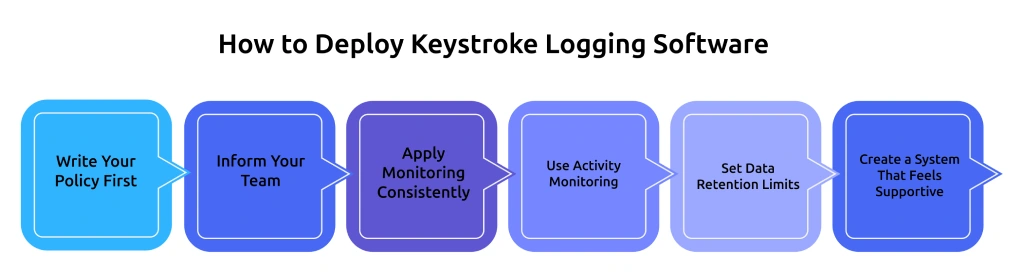
Keystroke logging works best when it is used with the right approach. It is about doing it in a way that feels fair and makes sense for your team. When there is clarity in how the tool is used, employees feel more comfortable, and the data becomes more useful.
A simple and well-planned setup helps you avoid confusion, reduce risks, and get better results from your monitoring system. Clear productivity tracking methods also make it easier to measure and improve team performance.
Write Your Policy First
Before you turn on any monitoring tool, take a step back and create a clear policy. This is your foundation. Explain what data you will track, why it is needed, and how it will be used in daily operations. Also include who can access the data and how long it will be stored. When your policy is clear, your team knows what to expect, and you avoid confusion later.
Inform Your Team
Transparency makes a huge difference. Employees are more comfortable when they understand what is happening and why. Before starting monitoring, clearly communicate what is being tracked, when it will happen, and how it helps the business. Keep the explanation simple and honest.
Apply Monitoring Consistently
Monitoring should never feel like targeting. Apply the same rules across teams or roles where it makes sense. If only a few employees are monitored without a clear reason, it can create fear and reduce morale. Consistency shows fairness and builds trust across the workplace.
Use Activity Monitoring
Activity monitoring tells you how engaged someone is without invading their privacy. It gives you enough data to improve productivity and spot unusual behavior. Capturing actual content, like messages or passwords, adds risk without providing much extra value. Keeping things simple and respectful helps you stay on the safe side.
Set Data Retention Limits
More data does not always mean better decisions. Keeping data for too long can create unnecessary risk. Decide how long you truly need the information and stick to that timeline. For most businesses, 30 to 90 days is enough to track patterns and review performance. Regularly clearing old data keeps your system clean, reduces storage issues, and ensures you only keep what is useful.
Create a System That Feels Supportive
The way you present monitoring matters. If employees feel controlled, it can hurt motivation. If they see it as a support system, it can actually improve performance. When used the right way, keystroke logging becomes a tool that helps both managers and employees work better together.
How Time Champ Handles Keystroke Logging
Most modern employee monitoring software focuses on tracking work activity in a way that balances productivity insights with employee privacy. These tools are designed to understand work patterns without crossing personal boundaries. McKinsey research shows that improved workforce visibility and data-driven management practices can increase team productivity by 20 to 25% in organizations where workers feel informed and supported.
Time Champ follows this same approach by focusing only on activity intensity.
In simple terms, Time Champ does not track what employees type. It only looks at how actively they work during their time on the system.
This approach helps businesses understand productivity without invading anyone’s personal space.
This means:
- It shows how active employees are during their work hours
- It does NOT record what they type, like messages or passwords
- It keeps employee privacy safe while still giving useful insights
This helps you understand whether work is flowing smoothly or if any gaps need attention.
Here, the data is also combined with other insights like app usage and idle time. Another important benefit is early problem detection. If there is a sudden drop in activity, unusual spikes, or work happening at unexpected hours, it becomes easier to notice. This allows you step in, offer support, or fix issues before they grow bigger.
Most importantly, Time Champ is built with transparency in mind. Employees are aware of what is being tracked, and they can also view their own activity data. Access is limited to the right people, which keeps the system fair and trustworthy.
Ready to improve productivity without creating pressure on your team?
Time Champ helps you build a balanced and transparent monitoring system.
Conclusion
Keystroke logging software helps you understand how work is happening in your team while also keeping your systems secure. When you use it the right way, it can improve productivity, help you detect risks early, and support compliance. The key is to use it responsibly by being clear and honest with your team, respecting their privacy at all times, and focusing only on activity. When you handle it properly, it becomes a helpful tool for both you and your employees. But if you misuse it, it can quickly break trust and create serious problems.

Guna Lakshmi


Table of Content
-
 What Is Keystroke Logging Software?
-
Software vs. Hardware Keyloggers: What's the Difference?
-
Practical Use Cases of Keystroke Logging in the Workplace
-
Common Mistakes You Should Avoid During Keystroke Logging
-
What Are the Legal Requirements for Keystroke Logging?
-
How to Deploy Keystroke Logging Software Correctly
-
How Time Champ Handles Keystroke Logging
-
Conclusion
Related Blogs
Uncover security insights with keyloggers. Explore the technology behind every key for robust PC monitoring and ensure secure data management.
Mounika Sai | Jan 06, 2024
Explore the legality of using keyloggers for monitoring. Understand the legal boundaries and implications of employing keylogger software in various contexts.
Jahnavi Pulluri | Aug 08, 2024
Protect your business from data theft by understanding key risks and prevention strategies. Learn how to secure sensitive information effectively.
Sai Keerthi Uppala | Mar 12, 2025
Unlock productivity with top strategies in the modern workplace. Improve work efficiency for a more effective and streamlined workplaces.
Mounika Sai | Jan 06, 2024
A data breach exposes sensitive data to hackers. Learn how breaches happen and the best ways to protect your personal and business data from cyber threats.
Jahnavi Pulluri | Mar 12, 2025
Explore common employee monitoring myths and learn what's actually true. Find out how proper monitoring boosts productivity, trust, and team performance.
Anjali | Apr 14, 2026


 4.7/5 avg.
Ready to Manage Your Workforce Smarter?
Join our family of 1500+ companies using smart insights to redefine workforces!

Free Trial
No Credit Card Required