Employee Activity Monitoring Software: A Complete Guide
Learn what employee activity monitoring software is, how it works, what data it captures, the main types, legal use, and how it differs from time tracking.
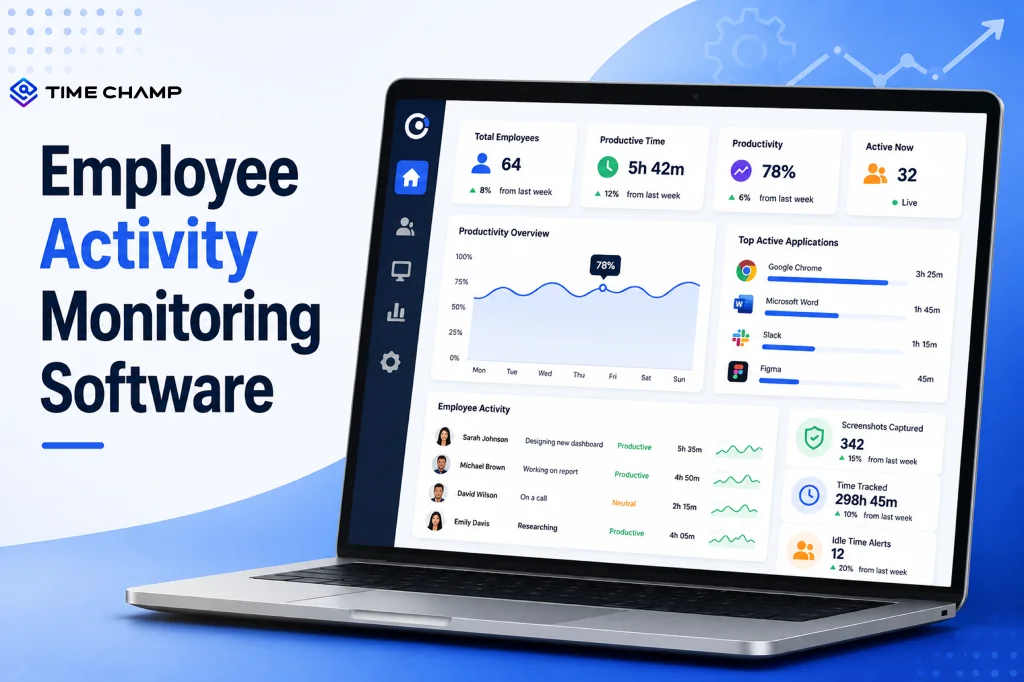
Your team might be busy all day, but being busy doesn't always mean productive. Between meetings, notifications, and endless browser tabs, it's easy to lose sight of where time actually goes. Employee activity monitoring software gives you a clear view of how employees spend their work hours, helping you uncover productivity opportunities and improve workflows. If you're considering using one, we've brought everything you need to know together in one guide.
Here, you’ll learn what employee activity monitoring software is, how it works, what it tracks, its different types, and how to use it ethically.
What Is Employee Activity Monitoring Software?
Employee activity monitoring software is a digital tool that helps you understand how employees spend their work hours by automatically tracking work-related activities on company devices. It records data such as application usage, active and idle time, productivity trends, and task progress, giving you clear insights into workflows while reducing the need for manual timesheets or constant check-ins.
For a closer look at how this software works, see our guide on how activity tracking software works.

Did You Know?
The U.S. Government Accountability Office (GAO) reports that organizations frequently use digital monitoring tools to improve productivity, performance, workplace safety, and security, which have become a normal part of modern workplaces.
How Does Employee Activity Monitoring Software Work?
Understanding how employee activity monitoring software works helps you see how it turns everyday work activities into meaningful insights. From collecting activity data to generating reports and dashboards, here's how the process works step by step.
1. The Software Agent
The process begins by installing a lightweight software agent on your employees' work devices, whether they're using a desktop, laptop, or mobile phone. Compatible with Windows, macOS, Linux, Android, and iOS, the agent runs quietly in the background without affecting device performance.
It securely transfers activity data to a centralized dashboard, either in the cloud or on your organization's servers.
2. Data Collection
Once you install the software, it begins collecting work-related activity throughout the day. It records details such as the applications your employees use, the websites they visit, the time spent on different tasks, and periods of inactivity.
Depending on your settings, it can also capture screenshots at scheduled intervals or collect additional activity data. Every action is timestamped, giving you a clear timeline of the workday.
3. Data Processing and Classification
After collecting the data, the software organizes and analyzes it to provide meaningful insights. It automatically categorizes activities as productive, neutral, or unproductive based on job roles or the rules you define. Many modern solutions also use AI to classify applications and websites, reducing the need for manual setup.
The software transforms the processed data into daily, weekly, and monthly reports, helping you identify productivity trends, work patterns, and potential bottlenecks.
4. Dashboards and Alerts
Finally, the software displays all the processed information in easy-to-use dashboards, giving you a real-time view of your team's activity and productivity. Many platforms also allow your employees to access their own dashboards, promoting transparency and self-improvement.
You can configure alerts for events such as extended idle time, excessive overtime, unusual activity, or policy violations, helping you address issues before they affect productivity or project deadlines.
Looking for a smarter way to monitor employee activity?
Time Champ helps you track work activities, visualize productivity, and improve team efficiency!
What Data Does Employee Activity Monitoring Software Capture?
Employee activity monitoring software collects various types of work-related data to provide meaningful insights. The software captures different types of work-related data to help you understand productivity, work habits, and team performance. Here's what it tracks.
Application Usage
The software records the applications your employees use during work hours and how much time they spend in each one. It also distinguishes between actively used applications and those running in the background. Most solutions classify apps as productive, neutral, or unproductive based on the employee's role, helping you understand where time is being spent.
Website and Internet Activity
Employee activity monitoring software tracks the websites your team visits during work hours and the time spent on each site. It can categorize websites as work-related, personal, entertainment, or potentially risky, giving you better visibility into browsing habits and internet usage.
Active and Idle Time
The software measures how long employees are actively using their devices and detects idle periods when there's no keyboard or mouse activity. You can customize idle-time thresholds for different job roles, allowing you to evaluate employees fairly. These insights help you identify workflow issues or provide support when needed rather than encouraging micromanagement.
Attendance and Work Hours
Many activity tracking solutions automatically record login and logout times, eliminating the need for manual clock-ins. They also track breaks, shift schedules, overtime, and total work hours, making it easier to manage attendance and simplify payroll processing.
Screenshots and Screen Recordings (Optional)
Depending on your organization's policies, the software can capture screenshots at scheduled intervals or record screen activity for roles that require additional visibility. Many modern solutions include privacy features, such as screenshot blurring, to protect sensitive information. Being transparent about what's captured also helps build employee trust.
Keystroke and Mouse Activity
Some employee activity monitoring software measures the level of keyboard and mouse activity to understand whether employees are actively working. Ethical solutions don't record the actual keys pressed or capture passwords, private chats, or personal messages.
File and Document Activity
The software can also monitor work-related file activity, including file access, edits, transfers, and downloads. This helps you detect unusual behavior, such as large file transfers or unauthorized downloads, while supporting data loss prevention (DLP) and security compliance.
Did You Know?
According to IBM's Cost of a Data Breach Report, malicious insider incidents cost organizations an average of USD 4.99 million per breach, highlighting why many businesses monitor file activity and user behavior to protect sensitive data.
What Ethical Activity Monitoring Software Do Not Capture
Responsible employee activity monitoring software focuses on work-related activity while respecting employee privacy. It does not capture personal email or chat content, monitor activity outside working hours, or track personal devices.
For GPS-enabled solutions, location tracking is typically limited to working hours and authorized work devices, helping you maintain transparency and employee trust.
What Are the Main Types of Employee Activity Monitoring Software?
Employee activity monitoring software is available in different types to suit various business needs. Let's explore the main types of employee monitoring and how they differ.
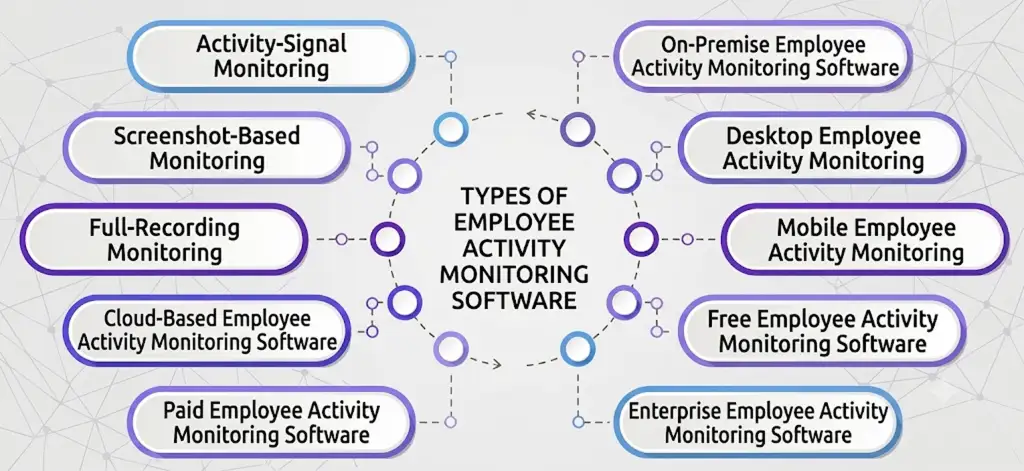
By Monitoring Intensity
The way employee activity monitoring software collects data varies from one solution to another. Some focus on basic activity tracking, while others offer more detailed monitoring features.
- Activity-Signal Monitoring: Activity-signal monitoring focuses on tracking work-related activities such as application usage, website categories, active hours, and idle time without capturing screenshots or recording keystrokes. Because it prioritizes productivity insights over surveillance, it's often the preferred choice for organizations that value employee privacy and trust.
- Screenshot-Based Monitoring: Screenshot-based monitoring combines activity tracking with periodic screen captures taken at predefined intervals. This provides additional context for understanding work progress and is commonly used in remote teams, outsourced projects, and client-billed work where visual proof of work may be required.
- Full-Recording Monitoring: Full-recording monitoring offers the highest level of visibility by continuously recording screen activity and, in some cases, monitoring keyboard and mouse activity. Organizations typically use full-recording monitoring only in highly regulated industries or environments with strict compliance and security requirements.
By Deployment Model
Employee activity monitoring software can also be categorized based on where it's installed and how your organization accesses it.
- Cloud-Based Employee Activity Monitoring Software: Cloud-based solutions store data on the vendor's secure servers and are accessed through a web browser or mobile application. They are quick to deploy, require little to no IT infrastructure, and offer automatic updates, seamless scalability, and remote access.
- On-Premise Employee Activity Monitoring Software: On-premise solutions are installed on your organization's own servers, giving you greater control over your data and security. While they offer enhanced customization and compliance, they require dedicated IT resources for deployment, maintenance, and updates.
By Operating Environment
The devices your employees use also determine which type of monitoring software is best suited for your business.
- Desktop Employee Activity Monitoring: Desktop monitoring solutions are designed for Windows, macOS, and Linux devices. They provide detailed insights into application usage, website activity, and productivity, making them ideal for office-based and knowledge workers.
- Mobile Employee Activity Monitoring: Mobile monitoring software is built for Android and iOS devices, making it a practical choice for field employees, sales representatives, delivery teams, and technicians who spend most of their time away from a desk.
- Cross-Platform Activity Monitoring: Cross-platform solutions combine desktop and mobile monitoring into a single platform. This allows you to manage remote, hybrid, office-based, and field employees from one centralized dashboard, ensuring consistent reporting across your workforce.
By Pricing Model
Employee activity monitoring software is available at different price points, allowing businesses of all sizes to find a solution that fits their budget.
- Free Employee Activity Monitoring Software: Free plans are typically designed for individuals or small teams and include basic monitoring features. While they can be useful for evaluating the software, they often come with limitations such as fewer users, limited reports, and fewer integrations.
- Paid Employee Activity Monitoring Software: Paid plans usually operate on a per-user, per-month subscription model and include advanced features such as automated tracking, productivity analytics, reporting, integrations, alerts, and customer support. They're suitable for growing businesses that need deeper workforce insights.
- Enterprise Employee Activity Monitoring Software: Enterprise solutions are built for large organizations with complex monitoring, security, and compliance requirements. They typically include custom pricing, dedicated onboarding, single sign-on (SSO), advanced security controls, custom workflows, API access, and priority support, making them ideal for managing large, distributed teams.
Ready to put the right monitoring solution into action?
Get started with Time Champ and manage your workforce with confidence.
Is Employee Activity Monitoring Software Legal?
The short answer is yes. Employee activity monitoring software is legal in many countries when it's used responsibly and for legitimate business purposes. However, the laws governing workplace monitoring vary by region, so it's important to understand the regulations that apply to your organization.
Legal Considerations
When implementing employee activity monitoring software, keep these legal considerations in mind:
- Inform Employees: Clearly communicate what data is being collected, why it's being collected, and how it will be used before monitoring begins.
- Obtain Consent Where Required: Some regions, such as the European Union under GDPR, require employers to obtain consent or have another lawful basis for processing employee data.
- Collect Only Necessary Data: Monitor only information that is relevant to legitimate business purposes, such as productivity, security, or compliance.
- Protect Employee Data: Store monitoring data securely and limit access to authorized personnel to reduce privacy and security risks.
- Follow Regional Regulations: Ensure your monitoring practices comply with applicable laws, such as GDPR (European Union), CCPA/CPRA (California), HIPAA (for healthcare organizations in the U.S.), or other local workplace privacy regulations. For a deeper breakdown, see our compliance guide for the US, UK, and EU.
- Define Retention Policies: Keep employee activity data only for as long as necessary and securely delete it once it is no longer required.
Why Choose Time Champ for Employee Activity Monitoring?
If you're looking for employee activity monitoring software that does more than just track activity, Time Champ is built for you. Time Champ is an employee activity monitoring and time tracking software designed to help you gain complete visibility into your workforce. It combines automated activity tracking with powerful workforce insights to help you improve productivity, streamline workflows, and manage your team more effectively.
Flexible Activity Monitoring
Time Champ captures application usage, website activity, active hours, idle time, and optional screenshots, allowing you to choose the level of monitoring that best fits your organization's needs.
Cloud-Based Deployment
As a cloud-based solution, Time Champ is quick to deploy, easy to scale, and accessible from anywhere. Automatic updates and centralized data management help you get started without complex IT infrastructure.
Cross-Platform Compatibility
Whether your employees work on Windows, macOS, Linux, Android, or iOS, Time Champ provides a unified dashboard that helps you manage remote, hybrid, office-based, and field teams from one place.
Real-Time Productivity Insights
Interactive dashboards and reports give you instant visibility into employee activity, productivity trends, and workflow bottlenecks, helping you make informed decisions faster.
Customizable Privacy Controls
Time Champ lets you configure monitoring settings based on your organization's policies. Role-based access controls and customizable tracking options help you balance workforce visibility with employee privacy.
Enterprise-Grade Security
Time Champ protects your workforce data with encrypted storage, role-based permissions, audit logs, and configurable data retention policies to support your security and compliance requirements.
Ready to transform the way you manage your workforce?
Start your 7-day free trial and experience smarter employee activity monitoring with Time Champ.
Conclusion
Employee activity monitoring software helps you understand how work gets done, identify productivity opportunities, and improve team performance. When used transparently and responsibly, it creates a more productive workplace while maintaining employee trust.
If you're looking for a solution that goes beyond basic activity monitoring, Time Champ helps you boost productivity, optimize workflows, and make smarter decisions. Start your 7-day free trial today.

Guna Lakshmi

Table of Content
 What Is Employee Activity Monitoring Software?
- How Does Employee Activity Monitoring Software Work?
- What Data Does Employee Activity Monitoring Software Capture?
- What Are the Main Types of Employee Activity Monitoring Software?
- Is Employee Activity Monitoring Software Legal?
- Why Choose Time Champ for Employee Activity Monitoring?
- Conclusion
Instant Signup
Thank you for your request!
We have received your signup request and our team will get back to you soon. In the meantime, you can book a demo to see Time Champ in action.
Book a DemoFree trial. No credit card required. Prefer a walkthrough? Book a demo.
Related Blogs

Explore common employee monitoring myths and learn what
Anjali | Apr 14, 2026
Companies are watching remote workers more than ever. But is it ethical? We break down where monitoring is justified and where it crosses the line.
Guna Lakshmi | Apr 16, 2026
Not all employee monitoring methods are the same. Explore 12 common types of employee monitoring and find the best fit for your workforce!
Guna Lakshmi | Jun 30, 2026
Learn how to monitor employee computer activity in the workplace using ethical, compliant methods to improve productivity and accountability.
Guna Lakshmi | Jun 29, 2026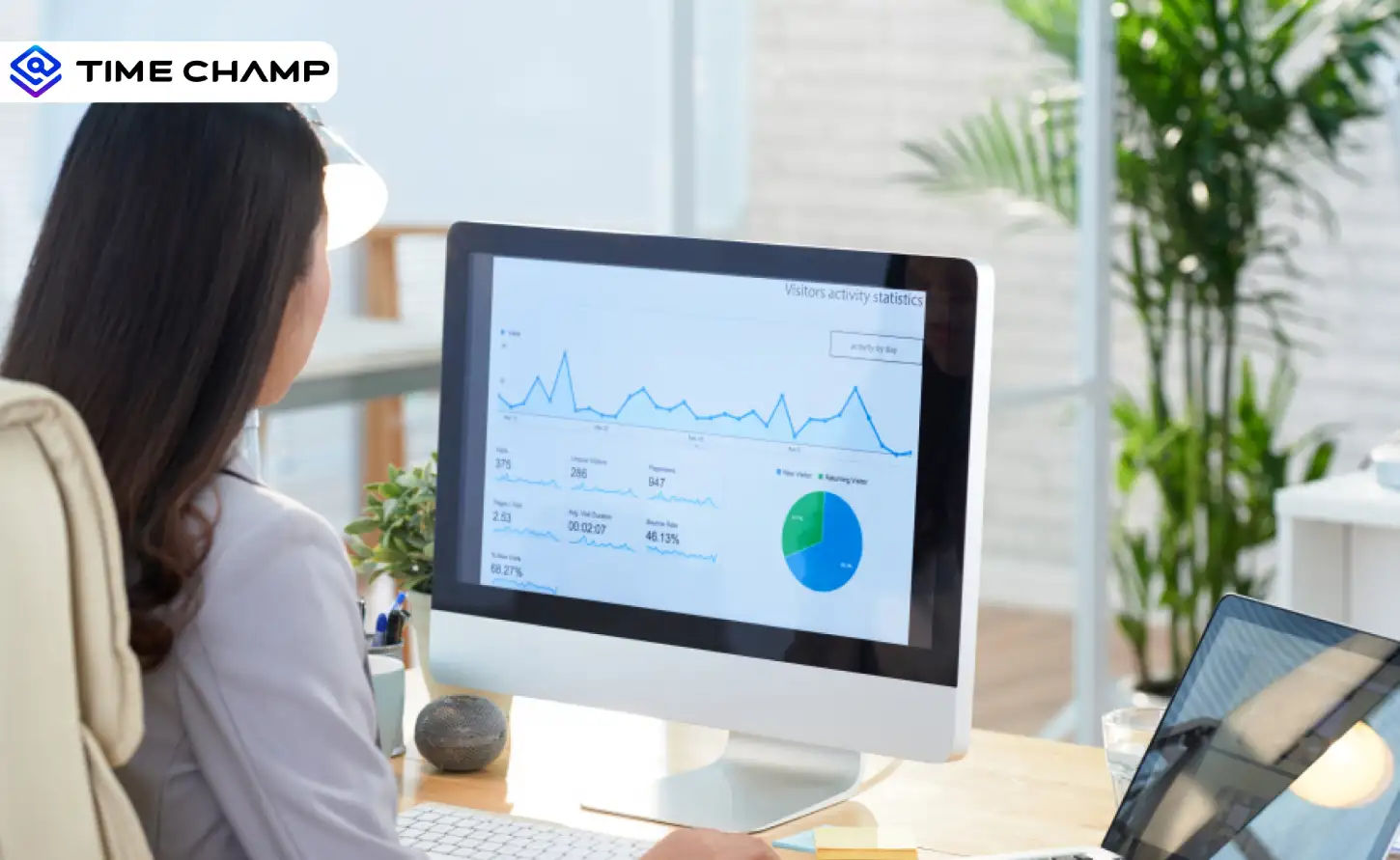
Activity tracking software shows you how work actually happens across your team. See what it tracks, how it differs from time tracking, and why it matters.
Guna Lakshmi | Apr 17, 2026
Understand how keystroke logging works, what it tracks, and where it is legal. Learn how to use it without crossing ethical boundaries.
Guna Lakshmi | Apr 17, 2026


 4.7/5 avg.
Ready to Manage Your Workforce Smarter?
Join our family of 1500+ companies using smart insights to redefine workforces!

Free Trial
No Credit Card Required