Employee Screen Recording for Compliance and Security
Employee screen recording helps you meet compliance and security requirements. See which regulations apply and when your team needs them.
Employee screen recording helps you meet compliance and security requirements with clear, reliable evidence. It creates a visual record of employee activity, showing how employees perform work during operational hours. In regulated industries, it serves as a required layer of documentation for audits, investigations, and policy enforcement. For the broader picture across this topic, our enterprise employee monitoring guide brings the moving parts together.
As regulations become stricter, you will face increasing pressure to prove compliance at any moment. It is no longer enough to prepare for audits once a year. You need systems that allow you to demonstrate compliance continuously with real, verifiable data.
This guide shows you how screen recording supports major compliance frameworks, which industries rely on it the most, how it works alongside other monitoring tools, and how you can implement it without creating privacy or trust issues.
Benefits of Screen Recording Compared to Other Monitoring Tools

Screen recording adds a layer of visibility that standard employee monitoring tools cannot provide. While work logs and activity data help you track actions, they do not show the actual context behind those actions. In compliance and security scenarios, this difference becomes critical, as you often need clear visual evidence to support audits, investigations, and policy enforcement.
Data Records vs Visual Evidence
Most monitoring tools capture data such as login times, application usage, and productivity metrics. These records help you understand what actions occurred, but they do not show how those actions were performed. Screen recording provides a visual layer that makes employee activity clearly visible.
Contextual Clarity in Compliance Scenarios
In regulated environments, data alone may not be enough for you to justify actions. Access logs can confirm system entry, but they do not explain whether the activity was appropriate. Screen recording gives you the necessary context by showing what actually happened during the work process.
Stronger Audit and Investigation Support
During audits or security investigations, you need more than basic logs. Screen recordings give you detailed evidence that helps validate actions and explain decisions clearly. This makes it easier to respond to regulatory requests and internal reviews.
Improves Accountability and Transparency
When you use screen recording properly, it creates a clear record of actions taken during work. This improves accountability across teams and reduces confusion during reviews. It helps you make your decisions based on actual evidence rather than assumptions.
Visual Proof in Real-World Use Cases
In healthcare, logs confirm access to patient records, while screen recordings show how that data was handled. In financial services, transaction logs show actions like trades, account updates, or client transactions, while recordings show how those actions were carried out. This makes your documentation more reliable during audits and investigations.
Still relying only on work logs to understand what actually happened?
See how Time Champ turns your monitoring into clear, visual insight.
Which Regulations Screen Recording Supports
Compliance frameworks require you to maintain clear and verifiable records of employee activity. Screen recording helps you meet these expectations by providing visual evidence that supports audits, investigations, and regulatory reviews.
The table below highlights key compliance frameworks, the industries they apply to, what each one requires, and how screen recording helps you meet those requirements with clear, verifiable proof.
| Regulation | Industry | What It Requires | Role of Screen Recording |
|---|---|---|---|
| HIPAA | Healthcare | Protects patient health information. Requires audit controls, access monitoring, and documentation of system activity involving PHI. | Shows when employees access systems that contain patient data (PHI). Provides an audit trail for OCR investigations. Supports breach investigation by showing what was on screen when a data event occurred. |
| PCI DSS | Financial services and retail | Requires monitoring of all access to cardholder data. Mandate audit logs of system activity and regular log review. | Shows a visual record of how employees work on systems that handle patient card data. It supports PCI DSS Requirement 10 by helping you monitor and track access to network resources and cardholder information. |
| FINRA / SEC | Financial services and investment firms | Requires firms to supervise employee activity and maintain records of communications and transactions. Electronic records must be retrievable. | Shows how employees are monitored while working on trading and handling client work. Provides retrievable visual records for FINRA examination requests. |
| SOX | Public companies | Requires controls over financial reporting systems and employee access to financial data. Auditors need evidence that controls are functioning. | Demonstrates internal controls on financial systems. Shows auditors that you track and record access to sensitive financial data. |
| GDPR | Any organization handling EU/UK personal data | Requires appropriate technical measures to protect personal data, documented access controls, and data breach investigation capability. | Supports breach investigation by providing visual evidence of employee activity around the time of a data event. Must be configured with proportionality (limited to work activity, with screenshot blur for sensitive content). |
| ISO 27001 | Cross-industry (certification framework) | Requires tracking employee access to important data and keeping records to show that security controls are in place. | Helps show that employee access is being monitored by providing clear visual proof. |

Did You Know?
GDPR fines can reach up to €20M or 4% of global revenue, making compliance a critical priority for organizations.
Screen Recording vs Other Monitoring Tools for Compliance
Monitoring tools like time tracking and activity logs show work timings, but they do not show how the work actually happens. This can create gaps during audits or investigations. Screen recording adds a visual layer that shows how work was performed, helping you meet compliance requirements with clearer and more reliable evidence.
The comparison below shows which tool is the best fit for each compliance or security need.
| Compliance or Security Need | Screen Recording | Activity Logs | DLP Monitoring | Screenshots |
|---|---|---|---|---|
| PHI/PCI access audit trail | Best fit | Supports | Limited | Supports |
| Insider threat investigation | Best fit | Supports | Supports | Supports |
| Data exfiltration detection | Limited | Limited | Best fit | Limited |
| USB and file transfer control | Limited | Limited | Best fit | Limited |
| Productivity and time verification | Limited | Best fit | Limited | Best fit |
| QA and agent performance review | Best fit | Limited | Limited | Supports |
| Incident reconstruction | Best fit | Supports | Supports | Supports |
| Regulatory access documentation | Best fit | Supports | Limited | Supports |
Using different tools but still missing important insights?
See how Time Champ simplifies monitoring with everything you need in one place.
Industries That Most Commonly Need Screen Recording
Different industries have different compliance needs, but all of them require clear visibility into how teams access and handle sensitive data. This means tracking and showing the actions taken to meet regulatory and security expectations. Below are some industries where screen recording plays a key role in meeting these requirements.
Healthcare
In healthcare, you handle sensitive patient data every day. Regulations like HIPAA require you to track and review how this data is accessed and used. Screen recording helps you show exactly what employees did when they accessed patient records. This becomes important during audits or investigations, as you can clearly prove that no misuse or unauthorized access happened. To protect privacy, you can use screenshot blur so sensitive patient information does not appear in recordings.
Financial Services
In financial services, you need to monitor employee actions closely to meet regulatory requirements. Rules like FINRA and SEC expect you to maintain proper supervision and keep records of activities. Screen recording helps you show how employees handled transactions, client interactions, and trading activities. It also supports quality checks in call centers by showing whether agents followed the correct processes.
Payment Processing
When you deal with cardholder data, PCI DSS requires you to track and monitor system access. Logs can show when someone accessed a system, but screen recordings show what they actually did. Visual recordings give you stronger proof of compliance than logs alone. You can also store recordings securely with encryption and access controls, which helps meet audit requirements while keeping data safe.
Legal and Professional Services
In legal, accounting, and consulting roles, you work with highly confidential client information. Even without strict regulatory frameworks, you still need to maintain strong documentation and accountability. Screen recording helps you verify access and activity without relying only on trust.
Configuring Screen Recording for Compliance Without Creating Problems
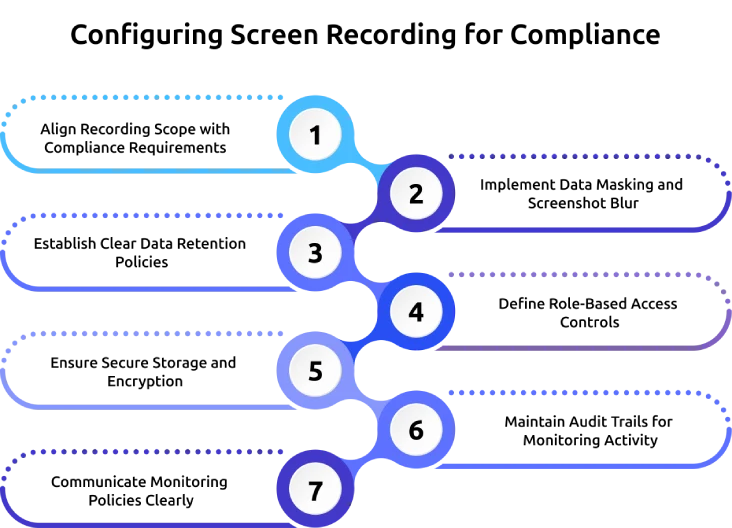
Setting up screen recording for compliance requires a focused and controlled approach. You need to capture the right data for regulatory needs without creating unnecessary risk or employee discomfort. Here are some key strategies to configure screen recording in a way that supports compliance while avoiding privacy, legal, and operational issues.
Align Recording Scope with Compliance Requirements
Limit recording to systems and activities that fall under regulatory requirements. Instead of capturing all employee activity, focus only on sessions involving regulated data or critical systems. This keeps monitoring relevant and avoids collecting unnecessary information.
Implement Data Masking and Screenshot Blur
You need to protect sensitive information while maintaining visibility. Features like screenshot blur or data masking help you hide confidential details without removing proof of activity. This maintains compliance while reducing the risk of exposing regulated data during reviews.
Establish Clear Data Retention Policies
You need to define how long recordings will be stored before implementation. Different regulations have specific retention requirements, so your policy must align with them. Keeping data beyond required periods increases risk and creates unnecessary liability.
Define Role-Based Access Controls
You need to control who can view screen recordings. Not everyone requires access to sensitive data. Assign access based on roles and responsibilities so only authorized people can review recordings. This improves security and reduces the risk of misuse.
Maintain Secure Storage and Encryption
You need to store recordings in a secure environment with proper encryption. This protects data from unauthorized access and helps meet compliance requirements related to data security. Secure storage also keeps recordings remain intact and tamper-proof.
Maintain Audit Trails for Monitoring Activity
You need to track who accessed recordings and when. Audit trails provide transparency and help you demonstrate accountability during compliance checks. They also support investigations if any misuse occurs.
Communicate Monitoring Policies Clearly
You need to inform employees about what is being recorded, why it is necessary, and how the data will be used. Clear workplace communication builds trust and keeps monitoring practices transparent and compliant with legal requirements.
Regularly Review and Update Configuration
You need to review your setup regularly to confirm it still aligns with current regulations and business needs. As compliance requirements evolve, updating your configuration helps you stay compliant and avoid outdated practices.
Not sure how to set up screen recording without creating risks?
See how Time Champ helps you configure monitoring the right way for your team.
Simplify Compliance Screen Recording with Time Champ
Managing screen recording for compliance becomes easier when you use the right employee monitoring software. Instead of handling multiple tools, you can bring everything into one system that is built to meet compliance and security requirements without adding complexity.
Time Champ is an employee monitoring tool that goes a step further with workforce intelligence, offering time and productivity tracking that helps you set up screen recording based on your team’s roles and needs. You can choose scheduled or continuous recording and apply it only where required. All recordings are stored securely with encryption and protection against tampering, helping you meet compliance standards like PCI DSS, HIPAA, and ISO 27001. Role-based access allows only authorized personnel to view recordings, keeping sensitive data protected.
To maintain privacy, you can enable screenshot blur for roles that handle confidential information. This allows you to verify activity without exposing sensitive content. You can also export recordings easily for audits or compliance reviews, making it simple to provide proof when needed. Time Champ also supports real-time alerts, helping you identify unusual activity early. Along with screen recording, it includes data loss prevention features like tracking file activity, USB usage, and restricted website access. This gives you a more complete compliance and security setup in one place.
Conclusion
Employee screen recording provides clarity that logs and access records cannot capture. It gives you clear visual proof of what actually happened on regulated systems, which is exactly what regulators expect during audits and investigations. When you use it with purpose by focusing on relevant systems, protecting sensitive data, and combining it with tools like data loss prevention, you create a compliance setup that is clear, secure, and easy to manage.
For a deeper understanding of employee screen recording in an ethical way, read our blog on: Time Champ’s Screen Recording: Enhancing Employee Accountability.

Guna Lakshmi


Table of Content
-
 Benefits of Screen Recording Compared to Other Monitoring Tools
-
Which Regulations Screen Recording Supports
-
Screen Recording vs Other Monitoring Tools for Compliance
-
Industries That Most Commonly Need Screen Recording
-
Configuring Screen Recording for Compliance Without Creating Problems
-
Simplify Compliance Screen Recording with Time Champ
-
Conclusion
Instant Signup
Thank you for your request!
We have received your signup request and our team will get back to you soon. In the meantime, you can book a demo to see Time Champ in action.
Book a DemoFree trial. No credit card required. Prefer a walkthrough? Book a demo.
Related Blogs
Learn how to choose the right remote employee monitoring software with the right features, scalability, and usability to manage remote teams effectively.
Guna Lakshmi | Apr 14, 2026
Companies are watching remote workers more than ever. But is it ethical? We break down where monitoring is justified and where it crosses the line.
Guna Lakshmi | Apr 16, 2026
Employee screen monitoring captures work activity in real time. Learn all monitoring types, how they boost productivity, and how to implement them ethically.
Jahnavi Pulluri | Apr 17, 2026
Learn how to address employee monitoring concerns with transparency, clear policies, and trust-building practices that improve engagement and reduce resistance.
Anjali | Apr 17, 2026
Data loss costs more than you think. Learn what causes it, how employee monitoring reduces data exfiltration risk, and how to protect your business.
Thasleem Shaik | Apr 17, 2026
Learn how to monitor employee internet usage with effective tips and tools to boost productivity, enhance security, and promote responsible online behavior.
Jahnavi Pulluri | Apr 17, 2026


 4.7/5 avg.
Ready to Manage Your Workforce Smarter?
Join our family of 1500+ companies using smart insights to redefine workforces!

Free Trial
No Credit Card Required