Time Champ's Screen Recording for Smarter Workforce Visibility
Improve workforce visibility with Time Champ’s screen recording. Track workflows and review productivity in remote teams without invasive surveillance.
You may know when work gets completed, but do you really know what happens during work hours across your remote team?
Time Champ’s screen recording helps you answer that with better visibility into workflows, task activity, and productivity without constantly checking in on employees. It helps you understand how work gets done, identify workflow issues faster, and keep projects moving without micromanaging your team.
In this guide, you will learn how Time Champ’s screen recording works, the different recording modes available, the real-world use cases, and how the platform protects employee privacy.
How Time Champ's Screen Recording Works
Time Champ’s screen recording works by capturing work activity directly from employee devices while they complete their daily tasks. This helps you review workflows, understand productivity patterns, and improve accountability with better visibility into how work gets done.
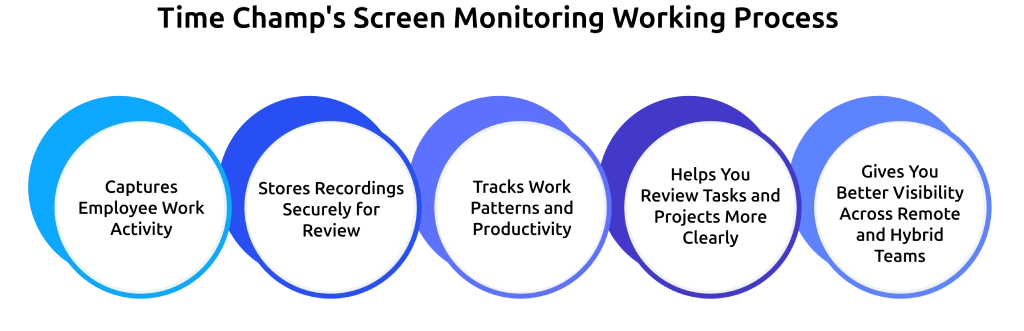
Captures Employee Work Activity
Time Champ captures screen activity directly from employee devices during working hours. The software records ongoing tasks, application usage, workflows, and work-related screen activity during working hours.
This helps you understand how employees handle tasks, projects, and daily operations.
Stores Recordings Securely for Review
After recording the activity, Time Champ securely stores the recordings inside the dashboard. You can access and review them later whenever you need to verify work, investigate issues, or review project progress.
This gives you a clear record of work activity without requiring constant live monitoring.
Tracks Work Patterns and Productivity
Time Champ combines screen recordings with activity tracking and workforce intelligence insights. The system analyzes work patterns, active hours, task behavior, and productivity trends to help you understand how work gets completed across your team.
This helps you identify workflow gaps, productivity blockers, and inefficient processes faster.
Helps You Review Tasks and Projects More Clearly
You can review screen recordings anytime to understand how work is progressing across your team. Instead of relying only on reports or updates, you get a clearer view of actual workflows and task activity.
With these recordings, you can:
- Verify time spent on tasks
- Track project progress more accurately
- Understand employee workflows
- Investigate unusual activity quickly
- Support performance discussions with real examples
This helps you improve accountability while keeping project management more organized and transparent.

Did You Know?
47% of digital workers struggle to find the information needed to perform their jobs effectively.
Gives You Better Visibility Across Remote and Hybrid Teams
Managing remote or hybrid teams becomes easier when you can clearly see how work happens across different locations. Time Champ helps you monitor task progress, review workflows, and maintain visibility without interrupting employees during work. You stay informed about ongoing activities while your team continues working normally.
This creates better operational transparency and helps you manage distributed teams with more confidence.
Need better visibility into your team’s work activity?
See how Time Champ’s screen recording helps you track workflows and improve accountability more clearly.
Understanding Time Champ’s Screen Recording Modes
Different work situations require different recording methods. That is why Time Champ gives you flexible recording modes instead of forcing one setup for every team.
Scheduled Screen Recording
Scheduled recording captures screens automatically during specific hours. You just need to set the recording schedule once, and Time Champ handles the rest. This works well when your team follows fixed work hours or handles time-sensitive projects.
You can use scheduled recording to:
- Monitor billable work hours
- Track shift-based operations
- Review project activity during peak hours
- Maintain accountability during remote work
Your employees also know when recording happens, which creates a more transparent work environment.
On-Demand Screen Recording
An on-demand recording allows you to start recording only when needed.
This mode works best when you need to investigate an issue, review a specific task, or document unusual activity. Instead of recording continuously, you capture only important moments.
You can use on-demand recording for:
- Incident investigations
- Client dispute resolution
- Performance reviews
- Workflow troubleshooting
- Security-related concerns
This approach gives you more flexibility while reducing unnecessary recordings.
Manual Screen Recording
Manual recording gives employees control over when recordings start and stop.
Your employees can record tasks for training, documentation, or collaboration purposes. This creates a more employee-friendly experience because the recording process stays transparent and voluntary.
Manual recording works well for:
- Creating onboarding material
- Sharing process walkthroughs
- Team collaboration
- Knowledge transfer
- Task documentation
This mode encourages accountability without creating pressure.
Use Cases for Employee Screen Recording
Screen recording supports much more than basic employee monitoring. From handling performance reviews to resolving security concerns, screen recordings provide clear visibility into key work activities while helping your employees stay productive and supported.
Here are some practical ways you can use employee screen recording to improve accountability, productivity, and team visibility.
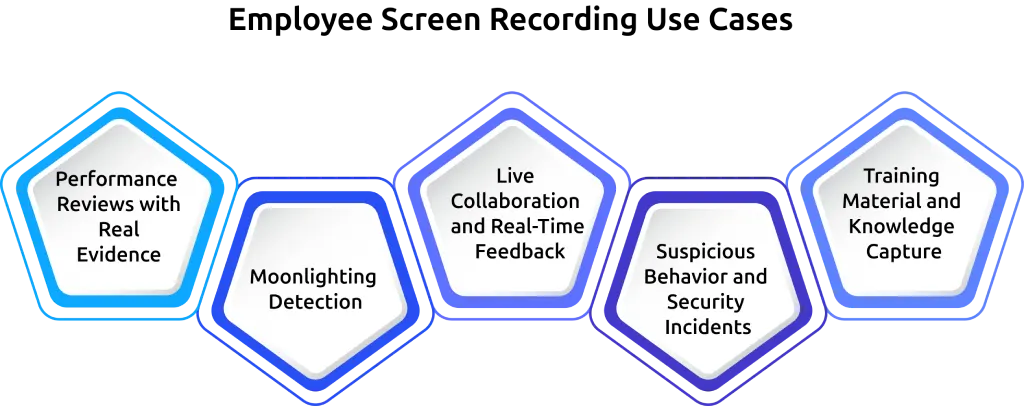
Performance Reviews with Real Evidence
Performance reviews become more accurate when you rely on actual work evidence instead of assumptions. Screen recordings help you review workflows, task handling, communication patterns, and productivity habits. You can identify strengths, support struggling employees, and provide more useful feedback.
This creates fairer evaluations and reduces confusion during reviews.
Moonlighting Detection
Moonlighting becomes a serious issue when employees work for multiple companies during paid work hours.
Screen recordings help you verify whether employees spend company time on company work. You can identify unusual work patterns, unrelated activities, or repeated productivity gaps.
This protects your business from productivity loss and project delays.
Live Collaboration and Real-Time Feedback
Your employees sometimes need quick guidance while handling important tasks. Screen recordings help you review workflows and give faster feedback without long back-and-forth explanations. You can quickly identify where mistakes happen, where processes slow down, or where employees need additional support.
This helps you improve collaboration, speed up training, and help your team solve problems more efficiently.
Suspicious Behavior and Security Incidents
Small warning signs can quickly turn into serious security problems if you miss them. Screen recordings help you investigate suspicious activity, policy violations, or unusual behavior before issues become larger. You can review workflows, identify unauthorized actions, and improve operational security across your organization.
This becomes especially useful when your business handles sensitive customer information or confidential company data.
Training Material and Knowledge Capture
Your experienced employees already know the fastest and most effective ways to complete important tasks. Screen recordings help you capture that knowledge and turn it into reusable training material. Your employees can record workflows, explain processes, and create step-by-step guidance for new team members.
This helps you improve onboarding, reduce training time, and make knowledge sharing easier across your team.
Looking for a smarter employee screen recording solution?
Use Time Champ’s screen recording to understand how work gets done across remote and hybrid teams.
Benefits of Time Champ's Screen Recording
Time Champ’s screen recording gives you better visibility into your team’s work and helps you create a more accountable, productive, and transparent work environment. Here are some key benefits you get when using the feature across your team.
Clear Workload Visibility
It becomes easier to understand who is overloaded, who needs support, and where work slows down.
Screen recordings help you identify workflow bottlenecks, repetitive tasks, and unbalanced workloads before they start affecting productivity. This gives you a clearer view of how work moves across your team so you can distribute tasks more effectively and reduce employee burnout.
Accurate Time Tracking on Projects
When you handle client projects or billable work, accurate time tracking matters.
Screen recordings help you verify time spent on tasks and support project documentation with real work evidence. This improves billing accuracy, reduces reporting confusion, and helps you resolve client disputes faster.
Productivity Insights with Workforce Intelligence
Time Champ’s employee monitoring software with advanced workforce intelligence features helps you go beyond basic activity tracking.
Instead of only seeing screen activity, you can identify work patterns, focus gaps, productivity trends, and workflow inefficiencies. These insights help you make smarter decisions that improve team performance and operational efficiency.
Accountability Without the Surveillance Feel
Employees are more comfortable with monitoring when the process feels transparent and fair. Time Champ focuses on accountability instead of aggressive surveillance. Your employees clearly understand what Time Champ records, when it records, and how managers use the data.
This creates a healthier balance between visibility, trust, and employee comfort while still helping you maintain accountability across remote and hybrid teams.
How Time Champ Protects Employee Privacy
Employee monitoring only works when your team trusts the process. If screen recording feels invasive or unclear, employees may feel uncomfortable instead of supported. That is why Time Champ focuses on transparency and privacy-friendly monitoring. You get the visibility needed to improve accountability without making employees feel constantly watched.
Time Champ gives you full control over how screen recording works inside your organization. So, you can:
- Set clear recording schedules so employees know when recording happens
- Limit recording access to authorized managers only
- Control how long recordings stay stored
- Create role-based permissions for better privacy protection
- Build transparent monitoring policies for remote and hybrid teams
Time Champ also helps you create a more open work environment through clear visibility. Employees understand what gets recorded, why it matters, and how the data is used. This reduces confusion and builds trust across your team.
For businesses using hybrid or BYOD environments, Time Champ helps separate work-related visibility from personal activity. This allows you to maintain accountability while still respecting employee boundaries.
Get started with Time Champ’s Employee Screen Recording Software
Getting started with Time Champ’s screen recording is simple. You can set everything up in a few easy steps and start improving accountability across your team.

Step 1: Install Time Champ on Employee Devices
Download and install Time Champ on the devices you want to monitor. The setup process is quick and works for both remote and in-office teams.
Step 2: Choose the Right Recording Mode
Select the recording mode that fits your workflow best.
- Use Scheduled Recording for fixed work hours
- Use On-Demand Recording for incidents or reviews
- Use Manual Recording for employee-controlled recording
This flexibility helps you match recording settings to your team’s daily work.
Step 3: Configure Privacy Settings
Set clear privacy rules before enabling recordings. You can control:
- Who can access recordings
- How long does Time Champ store recordings
- Which employees or teams does Time Champ record
This helps you maintain transparency while protecting employee privacy.
Step 4: Start Monitoring Workflows
Once you finish configuration, Time Champ captures activity based on your selected settings.
You can review recordings to:
- Improve remote team visibility
- Track project workflows
- Support performance management
- Reduce productivity gaps
- Maintain accountability across teams
Step 5: Use Workforce Intelligence Insights
Time Champ is an employee monitoring software with advanced workforce intelligence features. Along with screen recording, you also get productivity insights that help you understand work patterns more clearly.
This helps you make smarter decisions without relying on constant supervision.
Step 6: Build Transparent Accountability
Explain your monitoring policies clearly to employees so they understand what gets recorded and why.
When your team understands the purpose behind screen recording, you can improve accountability while still maintaining trust and a positive work environment.
Ready to improve accountability with smarter screen recording?
See how Time Champ helps remote and hybrid teams stay productive, transparent, and organized.
Conclusion
From project tracking and performance reviews to training and security investigations, Time Champ gives you the visibility needed to manage remote and hybrid teams more effectively while still respecting employee privacy.
If you want a smarter way to improve accountability and understand how work happens across your team, Time Champ’s screen recording gives you the flexibility and insights you need.

Guna Lakshmi

Table of Content
 How Time Champ's Screen Recording Works
- Understanding Time Champ’s Screen Recording Modes
- Use Cases for Employee Screen Recording
- Benefits of Time Champ's Screen Recording
- How Time Champ Protects Employee Privacy
- Get started with Time Champ’s Employee Screen Recording Software
- Conclusion

Related Blogs
Employee screen recording helps you meet compliance and security requirements. See which regulations apply and when your team needs them.
Guna Lakshmi | Apr 24, 2026
Implementing screen recording legally means getting notification, consent, and data rules right. Here is what you need to know before they start.
Guna Lakshmi | Jan 01, 2024
Learn when employee screen recording is legal in New York and how to meet notice and compliance requirements without creating risk or gaps.
Thasleem Shaik | Apr 27, 2026
Proof of work screenshots for remote teams help you see how work gets done and track real activity. Learn when to use screenshots effectively.
Guna Lakshmi | Apr 23, 2026
Employee screen monitoring captures work activity in real time. Learn all monitoring types, how they boost productivity, and how to implement them ethically.
Jahnavi Pulluri | Apr 17, 2026
Background screening also known as pre- employment screening, is a comprehensive screening process that employers implement to filter the history of candidates.
Vijaya Lakshmi | Feb 14, 2024


 4.7/5 avg.
Ready to Manage Your Workforce Smarter?
Join our family of 1500+ companies using smart insights to redefine workforces!

Free Trial
No Credit Card Required