How to Implement Employee Screen Recording Legally
Implementing screen recording legally means getting notification, consent, and data rules right. Here is what you need to know before they start.

Employee screen recording is allowed in many countries, and it works best when it is set up with care from the beginning. Taking a few simple steps like informing employees, getting consent, and following privacy rules helps you avoid issues and keeps everything clear and fair. It also builds trust in your organization, because your team understands what is being monitored and why. Most rollouts also need to align with NY screen recording laws before tracking begins. The detail here sits inside a wider conversation covered in our enterprise employee monitoring guide.
In this blog, you can understand how to implement employee screen recording legally in your organization across key regions like the US, EU, UK, and India, a simple checklist to help you stay compliant, and the most common mistakes companies make when setting up employee screen recording.
Legal Foundation of Employee Screen Recording
Before you start recording employee screens, you need to understand one key idea. The law is not mainly about asking permission. It is about making sure employees clearly know what is happening.
In most countries, you are allowed to monitor work devices only if you inform employees in advance. You must clearly communicate what data will be recorded, when monitoring will occur, and why you are doing it. When employees continue working after this information is shared, it is usually treated as acceptance of the policy. This approach makes things simpler for you. Instead of managing complex consent processes, you focus on being transparent. Clear workplace communication reduces confusion, builds trust, and helps you stay compliant.
However, you still need to be careful in certain situations. If your screen recording includes audio, some regions require permission from everyone involved before recording starts. Also, in places like the European Union and the United Kingdom, under the General Data Protection Regulation, you cannot rely on consent as your legal basis.
You must show a valid reason for monitoring and make sure it does not unfairly impact employee privacy. When you understand these basics, you can implement screen recording in a way that is both legally safe and respectful to your team.

Did You Know?
74% of U.S. employers use digital tracking tools, including real-time screen monitoring (59%).
Legal Requirements by Region for Employee Screen Recording
Before you implement employee screen recording, you need to understand that legal requirements are not the same everywhere. Each country and region has its own rules, and what works in one place may not be compliant in another.
The table below gives you a clear overview of the key legal requirements across the regions where most organizations operate. It helps you quickly understand what you need to do in each location before enabling screen recording.
Note
Laws continue to evolve, new regulations are introduced regularly, and existing ones may change. To stay compliant, you should always verify the latest legal requirements with qualified legal counsel before deployment.
| Jurisdiction | Key Requirement | What It Means for Screen Recording | Penalty for Non-Compliance |
|---|---|---|---|
| United States (Federal - ECPA) | One-party consent for electronic monitoring. Since the employer is part of the network, their consent is enough under federal law. | Screen recording on company devices is federally permitted without employee consent. | Violations under the ECPA can lead to civil liability, including actual damages, punitive damages, and attorney fees. |
| Connecticut (CGS 31-48d) | Employers must give prior written notice of electronic monitoring to employees. | Written notification that screen recording is active must be provided before monitoring begins. A posted notice or employment contract acknowledgment satisfies the requirement. | Up to USD 500 per violation for the first offense. USD 1,000 per violation for subsequent offenses. |
| New York (Labor Law 52-c) | Employers must provide notice of electronic monitoring before implementing it. Acknowledgment must be signed by the employee. | Signed acknowledgment that screen recording may occur is required before monitoring begins. Notice must specify the types of monitoring in use. | Civil penalty of USD 500 for first offense, USD 1,000 for second, USD 3,000 for subsequent violations. |
| Delaware (Code 19:7-705) | Employer must provide prior written notice of electronic monitoring. Posting at the workplace satisfies the requirement. | A posted or written notice that screen recording is active is required. The notice does not require an individual employee’s signature in Delaware. | Civil penalty for violations. |
| California (CCPA, Penal Code) | Employees are covered under the CCPA. Written notice of data collection required. Two-party consent for audio recording. | Screen recording (visual only) does not require consent beyond disclosure. Audio capture alongside screen recording requires all-party consent. Written privacy notice required. | CCPA fines up to USD 7,500 per intentional violation. California Invasion of Privacy Act civil penalty of USD 5,000 per audio recording violation. |
| European Union (GDPR Art. 6) | Legitimate interest or consent as a lawful basis. Privacy impact assessment recommended for high-risk processing. | Screen recording must have a documented legitimate interest basis. Employees must be informed through a privacy notice. Retention period must be defined. | Up to EUR 20 million or 4% of global annual turnover for serious violations. |
| United Kingdom (UK GDPR + ICO guidance) | Same legitimate interest framework as EU GDPR. ICO recommends an impact assessment for monitoring. | Screen recording requires a documented lawful basis, employee transparency notice, and proportionality. ICO guidance specifically addresses employee monitoring. | ICO fines up to GBP 17.5 million or 4% of global annual turnover. |
| India (IT Act, DPDP Act 2023) | The Digital Personal Data Protection Act 2023 requires consent or legitimate use for processing personal data. | Screen recording of employee activity requires either consent or falls within legitimate use for employment purposes. Notice to employees is required. | Financial penalties under the DPDP Act are currently being finalized through implementing rules. |
Not sure how to set up screen recording legally?
See how Time Champ helps you implement compliant monitoring without complexity.
Pre-Launch Legal Checklist Essential Steps for Screen Recording Compliance
Before you enable employee screen recording, you need to complete a few key legal steps to stay compliant. This checklist helps you make sure everything is in place, from policy setup to data protection. Following these steps early helps you avoid risks and keeps your monitoring clear, controlled, and legally sound.
| Requirement | Action Required | Applies In |
|---|---|---|
| Written monitoring policy | Draft a policy that identifies screen recording as an active monitoring practice, its purpose, scope, retention period, and who has access. | All jurisdictions |
| Employee notification | Inform all employees that screen recording is or may be active on company devices during work hours. This can be done through an employment contract, employee handbook, or posted notice, depending on jurisdiction. | US (CT, NY, DE required; other states recommended), EU, UK, India |
| Signed acknowledgment | Obtain a signed acknowledgment from each employee confirming they received notification of the screen recording. | Required: New York. Recommended: all other jurisdictions as evidence of disclosure. |
| Legitimate interest assessment (GDPR) | Document the legitimate interest basis for screen recording. Conduct a balancing test weighing organizational need against employee privacy impact. | EU and UK (GDPR/UK GDPR) |
| Audio consent verification | Confirm whether screen recording software captures audio alongside visual content. If yes, all-party consent is required in California and other two-party consent states. | California and 11 other US two-party consent states |
| Screenshot blur configuration | Configure blur for any role that regularly handles PHI, PCI cardholder data, legal privileged information, or other sensitive categories. | All jurisdictions where sensitive data is on screen |
| Data retention policy | Define how long recordings are stored, who can access them, and when they are deleted. Record this in the monitoring policy. | All jurisdictions. Specific retention minimums under HIPAA (6 years), PCI DSS (1 year), FINRA (3-6 years). |
| Role-based access controls | Limit recording access to authorized personnel only. Document who can view, download, or delete recordings. | GDPR, HIPAA, PCI DSS, ISO 27001 |
| BYOD consent documentation | If screen recording runs on employee-owned devices, obtain separate written consent specifically covering BYOD monitoring. | All jurisdictions. BYOD monitoring raises a higher privacy risk than company device monitoring. |
The most commonly missed step in the checklist is BYOD (Bring Your Own Device) consent documentation. You may set up screen recording for company devices and then apply the same policy to employee-owned devices without realizing that the rules are different. To stay compliant, you need a separate consent process for personal devices, since monitoring them usually requires explicit employee permission.
The Audio Recording Problems Most Organizations Miss
Before you enable screen recording, you need to understand how audio can change your legal responsibilities. This section helps you identify what to check so you can avoid compliance risks from the start.
Screen Recording May Capture Audio
When you enable screen recording, your tool may also capture system sound or microphone input. You should verify your settings to make sure you are not recording conversations without knowing it.
Audio Laws Are Different from Monitoring Laws
Audio recording is treated separately under the law. You need to recognize that while screen monitoring often requires notification, audio recording usually requires consent from all parties involved.
Some States Require All Party Consent
In states like California, Florida, and others, you must get permission from everyone involved before recording audio. You should check where your employees are located because this rule applies based on their location, not just your company’s location.
Remote Teams Increase Legal Complexity
If your team works across multiple states, different laws may apply at the same time. You need to account for this complexity to avoid gaps in compliance.
Disable Audio If Not Required
If audio recording is not essential for your purpose, you should turn it off. This is the easiest way to reduce your legal risk.
Follow the Strictest Standard
For distributed teams, you should apply all-party consent as a standard practice. This helps you stay compliant without needing to track different laws for each location.
Struggling to meet GDPR requirements for monitoring?
Time Champ helps you manage access control and data protection in one place.
GDPR Guidelines for Employee Screen Recording Implementation
If you plan to use employee screen recording in the EU or UK, you need to follow the rules under the General Data Protection Regulation (GDPR). The General Data Protection Regulation does not ban screen recording, but it sets clear conditions. You need a valid reason, you must inform employees clearly, and you must make sure your monitoring is not excessive. These rules translate into a few key steps you need to complete before recording begins.
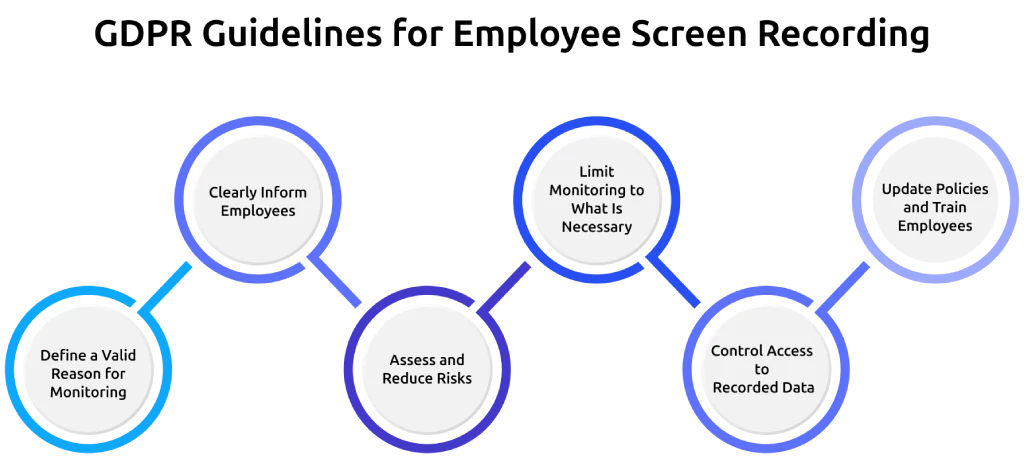
Define a Valid Reason for Monitoring
You need to clearly define the purpose of screen recording, such as security, compliance, or quality checks. You also need to make sure that the monitoring is necessary and does not negatively impact employee privacy. This needs to be supported with proper documentation.
Clearly Inform Employees
You must clearly inform employees about what data you collect, why you collect it, who can access it, and how long you will store it. You should also explicitly mention screen recording in your privacy notice. General or unclear policies are not sufficient, and this information should be shared before monitoring starts.
Assess and Reduce Risks
If you monitor employees regularly or at a large scale, you may need to conduct a data protection impact assessment. You need to identify risks and define how employee data will be protected. Using safeguards like limited access, masking sensitive data, and setting clear retention periods will help reduce risk and strengthen compliance.
Limit Monitoring to What Is Necessary
You need to avoid recording everything by default. Only collect data that is directly related to your purpose and avoid monitoring outside working hours or in sensitive contexts. This helps keep your monitoring proportionate and aligned with GDPR expectations.
Control Access to Recorded Data
You need to restrict who can view screen recordings and make sure access is limited to authorized roles with role-based access controls. This reduces the risk of misuse and protects employee privacy. Proper access control also strengthens your overall data security practices.
Update Policies and Train Employees
You should keep your monitoring policies updated and let your employees understand them properly. Clear communication and basic training help prevent confusion and build trust. Regular updates help to keep your practices aligned with changing regulations.
Common Legal Mistakes When Implementing Screen Recording
When you set up screen recording, small mistakes can lead to legal problems. These are easy to miss, but they can create serious risks if not handled properly. Here are the common mistakes you need to avoid and what you should pay attention to before you start monitoring.
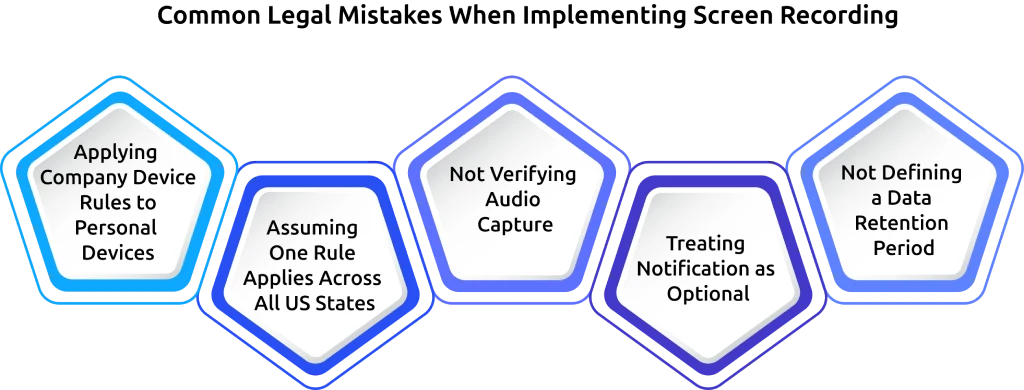
Applying Company Device Rules to Personal Devices
You may extend the same monitoring policy from company devices to employee devices without recognizing the difference. Company devices usually require notification, while personal devices require explicit consent in most jurisdictions. You need a separate policy and consent process for BYOD.
Assuming One Rule Applies Across All US States
Relying on federal law or one-party consent rules and assuming they apply everywhere can lead to gaps. You need to consider stricter state laws in places like Connecticut, New York, Delaware, and California. If your employees are located in these states, their local laws apply regardless of where your company operates.
Not Verifying Audio Capture
Enabling screen recording without checking whether audio is also being captured can create legal risk. This becomes critical in states that require two-party consent. You should always review your software settings before starting monitoring.
Treating Notification as Optional
Treating notification as optional can create serious compliance risks, especially when other laws require clear disclosure to employees. You still need to communicate clearly with employees, as most risks come from state laws, GDPR penalties, and employee disputes. Notification plays a key role in reducing these risks and improving transparency.
Not Defining a Data Retention Period
Storing recordings without setting a clear time limit increases risk. You need to define a retention period and remove data once it is no longer needed. This helps you stay aligned with regulations like GDPR, HIPAA, and PCI DSS. Automated reporting and activity data export features can support regular data lifecycle reviews.
Deploy Screen Recording with Built-in Legal Compliance Using Time Champ
Setting up employee screen recording the right way requires visibility, control, and safeguards in place to meet legal requirements across different regions. Without these elements in place, monitoring can quickly lead to compliance risks and data privacy concerns. Time Champ is an employee monitoring tool that goes a step further with workforce intelligence, offering time and productivity tracking that helps you implement screen recording with built-in safeguards, making it easier to stay compliant while maintaining full control over your monitoring setup from the start.
It helps you implement screen recording with the right level of transparency, control, and data protection needed for compliance. The monitoring agent remains visible, making it clear to employees that monitoring is active. You can also apply screenshot blur to protect sensitive information without interrupting visibility.
Role-based controls manage access to recordings, allowing only authorized persons to view, download, or manage data. This supports security requirements under regulations like the GDPR and PCI DSS. The platform provides exportable audit logs that support documentation and make it easier to handle audits or regulatory checks. Additional data protection features help reduce the risk of sensitive data exposure during monitoring.
Time Champ meets major compliance standards, including GDPR, ISO 27001, HIPAA, and SOC 2 Type I. With flexible configuration options for screen recording, screenshot monitoring, and reporting, it allows you to implement monitoring in a structured and compliant way.
Ready to implement screen recording without legal risk?
See how Time Champ helps you stay compliant while maintaining full visibility.
Conclusion
Employee screen recording becomes simple and manageable when you follow the right approach from the start. In most cases, it comes down to a few key actions. Inform employees before monitoring starts, clearly define your reason for recording, capture only what is necessary, protect sensitive data with blur, set a clear data retention period, and take separate consent for personal devices and audio. When you handle these steps properly from the beginning, monitoring becomes easier to manage and legally safer. It also builds trust with employees and helps you stay prepared in case of audits or disputes.

Guna Lakshmi


Table of Content
-
 Legal Foundation of Employee Screen Recording
-
Legal Requirements by Region for Employee Screen Recording
-
Pre-Launch Legal Checklist Essential Steps for Screen Recording Compliance
-
The Audio Recording Problems Most Organizations Miss
-
GDPR Guidelines for Employee Screen Recording Implementation
-
Common Legal Mistakes When Implementing Screen Recording
-
Deploy Screen Recording with Built-in Legal Compliance Using Time Champ
-
Conclusion
Instant Signup
Thank you for your request!
We have received your signup request and our team will get back to you soon. In the meantime, you can book a demo to see Time Champ in action.
Book a DemoFree trial. No credit card required. Prefer a walkthrough? Book a demo.
Related Blogs
Employee screen recording helps you meet compliance and security requirements. See which regulations apply and when your team needs them.
Guna Lakshmi | Apr 24, 2026
Choose the right employee screenshot monitoring frequency for your team type. See role-based guidance and interval tradeoffs.
Guna Lakshmi | Apr 23, 2026
Learn how to address employee monitoring concerns with transparency, clear policies, and trust-building practices that improve engagement and reduce resistance.
Anjali | Apr 17, 2026
Employee screen monitoring captures work activity in real time. Learn all monitoring types, how they boost productivity, and how to implement them ethically.
Jahnavi Pulluri | Apr 17, 2026
Roll out employee monitoring the right way with our training guide. Learn what to teach managers and employees before and after launch for smooth adoption.
Anjali | Apr 16, 2026
Learn the key ethical considerations in employee monitoring. Know what to track, how to stay transparent, and how to build trust with your team.
Thasleem Shaik | Apr 15, 2026


 4.7/5 avg.
Ready to Manage Your Workforce Smarter?
Join our family of 1500+ companies using smart insights to redefine workforces!

Free Trial
No Credit Card Required