Enterprise DLP vs Integrated DLP: Which One Fits You?
Compare enterprise DLP vs. integrated DLP to understand their key differences, benefits, and use cases. Find the right DLP solution for your business.
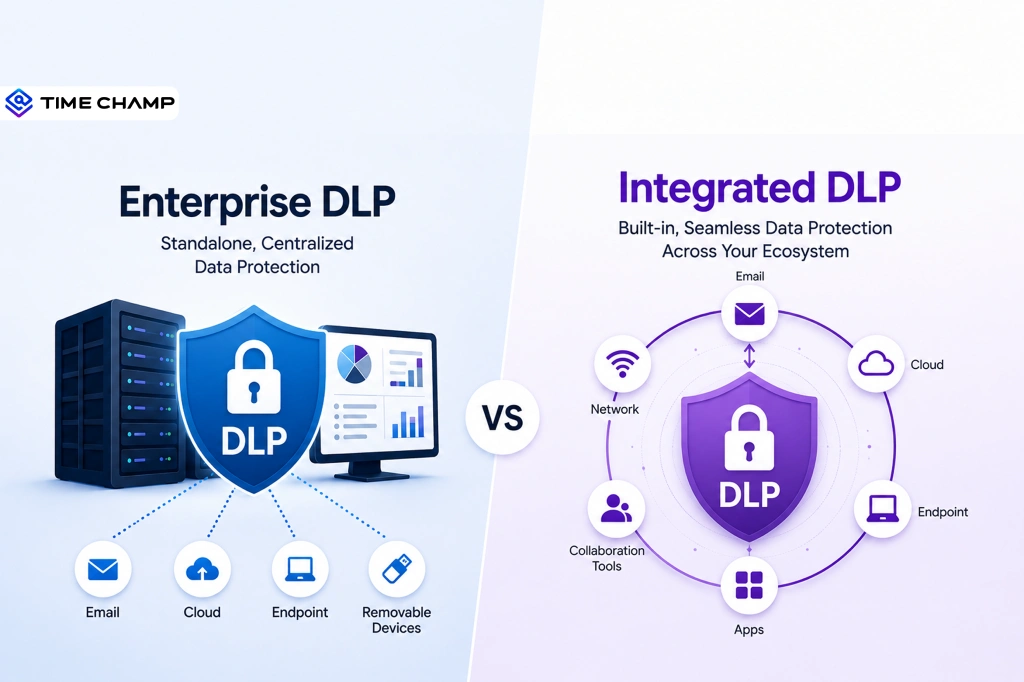
Just imagine hiring a security guard who only watches the front door while everyone else walks in through the back. That's what using the wrong DLP solution can feel like. When comparing enterprise DLP vs integrated DLP, the biggest question is not which one is better. It is which one fits your business.
To make your decision easier, we've compared enterprise DLP and integrated DLP side by side, covering their strengths, weaknesses, and best use cases.
What Is Enterprise DLP?
Enterprise Data Loss Prevention (Enterprise DLP) is a centralized security solution that helps you protect sensitive data across your entire organization. It monitors and controls how confidential information is accessed, used, and shared across endpoints, email, cloud applications, networks, and other business systems. With centralized security policies, enterprise DLP helps prevent data leaks, support compliance, and reduce the risk of insider threats.

Did You Know?
IBM Cost of a Data Breach Report 2026 says Malicious insider incidents cost organizations an average of USD 4.99 million per breach. Monitoring how sensitive data is accessed, shared, and transferred is a key reason many businesses adopt DLP solutions.
What Is Integrated DLP?
Integrated Data Loss Prevention (Integrated DLP) is a built-in data security feature that protects sensitive information within a specific platform or application, such as Microsoft 365, Google Workspace, or a cloud service. It monitors and controls how data is accessed, shared, and stored within that ecosystem. Integrated DLP helps you apply security policies, prevent accidental data exposure, and support compliance without requiring a separate DLP solution.
Looking for a simpler way to protect sensitive data?
See how Time Champ helps you reduce data loss with built-in DLP capabilities.
Enterprise DLP vs Integrated DLP: Side-by-Side Comparison
Choosing between enterprise DLP and integrated DLP becomes easier when you compare their capabilities side by side. The table below highlights the key differences to help you identify which approach best matches your organization's security needs.
| Dimension | Enterprise DLP | Integrated DLP |
|---|---|---|
| Deployment | A separate DLP solution installed for your organization | Built into a platform you already use |
| Protection Coverage | Protects data across devices, email, cloud apps, network, and more | Protects data only within the platform it belongs to |
| Policy Management | Manage all security policies from one place | Manage policies separately in each platform |
| Data Detection | Finds sensitive data using advanced rules and analysis | Uses basic or built-in rules to find sensitive data |
| Setup Time | Takes up to 4 to 12 weeks | Can be set up in a few days |
| Management | Needs a dedicated security or IT team | Can usually be managed by your existing IT team |
| Cost | Higher cost for software, setup, and maintenance | Lower cost and often included with your existing subscription |
| Best For | Large businesses with complex security needs | Small and mid-sized businesses with simpler security needs |
| Examples | Symantec (Broadcom) DLP, Forcepoint DLP, Proofpoint DLP | Microsoft Purview DLP, Google Workspace DLP, Time Champ |
Choose enterprise DLP for broad cross-channel coverage and integrated DLP for single-platform simplicity!
How Do You Decide Between Enterprise DLP and Integrated DLP?
Choosing the right DLP solution depends on your organization's size, where your sensitive data is stored, your compliance requirements, and the resources available to manage the solution.
Choose Integrated DLP
If most of your data stays within platforms like Microsoft 365 or Google Workspace, and you need a simple, cost-effective solution, integrated DLP is usually the better choice. It's easier to deploy, requires less maintenance, and works well for small and mid-sized businesses with straightforward security needs.
Choose Enterprise DLP
If your sensitive data is spread across multiple cloud services, endpoints, email systems, and on-premises environments, enterprise DLP is the better option. It provides centralized visibility, advanced policy management, and broader protection, making it well suited for large organizations and businesses operating in regulated industries.
Still deciding which DLP approach is right for your business?
Start with Time Champ to protect your highest-risk data channels through integrated DLP capabilities!
Can Enterprise DLP and Integrated DLP Work Together?
Yes, Enterprise DLP and integrated DLP can work together as part of a layered data protection strategy.
Integrated DLP protects sensitive information within the applications and services where your employees work every day. Enterprise DLP extends that protection across your entire IT environment, giving you centralized visibility and consistent policy enforcement across multiple channels.
When used together, they help you:
- Protect data at multiple layers, from individual applications to your entire IT environment.
- Apply consistent security policies while still using the built-in protection available in platforms like Microsoft 365 and Google Workspace.
- Gain better visibility into how sensitive data is accessed, shared, and moved across different systems.
- Reduce security gaps by covering data both inside individual platforms and across endpoints, email, cloud apps, and networks.
- Strengthen compliance efforts with centralized reporting and more comprehensive data protection.
Together, these two approaches create a stronger and more flexible DLP strategy, allowing you to benefit from platform-level security while maintaining organization-wide control.
Is Integrated DLP Good Enough for Small and Mid-Sized Businesses?
Yes. Integrated DLP is a practical choice for many small and mid-sized businesses. If your organization relies on a few business platforms, has straightforward data security needs, and doesn't require advanced cross-platform visibility, an integrated DLP solution can be more than enough.
Protects Data Within Your Existing Platforms
Integrated DLP helps you protect sensitive information across the business applications your team uses every day. This makes it easier to protect data without deploying additional security tools.
Simple to Deploy and Manage
Integrated DLP speeds up deployment and simplifies day-to-day management because it works within your existing platform. Your IT team can manage policies without maintaining a separate DLP solution.
Cost-Effective for Growing Businesses
Integrated DLP reduces upfront costs because you can use it through your existing software subscription while protecting sensitive business data.
When You May Need More Than Integrated DLP
As your business grows, adopts more cloud applications, or faces stricter compliance requirements, integrated DLP may no longer provide enough visibility or control. At that stage, enterprise DLP can offer broader protection across your entire environment.
Time Champ: A Practical Integrated DLP Approach for Growing Businesses
An effective DLP solution should help you identify and control the activities that commonly lead to data loss. Time Champ does exactly that.
Time Champ is an employee monitoring software with built-in data loss prevention features designed to improve workforce productivity while helping you protect sensitive business data. Its integrated DLP capabilities give you visibility into employee activities and common data loss risks, all from a single platform.
Monitor File Activity Across Employee Devices
Time Champ helps you keep track of how sensitive files are handled across employee endpoints. You can monitor file creation, access, modification, deletion, copying, and transfers, making it easier to identify unusual file activity before it becomes a security incident.
Control USB Devices and External Storage
USB drives remain one of the most common ways sensitive data leaves an organization. Time Champ lets you control USB and removable storage access, helping you prevent unauthorized file transfers and reduce the risk of data exfiltration.
Track Website and Cloud Application Usage
Employees often upload files to personal cloud storage, file-sharing platforms, or unauthorized web applications. Time Champ tracks website and cloud application activity, giving you visibility into where data is being shared and helping you detect risky behavior early.
Receive Real-Time Alerts for Risky Activities
Instead of reviewing reports after an incident occurs, Time Champ sends real-time alerts when it detects suspicious activities such as unauthorized file transfers, restricted application usage, or policy violations. This allows you to respond quickly and reduce potential data loss.
Manage Data Protection from a Single Platform
Instead of switching between multiple tools, you can manage employee activity, security controls, and DLP policies from a single dashboard, simplifying day-to-day administration while improving visibility.
Ready to protect your business from everyday data loss risks?
Use Time Champ to monitor file activity, control USB access, and strengthen your data protection strategy from one platform.
Conclusion
Choosing between enterprise DLP and integrated DLP depends on your organization's size, security requirements, and where your sensitive data is stored.
If you're looking for an integrated DLP solution, Time Champ combines employee monitoring and built-in DLP capabilities in a single platform. It helps you protect sensitive data, reduce data loss risks, and manage security more effectively.

Guna Lakshmi

Table of Content
 What Is Enterprise DLP?
- What Is Integrated DLP?
- Enterprise DLP vs Integrated DLP: Side-by-Side Comparison
- How Do You Decide Between Enterprise DLP and Integrated DLP?
- Can Enterprise DLP and Integrated DLP Work Together?
- Is Integrated DLP Good Enough for Small and Mid-Sized Businesses?
- Time Champ: A Practical Integrated DLP Approach for Growing Businesses
- Conclusion
Instant Signup
Thank you for your request!
We have received your signup request and our team will get back to you soon. In the meantime, you can book a demo to see Time Champ in action.
Book a DemoFree trial. No credit card required. Prefer a walkthrough? Book a demo.
Related Blogs

Protect your business from insider risks with insider threat prevention best practices for monitoring, access control, employee security, and data protection.
Guna Lakshmi | May 08, 2026
Protect your business from BYOD security risks like data breaches and phishing. Learn practical ways to secure employee devices and reduce security threats.
Guna Lakshmi | May 07, 2026
Protect sensitive business data in hybrid work environments with strong security controls and practical strategies to prevent data breaches.
Guna Lakshmi | Jun 10, 2026
Learn how to ensure data privacy in productivity tracking with key controls, vendor evaluation, and setup steps that reduce risk and protect employee data.
Guna Lakshmi | May 02, 2026
Implement data loss prevention practices to protect sensitive data, reduce security risks, prevent breaches, and strengthen your organization's security.
Thasleem Shaik | Aug 24, 2026
Data loss prevention helps protect sensitive business data from leaks, theft, and misuse. See how DLP works, its benefits, challenges, and best practices.
Thasleem Shaik | Aug 21, 2026


 4.7/5 avg.
Ready to Manage Your Workforce Smarter?
Join our family of 1500+ companies using smart insights to redefine workforces!

Free Trial
No Credit Card Required