DLP Incident Response: What to Do When Data Leaks Out
Learn what DLP incident response is, the 6-step response workflow, severity classification, roles involved, and how to build a DLP response plan.
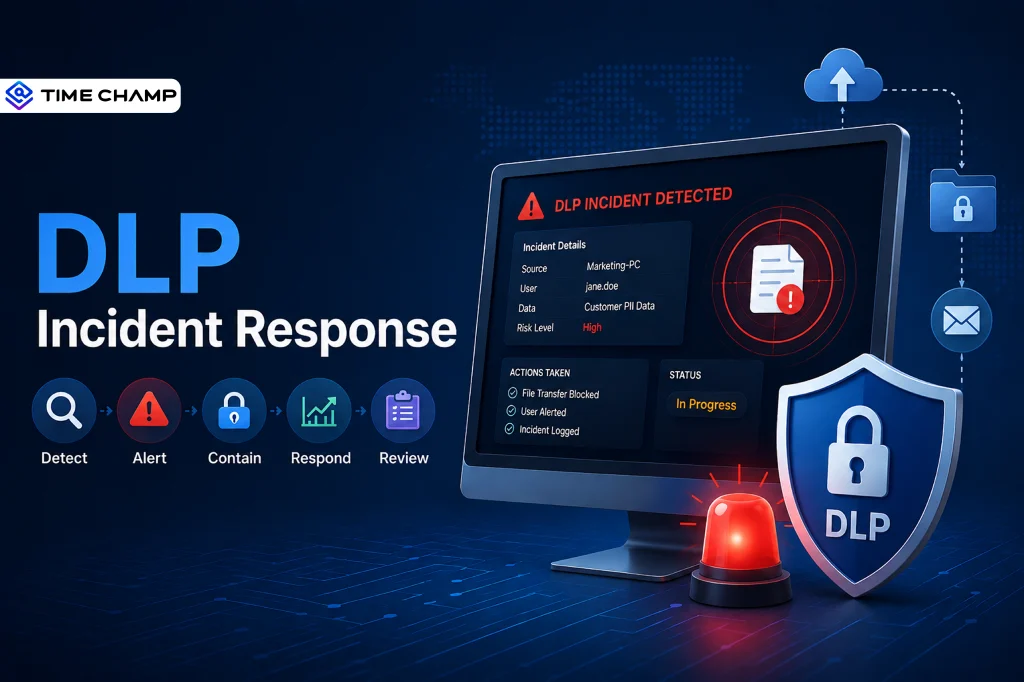
We've all sent a message to the wrong person and hoped they wouldn't notice. Now imagine that your message contains confidential company data. That's why having a solid DLP incident response plan matters. Whether caused by human error, malware, or an insider threat, every second counts when sensitive data leaks.
To help you get started, we've covered the essential steps of DLP incident response, common causes of data leaks, best practices, and the tools you need to respond quickly and protect sensitive data.
What Is DLP Incident Response?
DLP incident response is the process of identifying, containing, investigating, and recovering from data leak incidents. It helps you respond quickly when sensitive information is exposed, stolen, or shared without authorization. It combines data loss prevention (DLP) policies, tools, and response procedures to minimize damage, maintain compliance, and prevent future data leaks.
Why Does Your Business Need a DLP Incident Response Plan?
A DLP incident response plan helps your business respond quickly to data leaks, reduce their impact, and protect sensitive information. Here's why it matters:
- Minimizes Data Loss: Contains incidents quickly before more sensitive information is exposed.
- Reduces Financial Impact: Helps avoid costly downtime, legal penalties, and recovery expenses.
- Protects Customer Trust: Shows customers and stakeholders that your business takes data security seriously.
- Supports Regulatory Compliance: Helps meet data protection requirements like GDPR, HIPAA, and PCI DSS.
- Speeds Up Incident Response: Gives your team clear steps to follow during a security incident.
- Identifies the Root Cause: Helps determine how the data leak occurred so you can fix underlying issues.
- Prevents Future Incidents: Improves security policies and controls based on lessons learned.
- Strengthens Business Continuity: Enables your organization to recover faster and resume normal operations with minimal disruption.

Did You Know?
The global average cost of a data breach is $4.99 million, highlighting why every organization needs a well-defined incident response plan to reduce financial and operational impact.
What Are the 6 Steps of DLP Incident Response?
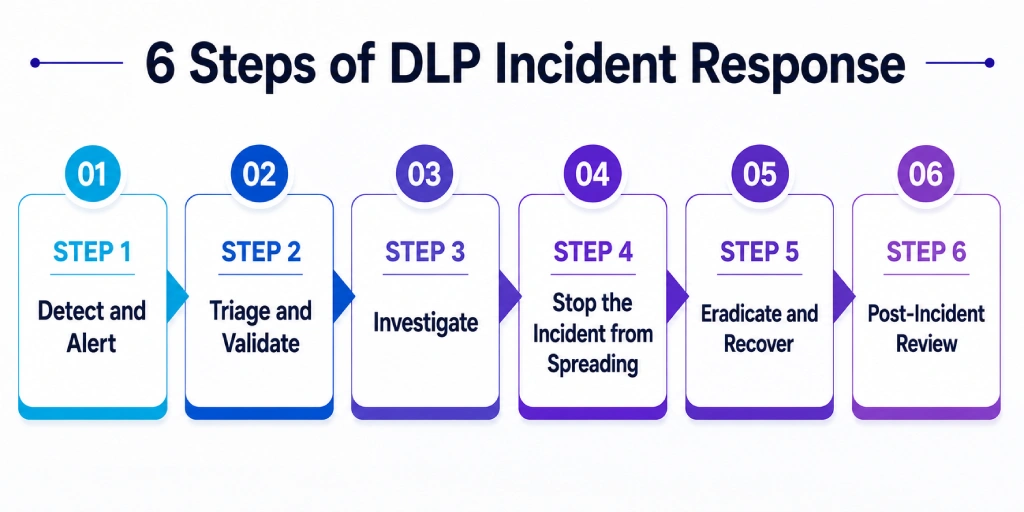
A successful DLP incident response follows a structured process that helps you detect data leaks early, minimize their impact, and prevent them from happening again. Here are the six essential steps every organization should follow.
The first step is identifying suspicious activity as soon as it occurs. DLP tools monitor sensitive data and generate alerts whenever a policy violation is detected, allowing your security team to respond quickly. The alert should include key details such as the user involved, the type of data, the action performed, the destination, and the time of the incident.
Step 1: Detect and Alert
The first step is identifying suspicious activity as soon as it occurs. DLP tools monitor sensitive data and generate alerts whenever a policy violation is detected, allowing your security team to respond quickly. The alert should include key details such as the user involved, the type of data, the action performed, the destination, and the time of the incident.
Step 2: Triage and Validate
Not every alert is a real security incident. Review the alert, verify whether it is a false positive, and assess the sensitivity of the data involved. Based on the risk level and business context, classify the incident by severity and decide whether it requires immediate action or continued monitoring.
Step 3: Investigate
Once the incident is confirmed, gather all the information needed to understand what happened. Review logs from your DLP solution, endpoint monitoring tools, SIEM platforms, email systems, and file activity to determine how the data moved, who was involved, and whether the incident is part of a larger security threat.
Step 4: Stop the Incident from Spreading
After identifying the threat, take immediate steps to stop further data exposure. This may include blocking file transfers, revoking user access, isolating affected devices, or quarantining sensitive data while preserving evidence for further investigation.
Step 5: Eradicate and Recover
Remove the root cause of the incident and restore normal business operations. Close security gaps, revoke compromised credentials, recover affected systems where possible, and notify stakeholders if required by regulatory or contractual obligations.
Step 6: Post-Incident Review
Once the incident is resolved, evaluate your response to identify what worked well and what needs improvement. Update DLP policies, response procedures, and employee training based on the lessons learned to strengthen your organization's defenses against future data leaks.
Don't wait until a data leak becomes a major security incident.
Time Champ helps you identify risks early, gives you complete endpoint visibility, and reduces the impact of sensitive data exposure.
How To Classify DLP Incident Severity?
Not every DLP alert requires the same level of attention. By classifying incidents based on severity, you can prioritize your response, involve the right teams, and reduce the impact of data leaks.
1. Low Severity
Low-severity incidents involve minor policy violations with little or no risk to sensitive data. While these events may not require immediate action, you should still document and monitor them to identify repeated behaviors that could become larger security risks over time.
- When It Happens: Internal policy violation with no external exposure.
- Example: An employee copies an internal document to a personal laptop for work.
- Response: Notify the user, log the event, and continue monitoring.
- Response Time: Within 24 hours.
2. Medium Severity
Medium-severity incidents involve limited exposure of low-sensitivity data outside your organization. You should investigate these incidents promptly to understand what happened, preserve evidence, and prevent similar mistakes from occurring again.
- When It Happens: Low-sensitivity information is shared outside the organization.
- Example: An employee emails a customer contact list to a personal email account.
- Response: Preserve evidence, notify the manager, and review the incident with the employee.
- Response Time: Within 4 hours.
3. High Severity
High-severity incidents indicate that sensitive business information has been exposed or transferred without authorization. At this stage, you need to act quickly to contain the incident, minimize further data loss, and begin a formal investigation to determine the root cause.
- When It Happens: Sensitive data is transferred or exposed without authorization.
- Example: An employee uploads a customer database to personal cloud storage.
- Response: Contain the incident immediately, begin an investigation, and involve HR and legal teams if needed.
- Response Time: Within 1 hour.
4. Critical Severity
Critical incidents pose the highest risk to your business because they often involve regulated data, intellectual property, or large-scale data breaches. You should activate your full incident response team immediately, coordinate with leadership, and take the necessary legal and regulatory actions to limit business impact.
- When It Happens: Regulated data or intellectual property is compromised.
- Example: A departing employee downloads source code and customer personal information before leaving.
- Response: Activate the full incident response team, notify leadership, and prepare regulatory reporting.
- Response Time: Within 15 minutes.
What Are the Most Common DLP Incident Types?
Every data leak follows a different path. Some involve accidental file sharing, while others are the result of insider threats or unauthorized access. Recognizing these common incident types helps you take the right action before the situation escalates.
1. Email Exfiltration
Email is one of the most common ways sensitive data leaves an organization. Whether it's sent by mistake or with malicious intent, you should act quickly to stop further exposure and determine if confidential information has reached an unauthorized recipient.
- Scenario: An employee sends sensitive data to a personal or external email address.
- Response: Quarantine the email, verify the recipient, and investigate the user's intent.
- Key Evidence: Email content, timestamps, and recipient details.
- Common in: Customer data leaks, intellectual property theft, and financial fraud.
2. Cloud Upload Violation
Unauthorized cloud storage services make it easy for employees to move files outside your organization's control. You should identify these uploads quickly, block further transfers, and remove sensitive files from unauthorized locations whenever possible.
- Scenario: An employee uploads confidential files to personal cloud storage such as Google Drive or Dropbox.
- Response: Block the upload, quarantine the files, and remove them from the unauthorized account.
- Key Evidence: Upload logs, file details, and destination service.
- Common in: Shadow IT and departing employee activity.
3. USB or Removable Media Transfer
Portable storage devices can bypass many traditional security controls. If sensitive files are copied to removable media, you should identify the device immediately and prevent additional data from being transferred.
- Scenario: An employee copies sensitive files to a USB drive or external storage device.
- Response: Block the transfer when possible, identify the device, and recover or wipe the stored data.
- Key Evidence: Device identifiers, file access logs, and timestamps.
- Common in: Insider threats and deliberate data exfiltration.
4. Print or Physical Exfiltration
Not every data leak happens digitally. Printed documents containing confidential information can be removed from the workplace, making physical security just as important as cybersecurity.
- Scenario: An employee prints confidential documents for unauthorized use or removal.
- Response: Alert physical security, recover the documents, and investigate the incident.
- Key Evidence: Print logs, printer location, and print history.
- Common in: Trade secret theft and financial fraud.
5. GenAI Prompt Data Leaks
As AI tools become part of everyday work, employees may unintentionally expose sensitive information by entering it into public AI platforms. You should establish clear AI usage policies and monitor for unauthorized sharing of confidential data.
- Scenario: An employee pastes sensitive information into ChatGPT, Claude, or another AI tool.
- Response: Assess the exposure, notify affected teams if necessary, and restrict unauthorized AI tools.
- Key Evidence: Browser activity, prompt history (if available), and the AI platform used.
- Common in: Accidental data exposure through generative AI applications.
Did You Know?
Harmonic Security analyzed 1 million GenAI prompts and found that 4.37% of prompts and 21.86% of uploaded files contained sensitive data, highlighting the growing risk of AI-related data leaks.
6. Screen Capture or Photography
Screenshots and mobile phone photos can bypass traditional DLP controls, making them difficult to detect. Combining endpoint monitoring with physical security measures helps reduce the risk of sensitive information being captured and shared.
- Scenario: An employee takes screenshots or photographs of confidential information.
- Response: Review activity logs, coordinate with physical security, and investigate if necessary.
- Key Evidence: Screenshot logs, endpoint activity, and access records.
- Common in: Insider trading, competitive intelligence theft, and unauthorized information sharing.
Want to stay ahead of the most common DLP incidents?
Time Champ helps you monitor user activity, detect unusual behavior, and protect sensitive data with real-time alerts.
What Are the Common Mistakes in DLP Incident Response?
Even with the right tools in place, your incident response can fall short if the process isn't well planned. Avoiding these common mistakes helps you respond faster, preserve critical evidence, and continuously improve your data protection strategy.
Mistake 1. Not Having a Documented Response Plan
Without a documented playbook, your team may respond differently to similar incidents, leading to delays and confusion. A clear incident response plan gives everyone defined roles, responsibilities, and procedures, so you can act quickly and consistently.
Mistake 2. Delaying HR and Legal Involvement
Waiting too long to involve HR or legal teams can complicate investigations and compliance efforts. Bringing them in early helps you handle employee issues properly, preserve evidence, and meet legal and regulatory requirements.
Mistake 3. Failing to Preserve Evidence
Your first instinct may be to stop the incident immediately, but overlooking evidence collection can create problems later. Properly preserving logs, files, and activity records supports internal investigations and any future legal or disciplinary actions.
Mistake 4. Skipping the Post-Incident Review
Resolving the incident isn't the end of the process. If you don't review what happened, you're likely to repeat the same mistakes. A post-incident review helps you identify gaps, improve your response process, and strengthen your security controls.
Mistake 5. Treating Every Alert as Critical
Not every DLP alert requires a full-scale investigation. Responding to every alert with the same urgency can overwhelm your security team and lead to alert fatigue. Instead, classify incidents based on their severity so you can focus on the highest-risk events first.
Mistake 6. Not Updating Security Policies
Every incident provides valuable lessons about your existing security controls. If you don't update your DLP policies, detection rules, and employee training after an incident, the same vulnerabilities may continue to put your organization at risk.
How Does Time Champ Support DLP Incident Response?
Responding to a DLP incident requires more than alerts. You also need complete visibility into what happened, who was involved, and how sensitive data was handled. Time Champ helps you do exactly that.
Time Champ is an employee monitoring and DLP solution that helps you identify security risks through endpoint activity monitoring, behavioral insights, and audit trails. It helps you investigate incidents faster and make informed response decisions.
Key Features of Time Champ that Help You Support DLP Incident Response:
Strengthen Investigations with Endpoint Visibility
Track user actions with detailed file activity, application usage, website visits, cloud access, USB usage, and screen activity. This gives you the context needed to investigate incidents faster and identify the source of a data leak.
Detect High-Risk Activities Early
Get real-time alerts for suspicious activities such as bulk file access, unusual transfers, and off-hours behavior. This helps you respond quickly and contain incidents before they escalate.
Improve Incident Prioritization
Compare current activity with historical user behavior to identify genuine threats and filter out false positives. This helps you prioritize incidents and speed up triage.
Support Compliance with Audit Trails
Access detailed, timestamped activity logs that support investigations, compliance reporting, and regulatory requirements such as GDPR, HIPAA, CCPA, and PCI DSS.
Promote Transparent Investigations
Provide security teams, HR, and managers access to the same activity records, making investigations more transparent and helping everyone make informed decisions.
Ready to strengthen your DLP incident response?
Detect threats earlier, investigate incidents faster, and protect sensitive data with Time Champ's real-time alerts and audit trails.
Conclusion
A well-defined DLP incident response plan helps you act quickly when sensitive data is exposed. From detecting and classifying incidents to containing threats and reviewing what went wrong, every step plays a role in reducing risk and protecting your business. When paired with the right tools such as Time Champ, you can investigate incidents faster, improve compliance, and reduce the impact of future data leaks.

Guna Lakshmi

Table of Content
 What Is DLP Incident Response?
- Why Does Your Business Need a DLP Incident Response Plan?
- What Are the 6 Steps of DLP Incident Response?
- How To Classify DLP Incident Severity?
- What Are the Most Common DLP Incident Types?
- What Are the Common Mistakes in DLP Incident Response?
- How Does Time Champ Support DLP Incident Response?
- Conclusion
Instant Signup
Thank you for your request!
We have received your signup request and our team will get back to you soon. In the meantime, you can book a demo to see Time Champ in action.
Book a DemoFree trial. No credit card required. Prefer a walkthrough? Book a demo.
Related Blogs

Learn about the impact of data loss on business, including its consequences, real-world examples, and ways to reduce its impact.
Guna Lakshmi | Aug 14, 2026
Learn what endpoint data loss prevention is, how it works, its key features, and how to protect sensitive data from unauthorized access.
Guna Lakshmi | Aug 18, 2026
Learn what Email Data Loss Prevention (DLP) is, how it works, key features, benefits, and best practices to protect email data from leaks.
Guna Lakshmi | Aug 19, 2026
Learn the biggest shadow IT risks, how they expose your business to security threats, and the best strategies to detect, manage, and prevent them.
Guna Lakshmi | Aug 27, 2026
Why do DLP prices vary so much? Uncover what you're actually paying for, what's worth the investment, and what costs you can avoid.
Guna Lakshmi | Aug 21, 2026
Learn how to create a DLP policy with step-by-step guidance, policy rules, real-world examples, and best practices to protect sensitive data effectively.
Guna Lakshmi | Aug 24, 2026


 4.7/5 avg.
Ready to Manage Your Workforce Smarter?
Join our family of 1500+ companies using smart insights to redefine workforces!

Free Trial
No Credit Card Required