Email Data Loss Prevention (DLP): A Complete Guide
Learn what Email Data Loss Prevention (DLP) is, how it works, key features, benefits, and best practices to protect email data from leaks.
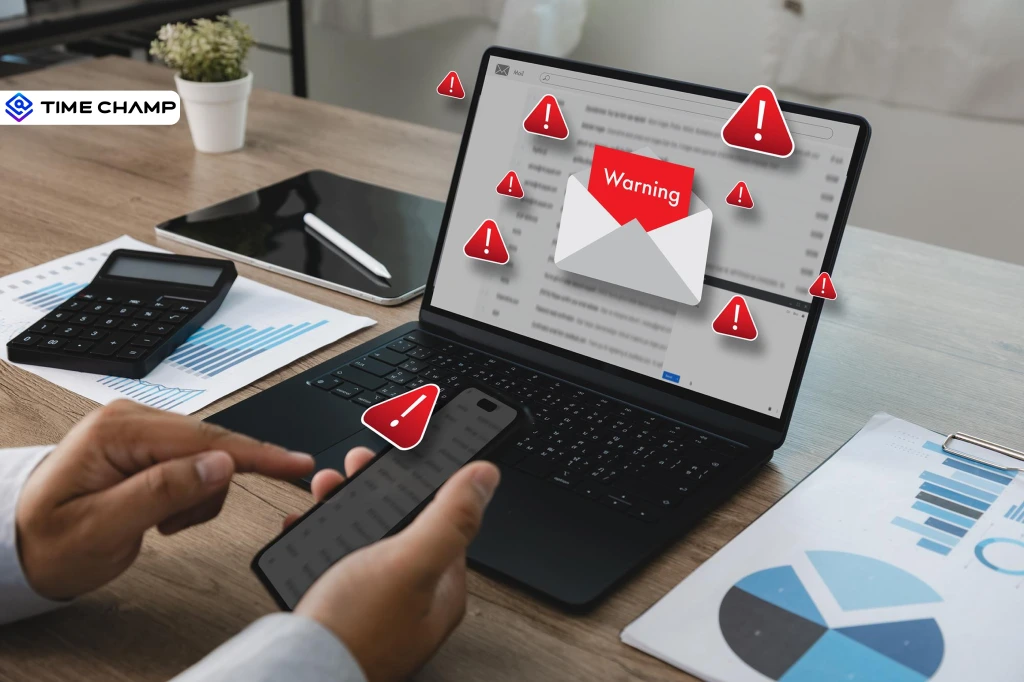
Ever sent an email and immediately wished you could take it back? If that email contains sensitive information, one small mistake can turn into a major security risk. Email Data Loss Prevention (DLP) helps you catch these mistakes before your email reaches the wrong person.
To help you understand Email DLP better, we've covered how it works, its key features and benefits, and what to look for in a solution.
What Is Email Data Loss Prevention (DLP)?
Email Data Loss Prevention (DLP) is a security solution that helps you prevent sensitive information from being shared through email, whether intentionally or accidentally. It scans outgoing emails, attachments, and other content for confidential data, such as customer information, financial records, or intellectual property, and automatically takes action based on your organization's security policies.
Depending on the risk, Email DLP can block the email, encrypt it, warn the sender, or alert your security team before the message reaches an unauthorized recipient. This helps you reduce data leaks, meet compliance requirements, and keep sensitive business information protected.

Did You Know?
The global average cost of a data breach reached USD 4.4 million. This highlights the financial impact of failing to protect sensitive information, including data shared through email.
How Does Email Data Loss Prevention Work?
Email Data Loss Prevention (DLP) protects your sensitive information before it leaves your organization. It scans every outgoing email in real time, checks it against your security policies, and takes action if it detects confidential data. Here's how the process works:
Step 1: Scan Email Content and Attachments
Email DLP scans your email subject, message body, and attachments for sensitive information. It identifies data such as customer records, credit card numbers, financial documents, passwords, and other confidential content using predefined rules, pattern matching, and AI. It also scans files like PDFs, Word documents, spreadsheets, and images with text.
Did You Know?
Organizations that extensively use AI and automation in security save an average of USD 1.9 million per data breach compared to organizations that don't.
Step 2: Classify Data Sensitivity
After scanning the email, Email DLP classifies the information based on its sensitivity. It evaluates the type of data, the sender, the recipient, and whether you're sending the email inside or outside your organization. This helps you apply the appropriate level of protection.
Step 3: Check Against Security Policies
Next, Email DLP compares the email with your organization's security policies. You can create rules based on data type, recipient, department, or compliance requirements. For example, you can prevent employees from sending financial reports to external recipients unless the email is encrypted.
Step 4: Take the Appropriate Action
If the email violates one of your policies, Email DLP immediately takes the configured action. It can block the email, encrypt sensitive content, display a warning, send the email for approval, or quarantine it for review. It can also allow the email while recording the event for future audits.
Step 5: Generate Alerts and Reports
Finally, Email DLP alerts your security team about high-risk incidents and records every policy violation. You can use these reports to investigate security events, demonstrate compliance, and fine-tune your policies to reduce false alerts and strengthen your email security over time.
Worried about sensitive emails reaching the wrong inbox?
Protect every email with Time Champ and stop data leaks before they happen.
Common Email Data Loss Scenarios
Every day, simple mistakes and malicious attacks put sensitive business data at risk. Understanding these common scenarios helps you create stronger Email DLP policies and protect sensitive information before it leaves your organization.
1. Misdirected Emails
Typing the wrong recipient or selecting the wrong contact from autocomplete can send confidential information to someone who shouldn't receive it. Email DLP scans the message before you send it and warns you or blocks the email if it contains sensitive data.
2. BCC Misuse
Sending a customer or client list using CC instead of BCC exposes every recipient's email address. Email DLP detects large recipient lists or risky external addresses and alerts you before the email is sent.
3. Wrong Attachments
Attaching the wrong document is one of the most common causes of accidental data leaks. You might send a confidential report instead of the intended file or share a document that contains hidden comments or tracked changes. Email DLP scans attachment content, not just filenames, to identify sensitive information.
4. Business Email Compromise (BEC)
Business Email Compromise (BEC) happens when attackers impersonate executives or trusted contacts to trick you into sharing confidential information or approving fraudulent payments. Email DLP identifies sensitive outbound data and can block the email or require additional approval before it leaves your organization.
5. Insider Data Exfiltration
Employees or contractors may intentionally send sensitive files to personal email accounts or unauthorized recipients. Email DLP detects unusual email activity, such as large file transfers, after-hours sending, or emails sent to personal domains, and takes action based on your security policies.
6. Credential Exposure
Sharing passwords, API keys, access tokens, or other credentials through email can create serious security risks. Email DLP detects these credentials using predefined patterns and automatically blocks, encrypts, or flags the email before the information is exposed.
Did You Know?
31% of data breaches now begin with software vulnerabilities, surpassing stolen credentials as the leading initial attack vector. Email remains one of the most common channels attackers use after gaining access.
Key Features of Email Data Loss Prevention Solutions
Not every Email DLP solution offers the same level of protection. The best solutions go beyond basic email filtering by detecting sensitive information, preventing accidental data leaks, and helping you meet compliance requirements. Here are the key features you should look for.
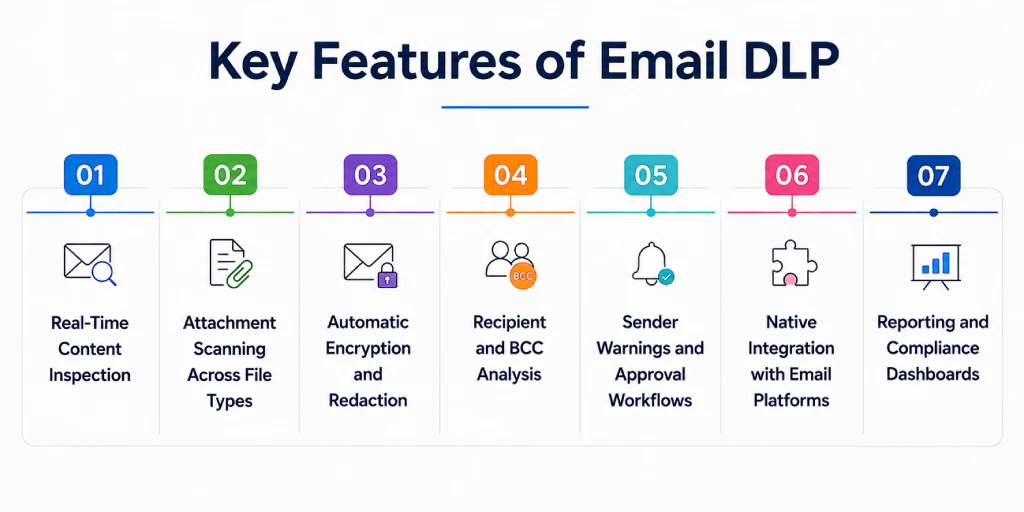
Real-Time Content Inspection
An effective Email DLP solution scans every outgoing email before you send it. It checks the subject line, message body, headers, and attachments for sensitive information such as customer data, financial records, passwords, or personal information. It also uses pattern matching and AI to identify confidential content, even when it appears in different formats.
Attachment Scanning Across File Types
Sensitive information often hides inside attachments rather than the email itself. A good Email DLP solution scans documents, spreadsheets, PDFs, ZIP files, and even images containing text to identify confidential data. It can also inspect password-protected files based on your organization's security policies.
Automatic Encryption and Redaction
Instead of simply blocking every risky email, Email DLP can automatically encrypt messages that contain sensitive information. It can also redact confidential details, allowing you to share the remaining content without exposing critical data. This helps you protect information while maintaining business productivity.
Recipient and BCC Analysis
Sending sensitive information to the wrong person is one of the most common causes of email data leaks. Email DLP analyzes recipients before you send an email and detects suspicious domains, unusually large CC or BCC lists, and possible typing mistakes in email addresses. It then warns you or blocks the email based on your security policies.
Sender Warnings and Approval Workflows
Email DLP helps you avoid accidental mistakes by displaying real-time warnings before you send risky emails. If necessary, it can require manager approval or a business justification before allowing the email to leave your organization. This encourages employees to review sensitive emails more carefully.
Native Integration with Email Platforms
The best Email DLP solutions integrate seamlessly with platforms such as Microsoft 365, Google Workspace, Exchange Online, and on-premises email servers. This allows you to apply consistent security policies across all email channels without disrupting your existing workflows.
Reporting and Compliance Dashboards
Detailed reporting helps you understand how sensitive information moves through your organization. Email DLP records every policy violation, action taken, and security event in detailed audit logs. You can use these reports to monitor trends, support compliance with regulations such as GDPR, HIPAA, and PCI DSS, and identify departments or users that require additional security awareness training.
Why settle for basic email protection?
Upgrade to Time Champ for smarter controls, deeper visibility, and stronger data security.
Email DLP vs Email Security vs General DLP: What Is the Difference
Do you think Email DLP, Email Security, and General DLP all do the same job? While they all protect your organization's data, each serves a different purpose and addresses different security risks.
| Feature | Email DLP | Email Security | General DLP |
|---|---|---|---|
| Primary Focus | Prevents sensitive data from leaving through email | Protects email from threats like spam, phishing, and malware | Protects sensitive data across all communication channels |
| What It Protects | Outgoing emails and attachments | Incoming and outgoing email threats | Email, endpoints, cloud apps, networks, and storage |
| Main Purpose | Prevents accidental or intentional data leaks | Blocks cyber threats before they reach users | Prevents data loss across the entire organization |
| Key Features | Content inspection, encryption, sender warnings, policy enforcement | Spam filtering, malware detection, phishing protection | Data classification, monitoring, encryption, policy enforcement |
| Best For | Protecting confidential information shared through email | Defending against email-based cyberattacks | Building a comprehensive data protection strategy |
In Simple Terms
- Email Security protects your inbox from external threats like phishing emails, malware, and spam.
- Email DLP protects sensitive information from leaving your organization through email.
- General DLP extends data protection beyond email to endpoints, cloud applications, removable devices, and networks.
For the best protection, you need to use all three together.
How To Deploy Email Data Loss Prevention Effectively?
Deploying Email DLP isn't just about installing a tool. You need to understand how sensitive information flows through your email, create the right policies, and fine-tune them over time. Follow these best practices to build an Email DLP strategy that protects your data without disrupting daily communication.
1. Define Your Security Policies First
Before choosing an Email DLP solution, identify the types of sensitive data your organization handles, such as customer information, financial records, or intellectual property. Then create policies that specify who can send this information, who can receive it, and under what conditions.
2. Roll Out Email DLP Gradually
Instead of enforcing strict policies from day one, start by monitoring email activity. Review the results, enable sender warnings, and then gradually introduce blocking rules based on data sensitivity and department. A phased rollout minimizes disruptions and gives your team time to adapt.
3. Configure Clear Sender Warnings
When Email DLP detects sensitive information, display clear and actionable warnings instead of generic alerts. Tell users what data was detected and why the email violates your policy. Ask employees to request approval or provide a business justification before they send sensitive business information through email.
4. Reduce False Positives
No Email DLP policy is perfect at launch. Review flagged emails regularly, adjust detection rules, and refine thresholds based on real communication patterns. Continuous tuning helps you reduce false positives while improving the accuracy of your Email DLP system over time.
How Does Time Champ Strengthen Your Email Data Loss Prevention Strategy?
Email DLP protects the sensitive information you send through email. But it can't always tell you how someone accessed, copied, or handled that information before sending it. That's where Time Champ adds another layer of protection.
Time Champ is an employee monitoring and data loss prevention software that provides greater visibility into employee activities, file handling, and application usage. It helps you identify risky behavior, prevent unauthorized data movement, and investigate incidents with detailed audit trails, making your overall data protection strategy more effective.
Attachment control complements email DLP
Control unauthorized file uploads and downloads across employee endpoints. This protects sensitive files before employees attach them to personal email or messaging apps.
Website and cloud app monitoring extends email coverage
Identify uploads to personal webmail and unauthorized cloud storage. This helps detect data exfiltration attempts that bypass email DLP.
File activity monitoring adds context
Get visibility into file creation, editing, access, copying, and movement on employee devices. This activity helps you connect suspicious file handling with potential email data leaks.
Application control reduces email-based attack surface
Restrict unauthorized applications on protected devices. You can also block personal email accounts and unauthorized email apps that could bypass your security policies.
Screen monitoring and audit trails support compliance
Maintain detailed activity records to support GDPR, HIPAA, and PCI DSS reporting. These audit trails also help you investigate email-related data loss incidents faster.
Ready to strengthen your email security?
Protect sensitive data, stop email leaks before they happen, and see Time Champ in action with a free demo.
Conclusion
Sending a single email to the wrong person can expose sensitive information and create costly consequences. Email Data Loss Prevention (DLP) protects your organization by scanning emails, enforcing security policies, and preventing sensitive data from leaving your organization.
For even stronger protection, combine Email DLP with Time Champ. Time Champ gives you greater visibility into employee and file activity, helps you identify risks early, and strengthens your overall data protection strategy.

Guna Lakshmi

Table of Content
 What Is Email Data Loss Prevention (DLP)?
- How Does Email Data Loss Prevention Work?
- Common Email Data Loss Scenarios
- Key Features of Email Data Loss Prevention Solutions
- Email DLP vs Email Security vs General DLP: What Is the Difference
- How To Deploy Email Data Loss Prevention Effectively?
- How Does Time Champ Strengthen Your Email Data Loss Prevention Strategy?
- Conclusion

Related Blogs
Protect sensitive business data in hybrid work environments with strong security controls and practical strategies to prevent data breaches.
Guna Lakshmi | Jun 10, 2026
Track time across multiple devices without missing a second and learn key features, common challenges, and smarter tracking methods.
Guna Lakshmi | May 22, 2026
Protect your business from insider risks with insider threat prevention best practices for monitoring, access control, employee security, and data protection.
Guna Lakshmi | May 08, 2026
Protect your business from BYOD security risks like data breaches and phishing. Learn practical ways to secure employee devices and reduce security threats.
Guna Lakshmi | May 07, 2026
Learn how to ensure data privacy in productivity tracking with key controls, vendor evaluation, and setup steps that reduce risk and protect employee data.
Guna Lakshmi | May 02, 2026
Learn how to balance screenshot monitoring and employee privacy with best practices that protect data, improve trust, and support compliance.
Guna Lakshmi | Apr 27, 2026


 4.7/5 avg.
Ready to Manage Your Workforce Smarter?
Join our family of 1500+ companies using smart insights to redefine workforces!

Free Trial
No Credit Card Required