Shadow IT Risks: How to Detect and Prevent Them
Learn the biggest shadow IT risks, how they expose your business to security threats, and the best strategies to detect, manage, and prevent them.
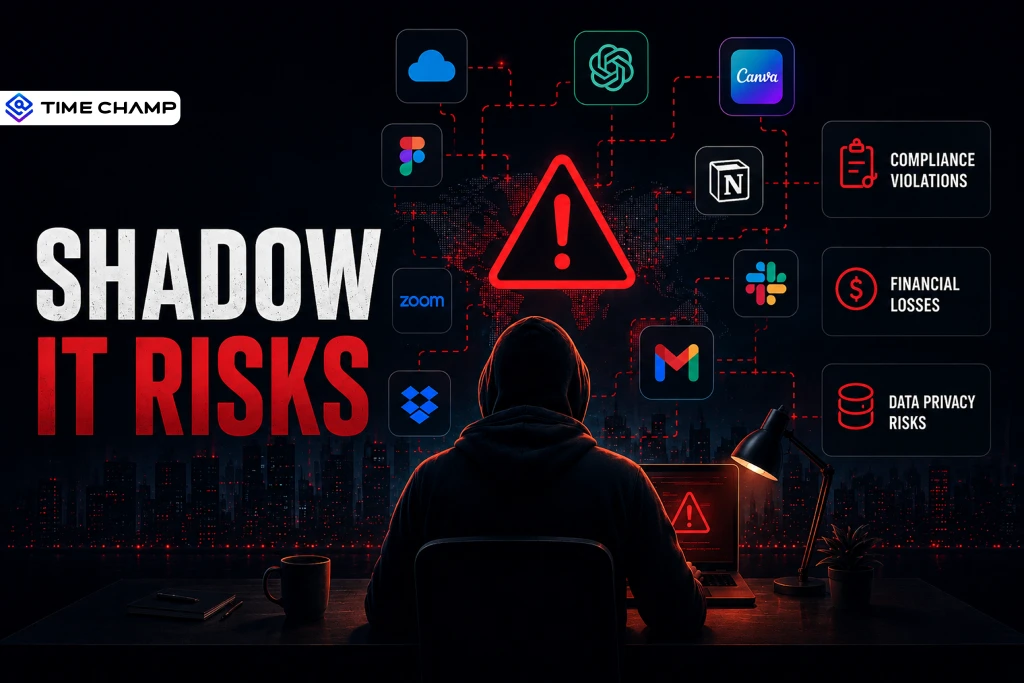
The biggest security risk in your organization isn't always a hacker. Sometimes it's an employee who signs up for a new app without involving IT. While the goal is simply to get work done faster, these unauthorized tools can create significant shadow IT risks, from data exposure to compliance violations.
To help you stay ahead of these challenges, this guide covers the key shadow IT risks, how to identify them, and practical ways to prevent them.
What Is Shadow IT?
Shadow IT refers to any software, application, cloud service, or device that employees use for work without the knowledge or approval of the IT department. Employees usually adopt these tools to work more efficiently. But without proper oversight, they can expose your business to security vulnerabilities, compliance issues, and hidden operational risks.

Did You Know?
Gartner predicts that by 2027, 75% of employees will acquire, modify, or create technology outside IT's visibility.
Why Employees Turn to Shadow IT
Shadow IT rarely happens because employees want to bypass your IT policies. More often, it happens when existing processes or tools don't meet their needs. Here are the most common reasons employees turn to shadow IT.
- Approved tools are too slow, lack key features, or difficult to use.
- Software approval processes take too long when employees need solutions immediately.
- Employees choose free SaaS and AI tools because they are easy to access and use.
- Remote and hybrid work makes it easier to adopt unauthorized applications.
- Employees do not realize the tools they choose can create serious security and compliance risks.
- Some employees prefer using familiar tools they have used in previous jobs or for personal projects.
- Tight deadlines and growing workloads push employees to use whatever tool helps them finish work faster.
- Poor communication with IT encourages employees to find their own software solutions.
- Different teams adopt different tools without checking whether approved alternatives already exist.
- Employees believe using unauthorized tools is harmless as long as it helps them get the job done.
Don't let hidden applications become hidden risks.
Spot unauthorized apps with Time Champ before they lead to data leaks or compliance issues.
What Are Common Examples of Shadow IT?
Shadow IT can emerge in any department and through many types of software. You may find employees using cloud applications, AI tools, personal devices, or browser extensions without IT approval, which can expose your organization to security, compliance, and data privacy risks. Here are some of the most common examples of shadow IT.
Unauthorized SaaS Applications
Employees often subscribe to SaaS tools that help them work faster without involving IT. While these applications improve productivity, they can create security and compliance gaps when left unmanaged., they can create security and compliance gaps when left unmanaged.
- Marketing teams use unapproved analytics or marketing automation platforms.
- Sales teams install third-party CRM add-ons or lead scoring tools.
- HR teams use free surveys or recruitment tools that store employee data outside company systems.
- Finance teams rely on unapproved spreadsheet extensions or accounting applications.
Did You Know?
A report by BetterCloud says around 65% of SaaS applications used within organizations have never been approved by IT.
Personal Cloud Storage
Storing business files in personal cloud accounts makes it difficult to control who can access sensitive information.
Common examples include:
- Employees save work documents in personal Google Drive, Dropbox, or iCloud accounts.
- Contractors keep company files in personal cloud storage after their engagement ends.
- Employees send large work files through personal email because of attachment limits.
Unapproved AI and Generative AI Tools
AI tools help employees complete tasks faster, but they can also expose confidential business information if used without proper controls.
- Employees enter customer information or internal documents into AI assistants like ChatGPT, Claude, or Gemini.
- Marketing teams use AI writing tools that retain prompts and generated content.
- Developers rely on unauthorized AI coding assistants that may expose proprietary source code.
- Employees experiment with new AI tools before the IT team evaluates their security.
Personal Devices and BYOD
Using unmanaged personal devices for work can make it difficult to protect company data and enforce security policies. can make it difficult to protect company data and enforce security policies.
Common examples include:
- Employees access work email and business applications from personal smartphones.
- Staff use personal laptops when company devices are unavailable.
- Employees connect USB drives to company computers without IT approval.
Unauthorized Communication Tools
When employees use personal messaging platforms for business communication, important conversations and sensitive data can fall outside your organization's control.
Common examples include:
- Sales teams communicate with customers through WhatsApp or Telegram.
- Employees discuss work using personal email accounts.
- Vendors collaborate through unapproved messaging applications.
Shadow Cloud Infrastructure
Development teams can quickly create cloud resources without IT visibility, increasing costs and security risks.
Common examples include:
- Developers launch AWS, Azure, or Google Cloud resources without approval.
- Teams create unapproved testing or staging environments.
- Employees use personal cloud accounts to host business applications or data.
Browser Extensions and Plugins
Browser extensions often request access to websites, passwords, and sensitive information, making them an overlooked source of shadow IT.
Common examples include:
- Employees install browser extensions that can access company data.
- Plugins connect business applications to third-party services without IT review.
- Extensions collect browsing activity or sensitive information without employees realizing it.
What Are the Biggest Shadow IT Risks?
Shadow IT risks can expose your organization to security threats, compliance violations, financial losses, and operational disruptions. Here are the biggest shadow IT risks every business should be aware of.
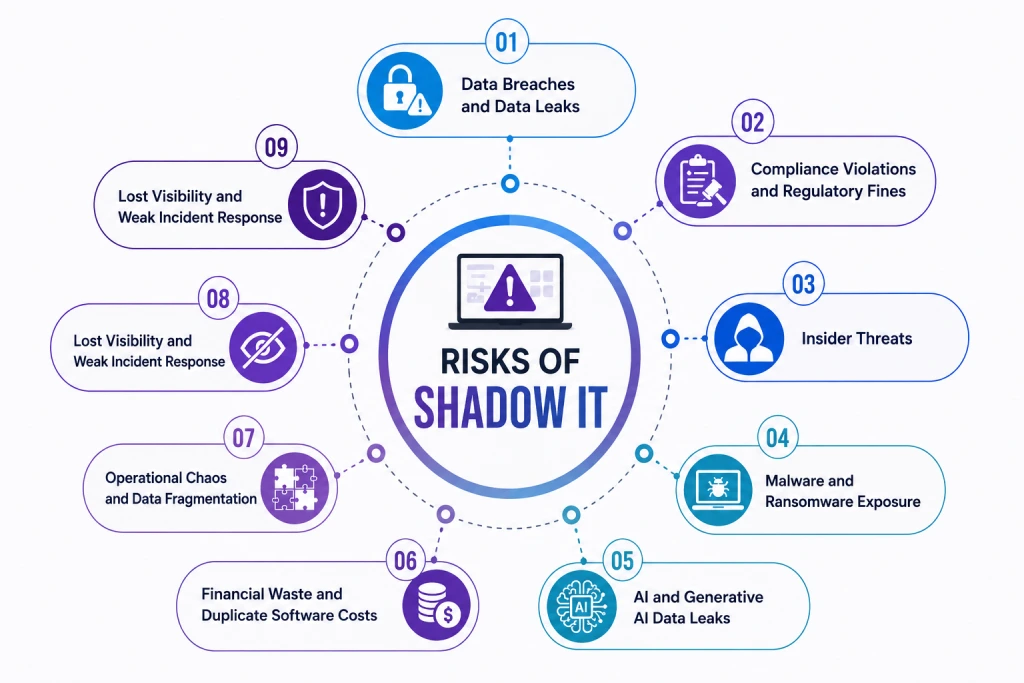
Data Breaches and Data Leaks
Unauthorized applications often lack security controls, encryption, and monitoring found in approved business software. As a result, sensitive customer information, intellectual property, and confidential business data can end up in unmanaged systems that your IT team cannot monitor. If data is exposed through a shadow IT tool, detecting the breach and limiting its impact becomes significantly more difficult.
Did You Know?
Research by isaca found that 85% of organizations have experienced cybersecurity incidents in the past two years, with shadow IT contributing to at least 11% of them.
Compliance Violations and Regulatory Fines
Regulations such as GDPR, HIPAA, CCPA, and PCI DSS require you to maintain visibility and control over sensitive data. When employees use unauthorized applications, regulated information may be stored or shared outside approved systems, making compliance difficult to prove. Even if your organization is unaware of these tools, you remain responsible for protecting the data they contain.
Insider Threats
Not every insider threat is intentional. Employees may use personal cloud storage, file-sharing platforms, or unauthorized collaboration tools simply to work more efficiently. However, these actions can expose confidential information to unauthorized users or make it easier for departing employees to take sensitive data with them. Without visibility into shadow IT, identifying these risks becomes much harder.
Malware and Ransomware Exposure
Every unauthorized application increases your organization's attack surface. Employees may unknowingly install software from untrusted sources or use applications that no longer receive security updates. Cybercriminals often target these unmanaged tools because they provide an easier way to distribute malware, launch ransomware attacks, or gain access to your corporate network.
AI and Generative AI Data Leaks
Public AI tools have become a popular productivity aid, but they also introduce new security concerns. Employees may enter customer information, financial records, source code, or confidential business documents into AI platforms without realizing the potential consequences. Once sensitive data is shared with an external AI service, you may lose control over how that information is stored or processed, making AI one of the fastest-growing shadow IT risks.
Did You Know?
According to new research from the tech giant, 71% of UK employees have used unapproved consumer AI tools at work.
Financial Waste and Duplicate Software Costs
Shadow IT can quietly increase your software spending. Different teams may purchase applications that duplicate existing company tools, while unused subscriptions continue generating recurring costs. Without complete visibility into software usage, you may also miss opportunities to consolidate licenses, negotiate better vendor agreements, and eliminate unnecessary expenses.
Operational Chaos and Data Fragmentation
When employees work across multiple unauthorized applications, business information becomes scattered across different platforms. Teams may end up working with outdated files, duplicate records, or inconsistent data, making collaboration less efficient. Over time, this fragmentation slows decision-making, complicates onboarding, and increases the risk of losing important business information.
Lost Visibility and Weak Incident Response
You cannot protect what you cannot see. Shadow IT creates blind spots that prevent your IT and security teams from monitoring applications, tracking user activity, and responding quickly to incidents. When a security event occurs, incomplete audit logs and unknown data locations make investigations more difficult. This can allow threats to persist longer and increase the overall impact on your business.
You can't protect anything without visibility!
Get complete visibility into shadow IT with Time Champ and reduce security risks before they escalate.
How To Detect Shadow IT in Your Organization?
You can't protect your organization from shadow IT if you don't know it exists. Unauthorized tools can appear across devices, cloud platforms, and departments, making them difficult to identify. Using multiple detection methods gives you complete visibility and helps you address risks before they affect your business.
Network Traffic Analysis
Network traffic analysis helps you identify connections to unauthorized SaaS applications, cloud services, and websites. It also reveals unusual data transfers to personal cloud storage or unknown domains that may indicate shadow IT activity. Firewalls, secure web gateways, and network DLP solutions make it easier to detect suspicious traffic patterns.
Endpoint Monitoring
Endpoint monitoring provides real-time visibility into the applications, websites, and software your employees use on their work devices. It quickly identifies unauthorized software installations and application usage that may go unnoticed through network monitoring alone. This makes endpoint monitoring one of the most effective ways to uncover shadow IT across your organization.
Cloud Access Security Broker (CASB)
A Cloud Access Security Broker (CASB) gives you visibility into the cloud applications employees use throughout your organization. It discovers unauthorized SaaS tools, evaluates their security posture, and assigns risk scores. So, your IT team can focus on the applications that pose the greatest threat.
Expense and Finance Data
Corporate card statements, software invoices, and employee expense reports often reveal shadow IT subscriptions that were never approved by IT. Regularly reviewing these records helps you identify duplicate software purchases, unauthorized SaaS tools, and recurring subscriptions that increase costs and security risks.
Employee Surveys and Interviews
Open conversations with employees often uncover shadow IT that automated tools miss. Encourage employees to share the applications they use to complete their work and explain that the goal is to provide better tools, not assign blame. This approach builds trust while giving your IT team valuable insight into unauthorized software usage.
How Do You Manage and Reduce Shadow IT?
Completely eliminating shadow IT is nearly impossible, but you can significantly reduce it with the right strategy. The key is to address the reasons employees adopt unauthorized tools while giving your IT team the visibility and controls needed to manage them effectively.
Address the Root Cause
Employees usually choose unauthorized tools because they want to work faster or solve a problem. Take time to understand why they need these tools and identify where your current software falls short. Offering better approved alternatives and making software requests easier can greatly reduce shadow IT.
Create a Simple Software Approval Process
A long or confusing approval process often encourages employees to find their own solutions. Make it easy to request new software and clearly explain the approval steps. Set reasonable approval timelines and involve IT, security, legal, and finance teams early so employees receive quick decisions.
Create a Clear Shadow IT Policy
Your employees should know what shadow IT is and why it creates risks. Write a simple policy that explains which tools require approval, how employees can request new software, and what types of applications are not allowed. Clear guidance helps employees make better decisions without slowing down their work.
Educate Employees About Shadow IT Risks
Many employees don't realize the risks of using unauthorized software. Include shadow IT in your regular security training and use real examples to show how it can lead to data leaks, compliance issues, and security incidents. Regular training helps employees understand the importance of using approved tools.
Use Monitoring and Security Tools
The right technology helps you identify shadow IT before it becomes a problem. Use endpoint monitoring, Data Loss Prevention (DLP), Cloud Access Security Broker (CASB), and network monitoring to find unauthorized applications and detect risky activity. These tools give your IT team better visibility and help you respond quickly.
Review Shadow IT Regularly
Shadow IT changes as new tools become available, so regular reviews are important. Check the applications your employees are using and decide whether each one should be approved, replaced, or blocked. Share those decisions with employees so they understand what is approved and why. This keeps everyone informed and helps reduce future shadow IT risks.
How Does Time Champ Help You Detect and Manage Shadow IT?
Managing shadow IT requires more than blocking unauthorized applications. You need to know which tools employees use, why they use them, and where security risks exist. Time Champ helps you do that.
Time Champ is an employee monitoring and Data Loss Prevention (DLP) platform that helps you detect, control, and reduce shadow IT before it becomes a security risk. With employee monitoring, application tracking, website controls, and detailed reports, you gain complete visibility into unauthorized tools and take action quickly.
Track Unauthorized Application Usage
See every application employees use on their work devices, whether approved or not. Identify shadow SaaS tools, measure their usage, and decide whether to approve, replace, or block them.
Monitor Websites and Applications
Track access to cloud storage, file-sharing platforms, and SaaS applications. Detect unauthorized cloud services and block access to websites that don't meet your security policies.
Control USB Devices and External Storage
Detect unauthorized USB drives and external storage devices connected to employee computers. Restrict access based on your security policies to prevent data from leaving your organization.
Gain Actionable Insights with Reports
View shadow IT trends across teams and departments through detailed reports and dashboards. Identify recurring patterns, uncover software gaps, and make informed decisions about which tools to approve, replace, or block.
Secure your workplace with complete visibility into shadow IT.
Try Time Champ to discover hidden applications, eliminate blind spots, and keep your business protected.
Conclusion
Shadow IT risks can expose your business to security risks, compliance issues, and unnecessary software costs. The key is to detect unauthorized tools early, understand why employees use them, and provide secure alternatives. Time Champ helps you gain that visibility with endpoint monitoring, application tracking, and actionable insights, so you can reduce shadow IT risks and build a more secure workplace.

Guna Lakshmi

Table of Content
 What Is Shadow IT?
- Why Employees Turn to Shadow IT
- What Are Common Examples of Shadow IT?
- What Are the Biggest Shadow IT Risks?
- How To Detect Shadow IT in Your Organization?
- How Do You Manage and Reduce Shadow IT?
- How Does Time Champ Help You Detect and Manage Shadow IT?
- Conclusion

Related Blogs

Protect your business from insider risks with insider threat prevention best practices for monitoring, access control, employee security, and data protection.
Guna Lakshmi | May 08, 2026
Learn what an Insider Threat Program is and how it helps protect data from internal risks. Get key strategies to safeguard your organization effectively.
Sai Keerthi Uppala | Mar 12, 2025
Learn what endpoint data loss prevention is, how it works, its key features, and how to protect sensitive data from unauthorized access.
Guna Lakshmi | Aug 18, 2026
Data loss prevention helps protect sensitive business data from leaks, theft, and misuse. See how DLP works, its benefits, challenges, and best practices.
Thasleem Shaik | Aug 21, 2026
Protect your business from BYOD security risks like data breaches and phishing. Learn practical ways to secure employee devices and reduce security threats.
Guna Lakshmi | May 07, 2026
Discover how network data loss prevention protects sensitive data and shields your business from costly breaches and regulatory risks
Thasleem Shaik | Jan 18, 2025


 4.7/5 avg.
Ready to Manage Your Workforce Smarter?
Join our family of 1500+ companies using smart insights to redefine workforces!

Free Trial
No Credit Card Required