10 Challenges of Managing Remote Employees & How to Fix Them
Handle the challenges of managing remote employees with clear solutions for accountability, communication, time zones, security, and team engagement.
The hardest part of remote work isn’t working from different locations. It’s knowing when distance starts affecting the way your team works together.
A missed update can become a communication gap. Limited visibility can turn into a trust issue. Different schedules can slow collaboration. And without clear boundaries, work can follow your team long after the workday ends.
If you’re figuring out how to manage remote teams, you need more than another list of remote work tips. You need practical solutions for the problems that make remote management difficult in the first place. In this article, we’ll cover the top challenges of managing remote employees and the practical solutions you can use to tackle them.
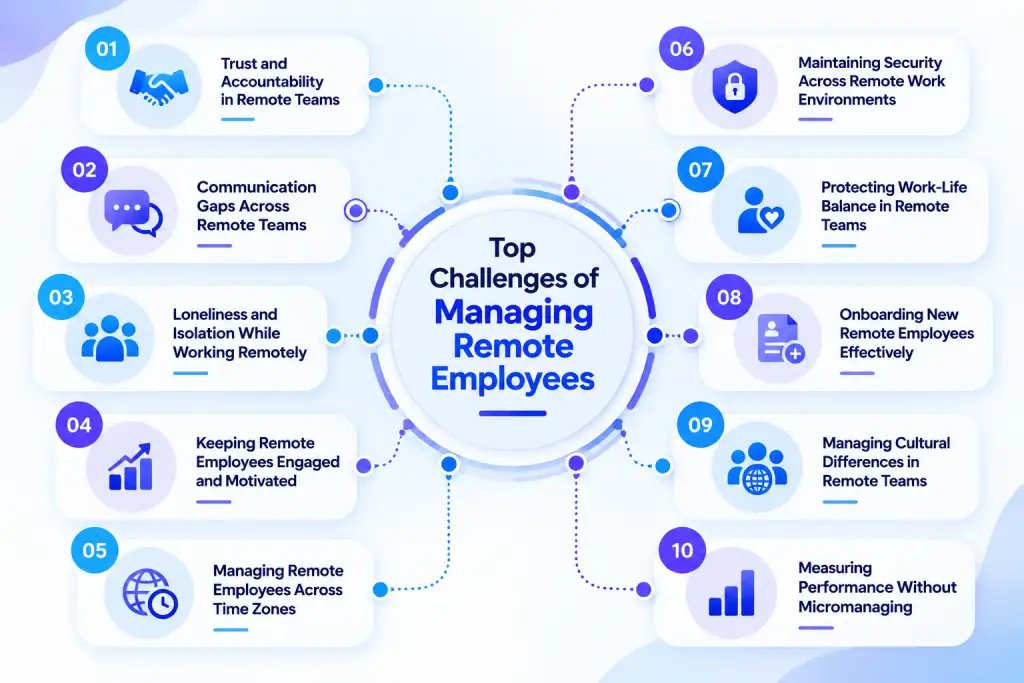
1. Trust and Accountability in Remote Teams
When you can’t rely on physical presence, trust can become harder to maintain. You may know what your team needs to deliver, but limited visibility into day-to-day work can leave you wondering whether priorities are moving forward. That uncertainty can quickly turn into unnecessary check-ins and pressure.
Microsoft found that 85% of leaders said the shift to hybrid work made it harder to feel confident that their teams were productive. Microsoft called this gap productivity paranoia, where doubts about productivity grow even when teams continue to work productively.
How to Build Accountability Without Constant Check-Ins
Set clear, written goals for each role with deadlines that you both agree on. Avoid vague expectations that you assume everyone understands.
Review outcomes weekly instead of tracking activity hourly. This keeps conversations focused on what your team has completed, not which tab was open at 2 PM.
Explain why you use any tracking tool and what data it collects. When your team understands the purpose behind the data, they are more likely to trust the process instead of feeling watched without explanation.
This is also where honest visibility tools earn their place. Time Champ's time tracking and productivity insights give you clear data on work and output, so you can discuss a missed deadline based on facts instead of guesswork. Used this way, the tool replaces suspicion with clarity rather than replacing trust with monitoring.
2. Communication Gaps Across Remote Teams
A quick question in the hallway can take seconds to answer. In a remote team, that same question can sit unanswered for hours and leave a task waiting.
Communication gaps often appear when you rely too heavily on scattered chats, unclear channels, or meetings for every decision. Different schedules can make the problem worse, especially when your team needs to coordinate work without being online at the same time.
Gallup’s latest research identifies collaboration and coordination as major challenges in distributed work. It found that 48% of hybrid workers cite communication as a top challenge, while 44% cite collaboration. Gallup also found that teams with a formal collaboration plan are 66% more likely to stay engaged and 29% less likely to experience burnout.
How to Close Communication Gaps
Build a communication system that tells your team where information belongs and when someone needs to respond.
You can start with a few simple rules:
- Use one channel for urgent issues and another for routine updates.
- Document important decisions instead of leaving them inside private chats.
- Set clear response expectations for different types of messages.
- Use asynchronous updates when a meeting adds little value.
- Create regular check-ins for work that needs discussion or support.
You also don’t need every conversation to happen in real time. Give your team clear communication norms so they know when to respond immediately and when they can work independently.
Struggling to keep your remote team aligned, accountable, and on track?
Try Time Champ to bring clear work insights and better visibility into your remote team.
3. Loneliness and Isolation While Working Remotely
Remote work can give your team more flexibility, but it can also remove the everyday interactions that make work feel social. A quick conversation before a meeting, lunch with a colleague, or an informal check-in can disappear when every interaction starts with a message or calendar invite.
Left alone, this does not stay a personal issue. Isolation can quietly reduce motivation and later show up as disengagement or turnover that seems to come out of nowhere. The good news is that you do not need grand gestures to fix it. Consistent, small efforts can make a real difference.
How to Reduce Isolation on Your Remote Team
- Open meetings with two minutes of non-work conversation instead of jumping straight into the agenda.
- Set up informal virtual coffee chats or random pairings so your team can talk with coworkers outside their immediate projects.
- Bring your team together in person once or twice a year if your budget allows. Even a short gathering can build stronger connections than months of Slack messages.
- Assign new hires a peer buddy for their first few weeks. This gives them someone to turn to and helps them feel connected from day one.
The goal is not to recreate office culture through video calls. It is to create small, regular moments of human connection that do not revolve around a deliverable.
4. Keeping Remote Employees Engaged and Motivated
Remote work can give your team greater autonomy, but autonomy alone doesn’t guarantee engagement. When daily work becomes a series of tasks, messages, and deadlines, your team can lose sight of why the work matters.
Gallup's State of the Global Workplace found that fully remote workers had a 31% global engagement rate, higher than hybrid and on-site groups. At the same time, fully remote workers reported lower overall well-being and higher levels of stress and loneliness. The contrast shows why engagement and well-being need attention together.
How to Keep Your Remote Team Engaged
Connect everyday work to meaningful goals and give your team enough ownership to contribute beyond simply completing assigned tasks.
Focus on four areas:
- Purpose: Show how individual work contributes to larger team goals.
- Autonomy: Give your team room to decide how they approach their work.
- Recognition: Acknowledge specific contributions instead of waiting for major milestones.
- Growth: Create opportunities to build skills and take on meaningful responsibilities.
You can also track whether engagement is translating into healthy work patterns. Look for signs such as repeated overtime, fragmented focus time, missed priorities, or declining participation in team discussions. These signals can help you start a conversation before a small engagement issue becomes a larger performance or retention problem.
5. Managing Remote Employees Across Time Zones
When your team works across different time zones, even a simple task can take longer than expected. Someone finishes their part of the work while you are offline, a question waits until the next morning, and an important meeting lands outside someone’s normal workday. Over time, these small delays can affect deadlines, collaboration, and team energy.
Time zone differences are not a minor scheduling issue. We Work Remotely's survey found that 18.4% of respondents identified time zone collaboration as a challenge, making it one of the most common issues reported by remote teams.
How to Keep Work Moving Across Time Zones
Build your workflow around the time zones your team actually works in instead of expecting everyone to follow one schedule.
- Set a shared overlap window for discussions that need real-time collaboration.
- Make asynchronous communication the default for updates, decisions, and routine questions.
- Add the time zone to important deadlines and meeting invites.
- Rotate meeting times when you need the whole team to attend so the same group does not always take early or late calls.
- Document decisions and next steps so anyone who starts work later can continue without waiting for a reply.
The goal is not to make everyone work at the same time. It is to make sure your team can keep work moving even when working hours do not overlap.
6. Maintaining Security Across Remote Work Environments
Remote work changes where your team accesses company data. Home Wi-Fi, shared devices, and unapproved apps can create security gaps, making remote work security essential when your team handles sensitive data.
Security also becomes more important as your team accesses sensitive files from different locations. IBM’s Cost of a Data Breach Report found that the global average cost of a data breach reached $4.44 million. The report also found that 97% of organizations that experienced an AI-related security incident lacked proper AI access controls.
How to Strengthen Remote Work Security
Give your team clear security rules and make secure work the easiest option.
Focus on the basics:
- Require multi-factor authentication for important accounts.
- Use strong access controls and give each role access only to the data it needs.
- Keep work devices, operating systems, browsers, and security software updated.
- Set clear rules for using personal devices and public Wi-Fi.
- Train your team to recognize phishing messages and suspicious links.
- Control how sensitive files move through email, USB devices, cloud storage, and other channels.
- Review access regularly and remove access when someone changes roles or leaves your team.
You can also add data loss prevention to your remote work security strategy. Time Champ helps you control how sensitive data moves through your work environment, giving you another layer of protection alongside access controls, authentication, and security training.
Security should not become a long list of restrictions that slows down work. Give your team clear rules, practical safeguards, and the right level of access so they can work securely without unnecessary friction.
Finding it hard to manage remote teams without constant follow-ups?
Use Time Champ to track work patterns, understand workloads, and manage teams with greater clarity.
7. Protecting Work-Life Balance in Remote Teams
A healthy work-life balance can become harder to maintain when work and home share the same space. Your team may answer messages after hours, finish tasks late at night, or feel the need to stay available even after the workday ends.
How to Support a Healthier Work-Life Balance
Start by making boundaries part of your team’s working norms rather than leaving everyone to figure them out alone.
- Set clear working hours and expected response times.
- Avoid sending non-urgent messages outside normal working hours.
- Encourage your team to use status messages when they are offline.
- Protect breaks and time off instead of treating them as optional.
- Watch for repeated overtime or unusually long workdays and discuss the reason behind them.
- Focus on priorities and outcomes, so your team does not feel pressure to stay online just to prove they are working.
You can also use work data to spot unhealthy patterns. If someone regularly works late or consistently puts in long hours, that gives you a reason to check in before overwork turns into burnout.
A healthy remote setup should give your team flexibility without making them feel like they need to be available all the time.
8. Onboarding New Remote Employees Effectively
Starting a new job remotely can feel very different from walking into an office on the first day. Your new hire may have the right laptop and access to the required tools, yet still have no clear idea who to ask for help, how work gets done, or where they fit into the team.
How to Build a Strong Remote Onboarding Process
Give your new hires a clear path instead of sending a collection of documents and expecting them to figure everything out.
Start with a simple onboarding plan:
- Share a first-week schedule with clear priorities.
- Give access to the tools, documents, and systems they need before their first day.
- Explain their role, goals, responsibilities, and expected outcomes.
- Introduce them to the teammates they will work with most often.
- Pair them with a peer who can answer everyday questions.
- Schedule regular check-ins during the first few weeks.
- Give them small, meaningful tasks before moving them into larger responsibilities.
Do not treat onboarding as something that ends after the first week. Keep checking in as your new hire learns the workflow, builds relationships, and takes on more responsibility.
9. Managing Cultural Differences in Remote Teams
When your team works across countries, cultures, and backgrounds, the same message can mean different things to different team members. Communication styles, feedback, decision-making, holidays, and working norms can all vary. These differences can sometimes lead to misunderstandings, missed expectations, and different approaches to collaboration.
How to Build a Stronger Remote Work Culture
You do not need everyone on your team to work in the same way. You need shared expectations that give everyone enough room to work in a way that suits them.
- Set clear communication and collaboration norms that apply to everyone.
- Avoid assuming that a communication style or work habit reflects someone’s culture.
- Give your team space to share different perspectives before making decisions.
- Consider local holidays, work schedules, and time differences when planning work.
- Rotate meeting times when your team works across regions so the same group does not always take the inconvenient hours.
- Create regular opportunities for your team to connect beyond daily tasks.
A strong remote work culture starts with clarity and respect. Give your team common expectations while allowing room for different backgrounds and working styles. This helps everyone collaborate comfortably and brings a wider range of perspectives into your team.
10. Measuring Performance Without Micromanaging
When you cannot see how work progresses throughout the day, it can be tempting to ask for frequent updates or measure activity instead of results. That approach can quickly create pressure without telling you whether your team is focusing on the right priorities.
Performance measurement itself can create trust problems when your process focuses too heavily on activity. Deloitte's Global Human Capital Trends research found that 61% of managers and 72% of workers could not say they trusted their organization's performance management process.
How to Track Results Without Constant Oversight
Start by defining what successful work looks like, then give your team room to deliver it.
- Set clear goals and measurable outcomes for each role.
- Agree on deadlines and priorities before work begins.
- Review progress at regular intervals instead of asking for constant updates.
- Focus performance conversations on completed work, quality, deadlines, and business results.
- Give feedback based on outcomes rather than online status or hours spent at a desk.
- Use work data when you need more visibility, but explain what you track and why.
This is also where the right tools can genuinely help, as long as you use them for clarity rather than constant oversight. Time Champ's time tracking and productivity insights give you clear data on workload and output, helping you spot overwork and support performance conversations with real numbers instead of assumptions. This kind of visibility can build trust while giving your team the freedom to work independently.
How Time Champ Helps You Manage Remote Employees
Every challenge in this guide comes back to one problem. You cannot see the work clearly when your team works from different locations. Time Champ closes that gap by giving you real data instead of guesswork, so you can see what is on track and where you need to step in.
Instead of chasing updates or scheduling constant status calls, you get automatic time tracking that shows active hours, idle time, and how your team’s day breaks down. You can also see workload distribution across your team in one dashboard, helping you spot when workloads become too heavy or when progress starts to slow. This replaces constant back-and-forth with a clear view that you and your team can access anytime, helping build the trust this guide focuses on.
On the security side, remote work spreads your data across home networks and personal devices. That is where data loss prevention comes in. Time Champ flags risky file transfers, unusual data movement, and unauthorized sharing, helping you protect sensitive data without adding extra steps to your team’s day. Together, these tools give you outcome data instead of activity logs, so you can manage your remote team based on what gets done rather than how closely you watch the work.
How do you keep your remote team productive without micromanaging?
Use Time Champ to gain better visibility into work while giving your team room to work independently.
Conclusion
The challenges of managing remote employees often come down to trust, communication, accountability, coordination, and visibility. Addressing these areas with clear processes can help you create a remote setup where your team can work with confidence. If you want better visibility into workload and work patterns, Time Champ gives you time tracking, productivity insights, and data loss prevention to support better remote team management.

Thasleem Shaik

Table of Content
 1. Trust and Accountability in Remote Teams
- 2. Communication Gaps Across Remote Teams
- 3. Loneliness and Isolation While Working Remotely
- 4. Keeping Remote Employees Engaged and Motivated
- 5. Managing Remote Employees Across Time Zones
- 6. Maintaining Security Across Remote Work Environments
- 7. Protecting Work-Life Balance in Remote Teams
- 8. Onboarding New Remote Employees Effectively
- 9. Managing Cultural Differences in Remote Teams
- 10. Measuring Performance Without Micromanaging
- How Time Champ Helps You Manage Remote Employees
- Conclusion

Related Blogs

Create an effective and simple remote work policy with practical steps, proven best practices, helpful examples, and a free downloadable template.
Thasleem Shaik | Jul 27, 2026
Boost productivity with remote work best practices that improve communication, overcome challenges, and help you manage remote teams more effectively.
Anjali | Jul 23, 2026
Understand the role of productivity tracking in remote work and how it improves team clarity, workload balance, and performance with real insights.
Thasleem Shaik | May 01, 2026
Track the right remote worker productivity metrics to understand performance, improve output, and avoid micromanagement with clear insights.
Thasleem Shaik | Apr 24, 2026
Remote workforce management, also called virtual workforce management, helps teams stay engaged. Explore its definition, benefits, challenges & tools.
Thasleem Shaik | Sep 16, 2025
Download a free remote work agreement template in Word and PDF. Learn what to include, see a completed sample, and avoid common mistakes after signing.
Jahnavi Pulluri | Aug 19, 2026


 4.7/5 avg.
Ready to Manage Your Workforce Smarter?
Join our family of 1500+ companies using smart insights to redefine workforces!

Free Trial
No Credit Card Required