What are Productivity Tools? Types, Benefits & How They Work
Learn what productivity software is, explore its key types and benefits, and discover how to use modern productivity tools to boost team efficiency easily.

Ever feel like your workday disappears in a bunch of emails, meetings, notifications, and endless to-do lists? You start the day with a plan, but by the time you log off, it feels like you've been busy without making much real progress.
That's where productivity tools come in. They're designed to help you keep tasks organized, collaborate with your team, manage projects, and cut down on the back-and-forth that slows work down.
In this blog, I’ll explain what productivity tools are, the different types available, their key benefits, and practical ways to use them to get more done.
What are Productivity Tools?
Productivity tools are software applications that help individuals and teams work more efficiently by organizing tasks, managing projects, improving communication, and automating repetitive work. Also known as productivity software, these tools simplify workflows, save time, and help users stay organized and focused.
What are the Main Types of Productivity Tools?
Productivity tools can be grouped into seven main categories, each designed to improve a specific part of your workflow.
Let’s have a look at them!
| Type | Purpose | Examples |
|---|---|---|
| Communication & Collaboration | Streamline team communication and file sharing | Slack, Microsoft Teams |
| Project & Task Management | Plan, assign, and track tasks | Asana, Trello, Jira |
| Time Tracking & Focus | Monitor time and improve productivity | Time Champ, RescueTime |
| Document & Content Creation | Create and collaborate on documents, spreadsheets, and presentations | Google Workspace, Microsoft 365 |
| Note-Taking & Knowledge Management | Capture ideas and organize knowledge | Notion, Evernote |
| Automation & Workflow | Automate repetitive tasks and workflows | Zapier, Make |
| AI Assistants | Generate content, summarize information, and automate routine work | ChatGPT, Microsoft Copilot, Gemini |
The best productivity setup isn't about using every type of tool, it's about choosing the ones that support your team's daily workflow and eliminate unnecessary complexity.
Benefits of Using Productivity Tools
Managing work becomes much easier when everything is organized and accessible in one place.
Here are the key benefits of using productivity tools:
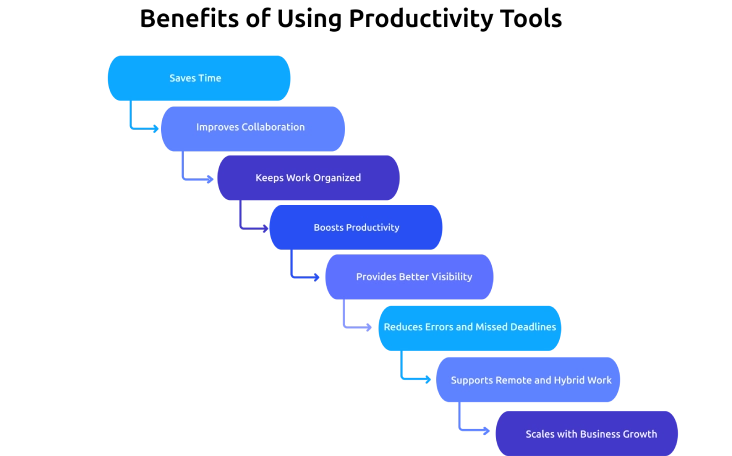
- Saves Time: Automates repetitive tasks, streamlines workflows, and reduces the time spent switching between multiple apps, allowing teams to focus on meaningful work.
- Improves Collaboration: Centralizes conversations, files, and project updates in one place, making it easier for teams to communicate, share information, and stay aligned.
- Keeps Work Organized: Organizes tasks, deadlines, calendars, and priorities in a structured system, ensuring nothing important gets overlooked.
- Boosts Productivity: Reduces distractions and manual effort, helping individuals and teams dedicate more time to high-value tasks and strategic work.
- Provides Better Visibility: Offers real-time insights into project progress, workloads, and potential bottlenecks, enabling faster and more informed decision-making.
- Reduces Errors and Missed Deadlines: Improves accountability with task assignments, reminders, and workflow tracking, minimizing missed deliverables and duplicated work.
- Supports Remote and Hybrid Work: Enables seamless collaboration through shared workspaces, cloud-based access, and instant communication, regardless of team location.
- Scales with Business Growth: Adapts to growing teams by standardizing processes, simplifying onboarding, and maintaining efficient workflows.
What are the Best Team Productivity Tools?
The best team productivity tools depend on your workflow, but most teams need four essentials: communication, task management, time tracking, focus, and document collaboration tools. Instead of searching for a single all-in-one solution, build a productivity stack that covers these core needs and works well together.
If you’re looking for detailed recommendations, check out our blog on the best productivity tools for teams to compare options by category.
Know What's Slowing Your Team Down?
Get detailed productivity reports, workload insights, and time analytics to remove inefficiencies
How Productivity Tools Improve Team Performance
Productivity tools do more than help teams manage tasks, they change the way teams work together.
When teams use productivity tools effectively, they can:
- Improve Team Alignment: Everyone has a clear view of goals, responsibilities, and project progress.
- Speed Up Decision-Making: Real-time updates and centralized information help teams make faster, more informed decisions.
- Strengthen Accountability: Clear task ownership and deadlines ensure everyone knows their role and responsibilities.
- Reduce Workflow Bottlenecks: Teams can identify delays early and keep projects moving forward.
- Encourage Better Collaboration: Shared workspaces make it easier for team members to contribute and stay connected.
Why Choose Time Champ as Your Employee Productivity Tool?
Time Champ is an employee productivity software that gives you a complete view of team performance instead of just recording activity.
From monitoring app and website usage to tracking attendance, projects, and work hours, Time Champ turns everyday work data into actionable insights.
How Time Champ Helps Improve Employee Productivity
- Gain Complete Productivity Insights: Monitor app and website usage, active and idle time, attendance, and project activity from a single dashboard.
- Automate Routine Tracking: Generate accurate timesheets, attendance records, and productivity reports without manual effort.
- Improve Workload Management: Analyze capacity, utilization, and workload distribution to prevent burnout and optimize team performance.
- Track Projects with Confidence: Measure time spent on projects and billable tasks to improve accountability and project profitability.
- Support Every Work Environment: Monitor remote, hybrid, field, and in-office employees with GPS-enabled tracking and cross-platform compatibility.
- Make Data-Driven Decisions: Use workforce intelligence reports to identify productivity trends, eliminate bottlenecks, and improve operational efficiency.
Are Your Productivity Tools Actually Driving Results?
See how Time Champ helps you understand where time goes, optimize workflows, and improve team performance
Conclusion
Productivity tools simplify the way individuals and teams manage their work, making everyday tasks more organized and efficient. Choosing productivity tools that match your workflow makes it easier to stay organized, collaborate effectively, and keep work moving smoothly. The goal isn't to use more tools, it's using the right ones to support the way your team works.

Jahnavi Pulluri

Table of Content
 What are Productivity Tools?
- What are the Main Types of Productivity Tools?
- Benefits of Using Productivity Tools
- What are the Best Team Productivity Tools?
- How Productivity Tools Improve Team Performance
- Why Choose Time Champ as Your Employee Productivity Tool?
- Conclusion
Instant Signup
Thank you for your request!
We have received your signup request and our team will get back to you soon. In the meantime, you can book a demo to see Time Champ in action.
Book a DemoFree trial. No credit card required. Prefer a walkthrough? Book a demo.
Related Blogs

Discover how attendance reports increase team efficiency by tracking attendance, making the right decisions, and boosting morale among the workforces.
Thasleem Shaik | Jun 22, 2024
Learn how to calculate employee productivity ratio using formulas, examples, benchmarks, and practical tips to improve team performance across departments.
Anjali | May 14, 2026
Workforce productivity analytics turns daily work data into clear decisions. Learn the key metrics, monitoring signals, and AI tools that improve team output.
Thasleem Shaik | Apr 21, 2026
Employee screen monitoring captures work activity in real time. Learn all monitoring types, how they boost productivity, and how to implement them ethically.
Jahnavi Pulluri | Apr 17, 2026
Apply the OKR framework to boost employee productivity with clear goals, aligned teams, and measurable progress you can track weekly.
Guna Lakshmi | Apr 22, 2026
Avoid common productivity tracking mistakes that disrupt rollouts. Get practical fixes, self-audit checklist, and clear guidance for successful implementation.
Anjali | May 01, 2026


 4.7/5 avg.
Ready to Manage Your Workforce Smarter?
Join our family of 1500+ companies using smart insights to redefine workforces!

Free Trial
No Credit Card Required