Attendance Report: Increase Workforce Productivity
Improve workforce productivity with attendance reports that simplify attendance tracking, support workforce planning, and help you make better decisions.

Late arrivals, frequent absences, and inconsistent attendance can affect productivity more than you realize. Without clear attendance records, you may find it difficult to keep work on track and make confident workforce decisions. An attendance report helps turn attendance records into useful insights, making it easier to identify issues early and improve team performance.
Here you’ll understand how attendance reporting works, the different types, the key metrics to track, and how it helps improve workforce productivity. You’ll also learn best practices for attendance tracking and choosing the right attendance management system.
What Is an Attendance Report?
An attendance report is a document or digital record that summarizes employee attendance over a specific period, including workdays, absences, late arrivals, leave, and hours worked. These reports help identify attendance trends, improve workforce planning, support payroll accuracy, maintain compliance, and make informed decisions that improve overall productivity.

Did You Know?
Gallup’s Workplace Report shows that only 32% of U.S. employees are engaged at work, highlighting the need for better workforce visibility and management.
What Are the Main Types of Attendance Reports
Different attendance reports help you monitor employee attendance from different angles. Choosing the right report makes it easier to identify attendance patterns, manage work schedules, improve workforce planning, and make informed decisions.
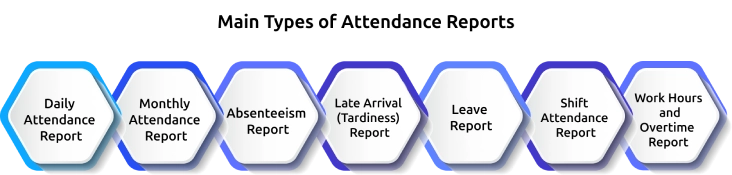
1. Daily Attendance Report
Provides a complete view of employee attendance for a specific day, including clock-in and clock-out times, work hours, absences, and late arrivals. It helps you monitor attendance in real time, resolve issues quickly, and keep daily operations running smoothly.
2. Monthly Attendance Report
Summarizes attendance records for an entire month, including total working days, leave, absences, overtime, and hours worked. It gives you a clear overview of attendance trends and supports payroll processing, attendance reviews, and workforce planning.
3. Absenteeism Report
Highlights employee absences over a selected period and identifies recurring absence patterns across teams or departments. Reviewing these insights regularly helps you reduce unplanned absences and improve workforce availability.
4. Late Arrival (Tardiness) Report
Tracks employees who frequently arrive after their scheduled start time. It helps you identify punctuality issues, reduce delays, and encourage better attendance habits across the organization.
5. Leave Report
Shows approved, pending, and rejected leave requests along with available leave balances. It helps you plan staffing levels, manage workloads efficiently, and avoid scheduling conflicts.
6. Shift Attendance Report
Monitors attendance across different work shifts, including day, night, rotating, and flexible schedules. It helps you ensure adequate coverage on every shift while identifying missed shifts and attendance gaps.
7. Work Hours and Overtime Report
Records regular work hours, overtime hours, and total hours worked by each employee. It supports accurate payroll, helps you balance workloads, and identifies employees who may be consistently working beyond their scheduled hours.
Key Metrics to Include in an Attendance Report
Tracking the right metrics helps you spot attendance patterns, improve workforce planning, manage staffing more effectively, and make informed decisions. Here are the key metrics every attendance report should include.
Attendance Rate
This shows the percentage of scheduled workdays employees are present during a specific period. Monitoring this metric helps you measure workforce availability, identify attendance trends, and evaluate overall attendance performance.
Absenteeism Rate
This metric highlights how often employees are absent from work, whether the leave is planned or unplanned. Regularly reviewing absenteeism helps you identify recurring patterns, reduce workforce disruptions, and improve staffing decisions.
Punctuality Rate
This measures how consistently employees arrive and clock in on time. Tracking punctuality helps you address frequent late arrivals, improve schedule adherence, and minimize delays that affect team productivity.
Overtime Hours
Records the number of hours employees work beyond their scheduled shifts. Reviewing overtime trends helps you balance workloads, control labor costs, identify understaffing, and reduce the risk of employee burnout.
Leave Utilization
This metric tracks how employees use different types of leave, including vacation, sick leave, and personal leave. These insights help you plan workforce availability, manage workloads, and avoid staffing shortages during peak periods.
Total Hours Worked
Provides a complete view of the regular and overtime hours worked by each employee during the reporting period. This information supports accurate payroll, improves workforce planning, and helps evaluate overall workforce utilization.
Did You Know?
According to the CDC, monitoring workplace absenteeism helps employers identify illness trends early and supports timely workplace interventions.
8 Ways Attendance Reports Improve Workforce Productivity
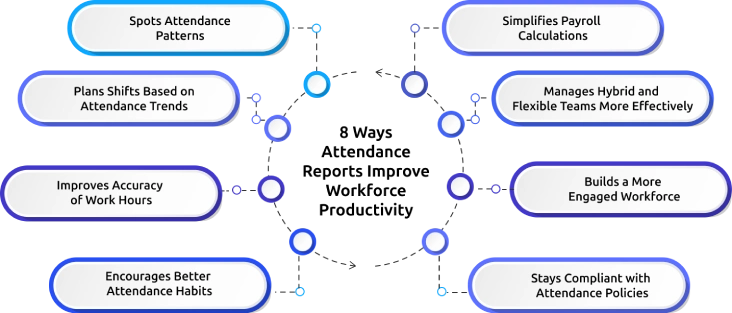
Attendance reports provide valuable insights into employee attendance and workforce trends. When reviewed regularly, they help you identify workforce challenges, improve planning, and make decisions that keep your teams productive. Here are eight ways attendance reports contribute to higher workforce productivity.
1. Spots Attendance Patterns
Reviews attendance reports regularly to identify recurring absences, frequent late arrivals, or unexpected changes in attendance. Addressing these patterns early helps you reduce disruptions and maintain consistent team performance.
2. Plans Shifts Based on Attendance Trends
Use attendance data to understand staffing patterns across different teams and shifts. This helps you schedule the right employees at the right time, avoid understaffing, and maintain smooth daily operations.
3. Improves Accuracy of Work Hours
Compares recorded attendance with scheduled work hours to identify missing entries, incorrect clock-ins, or unusual time records. Accurate attendance records help reduce time-related errors and improve accountability.
4. Encourages Better Attendance Habits
Shares attendance expectations clearly and reviews reports consistently to identify employees who may need additional support or guidance. Regular monitoring encourages punctuality and helps build a more accountable workplace.
5. Simplifies Payroll Calculations
Use verified attendance records to calculate payable work hours, overtime, leave, and absences accurately. Reliable attendance data reduces payroll errors and saves time during payroll processing.
6. Manages Hybrid and Flexible Teams More Effectively
Tracks attendance across office, remote, and hybrid employees from a single report. A centralized view helps you monitor availability, coordinate schedules, and maintain productivity no matter where employees work.
7. Builds a More Engaged Workforce
Reviews attendance trends alongside workload and leave patterns to identify signs of employee fatigue or disengagement. Taking timely action helps improve employee experience, reduce absenteeism, and support long-term productivity.
8. Stays Compliant with Attendance Policies
Maintains complete attendance records to support labor regulations, company policies, and internal audits. Well-organized reports make it easier to resolve attendance disputes and demonstrate compliance whenever required.
Are attendance errors slowing down your team?
Time Champ automates attendance tracking and keeps every record accurate.
How to Track Attendance Without Breaking Trust
Accurate attendance tracking should help employees stay accountable without making them feel constantly monitored. A transparent and fair approach builds trust, improves compliance, and encourages employees to maintain consistent attendance. Following these best practices helps to track attendance while creating a positive workplace experience.
Communicate Attendance Policies Clearly
Explain how attendance is tracked, why it matters, and how the information is used. Clear expectations reduce confusion and help your employees understand the purpose of attendance tracking.
Choose Transparent Attendance Tracking Tools
Use an attendance management system that records work hours accurately while giving employees visibility into their attendance records. Transparency helps to build confidence in the process.
Focus on Accuracy, Not Constant Monitoring
Track attendance to verify work hours, manage schedules, and support payroll, without just monitoring every employee's activity. This keeps attendance tracking fair and purpose-driven.
Give Employees Access to Their Attendance Records
Allow your employees to review their attendance, work hours, leave balances, and clock-in history. Easy access helps them identify mistakes and request corrections when needed.
Respect Employee Privacy
Collect only the attendance information necessary for business operations and protect it with appropriate security measures. Respecting privacy strengthens your employees' trust.
Review Attendance Data Consistently
Analyze attendance reports regularly to identify trends and resolve issues fairly. Consistent reviews ensure that decisions are based on accurate data.
Use Attendance Insights to Support Employees
Identify recurring attendance challenges early and work with employees to find practical solutions. A supportive approach improves attendance while strengthening employee engagement.
How to Choose an Attendance Management System
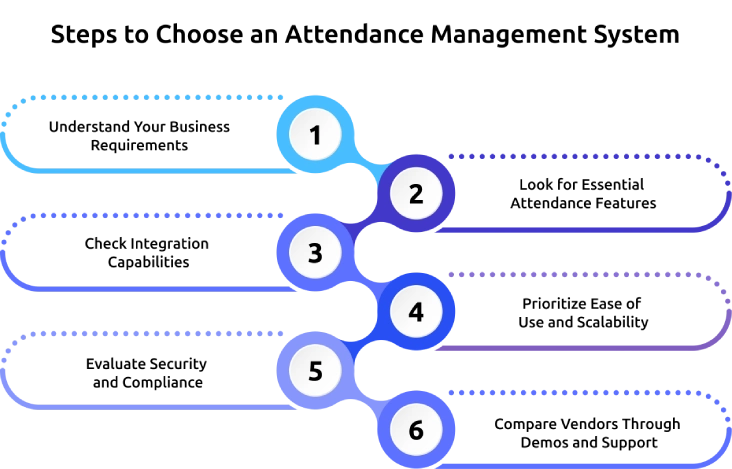
Selecting an attendance management system starts with understanding your workforce requirements. The right solution should match your workforce needs, simplify attendance tracking, and support future business growth. Consider these key factors before making your decision.
1. Understand Your Business Requirements
Start by identifying how your workforce operates. Consider the team size, work locations, shift schedules, remote or field employees, and attendance policies. Defining the requirements first makes it easier to choose a solution that fits your business today and can support future growth.
2. Look for Essential Attendance Features
Choose a system that includes the features your business needs, such as multiple clock-in methods, leave management, shift scheduling, overtime tracking, automated timesheets, and attendance reporting. The right features reduce manual work and improve attendance accuracy.
3. Check Integration Capabilities
Attendance data should connect seamlessly with your payroll, HRMS, project management, and other business systems. Strong integrations eliminate duplicate data entry, improve payroll accuracy, and streamline daily HR operations.
4. Prioritize Ease of Use and Scalability
A user-friendly system encourages faster adoption by both employees and managers. At the same time, ensure the software can scale as your workforce grows, supporting additional employees, locations, and changing business requirements without major disruptions.
5. Evaluate Security and Compliance
Attendance records contain sensitive employee information, so choose software with strong security controls, secure data storage, and compliance features. A secure system protects employee data while helping you meet labor regulations and company policies.
6. Compare Vendors Through Demos and Support
Before making a final decision, compare shortlisted vendors by requesting product demonstrations or free trials. Evaluate customer support, onboarding assistance, pricing transparency, and overall user experience to ensure the software meets your long-term business needs.
How Time Champ Boosts Productivity with Smarter Attendance Reports
Inaccurate attendance records, manual tracking, and limited visibility into workforce attendance can make it difficult to improve productivity and manage teams efficiently. Time Champ is a smart employee monitoring software with automated attendance tracking, real-time workforce insights, and comprehensive reporting that helps you monitor attendance accurately, reduce administrative effort, and make informed workforce decisions that improve productivity.
Here are the key features of Time Champ that help you simplify attendance management and improve workforce productivity:
- Automated Attendance Tracking: Automatically records employee attendance, work hours, breaks, and overtime, reducing manual effort while ensuring accurate attendance records.
- Real-Time Attendance Reports: Generates detailed attendance reports with insights into attendance patterns, absences, late arrivals, and work hours, helping you identify issues before they affect productivity.
- Smart Shift and Attendance Management: Simplifies shift scheduling and tracks attendance across multiple shifts, making it easier to maintain adequate workforce coverage and improve operational efficiency.
- Accurate Timesheets for Payroll: Creates automated timesheets using verified attendance data, helping you process payroll accurately while reducing errors and administrative work.
- Attendance and Productivity Insights: Combines attendance data with productivity metrics to help you identify attendance trends, balance workloads, and improve overall team performance.
- Centralized Workforce Dashboard: Provides a single dashboard to monitor attendance across office, remote, and hybrid teams, giving you complete visibility to manage your workforce more effectively.
Finding it hard to track attendance across your teams?
Time Champ gives you real-time attendance insights from one simple dashboard.
Conclusion
Accurate attendance reporting helps you make better workforce decisions, improve productivity, and maintain a more accountable workplace. Tracking the right metrics, reviewing attendance trends regularly, and using a reliable attendance management system can help you reduce attendance issues, improve payroll accuracy, and make better workforce decisions. As your business grows, accurate attendance reporting becomes essential for maintaining efficiency and supporting long-term success. Start using smarter attendance reports today to build a more productive, accountable, and well-managed workforce.

Anjali

Table of Content
 What Is an Attendance Report?
- What Are the Main Types of Attendance Reports
- Key Metrics to Include in an Attendance Report
- 8 Ways Attendance Reports Improve Workforce Productivity
- How to Track Attendance Without Breaking Trust
- How to Choose an Attendance Management System
- How Time Champ Boosts Productivity with Smarter Attendance Reports
- Conclusion

Related Blogs

Employee attendance tracker helps businesses maintain accurate work hour records, ensure labor law compliance, manage overtime, and prevent legal issues.
Thasleem Shaik | Mar 15, 2025
Discover the key advantages of an Online Attendance System. Enhance accuracy, save time, and streamline attendance management efficiently.
Mounika Sai | Aug 11, 2023
Learn how to calculate overtime pay with simple formulas, examples, and overtime rules. Understand double time, salaried overtime, taxes, & payroll tips.
Jahnavi Pulluri | Jun 01, 2026
Master the art of calculating worked hours with ease! Learn valuable tips and uncover the benefits of accurate time tracking.
Shabana Shaik | Apr 11, 2024
Time tracking software vs manual timesheets: compare accuracy, cost, effort, and ROI to pick the right solution for improving your team's productivity.
Jahnavi Pulluri | May 15, 2026
Discover essential time-tracking features that improve productivity, payroll accuracy, and workforce visibility, and learn how to use them effectively.
Guna Lakshmi | May 16, 2026


 4.7/5 avg.
Ready to Manage Your Workforce Smarter?
Join our family of 1500+ companies using smart insights to redefine workforces!

Free Trial
No Credit Card Required