6 Employee Productivity Report Templates That Teams Actually Use (2026)
Get 6 free employee productivity report templates for 2026, designed for daily, weekly, monthly, and team reporting. Simple, customizable, and easy to use.

Most employee productivity reports stop working after a few weeks because the format becomes hard to follow, collecting data takes too much time, and teams slowly stop using them. Usually, the problem is not the template itself, but how well it matches the team’s goals, reporting style, and decision-making process.
This guide includes 6 employee productivity report templates for daily, weekly, monthly, quarterly, project, and remote team reporting. Each template comes with clear fields and sample entries to help you customize and use it quickly.
Why Most Employee Productivity Report Templates Fail Within a Few Weeks
Most employee productivity report templates fail for the same few reasons, and usually the template itself is not the problem. The issue is how the report is used after it is introduced.
1. The Report Takes Too Much Time to Fill Out
If your employees need extra time every week to collect data manually, they eventually stop updating the report or fill it with incomplete information. Good templates are built using data that teams already collect.
2. The Report Is Built for the Wrong Audience
A daily report for your employees should not look like a quarterly report for executives. When one template is used for everyone, it usually fits no one.
3. Nobody Uses the Report to Make Decisions
If you read reports but never take action, your employees lose interest in maintaining them. Reports need to lead to continuous feedback, planning, or clear next steps.
4. The Information Becomes Outdated Too Quickly
Reports lose value when they arrive too late. A weekly report reviewed several days later often contains outdated information that you can no longer act on.
The best way to avoid these problems is to use a template that matches the reporting schedule, the audience, and the decisions the report is meant to support. Automating data collection also makes reporting easier and more reliable.
What Should a Good Employee Productivity Report Include?
A useful employee productivity report usually includes six key sections. The details may change based on the reporting style or audience, but these core sections should always be included.
1. Header Information
A clear header keeps the report organized by showing the employee’s name, role, reporting period, and submission date.
2. Work Summary
This section gives you a quick overview of completed tasks, finished projects, closed tickets, and important progress updates.
3. Time and Focus Tracking
Use this section to show how work hours were spent, including focus time, meetings, productive hours, and task-related activities.
4. Blockers and Challenges
This part highlights delays, issues, or incomplete tasks along with the reasons behind them to make problem-solving easier.
5. Next Steps and Support Needed
This section outlines upcoming priorities and any approvals, resources, or support required to maintain progress.
6. Productivity Metrics or KPIs
Here, you can track measurable performance indicators such as task completion rate, response time, billable hours, productivity scores, or other role-specific KPIs.
These six sections create a solid structure for almost any employee productivity report. The templates below adapt this structure for different reporting schedules and team needs.
6 Employee Productivity Report Templates Ready to Use
Below are 6 ready-to-use employee productivity report templates built for different reporting needs, from daily updates to quarterly reviews. Each template is structured for clarity, consistency, and easy implementation.
1. Daily Productivity Report
A daily productivity report is used by an individual at the end of each workday to summarize their daily output. It helps you quickly understand progress, identify blockers, and plan the next day’s priorities.
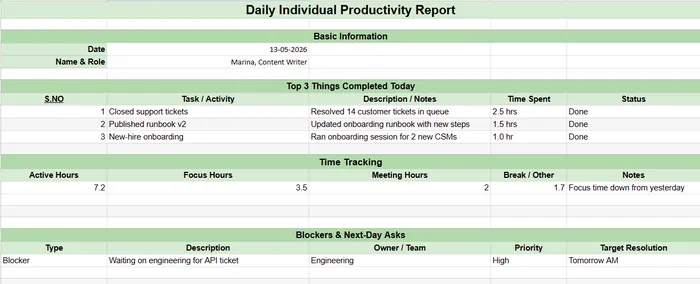
It focuses on:
- Key tasks completed during the day
- Active or focused working hours
- Current blockers affecting progress
- Immediate support or requests for the next day
This format encourages daily accountability while ensuring issues are clear early, allowing you to unblock work faster and maintain steady productivity.
2. Weekly Team Productivity Report
The weekly report provides a broader view of team performance trends. It is usually prepared by team leads and shared with department heads.
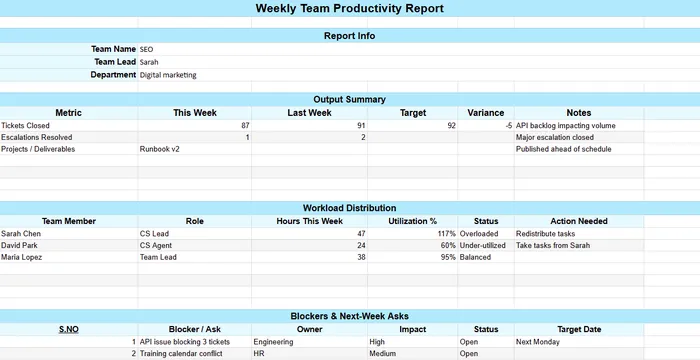
It highlights:
- Overall output and key achievements of the week
- Time distribution, including focus time and meeting load
- Workload balance across team members
- Major blockers impacting team performance
- Planning inputs for the upcoming week
This template helps you identify patterns such as overload, inefficiencies, or recurring bottlenecks, enabling better team planning and coordination.
3. Monthly Department Productivity Report
The monthly department productivity report is designed for strategic oversight at the department level. It is typically prepared by department heads and reviewed by senior leadership.
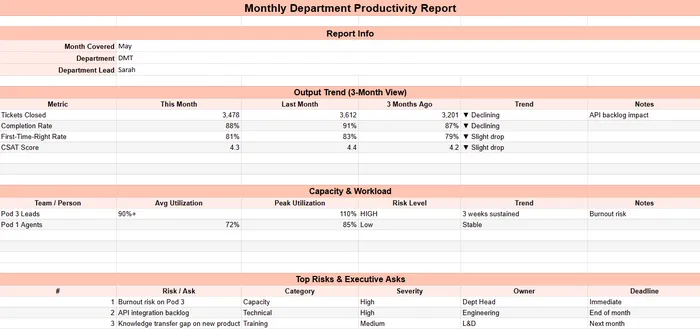
It includes:
- Monthly productivity trends compared to previous months
- Key performance indicators like completion rates and quality scores
- Capacity utilization and workload distribution
- Hiring or training requirements
- Emerging risks and operational challenges
The goal is to review long-term performance trends and make sure that departments are aligned with organizational capacity and growth requirements.
4. Quarterly Executive Productivity Report
The quarterly executive productivity report is a high-level strategic report used by executive leadership and board members. It connects workforce productivity with business outcomes.
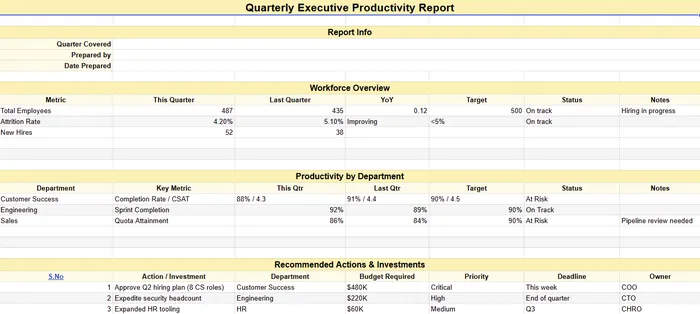
It focuses on:
- Workforce size and growth trends
- Department-wise productivity performance
- Major business wins and achievements
- Investment and hiring requirements
- Capacity forecasts for upcoming quarters
- Risk and compliance overview
This report supports executive decision-making by highlighting whether the organization is scaling sustainably and where strategic intervention is needed.
5. Project-Based Productivity Report
A project-based productivity report is used during active projects to track progress, budget usage, and risks in real time. Project managers typically prepare it for stakeholders.
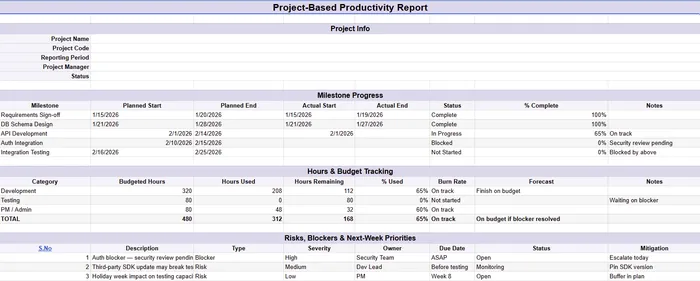
It includes:
- Project status
- Milestone completion tracking
- Hours spent vs planned budget
- Key risks and blockers
- Next-step priorities
It ensures transparency in project execution and helps stakeholders quickly assess whether the project is on track or needs intervention.
6. Remote Team Weekly Productivity Report
The remote team weekly productivity template is designed specifically for distributed or remote teams to replace informal in-office communication.
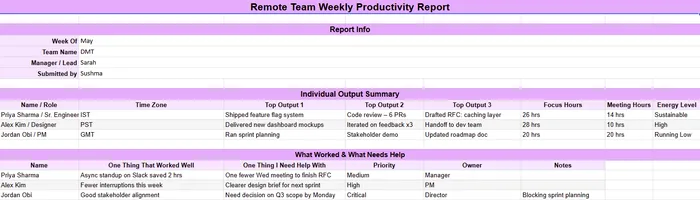
It captures:
- Key weekly outputs of each team member
- Focus time vs meeting time ratio
- Work energy levels and workload status
- Personal reflections on what worked and what needs support
This report helps you maintain visibility in remote environments where communication is limited, ensuring teams stay aligned and supported.
Quick Reference: The 6-Template Cheat Sheet
| Template | Frequency | Who fills | Who reads |
|---|---|---|---|
| Daily individual | Daily | Individual contributor | Direct manager |
| Weekly team | Weekly | Team lead | Department head |
| Monthly department | Monthly | Department head | Executive sponsor |
| Quarterly executive | Quarterly | Operations or HR partner | Executive team and board |
| Project-based | Weekly during project | Project manager | Stakeholders, client, leadership |
| Remote team | Weekly | Each team member | Direct manager |
Five Rules to Remember:Always pilot before rolling out, keep each report within one screen, start with what has changed, make blockers clearly visible, and automate data collection so reports are filled accurately every cycle.
How To Choose the Right Productivity Report Template for Your Team?
Use this simple four-step framework to choose a productivity report template that actually works for your team.
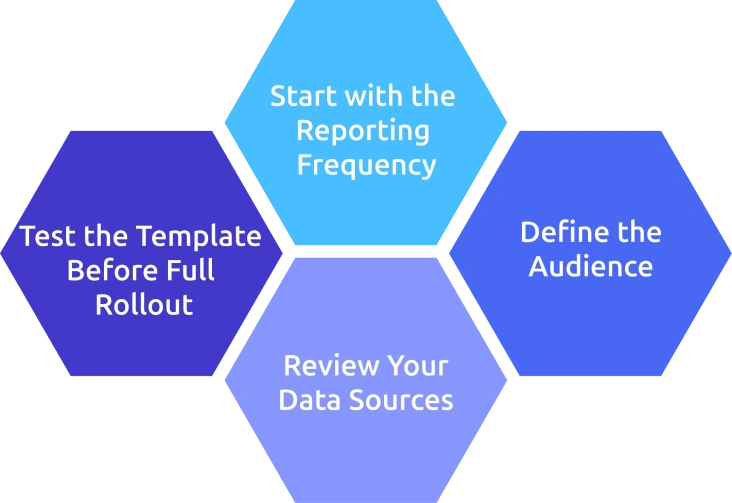
1. Start with the Reporting Frequency
Choose how often the report should be used before selecting a template. Daily reports work best for individual contributors, weekly reports for team leads, monthly reports for department managers, and quarterly reports for executives.
2. Define the Audience
Decide who will read the report and what decisions they need to make from it. The audience determines what information should be included and how detailed the report has to be.
3. Review Your Data Sources
Identify which data can be pulled automatically from existing tools like project trackers, HR systems, or productivity software, and which data requires manual updates. The more manual work involved, the less likely the report will be used consistently.
4. Test the Template Before Full Rollout
Try the template with one team for a few weeks, gather feedback, and improve it before using it across the organization. Most successful reporting systems start small and evolve.
Skipping the testing phase often leads to well-designed templates that employees rarely use. Always test first before scaling.
How Does Time Champ Automate Productivity Reporting?
Time Champ is an employee monitoring software with a built-in workforce intelligence layer that automatically generates the data behind productivity reporting. Instead of manually collecting updates, the system continuously captures work activity signals such as active hours, focus time, app and website usage by role, attendance patterns, and project or task-level time tracking.
These signals are then structured into ready-to-use productivity reports across different levels, such as individual, team, department, and manager. Reports can be exported in PDF, Excel, or CSV formats and scheduled for automatic delivery on a daily, weekly, or monthly basis to relevant stakeholders.
Time Champ is also built with enterprise-grade compliance standards, including GDPR, ISO 27001:2022, HIPAA, and SOC 2 Type I, maintaining data security and governance for organizations.
Why Automation Improves Productivity Reporting
The growing demand for structured reporting and automation tools is also reflected in market trends. According to Mordor Intelligence, the business productivity software market is expected to reach around USD 110.36 billion by 2026, growing at nearly 12% CAGR, showing strong and continuous adoption of productivity tools across industries.
The real value of automated reporting is not just speed, it is consistency.
When reports are generated using the same logic every time, you can compare performance across weeks, months, and quarters without variation in measurement. This consistency leads to accurate trend analysis, better forecasting, and more reliable decision-making.
Instead of spending time compiling data, you can focus on interpreting insights and taking action.
Automate Your Team’s Productivity Tracking with Time Champ!
Get accurate productivity reports instantly with real-time team insights.
Conclusion
Employee productivity reports work best when they are simple, consistent, and aligned with team goals. The right template helps teams track progress, identify blockers, and improve decision-making without adding extra workload. When you choose the correct format for daily, weekly, or long-term reporting, you can maintain clarity across all levels.

Jahnavi Pulluri

Table of Content
 Why Most Employee Productivity Report Templates Fail Within a Few Weeks
- What Should a Good Employee Productivity Report Include?
- 6 Employee Productivity Report Templates Ready to Use
- Quick Reference: The 6-Template Cheat Sheet
- How To Choose the Right Productivity Report Template for Your Team?
- How Does Time Champ Automate Productivity Reporting?
- Conclusion

Related Blogs

Implement a productivity tracking tool with clear steps, setup tips, and best practices to track employee productivity and improve team performance.
Thasleem Shaik | Apr 30, 2026
Align employee performance with productivity tracking using a practical framework, clear metrics, and a 90-day plan to turn your data into measurable growth.
Jahnavi Pulluri | Apr 30, 2026
Explore the top benefits of productivity tracking software for better visibility, balanced workloads, smarter planning, and improved business decisions.
Guna Lakshmi | Apr 30, 2026
Avoid common productivity tracking mistakes that disrupt rollouts. Get practical fixes, self-audit checklist, and clear guidance for successful implementation.
Anjali | May 01, 2026
Learn how to analyze productivity data, identify patterns, avoid common mistakes, and build reports that turn insights into clear, actionable decisions.
Thasleem Shaik | May 01, 2026
Productivity tracking is legal in the US, UK, and EU when you follow the rules. Get the per-region checklist, GDPR framework, and risk lines.
Guna Lakshmi | May 01, 2026


 4.7/5 avg.
Ready to Manage Your Workforce Smarter?
Join our family of 1500+ companies using smart insights to redefine workforces!

Free Trial
No Credit Card Required